EdbMails EDB Recovery and Migration software
  • Products
    EdbMails
    All-in-one Recovery and Migration
    Explore our products
    • EDB recovery and Migration
    • OST, PST, MBOX, NSF, EML, MSG
    • Office 365, Exchange Migration
    • SharePoint, OneDrive & Teams
    • G Suite Migration
    • IMAP Migration
    • Duplicate Remover
    • Windows Data Recovery
    • Backup Solutions

    EDB Recovery and Migration

    EdbMails lets you recover corrupted, damaged, and offline Exchange EDB files, convert EDB mailboxes to PST format, and directly migrate mailbox data to Office 365 and live Exchange Server.

    EDB to PST
    Recover corrupted, damaged, offline EDB files and convert Exchange EDB mailboxes to PST file format
    Public Folder to Exchange
    Migrate public folders from an Exchange offline EDB file to live Exchange Server
    EDB to Live Exchange Migration
    Directly migrate offline Exchange database (EDB) files to live Exchange server
    Archive Mailbox to Office 365
    Migrate archive mailboxes from offline EDB files directly to Office 365
    EDB to Office 365 Migration
    Directly migrate offline Exchange database (EDB) files to Office 365
    Public Folder to Office 365
    Migrate public folders from an offline Exchange EDB file to Office 365

    OST, PST, MBOX, NSF, EML, MSG Export and Migration

    EdbMails lets you to recover OST and PST files, export OST, PST, MBOX, NSF, EML, and MSG files to PST files, and directly migrate OST, PST, MBOX, and NSF mailbox data to Office 365 and live Exchange Server.

    OST Recovery and Migration
    Recover offline OST files, convert OST to PST, and migrate OST to Office 365 and Exchange Server
    PST Recovery and Migration
    Recover Outlook PST files , Export PST to PST, migrate PST to Office 365 and Exchange Server
    MBOX Export and Migration
    Export MBOX to PST, migrate MBOX to Office 365 and Exchange Server
    NSF Export and Migration
    Export NSF to PST, migrate NSF to Office 365 and Exchange Server
    EML to PST Export
    Convert EML files to Outlook PST files
    PST to MSG Export
    Convert Outlook PST file to MSG file format
    MSG to PST Export
    Export MSG files to Outlook PST files

    Office 365, Exchange Migration

    EdbMails lets you securely migrate mailboxes across Microsoft 365, Exchange, Google Workspace (G Suite), and IMAP-supported servers such as Outlook, Gmail, Zimbra, Zoho Mail, and cPanel, ensuring zero downtime.

    Office 365 Migration
    Migrate between Office 365 tenants, Office 365 to Exchange, Office 365 to PST, PST files to Office 365.
    Exchange Migration
    Migrate between any Exchange Servers, Exchange to Office 365, Exchange to PST, PST files to Exchange.
    Tenant to Tenant Migration
    Migrate Mailboxes, Public Folders, Archive Mailboxes between Office 365 Tenants.
    Exchange to Office 365
    Migrate Mailboxes, Public Folders, Archive Mailboxes from live Exchange server to Office 365.
    Office 365 to IMAP
    Migrate Office 365 to IMAP, Office 365 to Gmail, Office 365 to Outlook, Office 365 to Zoho etc.
    Exchange to IMAP
    Migrate from live Exchange Server to IMAP servers such as Gmail, Outlook, and Zoho Mail.
    Public Folder to Office 365
    Migrate Public Folders between Office 365 tenants with complete folder hierarchy and mailbox data integrity.
    Exchange to PST
    Export live Exchange Server mailboxes, public folders, and archive mailboxes to Outlook PST files.

    SharePoint, OneDrive & Microsoft Teams Migration

    EdbMails lets you migrate SharePoint sites, OneDrive data, Microsoft Teams, teams, channels, chats, permissions, and documents between Microsoft 365 tenants while maintaining the existing folder structure and data integrity.

    SharePoint Online Migration
    Migrate documents, lists, files and folders from SharePoint sites.
    OneDrive for Business Migration
    Migrate documents, lists, files, folders, private chats from OneDrive.
    Microsoft Teams Migration
    Migrate Teams, chats, channels, documents, files and folders etc.

    Google Workspace / G Suite Migration

    EdbMails G Suite Migration Tool lets you easily migrate emails, calendars, contacts, tasks, and more from G Suite to Office 365, Exchange Server, and IMAP servers using a Google Admin account without requiring individual user credentials.

    G Suite Migration
    Migrate emails, calendars, contacts, tasks from G Suite to Office 365, G Suite to Exchange, G Suite to IMAP Servers
    G Suite to Office 365
    Migrate emails, calendars, contacts, tasks from Google Workspace / G Suite to Office 365
    G Suite to Exchange Server
    Migrate emails, calendars, contacts, tasks from Google Workspace / G Suite to on-Premise Exchange Server
    G Suite to IMAP
    Migrate emails, calendars, contacts, tasks from Google Workspace / G Suite to IMAP, Outlook, Zimbra, Zoho etc.

    IMAP Migration

    EdbMails IMAP Migration tool lets you easily migrate emails from IMAP servers such as Outlook, Gmail, Zoho Mail, Zimbra, cPanel, and more. Supports IMAP to IMAP, Office 365, Exchange Server, PST, and bulk PST to IMAP migration.

    IMAP Email Backup & Migration
    Backup and migrate emails from IMAP servers to PST, Office 365, and On-Premises Exchange Server
    IMAP to Office 365
    Migrate emails, folders, and attachments from IMAP servers to Office 365
    IMAP to Exchange
    Migrate emails, folders, and attachments from IMAP servers to on-premises Exchange Server
    IMAP to PST
    Export emails, folders, and attachments from IMAP servers to Outlook PST files for backup
    PST to IMAP
    Migrate emails, folders, and attachments from bulk PST files to IMAP servers

    Duplicate Remover

    EdbMails Duplicate Remover lets you easily remove duplicate items from Office 365 and Exchange Server, and from IMAP, Outlook, Gmail, Zimbra, Zoho Mail, etc., ensuring a clean and organized mailbox.

    Remove Duplicates
    Easily clean up your Office 365, Exchange, Outlook and IMAP accounts by removing duplicate emails.
    Remove Duplicates from Office 365
    Remove duplicate emails, calendars, contacts, journal tasks, etc. from Office 365.
    Remove Duplicates from Exchange Server
    Remove duplicate emails, calendars, contacts, journal tasks, etc. from live Exchange Server.
    Remove Duplicates from IMAP, Outlook
    Remove duplicate emails, attachments from IMAP, Outlook, Gmail, Zimbra, Zoho Mail etc.

    Exchange, SharePoint, OneDrive, Teams and Office 365 Backup

    EdbMails enables secure, automated backup and recovery for Microsoft 365 services including Exchange Online, SharePoint, OneDrive, Teams, and Live Exchange Server with complete data protection and restore flexibility.

    Office 365 Backup
    Incremental, Granular, Encrypted and Compressed Office 365 Mailboxes Backup
    Exchange Server Backup
    Incremental, Granular, Encrypted and Compressed Exchange Mailboxes Backup
    SharePoint, OneDrive & Teams Backup
    Backup Online site collections, Team sites, Office 365 groups, all documents etc.

    Windows Data Recovery

    EdbMails Windows Data Recovery Software lets you recover permanently deleted data, including photos, videos, documents, and archived files, from partitions on hard drives, SSDs, USB drives, SD cards, and external storage devices.

    Windows Data Recovery
    Recover and restore permanently deleted data from hard drives, SSDs, USB drives, SD cards, and etc.
    Whitepaper
    Request a Demo
    Sign Up
  • Features
  • FAQ
  • Pricing
  • Download
  • Support
  • Sign in
User’s Manual
MBOX Export and Migration

User Manual

User Manual

  • FAQ
    • MBOX to PST
    • MBOX to Office 365 Migration
    • MBOX to Exchange Migration
  • Videos
    • MBOX Export to PST
    • MBOX to Office 365 Migration
    • MBOX to Exchange Migration
  • Screenshots
    • MBOX to PST
    • MBOX to Office 365 Migration
    • MBOX to Exchange Migration
  • How it works?
    • MBOX Export to PST
    • MBOX to Office 365 Migration
    • MBOX to Exchange Migration
  1. Home
  2. Product
  3. How to Convert MBOX to PST?
Download Buy Now

Step by step guide to convert MBOX to PST

Migrating from MBOX-based email clients to Outlook can be a complex task, especially when you need to ensure that all your emails and attachments are transferred without any data loss. Using a reliable MBOX to PST converter like EdbMails makes this process effortless and ensures a smooth transition to Outlook. With support for a wide range of MBOX email clients such as Mozilla Thunderbird, Apple Mail, Entourage, and more, EdbMails offers a straightforward solution for converting MBOX files into the widely used PST format.

The tool allows you to convert single or multiple MBOX files with ease, ensuring that all your valuable emails, attachments, and folder structures are preserved. You can even filter emails based on criteria like To, From, Subject, and Date to make sure you're only converting the emails you need. Whether you're moving from popular email clients like Spicebird, Pocomail, or Eudora, EdbMails handles the conversion process quickly and efficiently.

EdbMails supports all versions of Outlook, including 2007, 2010, 2013, 2016, 2019, and 2021, making it the perfect tool for anyone looking to import their MBOX files into Outlook. This step-by-step guide will walk you through the entire conversion process, ensuring you get the best results with minimal effort.
Convert MBOX to PST

  1. Prerequisites to convert MBOX to PST

    1. To export MBOX to PST, ensure that Microsoft Outlook is installed with a configured profile on your computer.

       See how to create an Outlook profile

    2. Install the latest applicable updates for MS Outlook
    3. Ensure that enough storage space is available on your computer drive to save the PST files.
  2. Steps to convert MBOX to PST using EdbMails

    1. Step 1: Download and install the EdbMails application

      • Download and install EdbMails MBOX to PST converter on your computer running on Windows OS.
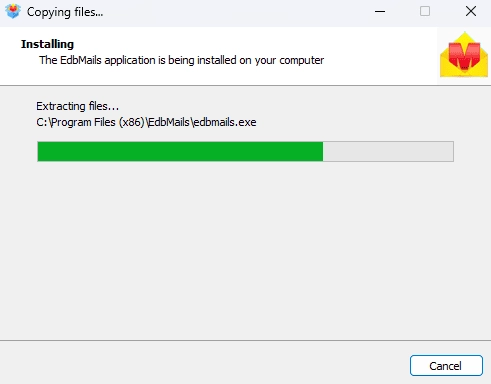
        EdbMails software installation

    2. Step 2: ‘Login’ or ‘Start Your Free Trial’ to start the operation

      • Enter your registered email address and password to log in to the application, or select the ‘Start Your Free Trial’ option to explore the software’s features.
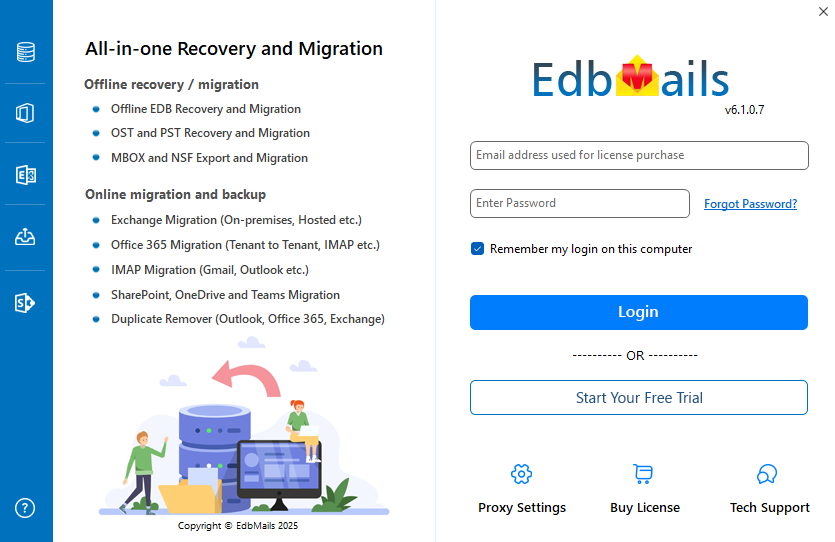
        Login to EdbMails application

    3. Step 3: Select MBOX Export and Migration

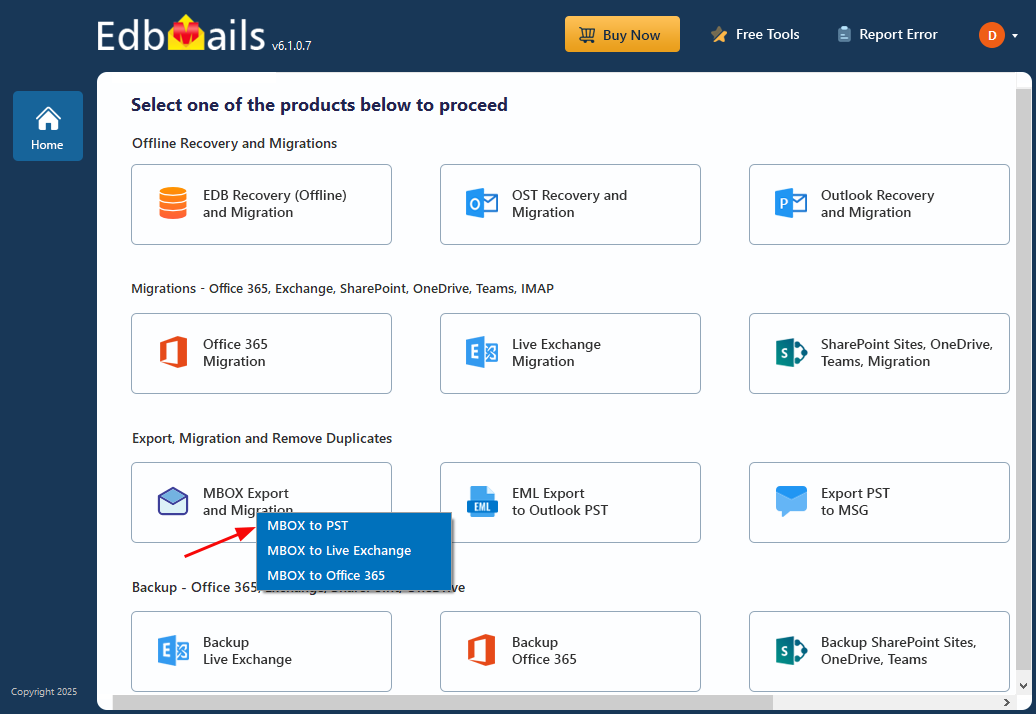
      • Choose ‘MBOX Export and Migration’ from the list of products
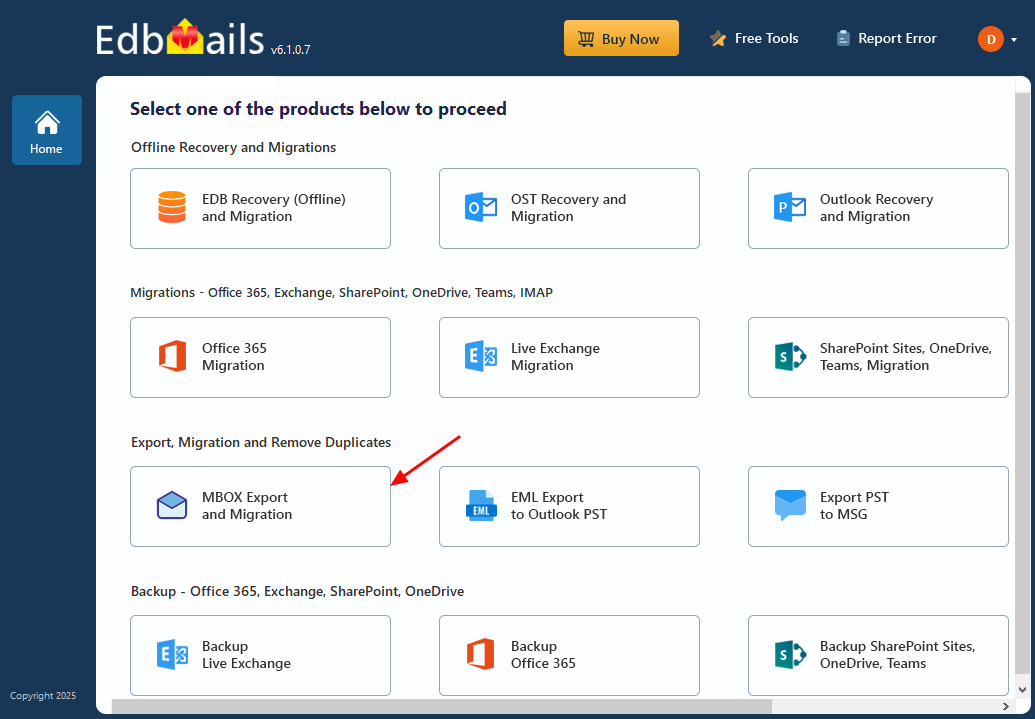
        Select MBOX Export and Migration

      • Select ‘MBOX to PST’

        Select MBOX to PST

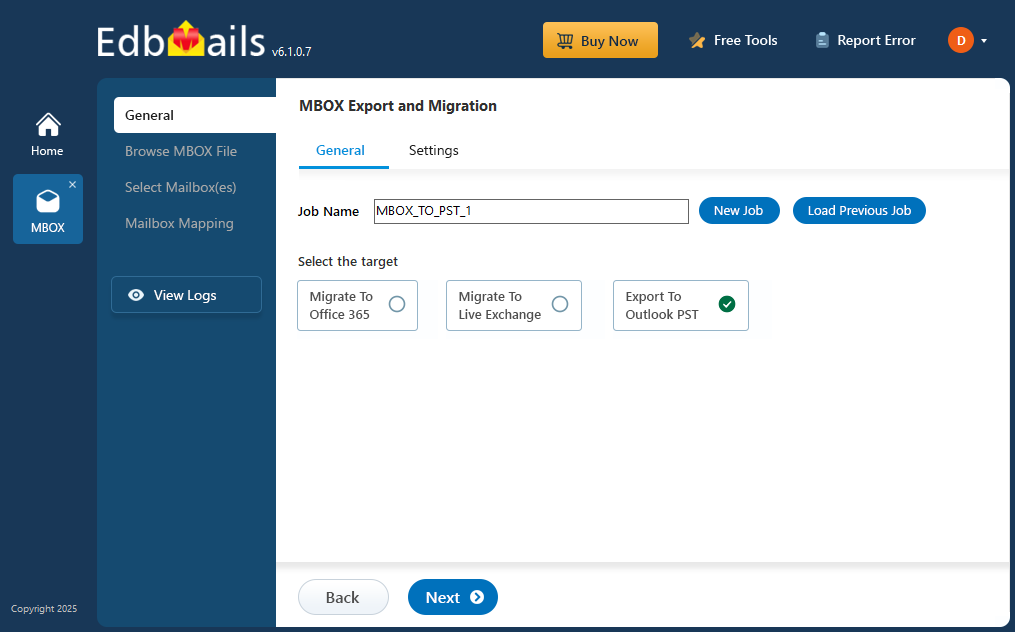
      • You can keep the default job name or click ‘New Job’ to change the job name
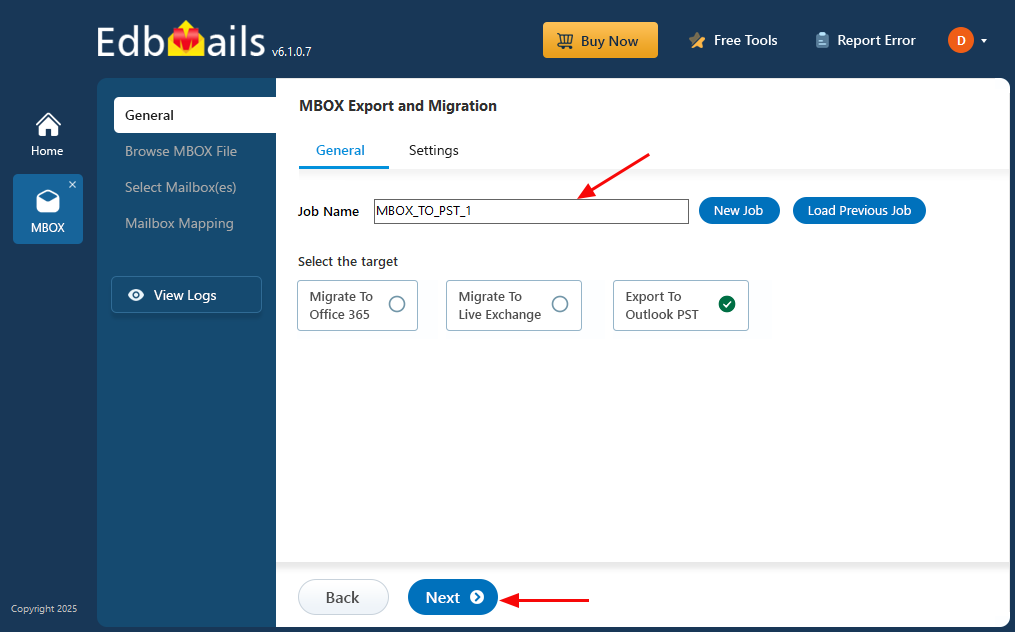
        Enter Job Name for MBOX to PST

    4. Step 4: Browse MBOX files

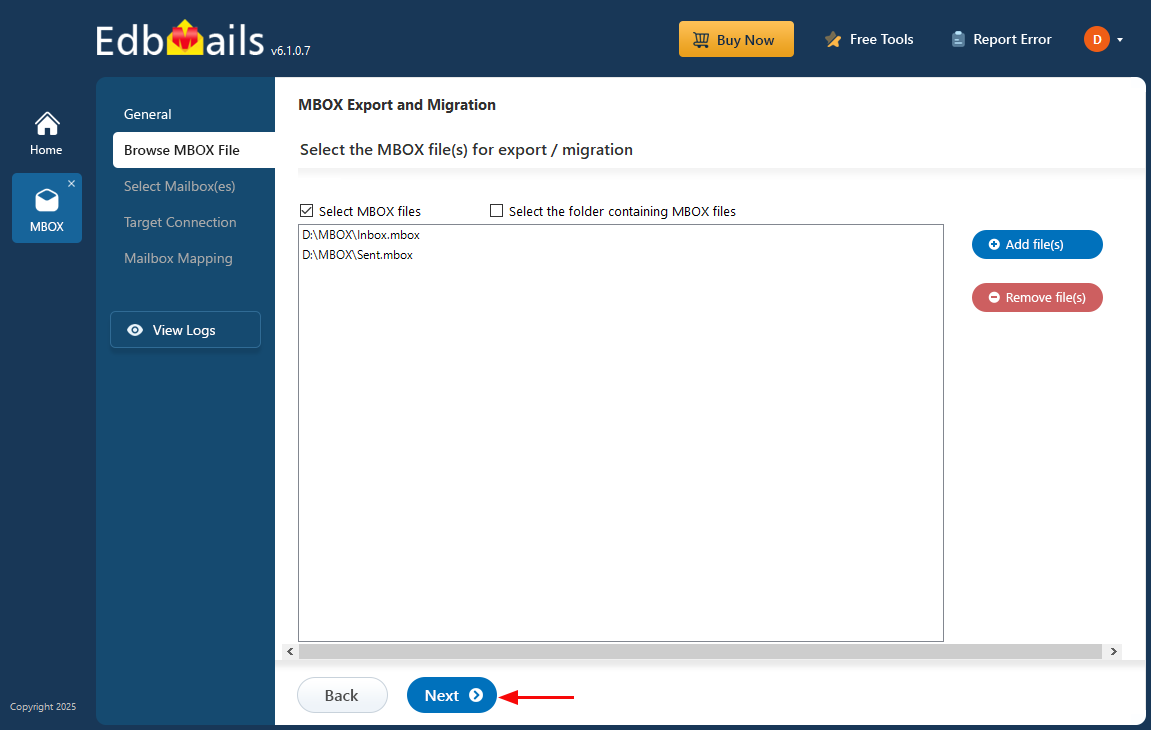
      • Click ‘Add file(s)’ to add the MBOX file for export
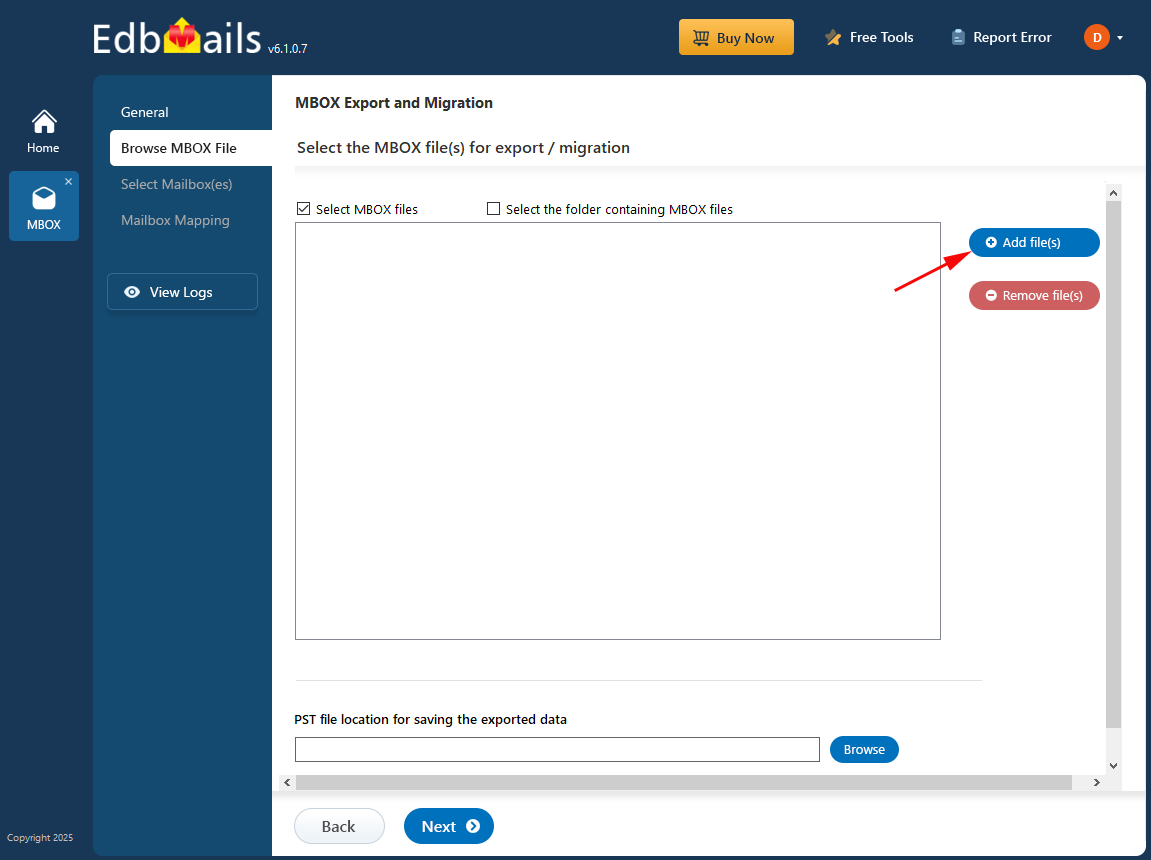
        Add the MBOX file

      • Select MBOX file(s) from the local drive
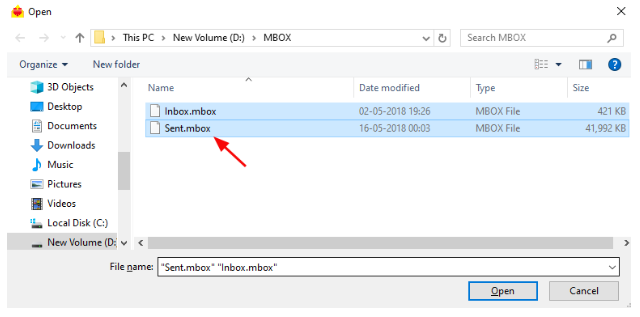
        Select the MBOX file

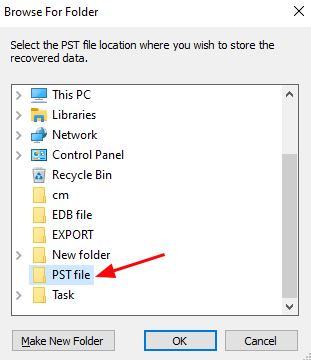
      • Click ‘Browse’ for selecting PST location
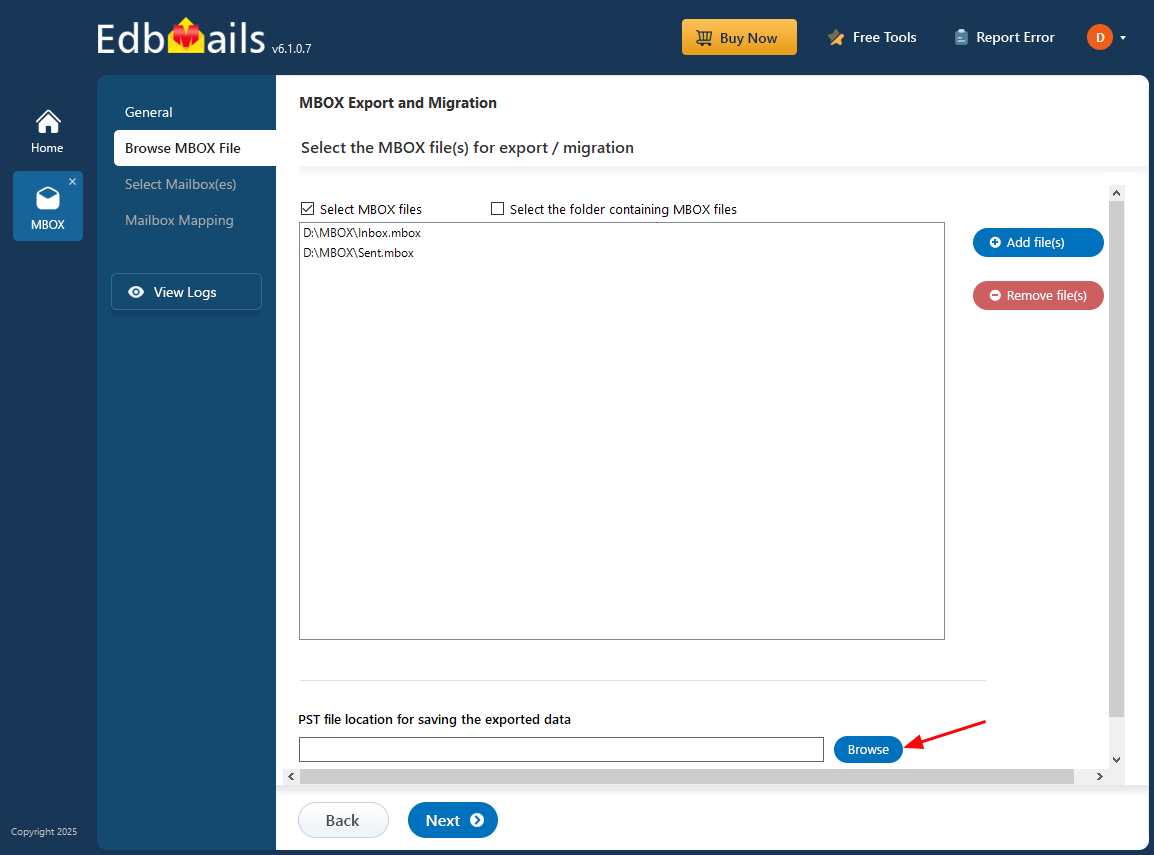
        Browse PST location

      • Select location to store PST file

        Select location to store PST file

      • Click ‘Next’ to continue

        Click Next

      • Select the mailboxes to export and click ‘Next’
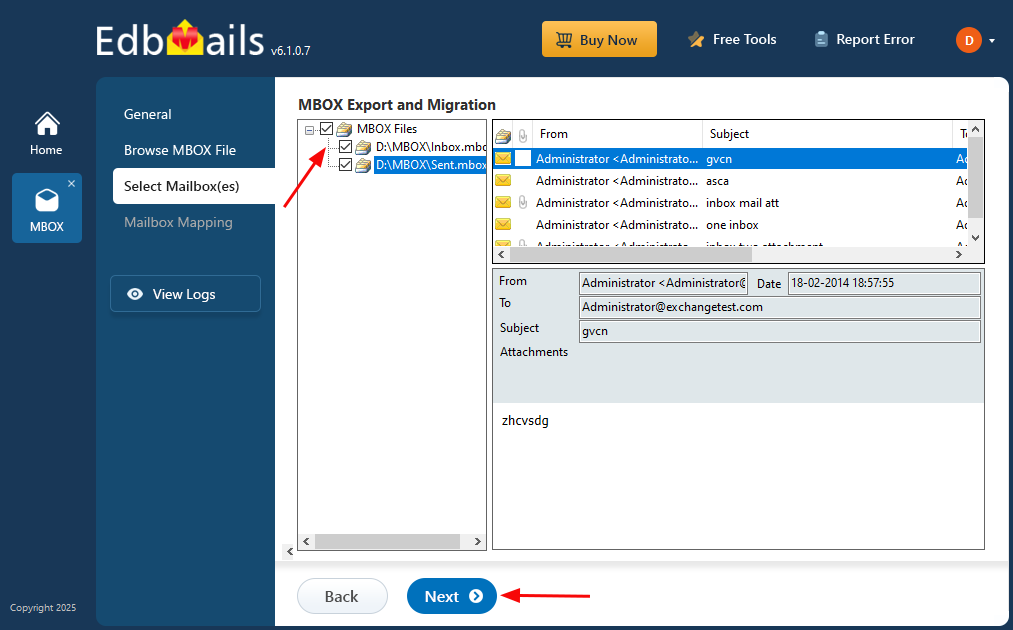
        Select the MBOX file to export

    5. Step 5: Start MBOX to PST export operation

      • Verify the selected files and ensure the 'Action' is set to 'Export.' Once confirmed, click the 'Start Export' button to begin the process.
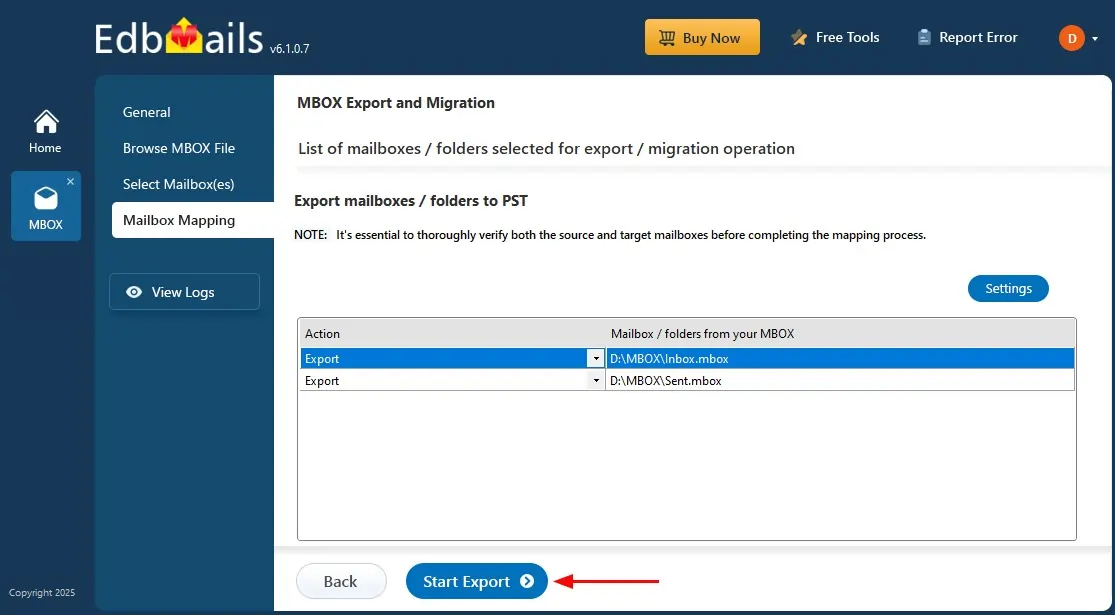
        MBOX to PST Export

      • That’s it! As the export runs, you can monitor its progress. Once completed, EdbMails prompts to verify the export operation status. Click the ‘View Logs’ button to view the export operation report.
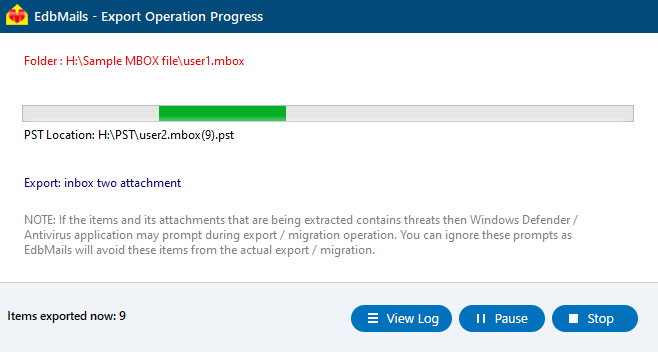
        MBOX to PST export progress

Benefits of using EdbMails to convert MBOX to PST

  1. Supports a wide range of email clients, including Thunderbird, Apple Mail, and more.
  2. Easy-to-use interface to convert MBOX to PST.
  3. Allows to load batch of multiple MBOX files
  4. Preserves email data, attachments during conversion.
  5. Offers advanced filtering options based on To, From, Subject, and Message received After Date / Before Date etc.
  6. Compatible with all versions of Outlook, including 2007 to 2021.
  7. Ensures safe and secure conversion without data loss.
  8. Free trial available to test the software before purchasing.
  9. Fast and efficient conversion process with high accuracy.

Additional resources:

  • EdbMails MBOX to PST Converter
  • MBOX to PST converter features
  • MBOX to PST converter FAQs
  • Video tutorials to convert MBOX to PST
lady image


 In this manual

IntroductionMBOX to PST PrerequisitesSteps to convert MBOX to PSTEdbMails Benefits

MBOX to PST converter

Just $45 Onwards

Buy Now

Need help?

24/7 Customer support

Contact us on Live chat

Personalized Demo

Book a personalized demo

Still need help?

Email us / Call us

© 2026 Shifttocloud Inc. Privacy Policy | Terms of Use | GDPR | Security | Press Releases

hidden msg
Live Chat

Hi, May I help you?

Hide Chat Now