• Menu
    • Products
      EDB Recovery and Migration
      • Overview
      • Features
      • How it works
      • User Manual
      • FAQ
      • Videos
      • Pricing
      • Screenshots
      Exchange Server Migration
      • Overview
      • Features
      • How it works
      • User Manual
      • FAQ
      • Videos
      • Pricing
      • Screenshots
      Office 365 Migration
      • Overview
      • Features
      • How it works
      • User Manual
      • FAQ
      • Videos
      • Pricing
      • Screenshots
      SharePoint Online Migration
      • Overview
      • Features
      • How it works
      • FAQ
      • Videos
      • Pricing
      • Screenshots
      OneDrive for Business Migration
      • Overview
      • Features
      • How it works
      • FAQ
      • Videos
      • Pricing
      • Screenshots
      Microsoft Teams Migration
      • Overview
      • Features
      • How it works
      • FAQ
      • Videos
      • Pricing
      • Screenshots
      SharePoint Backup
      • Overview
      • Features
      • How it works
      • FAQ
      • Videos
      • Pricing
      • Screenshots
      OneDrive Backup
      • Overview
      • Features
      • How it works
      • FAQ
      • Videos
      • Pricing
      • Screenshots
      IMAP Email Backup & Migration
      • Overview
      • Features
      • How it works
      • User Manual
      • FAQ
      • Videos
      • Pricing
      • Screenshots
      Exchange Server Backup
      • Overview
      • Features
      • How it works
      • FAQ
      • Videos
      • Pricing
      • Screenshots
      Office 365 Backup
      • Overview
      • Features
      • How it works
      • FAQ
      • Videos
      • Pricing
      • Screenshots
      OST Recovery and Migration
      • Overview
      • Features
      • How it works
      • User Manual
      • FAQ
      • Videos
      • Pricing
      • Screenshots
      MBOX Export and Migration
      • Overview
      • Features
      • How it works
      • FAQ
      • Videos
      • Pricing
      • Screenshots
      NSF Export and Migration
      • Overview
      • Features
      • How it works
      • FAQ
      • Videos
      • Pricing
      • Screenshots
      PST Recovery and Migration
      • Overview
      • Features
      • How it works
      • User Manual
      • FAQ
      • Videos
      • Pricing
      • Screenshots
      EML to PST Export
      • Overview
      • How it works
      • Pricing
      PST to MSG Export
      • Overview
      • How it works
      • Pricing
      MSG to PST Export
      • Overview
      • How it works
      • Pricing
      • Screenshots
      G Suite Migration
      • Overview
      • How it works
      • Pricing
      • Screenshots
      Windows Recovery
      • Overview
      • How it works
      • Pricing
      • Screenshots
    • Free Tools
    • Features
    • Reseller
    • Free Trial
    • FAQ
    • Video Tutorials
    • Pricing
    • Download
    • Support
    • Account
EdbMails EDB Recovery and Migration software
  • Reseller
  • Products
    Exchange EDB / Email Recovery Tools
    • EDB Recovery and MigrationRecover EDB to PST, EDB to Office 365 and Exchange NO Duplicate Migration
    • OST Recovery and MigrationRecover OST to PST, OST to Office 365 and Exchange Migration
    • PST Recovery and MigrationRecover Outlook PST, PST to Office 365 and Exchange Migration
    • MBOX Export and MigrationExport MBOX to PST, MBOX to Office 365 and Exchange Migration
    • NSF Export and MigrationExport NSF to PST, NSF to Office 365 and Exchange Migration
    • EML to PST ExportEML files export to Outlook PST format
    • PST to MSG ExportOutlook PST files export to MSG format
    • MSG to PST ExportExport MSG files Outlook PST files
    Exchange and Office 365 Migration
    • Exchange Server MigrationMigrate between any Exchange Servers, Exchange to Office 365, Export Exchange to PST, Migrate PST files to Exchange server
    • Office 365 MigrationMigrate between Office 365 tenants, Office 365 to Exchange, Export Office 365 to PST, Migrates PST files to Office 365
    • IMAP Email Backup & MigrationMigrate between any IMAP Servers (Gmail, Outlook, Zimbra, Zoho, Yahoo etc.), IMAP to Office 365, Exchange, IMAP to PST, PST to IMAP
    • G Suite MigrationMigrate emails, contacts, calendars from G Suite /Google Work Space to Office 365, Exchange, IMAP
    • SharePoint Online MigrationMigrate documents, lists, files and folders from SharePoint sites
    • OneDrive for Business MigrationMigrate documents, lists, files and folders from OneDrive
    • Microsoft Teams MigrationMigrate Teams, chats, channels, documents, files and folders etc.
    Exchange and Office 365 Backup
    • Office 365 BackupIncremental, Granular, Encrypted and Compressed Office 365 Mailboxes Backup
    • Exchange Server BackupIncremental, Granular, Encrypted and Compressed Exchange Mailboxes Backup
    • SharePoint, OneDrive & Teams BackupBackup Online site collections, Team sites, Office 365 groups, all documents etc.
    • Duplicate Remover - Office 365, Exchange, IMAP & Outlook Remove duplicate emails, calendars, contacts, journal etc. from Office 365, Exchange, IMAP, Outlook, Gmail, Zimbra, Zoho Mail etc.
    • Windows Data Recovery Recover and restore permanently deleted data from partitions across hard drives, SSDs, USB drives, SD cards, and external storage devices.
    • More Products
  • Features
  • Video Tutorials
  • Free Tools
  • FAQ
  • Knowledge Base
  • Pricing
  • Download
  • Support
  • Sign in
  • Cart

Export Office 365 to PST

Perform secure migration of all your data from one Office 365 tenant to PST file. Export PST from office 365 online with all the mailbox, calendar, contacts, tasks etc. Also migrate Public Folders and archive mailboxes to PST file flawlessly. The office 365 export to PST tool from EdbMails guarantees no downtime and can perform truly incremental migrations saving time and space. You don’t need to search for any office 365 export mailbox to pst powershell commands as EdbMails can migrate your office 365 mailbox to PST seamlessly.

Features and more....


Auto re-connectivity for any intermittent internet connection

Office 365 migration resume: EdbMails will automatically reconnect and resume the migration operation in case of any intermittent connection issues and you don't have to worry about office 365 migration syncing.

Source server interruption — If the Source server connection is interrupted like for instance the connection to source server is broken but the server maintains the connection information. Application Availability source, not being able to communicate with the Availability source server, In this situation EdbMails tries to re-establish the connection and proceed with the migration.

Incremental Office 365 PST export

The office 365 export tool makes it possible to migrate only the newly added mailbox items which have not been migrated before during consecutive migrations from same computer. Also, there will be no user impact during office 365 PST mailbox export with EdbMails.


Office 365 mailbox to PST migration tool

Migrate all the mails, tasks, contacts, calendar etc from source Office 365 mailbox to PST file flawlessly. None of your data will be left out when using the tool to export office 365 to pst and no duplicates will be created upon successive incremental migrations. Thanks to the simple and straightforward GUI, you don't have to look for any other options as EdbMails offers you the complete office 365 migration to PST strategy which can be setup in a few steps.

Secure migration Exchange online export to PST

All the data including private credentials and other information will be safe and secure when using the EdbMails Office 365 Migration tool as there are no third party services or DLLs or cloud platforms used in the migration operation. The data is migrated directly from source tenant to PST file and no intermediaries are involved thus eliminating any risks.


No access to your System

We will not have any access your system if you install EdbMails. However, qualified technicians from our team will be always available and can connect to you remotely over the internet to resolve any issues you may be facing.

Prevent Data Loss

Office 365 export to PST tool from EdbMails ensures a 1:1 copy of your source tenant mailboxes to PST file. Thus, you don't have to worry about any omissions or deletions. Also, the data in source server is not altered with in anyway making the office 365 migration to PST process entirely risk-free.


Detailed Progress

Access precise progress of the migration operation underway with EdbMails Office 365 migration tool. Once the migration is completed you will also be shown a summary of the operation.

Multi Factor Authentication Support

Multi Factor Authentication (MFA) support ensures that even if your Office 365 tenant has multi factor authentication enabled, you can use EdbMails for office 365 migration login and proceed with the migration effortlessly without having to disable MFA and compromise on security.


Extensive filtering options

There are number for Include/Exclude filtering options provided, that lets you filter mails by before/after date, subject, attachment name, to/from address.

Split PST file

You are provided with an option to split the PST file into sizes of upto 100GB as per your convenience.

 
Export office 365 to PST guide
  • Export office 365 to PST guide

Steps to Export Office 365 to PST using EdbMails application

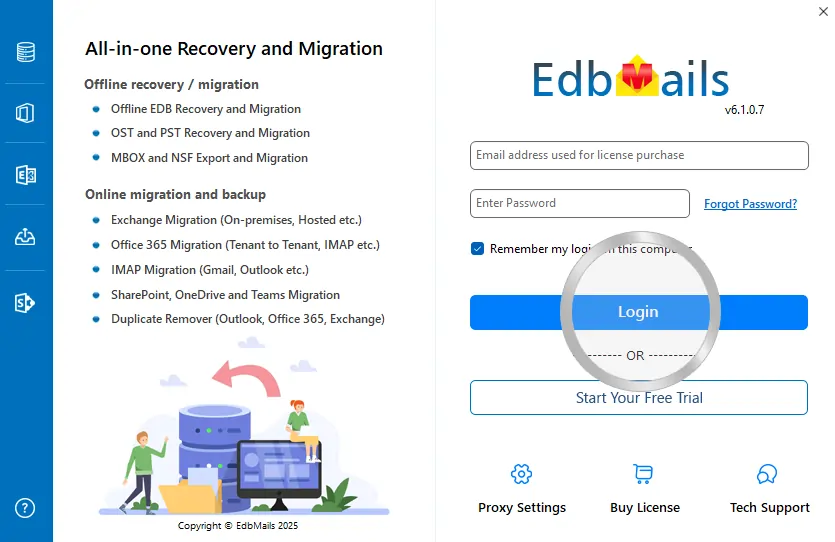
  1. Step 1. Start the EdbMails application and click the 'Start your free trial'
  2. Step 2. Select 'Office 365 Migration' and click the 'Continue'
  3. Step 3. Login to your Source Office 365 as prompted and follow the steps
  4. Step 4. Select all mailboxes that you wish to migrate. Click the 'Export Office 365 to PST'
  5. Step 5. Choose the filtering options as needed and Click ‘Export / Archive Office 365 to PST’
  6. Step 6. Select the destination location to store exported data
  7. Step 7. Upon operation completion, appropriate message will be prompted
hidden msg

EdbMails Demo / Trial Version

Step 1. Download and install EdbMails

Step 2. Click the 'Start Your Free Trial' button

Demo login EdbMails

  • Home
  • Features
  • Pricing
  • Support
  • Download
  • Sitemap
  • FAQ
  • Video Tutorials
  • Technical Support
  • Live Chat
  • Contact Us
Shifttocloud Inc.
Rehoboth Beach, DE
United States
+1 (302) 416-3056

Privacy Policy | Terms of Use | GDPR | Security | Press Releases

© 2026 Shifttocloud Inc.

Live Chat

Hi, May I help you?

Hide Chat Now

//