
EdbMails EDB Recovery and Migration software
  • Products
    EdbMails
    All-in-one Recovery and Migration Tool
    • EDB recovery and Migration
    • OST, PST, MBOX, NSF, EML, MSG
    • Office 365, Exchange Migration
    • SharePoint, OneDrive & Teams
    • G Suite Migration
    • IMAP Migration
    • Duplicate Remover
    • EdbMails Data Recovery
    • Backup Solutions
    All Products

    EDB Recovery and Migration

    EdbMails lets you recover corrupted, damaged, and offline Exchange EDB files, convert EDB mailboxes to PST format, and directly migrate mailbox data to Office 365 and live Exchange Server.

    EDB to PST
    Recover corrupted, damaged, offline EDB files and convert Exchange EDB mailboxes to PST file format
    Public Folder to Exchange
    Migrate public folders from an Exchange offline EDB file to live Exchange Server
    EDB to Live Exchange Migration
    Directly migrate offline Exchange database (EDB) files to live Exchange server
    Archive Mailbox to Office 365
    Migrate archive mailboxes from offline EDB files directly to Office 365
    EDB to Office 365 Migration
    Directly migrate offline Exchange database (EDB) files to Office 365
    Public Folder to Office 365
    Migrate public folders from an offline Exchange EDB file to Office 365

    OST, PST, MBOX, NSF, EML, MSG Export and Migration

    EdbMails lets you to recover OST and PST files, export OST, PST, MBOX, NSF, EML, and MSG files to PST files, and directly migrate OST, PST, MBOX, and NSF mailbox data to Office 365 and live Exchange Server.

    OST Recovery and Migration
    Recover offline OST files, convert OST to PST, and migrate OST to Office 365 and Exchange Server
    PST Recovery and Migration
    Recover Outlook PST files , Export PST to PST, migrate PST to Office 365 and Exchange Server
    MBOX Export and Migration
    Export MBOX to PST, migrate MBOX to Office 365 and Exchange Server
    NSF Export and Migration
    Export NSF to PST, migrate NSF to Office 365 and Exchange Server
    EML to PST Export
    Convert EML files to Outlook PST files
    PST to MSG Export
    Convert Outlook PST file to MSG file format
    MSG to PST Export
    Export MSG files to Outlook PST files

    Office 365, Exchange Migration

    EdbMails lets you securely migrate mailboxes across Microsoft 365, Exchange, Google Workspace (G Suite), and IMAP-supported servers such as Outlook, Gmail, Zimbra, Zoho Mail, and cPanel, ensuring zero downtime.

    Office 365 Migration
    Migrate between Office 365 tenants, Office 365 to Exchange, Office 365 to PST, PST files to Office 365.
    Exchange Migration
    Migrate between any Exchange Servers, Exchange to Office 365, Exchange to PST, PST files to Exchange.
    Tenant to Tenant Migration
    Migrate Mailboxes, Public Folders, Archive Mailboxes between Office 365 Tenants.
    Exchange to Office 365
    Migrate Mailboxes, Public Folders, Archive Mailboxes from live Exchange server to Office 365.
    Office 365 to IMAP
    Migrate Office 365 to IMAP, Office 365 to Gmail, Office 365 to Outlook, Office 365 to Zoho etc.
    Exchange to IMAP
    Migrate from live Exchange Server to IMAP servers such as Gmail, Outlook, and Zoho Mail.
    Public Folder to Office 365
    Migrate Public Folders between Office 365 tenants with complete folder hierarchy and mailbox data integrity.
    Exchange to PST
    Export live Exchange Server mailboxes, public folders, and archive mailboxes to Outlook PST files.

    SharePoint, OneDrive & Microsoft Teams Migration

    EdbMails lets you migrate SharePoint sites, OneDrive data, Microsoft Teams, teams, channels, chats, permissions, and documents between Microsoft 365 tenants while maintaining the existing folder structure and data integrity.

    SharePoint Online Migration
    Migrate documents, lists, files and folders from SharePoint sites.
    OneDrive for Business Migration
    Migrate documents, lists, files, folders, private chats from OneDrive.
    Microsoft Teams Migration
    Migrate Teams, chats, channels, documents, files and folders etc.

    Google Workspace / G Suite Migration

    EdbMails G Suite Migration Tool lets you easily migrate emails, calendars, contacts, tasks, and more from G Suite to Office 365, Exchange Server, and IMAP servers using a Google Admin account without requiring individual user credentials.

    G Suite Migration
    Migrate emails, calendars, contacts, tasks from G Suite to Office 365, G Suite to Exchange, G Suite to IMAP Servers
    G Suite to Office 365
    Migrate emails, calendars, contacts, tasks from Google Workspace / G Suite to Office 365
    G Suite to Exchange Server
    Migrate emails, calendars, contacts, tasks from Google Workspace / G Suite to on-Premise Exchange Server
    G Suite to IMAP
    Migrate emails, calendars, contacts, tasks from Google Workspace / G Suite to IMAP, Outlook, Zimbra, Zoho etc.

    IMAP Migration

    EdbMails IMAP Migration tool lets you easily migrate emails from IMAP servers such as Outlook, Gmail, Zoho Mail, Zimbra, cPanel, and more. Supports IMAP to IMAP, Office 365, Exchange Server, PST, and bulk PST to IMAP migration.

    IMAP Email Backup & Migration
    Backup and migrate emails from IMAP servers to PST, Office 365, and On-Premises Exchange Server
    IMAP to Office 365
    Migrate emails, folders, and attachments from IMAP servers to Office 365
    IMAP to Exchange
    Migrate emails, folders, and attachments from IMAP servers to on-premises Exchange Server
    IMAP to PST
    Export emails, folders, and attachments from IMAP servers to Outlook PST files for backup
    PST to IMAP
    Migrate emails, folders, and attachments from bulk PST files to IMAP servers

    Duplicate Remover

    EdbMails Duplicate Remover lets you easily remove duplicate items from Office 365 and Exchange Server, and from IMAP, Outlook, Gmail, Zimbra, Zoho Mail, etc., ensuring a clean and organized mailbox.

    Remove Duplicates
    Easily clean up your Office 365, Exchange, Outlook and IMAP accounts by removing duplicate emails.
    Remove Duplicates from Office 365
    Remove duplicate emails, calendars, contacts, journal tasks, etc. from Office 365.
    Remove Duplicates from Exchange Server
    Remove duplicate emails, calendars, contacts, journal tasks, etc. from live Exchange Server.
    Remove Duplicates from IMAP, Outlook
    Remove duplicate emails, attachments from IMAP, Outlook, Gmail, Zimbra, Zoho Mail etc.

    Exchange, SharePoint, OneDrive, Teams and Office 365 Backup

    EdbMails enables secure, automated backup and recovery for Microsoft 365 services including Exchange Online, SharePoint, OneDrive, Teams, and Live Exchange Server with complete data protection and restore flexibility.

    Office 365 Backup
    Incremental, Granular, Encrypted and Compressed Office 365 Mailboxes Backup
    Exchange Server Backup
    Incremental, Granular, Encrypted and Compressed Exchange Mailboxes Backup
    SharePoint, OneDrive & Teams Backup
    Backup Online site collections, Team sites, Office 365 groups, all documents etc.

    EdbMails Data Recovery

    EdbMails Data Recovery Software lets you recover permanently deleted data, including photos, videos, documents, and archived files, from partitions on hard drives, SSDs, USB drives, SD cards, and external storage devices.

    EdbMails Data Recovery
    Recover and restore permanently deleted data from hard drives, SSDs, USB drives, SD cards, and etc.
    Whitepaper
    Request a Demo
    Sign Up
  • Features
  • FAQ
  • Offers
  • Pricing
  • Download
  • Support
  • Sign in
User’s Manual
OST Recovery and Migration

User Manual

User Manual

  • Overview
  • System Requirements
  • Installation
    • Installation process
    • Reinstall or Upgrade
    • How to uninstall
  • Initial Setup
  • FAQ
    • OST to PST
    • OST to Office 365 Migration
    • OST to Exchange Migration
  • Videos
    • OST to PST Converter
    • OST to Office 365 Migration
    • OST to Exchange Migration
  • Screenshots
    • OST to PST
    • OST to Office 365 Migration
    • OST to Exchange Migration
  • How it works?
    • OST to PST Converter
    • OST to Office 365 Migration
    • OST to Exchange Migration
  • Connect to Exchange server for multiple mailboxes migration
    • Connect with Global Admin
    • Connect to multiple users using CSV file
    • Connect using full access permission
    • Connect individual users for Single / Specific user Migration
  • Connect to Hosted Exchange for its Migration
    • Connect with Full Access permissions
    • Using multiple user credentials with CSV file
    • Connecting to Individual user for its migration
  • Connect to target Office 365
  • Modern Authentication Using OAuth 2.0
    • Microsoft 365 modern authentication
    • Automatic Registration
    • Manual Registration
  • Set Exchange Server Impersonation rights
    • Exchange 2007 and below
    • Exchange 2010, 2013, 2016 and 2019
    • Set using Exchange Server GUI
  • Knowledge Base
    • Corrupt OST file recovery
    • Unicode and ANSI OST format
    • Split OST file
    • Rebuild OST file
    • Exchange mailbox backup
    • Recover orphaned OST file
    • Recover all Exchange and Outlook OST files
    • Recover metadata and attachments
    • Export unlimited OST files to PST
    • Free OST file viewer
    • Granular recovery of OST file
    • Recover encrypted OST file
    • Recover deleted mailboxes from OST
    • Export email, calendars, contacts
    • Selective OST export
    • Migrate OST to Office 365
    • OST to Live Exchange
    • Outlook OST cannot be accessed
    • Log report
    • Fix Outlook not connecting to server error
    • Fix Outlook the set of folders cannot be opened
    • Fix Outlook not syncing error
    • Outlook Cached Exchange mode
    • Fix Outlook data file cannot be accessed
    • Fix the error Outlook inbox not updating
    • Your mailbox has been temporarily moved on Exchange server
    • Open OST file in Outlook
    • Repair corrupted OST files from Outlook 365
    • Save Outlook emails to hard drive
    • Import OST file into Outlook
    • Your Outlook data file cannot be configured
    • Errors have been detected in the OST
  • Incremental Migration
  • Exchange Throttling Policy
  • Set Office 365 Impersonation rights
    • Using PowerShell commands
    • Using Office 365 GUI
  • Map the Mailboxes
  • Multifactor Authentication
    • Enable MFA in Office 365
    • Create App password for MFA
    • Disable Security Defaults
    • Disable MFA in Office 365
  1. Home
  2. OST Recovery and Migration
  3. Recover Outlook Emails from Corrupted OST Files | EdbMails
Download Buy Now

Recover Outlook emails with EdbMails Converter for OST

There are several reasons that may make the Outlook data inaccessible, like server failure, accidental deletion of the mailbox, oversized OST files or synchronization errors. In such cases, the OST file (which contains data for the offline mailbox) may become orphaned or corrupted, and the important emails, attachments, and other mailbox items may become inaccessible. Such disruptions can stop everyday activities and threaten sensitive information.

EdbMails OST to PST Converter is a safe and secure method that helps you get access to your Outlook data. It allows you to convert OST to PST format successfully with the original file structure, email formatting, and original hierarchy of folders. EdbMails recovers all OST files, mailbox items, including emails, contacts, calendar, tasks, and attachments, etc. It can even recover corrupted OST files. You can also export the OST file to EML, HTML, and MHT formats or directly migrate to Office 365 & Exchange Server.
Move Exchange mailbox to another database

The following sections explain common causes of OST file corruption, outline the advantages of using EdbMails OST to PST Converter, describe how to repair damaged OST files, and provide an overview of key features along with answers to frequently asked questions.

Common reasons for OST File Corruption

There are many reasons for corruption of OST files. If this issue is not resolved on time, it may result in partial or complete loss of data. It is important to know the causes of corruption in order to choose the appropriate recovery approach. Here are some of the most common scenarios outlined below.

  • In cases such as ransomware attacks, server crashes, or accidental deletion of mailboxes, the Exchange server may become permanently inaccessible. When this occurs, the corresponding Offline Storage Table (.ost) file becomes orphaned, and you cannot access mailbox data directly from Outlook.
  • Problems with the Outlook installation, registry errors, or configuration issues can also disrupt access to the OST file. Such issues often result in errors like ‘Your Outlook data file could not be configured’. In cached Exchange mode, synchronization failures can cause folders not to sync properly, and corruption or inconsistencies in the Exchange database can also cause OST files not to be accessible or cause Outlook processes to end unexpectedly.
  • Large or oversized OST files can affect the performance of Outlook. As the file size increases, Outlook may slow down or become unstable. Therefore, improving performance is necessary by exporting emails to a PST file on your hard drive for backup and long-term storage.
  • OST files can also be corrupted because of network disconnections during OST sync, abnormal shutdowns of Outlook, or abrupt termination of Outlook processes. These interruptions can create file corruption, and you’ll have to recover and convert it to PST format.
  • Also, accidentally deleted emails or folders from the Exchange server may still be there in the local OST file. You can export this data to a PST file for a backup copy of important items in your mailbox.

In all of the above situations, EdbMails lets you recover and convert OST files to PST file format, ensuring secure recovery, accessibility, and long-term backup of your Outlook data.

Why EdbMails is Best for Recovering Lost Outlook Emails

  • EdbMails is the best choice for converting OST files to PST format, which comes with a full set of features that are intended to make the conversion process smooth and efficient.
  • The software supports high-speed conversion with an easy-to-use user interface and provides 100% data security, so that the OST to PST conversion can be done quickly without any risk of data loss.
  • But, SCANPST, the default data repair tool of Outlook, generally doesn't work with OST files and throws errors like 'Inbox Repair Tool does not recognize the file.ost' or 'SCANPST fails to repair OST file’.
  • SCANPST is also limited to minor OST file corruption and cannot recover mail items when the Exchange mailbox is temporarily moved or unavailable on the server.
  • EdbMails is a far more reliable solution to repair OST Files for Outlook versions 2021, 2019, 2016, 2013, 2010, and 2007.
  • It is a full and reliable solution for all OST file repair and conversion needs, as it can recover and convert even severely corrupted OST files.

How to Repair the Corrupt and Damaged OST Files?

Microsoft Outlook does not open corrupted OST files. If you try to open or retrieve mail items from a corrupt OST file, you may get error messages like ‘Outlook OST file cannot be opened’ or ‘Errors have been detected in the OST file.’ In such cases, EdbMails is one of the best options to repair and convert corrupt or damaged OST files to PST format. It completely repairs OST files and allows you to recover and convert all mailbox data, like emails and other Outlook items.

How to repair the OST file and convert it to PST file?
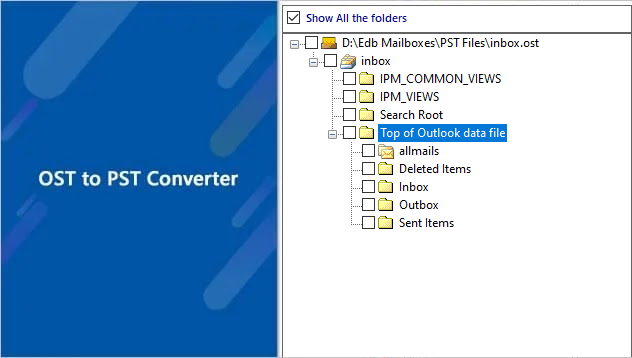
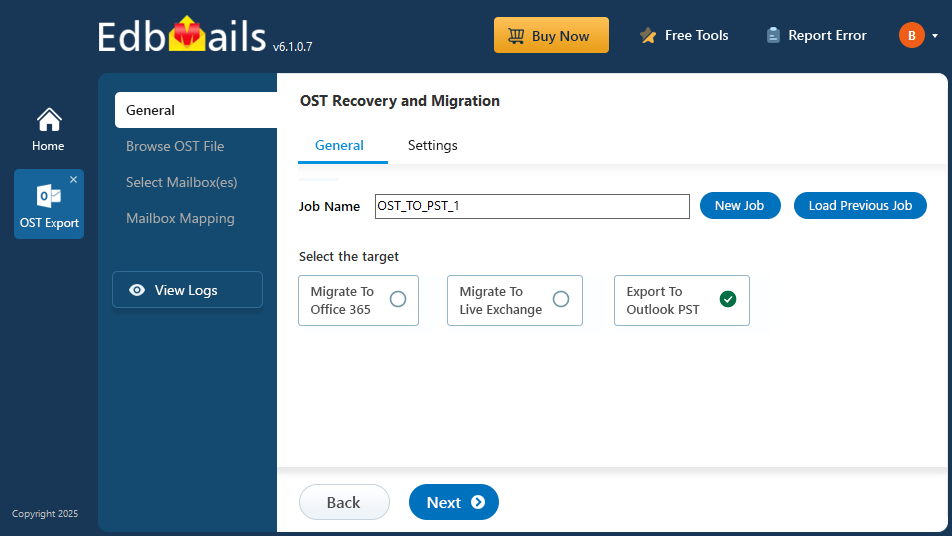
Here are the steps to convert OST files to PST format:

  • Step 1: Browse and select the corrupt OST file to repair and convert
  • Step 2: Select the mailbox and folders you want to export
  • Step 3: Choose the location to save the recovered PST file
  • Step 4: Apply advanced filter settings such as Date, To, and CC (optional)
  • Step 5: Start converting the Outlook OST file to PST
  • OST to PST converter video

EdbMails OST to PST Converter Key Features

  1. User-Friendly Interface: EdbMails OST to PST Converter comes with a simple and user-friendly interface, allowing users of all experience levels to convert OST files to PST format easily.
  2. Fast Conversion: The tool helps to convert OST to PST within minutes for bulk OST files. It also offers the facility to split the OST file data into multiple PST files on OST to PST conversion for the effective management of large OST files.
  3. Safe and Secure: EdbMails OST to PST Converter ensures complete data security while converting Outlook data and also protects the mailbox content from unauthorized access or modification.
  4. Preview Feature: EdbMails lets you open the OST file and preview mailbox items such as emails, contacts, calendars, notes, tasks, journals, and header information before conversion.
  5. No Data Loss Conversion: The software performs the conversion of all Outlook mailbox items to PST format without any loss. Hence, 100% data integrity is maintained.
  6. Compatibility: EdbMails is compatible with all versions of Microsoft Outlook, including the latest Outlook 2022, ensuring wide compatibility in different environments.

Frequently Asked Questions

  1. What is an OST file and how does it differ from PST files?

    An OST (Offline Storage Table) file is a local copy of your Exchange mailbox that allows you to access and work on your emails even when you're offline. Once you're connected to the Exchange server again, any changes made while offline are automatically synchronized. OST files are automatically created when your Exchange mailbox is configured in Cached Exchange Mode in Microsoft Outlook, ensuring continuous access to your mailbox data.

    A PST (Personal Storage Table) file, on the other hand, is a file format used to store copies of emails, contacts, calendars, and other data in Microsoft Outlook. Unlike OST files, PST files are not synchronized with an Exchange server and are typically used for archiving or backup purposes.

    The key difference between OST and PST files is their function. OST files provide offline access to Exchange mailboxes and are created in Cached Exchange Mode, allowing users to work with their mailbox data without a direct server connection. PST files, however, are used for locally storing Outlook data, whether for archiving, backup, or keeping data that isn't linked to an Exchange server mailbox.

  2. Does EdbMails fix OST file corruption?

    EdbMails OST to PST Converter is an effective solution for repairing corrupted OST files. The tool helps you fix corruption issues and recover all your email data seamlessly. In addition to converting OST files to PST, EdbMails also allows you to export emails to other formats like EML, HTML, and MHT. Plus, it offers the convenience of directly uploading OST data to Office 365 or a Live Exchange server.

  3. How does EdbMails compare to ScanPST?

    Compared to ScanPST, EdbMails offers more advanced features, better data recovery options, a user-friendly interface, and can recover and convert corrupted and orphaned OST files to PST format. ScanPST may not be able to recover data from severely corrupted PST files.

  4. How long does it take EdbMails to convert an OST to a PST file?

    EdbMails uses advanced algorithms to convert OST files to PST format quickly. The conversion time varies depending on the size of the OST file.

  5. Can I convert OST to PST for free with EdbMails?

    Yes, EdbMails includes a free trial version with which you can convert 30 mail items from each folder of the OST file to PST format. The free tool also enables you to repair, open and view the contents of the OST file before you start the conversion operation.

  6. How does EdbMails protect the data during the conversion process?

    EdbMails algorithms ensure that all data is protected during the conversion process. The software does not alter the original OST file and saves all data to a new PST file. The output file is an exact copy of the source file, including all email properties and data formatting.

  7. Can EdbMails convert password-protected OST files to PST format?

    Yes, EdbMails can convert encrypted and password-protected OST files to PST format without requiring you to provide any password during the conversion.

  8. What is the largest OST file EdbMails can convert to PST?

    EdbMails has no size limit when converting OST files to PST, allowing you to handle even the largest OST files without any issues. Additionally, the software offers a file-splitting option during conversion, enabling you to divide the output PST file into smaller, more manageable parts for easier handling.


Additional resources:

  • OST to PST Converter
  • Unicode and ANSI OST format
  • Split OST file
  • Rebuild OST file
lady image

 In this manual

IntroductionReasons for CorruptionEfficient ConversionOST file RepairFeatures of EdbMailsFAQ's

OST Recovery and Migration

Just $45 Onwards

Buy Now

Need help?

24/7 Customer support

Contact us on Live chat

Personalized Demo

Book a personalized demo

Still need help?

Email us / Call us

© 2026 Shifttocloud Inc. Privacy Policy | Terms of Use | GDPR | Security | Press Releases

hidden msg
Live Chat

Hi, May I help you?

Hide Chat Now

