

 Cart
Cart
Exchange to Exchange Server Migration Features
Exchange to Exchange Server Migration is very useful for organisations that are enhancing their infrastructure, merging or consolidating Exchange resources and increasing the effectiveness and accessibility of email data. Exchange to Exchange Server migration allows moving a user's mailbox, public folders and other data from one Exchange server to another. This migration is done by planning very thoroughly, covering aspects such as version compatibility, data security, and zero downtime.
EdbMails Exchange Migration Tool is a simple and powerful tool that allows users to easily migrate from one Exchange server to another. All significant versions, like Microsoft Exchange Server 2019, 2016, 2013, 2010, and 2007, are supported by the program. This would allow uninterrupted use and operation across all environments without complex scripts or advanced expertise. The system automates crucial migration steps and streamlines the entire workflow, while also offering a real-time monitor with reporting capabilities to enable users to track migration progress. EdbMails offers organisations a dependable, efficient way to handle Exchange to Exchange server migrations with confidence.
Simplified Cross-domain and Cross-forest migration
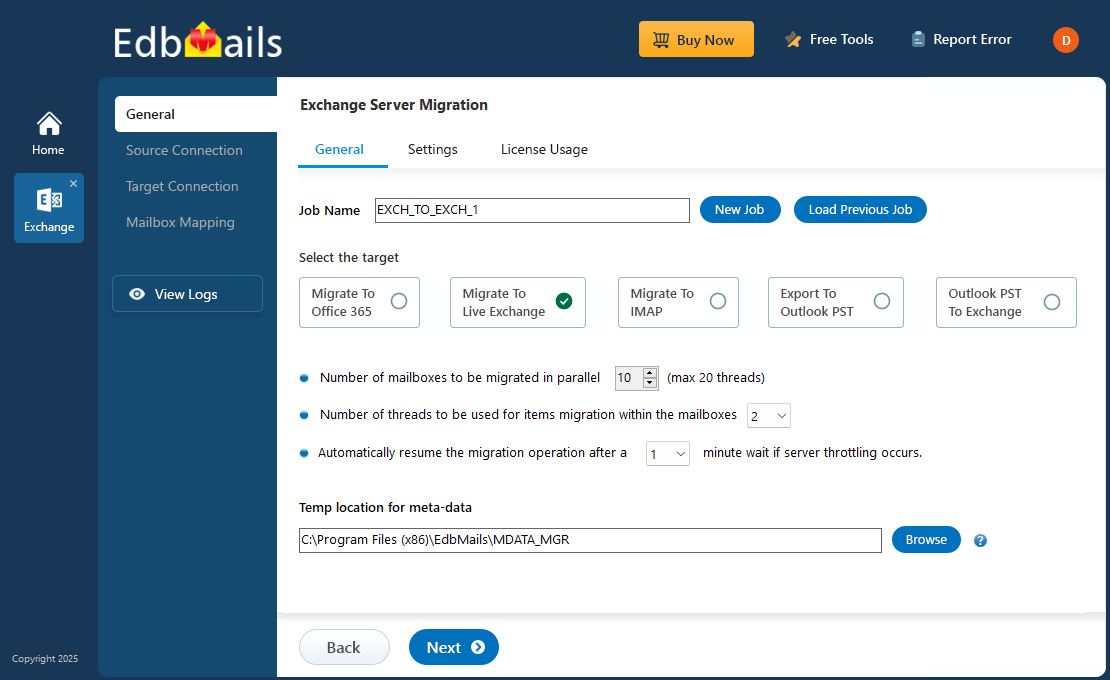
If you have multiple domains or an AD forest, EdbMails provides a straightforward approach to perform your cross-domain and cross-forest migration. The software has managed to simplify a complicated task into a straightforward three-step approach: Install the application, log on to both source and target Exchange servers, and configure the migration using an easy interface. All users can make use of the simple interface as there is no need for scripting or complex technical know-how. EdbMails handles all complex configurations behind the scenes and provides seamless, error-free migration of data between different domains and AD forests. This not only saves a lot of time but also ensures a high level of accuracy.
Complete Solution for Exchange to Exchange Server Migration
EdbMails is the all-in-one Exchange to Exchange server migration solution, which enables users to migrate User Mailboxes, Public Folders & Archive Mailboxes (In-Place Archives) to the target Exchange server. This feature also allows for seamless archive data migration. You will be allowed to migrate to archive mailboxes, primary mailboxes and public folders on the Exchange environment. Both old and new data are retained; therefore, users can see the entire history of their mailbox even after the migration to the new environment, EdbMails ensures this. No tool is needed to handle different types of data. The migration of your Exchange mailbox data to the new server using a migration tool such as this would be an absolute guarantee that every bit of your data is migrated seamlessly.
Essential Features for Effective Migration
EdbMails Exchange to Exchange server migration tool contains several advanced features and also supports several advanced tools that help you accomplish the migration task easily, quickly, accurately, and without compromise. Its automatic mailbox mapping function aligns source mailboxes with destination mailboxes, reducing administrative overhead and speeding data transfer. Concurrent mailbox migration increases migration speed and reduces overall migration time.
Auto mailbox creation will save you time configuring mailbox settings on the destination server by automatically creating mailboxes there. Incremental migration allows you to transfer only the newly created or updated mailboxes after the first data migration. Cross-version compatibility of the EdbMails application allows you to migrate easily across the different versions of Exchange servers and helps you save time.
Key Benefits of EdbMails Exchange Server Migration:
EdbMails offers key features that effectively assist organisations upgrading or consolidating their Exchange servers.
- Migration with Zero Downtime: With this software, you can achieve zero downtime, and the users will continue working without any service interruption during migration.
- Automatic Throttling Management: It will also handle Exchange throttling limits automatically and reconnect the session if the connection is lost, preventing data loss.
- Preserves Mailbox Permissions: All access rights and delegation permissions on folders and mailboxes are preserved, ensuring mailboxes can be accessed with the correct rights.
- Mailbox Data Migration: It is also used to migrate the archive and public folders between Exchange servers, enabling complete data migration.
- Migration Reports: These detailed migration logs and summary reports give the administrators real-time tracking of progression, making the whole process completely transparent and accountable.