EdbMails EDB Recovery and Migration software
  • Products
    EdbMails
    All-in-one Recovery and Migration
    Explore our products
    • EDB recovery and Migration
    • OST, PST, MBOX, NSF, EML, MSG
    • Office 365, Exchange Migration
    • SharePoint, OneDrive & Teams
    • G Suite Migration
    • IMAP Migration
    • Duplicate Remover
    • Windows Data Recovery
    • Backup Solutions

    EDB Recovery and Migration

    EdbMails lets you recover corrupted, damaged, and offline Exchange EDB files, convert EDB mailboxes to PST format, and directly migrate mailbox data to Office 365 and live Exchange Server.

    EDB to PST
    Recover corrupted, damaged, offline EDB files and convert Exchange EDB mailboxes to PST file format
    Public Folder to Exchange
    Migrate public folders from an Exchange offline EDB file to live Exchange Server
    EDB to Live Exchange Migration
    Directly migrate offline Exchange database (EDB) files to live Exchange server
    Archive Mailbox to Office 365
    Migrate archive mailboxes from offline EDB files directly to Office 365
    EDB to Office 365 Migration
    Directly migrate offline Exchange database (EDB) files to Office 365
    Public Folder to Office 365
    Migrate public folders from an offline Exchange EDB file to Office 365

    OST, PST, MBOX, NSF, EML, MSG Export and Migration

    EdbMails lets you to recover OST and PST files, export OST, PST, MBOX, NSF, EML, and MSG files to PST files, and directly migrate OST, PST, MBOX, and NSF mailbox data to Office 365 and live Exchange Server.

    OST Recovery and Migration
    Recover offline OST files, convert OST to PST, and migrate OST to Office 365 and Exchange Server
    PST Recovery and Migration
    Recover Outlook PST files , Export PST to PST, migrate PST to Office 365 and Exchange Server
    MBOX Export and Migration
    Export MBOX to PST, migrate MBOX to Office 365 and Exchange Server
    NSF Export and Migration
    Export NSF to PST, migrate NSF to Office 365 and Exchange Server
    EML to PST Export
    Convert EML files to Outlook PST files
    PST to MSG Export
    Convert Outlook PST file to MSG file format
    MSG to PST Export
    Export MSG files to Outlook PST files

    Office 365, Exchange Migration

    EdbMails lets you securely migrate mailboxes across Microsoft 365, Exchange, Google Workspace (G Suite), and IMAP-supported servers such as Outlook, Gmail, Zimbra, Zoho Mail, and cPanel, ensuring zero downtime.

    Office 365 Migration
    Migrate between Office 365 tenants, Office 365 to Exchange, Office 365 to PST, PST files to Office 365.
    Exchange Migration
    Migrate between any Exchange Servers, Exchange to Office 365, Exchange to PST, PST files to Exchange.
    Tenant to Tenant Migration
    Migrate Mailboxes, Public Folders, Archive Mailboxes between Office 365 Tenants.
    Exchange to Office 365
    Migrate Mailboxes, Public Folders, Archive Mailboxes from live Exchange server to Office 365.
    Office 365 to IMAP
    Migrate Office 365 to IMAP, Office 365 to Gmail, Office 365 to Outlook, Office 365 to Zoho etc.
    Exchange to IMAP
    Migrate from live Exchange Server to IMAP servers such as Gmail, Outlook, and Zoho Mail.
    Public Folder to Office 365
    Migrate Public Folders between Office 365 tenants with complete folder hierarchy and mailbox data integrity.
    Exchange to PST
    Export live Exchange Server mailboxes, public folders, and archive mailboxes to Outlook PST files.

    SharePoint, OneDrive & Microsoft Teams Migration

    EdbMails lets you migrate SharePoint sites, OneDrive data, Microsoft Teams, teams, channels, chats, permissions, and documents between Microsoft 365 tenants while maintaining the existing folder structure and data integrity.

    SharePoint Online Migration
    Migrate documents, lists, files and folders from SharePoint sites.
    OneDrive for Business Migration
    Migrate documents, lists, files, folders, private chats from OneDrive.
    Microsoft Teams Migration
    Migrate Teams, chats, channels, documents, files and folders etc.

    Google Workspace / G Suite Migration

    EdbMails G Suite Migration Tool lets you easily migrate emails, calendars, contacts, tasks, and more from G Suite to Office 365, Exchange Server, and IMAP servers using a Google Admin account without requiring individual user credentials.

    G Suite Migration
    Migrate emails, calendars, contacts, tasks from G Suite to Office 365, G Suite to Exchange, G Suite to IMAP Servers
    G Suite to Office 365
    Migrate emails, calendars, contacts, tasks from Google Workspace / G Suite to Office 365
    G Suite to Exchange Server
    Migrate emails, calendars, contacts, tasks from Google Workspace / G Suite to on-Premise Exchange Server
    G Suite to IMAP
    Migrate emails, calendars, contacts, tasks from Google Workspace / G Suite to IMAP, Outlook, Zimbra, Zoho etc.

    IMAP Migration

    EdbMails IMAP Migration tool lets you easily migrate emails from IMAP servers such as Outlook, Gmail, Zoho Mail, Zimbra, cPanel, and more. Supports IMAP to IMAP, Office 365, Exchange Server, PST, and bulk PST to IMAP migration.

    IMAP Email Backup & Migration
    Backup and migrate emails from IMAP servers to PST, Office 365, and On-Premises Exchange Server
    IMAP to Office 365
    Migrate emails, folders, and attachments from IMAP servers to Office 365
    IMAP to Exchange
    Migrate emails, folders, and attachments from IMAP servers to on-premises Exchange Server
    IMAP to PST
    Export emails, folders, and attachments from IMAP servers to Outlook PST files for backup
    PST to IMAP
    Migrate emails, folders, and attachments from bulk PST files to IMAP servers

    Duplicate Remover

    EdbMails Duplicate Remover lets you easily remove duplicate items from Office 365 and Exchange Server, and from IMAP, Outlook, Gmail, Zimbra, Zoho Mail, etc., ensuring a clean and organized mailbox.

    Remove Duplicates
    Easily clean up your Office 365, Exchange, Outlook and IMAP accounts by removing duplicate emails.
    Remove Duplicates from Office 365
    Remove duplicate emails, calendars, contacts, journal tasks, etc. from Office 365.
    Remove Duplicates from Exchange Server
    Remove duplicate emails, calendars, contacts, journal tasks, etc. from live Exchange Server.
    Remove Duplicates from IMAP, Outlook
    Remove duplicate emails, attachments from IMAP, Outlook, Gmail, Zimbra, Zoho Mail etc.

    Exchange, SharePoint, OneDrive, Teams and Office 365 Backup

    EdbMails enables secure, automated backup and recovery for Microsoft 365 services including Exchange Online, SharePoint, OneDrive, Teams, and Live Exchange Server with complete data protection and restore flexibility.

    Office 365 Backup
    Incremental, Granular, Encrypted and Compressed Office 365 Mailboxes Backup
    Exchange Server Backup
    Incremental, Granular, Encrypted and Compressed Exchange Mailboxes Backup
    SharePoint, OneDrive & Teams Backup
    Backup Online site collections, Team sites, Office 365 groups, all documents etc.

    Windows Data Recovery

    EdbMails Windows Data Recovery Software lets you recover permanently deleted data, including photos, videos, documents, and archived files, from partitions on hard drives, SSDs, USB drives, SD cards, and external storage devices.

    Windows Data Recovery
    Recover and restore permanently deleted data from hard drives, SSDs, USB drives, SD cards, and etc.
    Whitepaper
    Request a Demo
    Sign Up
  • Features
  • FAQ
  • Pricing
  • Download
  • Support
  • Sign in
User’s Manual
EDB Recovery and Migration

User Manual

User Manual

  • Overview
  • System Requirements
  • Installation
    • Installation process
    • Reinstall or Upgrade
    • How to uninstall
  • Initial Setup
  • FAQ
    • EDB to PST
    • EDB to Office 365 Migration
    • EDB to Exchange Migration
    • EDB Public Folder to Office 365
    • EDB Archive Mailbox to Office 365
    • EDB Public Folder to Exchange
    • EDB Archive Mailbox to Exchange
  • Videos
    • EDB to PST Converter
    • EDB to Office 365 Migration
    • EDB to Exchange Migration
    • EDB Public Folder to Office 365
    • EDB Archive Mailbox to Office 365
    • EDB Public Folder to Exchange
    • EDB Archive Mailbox to Exchange
  • Screenshots
    • EDB to PST
    • EDB to Office 365 Migration
    • EDB to Exchange Migration
    • EDB Public Folder to Office 365
    • EDB Archive Mailbox to Office 365
    • EDB Public Folder to Exchange
    • EDB Archive Mailbox to Exchange
  • How it works?
    • EDB to PST Converter
    • EDB to Office 365 Migration
    • EDB to Exchange Migration
    • EDB Public Folder to Office 365
    • EDB Public Folder to Exchange
    • EDB Archive Mailbox to Office 365
    • EDB Archive Mailbox to Exchange
  • Connect to Exchange server for multiple mailboxes migration
    • Connect with Global Admin
    • Connect to multiple users using CSV file
    • Connect using full access permission
    • Connect individual users for Single / Specific user Migration
  • Connect to Hosted Exchange for its Migration
    • Connect with Full Access permissions
    • Using multiple user credentials with CSV file
    • Connecting to Individual user for its migration
  • Connect to target Office 365
  • Modern Authentication Using OAuth 2.0
    • Microsoft 365 modern authentication
    • Automatic Registration
    • Manual Registration
  • Set Exchange Server Impersonation rights
    • Exchange 2007 and below
    • Exchange 2010, 2013, 2016 and 2019
    • Set using Exchange Server GUI
  • Knowledge Base
    • How to recover Microsoft Exchange server from Jet Errors
    • Repair a corrupted Exchange database (EDB) file
    • Open and view an EDB file without Exchange server
    • Recover data from an Exchange server crash
    • Open and view an Exchange EDB file
    • Export a disconnected Exchange mailbox
    • Resolve Exchange database consistency check failure
    • Import an Exchange database file (.EDB) into a new Exchange
    • Recover deleted Exchange server mailboxes
    • Resolve Dirty Shutdown error of Exchange database
    • Restore an Exchange server database
    • Export Exchange mailboxes to Outlook PST
    • Export Exchange Public folders to Outlook PST
    • Extract mailbox and export EDB to Outlook PST
    • Export Exchange emails to PST by specific date
    • Export Exchange Archive mailbox to PST
    • Resolve Exchange database fails to mount error
    • Fix Content Index State Failed and suspended error
    • Recover emails from a dismounted Exchange database
    • Exchange database is mandatory on UserMailbox
    • Exchange database status unknown error
    • Restore Exchange 2016 mailbox from Recovery database
    • Move Exchange mailbox to another database
    • Check Exchange database health
    • Backup Exchange server database
    • Reduce Exchange database file size
    • Unable to Mount Database (hr=0x80004005, ec=1108)
    • Exchange Server Disaster Recovery Plan
    • Exchange database in clean shutdown fails to mount
    • Offline EDB Recovery
    • Reduce the size of bulky Exchange server
    • Dial Tone Recovery
    • Recover deleted mailboxes
    • Filter Settings
  • Incremental Migration
  • Exchange Throttling Policy
  • Set Office 365 Impersonation rights
    • Using PowerShell commands
    • Using Office 365 GUI
  • Multifactor Authentication
    • Enable MFA in Office 365
    • Map the Mailboxes
    • Create App password for MFA
    • Disable Security Defaults
    • Disable MFA in Office 365
  1. Home
  2. Product
  3. Export Exchange Mailbox to PST for a Specific Date Range
Download Buy Now

Export Exchange Server emails to PST by Specific Date Range

Exporting Exchange Server mailboxes to PST for a specific date range is useful when access is required only to data from a specific time period. This approach is commonly used for compliance reviews, legal matters, or targeted migrations where only selected emails, calendar items, or contacts are needed. Extracting the full mailbox in such cases can be unnecessary, time-consuming, and inefficient, particularly when most of the data is outside the required timeframe.

To simplify the conversion process, EdbMails EDB to PST Converter offers an integrated date filter that lets you selectively extract and export mailbox items from a specific time frame. This eliminates the need to process unnecessary data, allowing you to export only relevant emails, tasks, or calendar entries within the defined date range. Compatible with all major Exchange Server versions from 2003 to 2019, EdbMails delivers a targeted, efficient, and easy-to-use export solution.
Extract mailbox and export EDB to Outlook PST

With a user-friendly interface, EdbMails allows you to easily choose a specific date range and export Exchange Server mailbox data to PST or other supported formats, including MHT, EML, and HTML. This step-by-step guide explains how to use EdbMails to efficiently extract mailbox data, helping you retrieve only the required information while maintaining data accuracy and integrity.

How to export an Exchange server mailbox to PST for a Specific Date Range?

To export Exchange server mailboxes to PST for a specific date range, you can either use the New-MailboxExportRequest -ContentFilter PowerShell cmdlet in the Exchange Management Shell (EMS) or set up your account in Outlook and apply the Advanced Date filter to select emails based on their Sent and Received dates.

  1. Steps to export Exchange server mailboxes to PST by Date Range.

    • Step 1: Create a Shared Network folder on your computer and copy the Network path.
    • Step 2: Launch the EMS on your computer as a system administrator.
    • Step 3: Run the New-MailboxExport request PowerShell cmdlet to filter your emails.
      Command: Copy & Paste it on PowerShell

      New-MailboxExportRequest -Mailbox stevesmith@yourdomain.com -ContentFilter {(Received -gt '04/05/2022') -and (Received -lt '04/06/2022') -or (Sent -gt '01/02/2022') -and (Sent -lt '01/06/2022')} -Filepath "\\Network Location\Export folder\backup.pst

      Note: The above command exports both sent and received emails from Steve Smith’s mailbox using an OR filter. Received emails are filtered between May 4, 2022, and June 4, 2022, while sent emails are filtered between February 1, 2022, and June 1, 2022. All the selected emails are then saved as a backup file named backup.pst.file at the specified network location.

    • Step 4: To export multiple mailboxes, create a CSV file and use a Foreach loop in the cmdlet.
      Command: Copy & Paste it on PowerShell

      $mailboxes = Get-Content "C:\Users\admin\Desktop\export_file.csv” foreach ($mailbox in ($mailboxes)) {New-MailboxExportRequest -Mailbox $mailbox -ContentFilter {(Received -gt '04/05/2022') -and (Received -lt '04/06/2022') -or (Sent -gt '01/02/2022') -and (Sent -lt '01/06/2022')} -Filepath "\\Network Location\Export folder\$($mailbox).pst" }

    • Step 5: Execute the cmdlet Get-MailboxExportRequestStatistics to verify the status of the export.
    • Step 6: Finally stop and remove the export request with the cmdlet Remove-MailboxExportRequest.

    Limitations of using the PowerShell method of exporting Exchange server mailboxes

    1. Thorough knowledge and expertise of running the PowerShell commands is required.
    2. This method fails to export mailboxes if the Exchange EDB file is corrupted.
    3. The PowerShell method of filtering emails may not work on all Exchange server versions.
    4. Cannot recover the Exchange database file from Jet Error corruptions
    5. Additional options such as exporting specific folders or based on other rules and conditions is not possible.
    6. The operation requires export permissions and access to a Shared Network folder on your computer.
    7. Not a very user friendly approach of exporting emails based on date range.
    8. Difficult and time-consuming export method when your mailboxes are very large or oversized.
  2. How to export mailboxes to PST by Date Range in Exchange server using EdbMails?

    Using EdbMails EDB to PST Converter, you can easily export mailboxes from Exchange Server 2010, 2013, 2016, and 2019 with the help of filtering options. The tool lets you refine the export process by selecting specific date ranges, sender or recipient details, attachments, CC, BCC, and other criteria, ensuring accurate data selection and a more streamlined mailbox extraction experience.

    Steps to export mailbox to PST by Date Range in Exchange server 2019, 2016, 2013 and 2010

    • Step 1: Download and install EdbMails EDB converter software

      • Download and set up EdbMails on any Windows PC, even if Exchange Server isn’t installed.
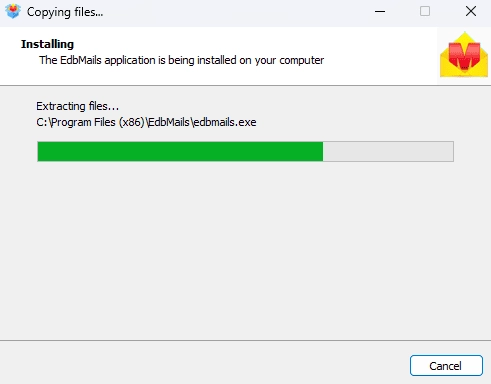
        EdbMails software installation

      • Start by launching the EdbMails software on your computer.
      • Enter your email address and password, then click ‘Login’. New users can select ‘Start Your Free Trial’ to continue with the trial version without registering in EdbMails.
         Note: The trial edition allows mailbox export with a limit of 30 items per folder. To export the complete mailbox without restrictions, you must upgrade to a licensed version.

         Click here to purchase the license from the EdbMails website.

        After purchasing the license from the EdbMails website, close and reopen the application, then sign in with the same credentials used during purchase to enable full access.
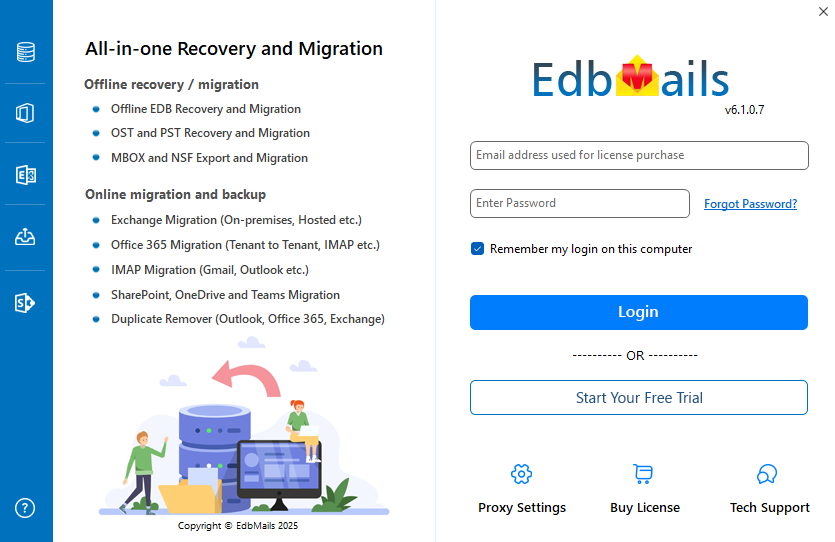
        Login to EdbMails application

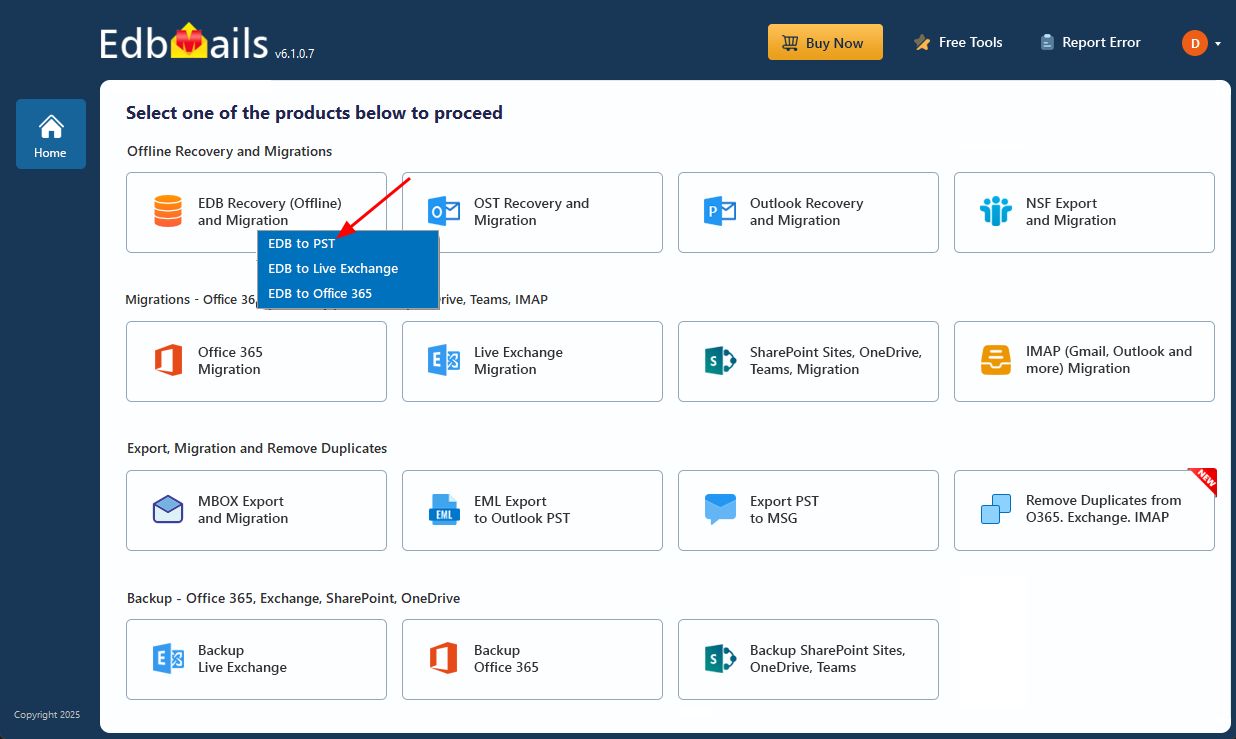
      • From the product list, choose ‘EDB Recovery (Offline) and Migration’ to proceed.
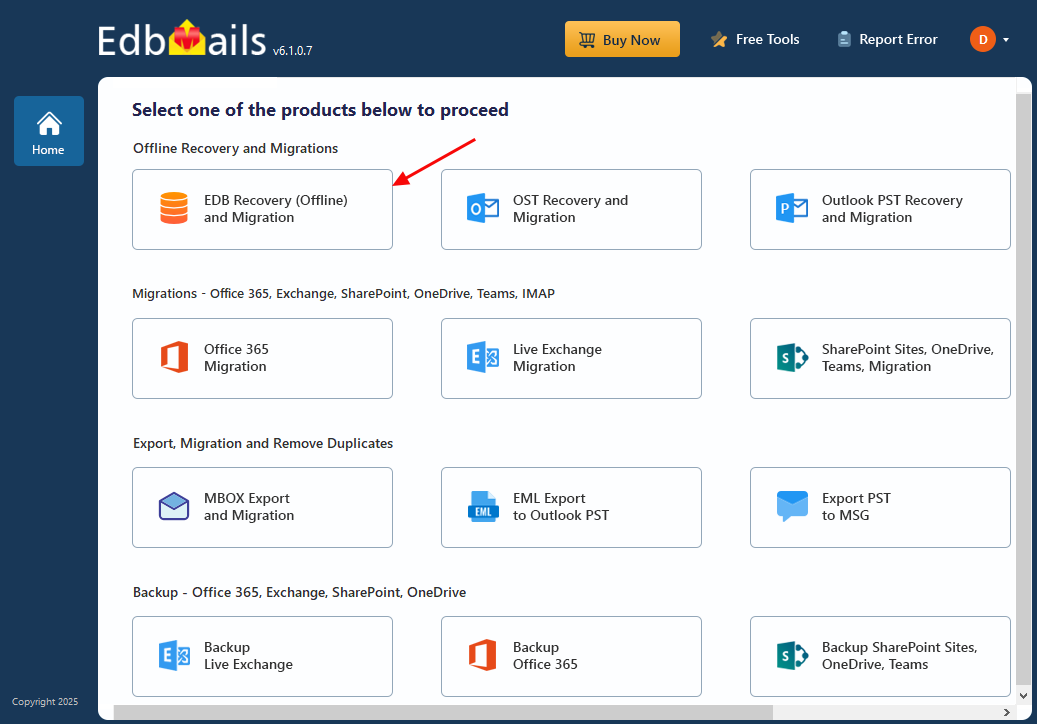
        Select EDB Recovery and Migration

      • Select ‘EDB to PST’ option.

        Select EDB to PST

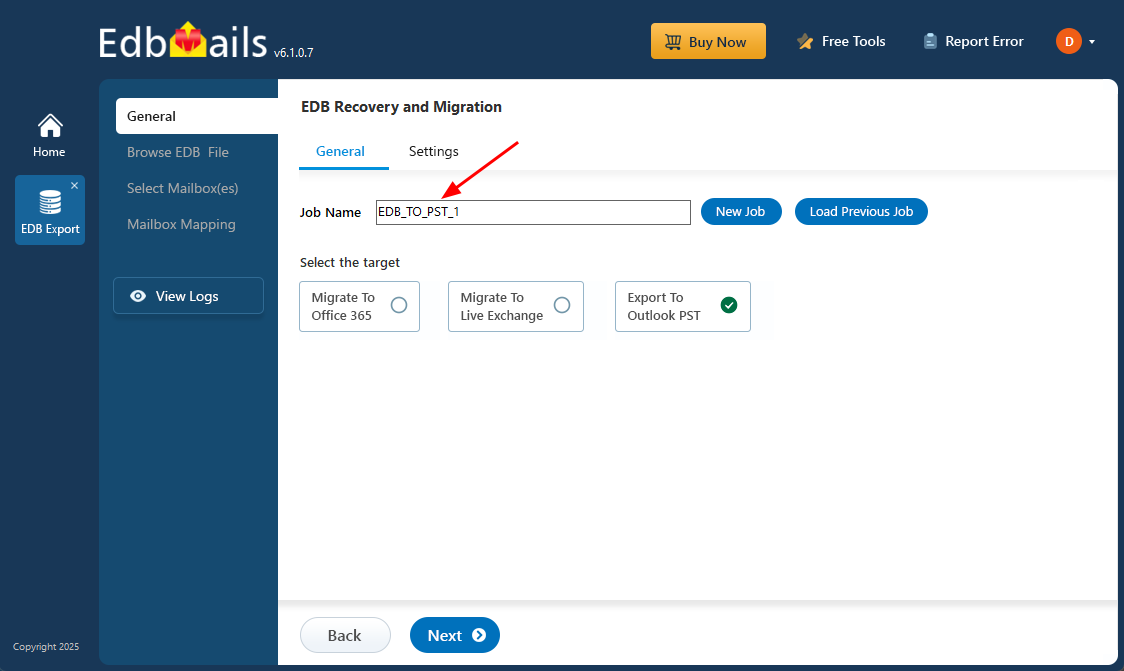
      • You may keep the default job name or select ‘New Job’ to assign a custom name, making it easier to identify and track the task.
      • Then, click ‘Next’ to continue.

        Enter export job name

    • Step 2: Select offline Exchange EDB file

      • Click the ‘Browse for EDB file’button.
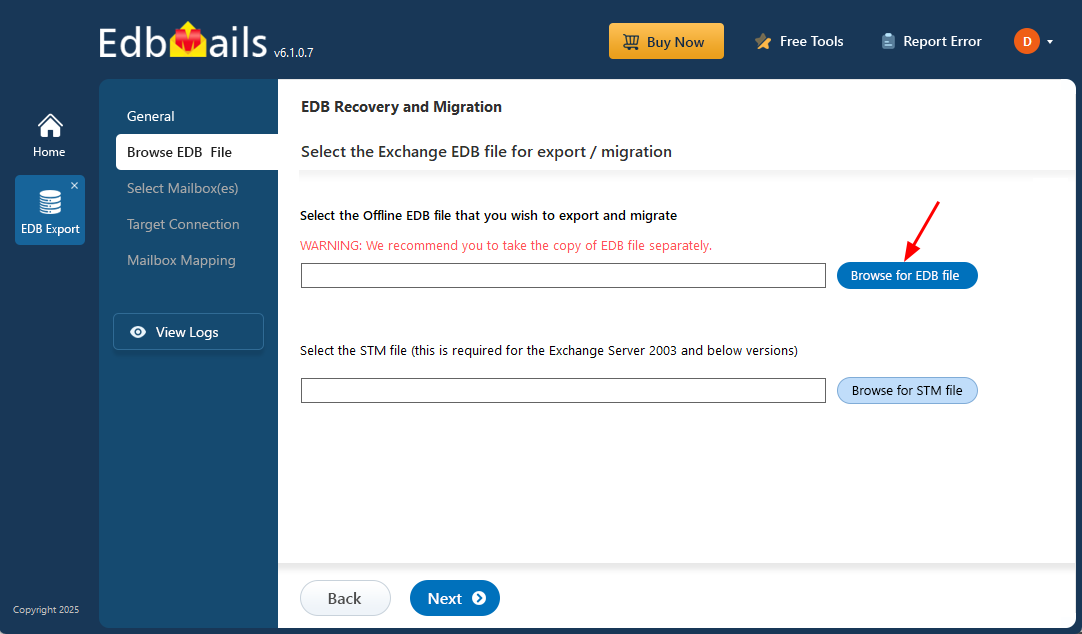
        Browse for EDB file

      • Select the offline Exchange EDB file you want to export by specific date.
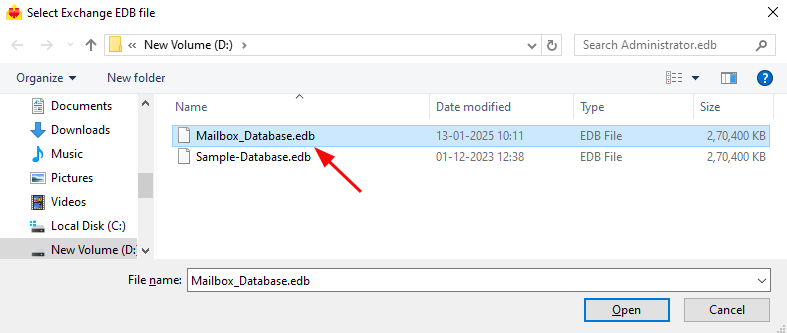
        Select EDB file

      • EdbMails thoroughly scans the offline EDB file to retrieve mailbox data, even if the database is corrupted. The recovery time depends on the file size and the extent of the damage, so allow the scan to complete fully before proceeding.
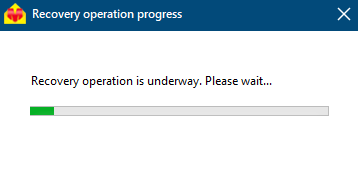
        Recovery operation progress

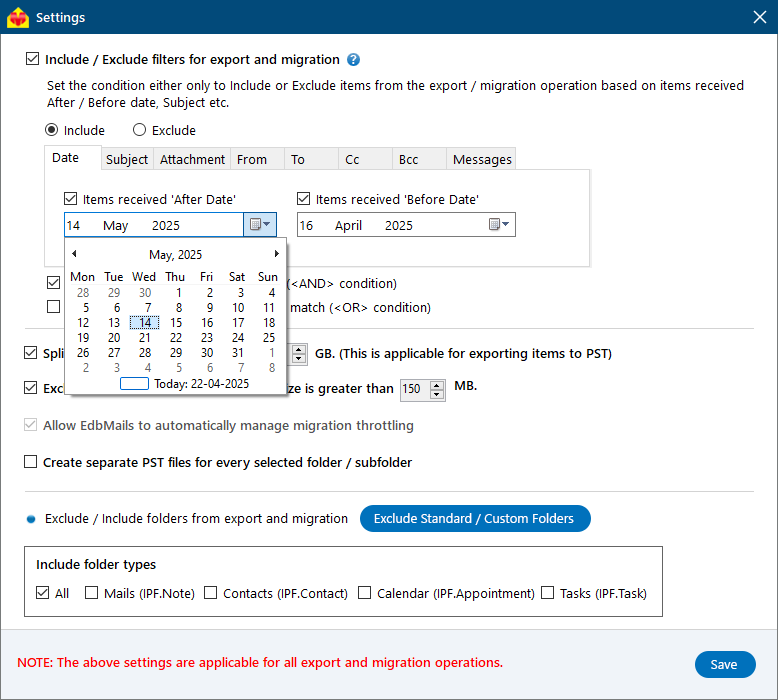
      • For filtering email items based on the Date, click ‘Settings’. Select the option Include/Exclude filters for export and migration.
      • EdbMails comes with built-in filter settings to help you export mail based on various email rules such as Date, Subject, Attachment, Sender Address, Recipient Address, and conditions such as logical AND, OR.
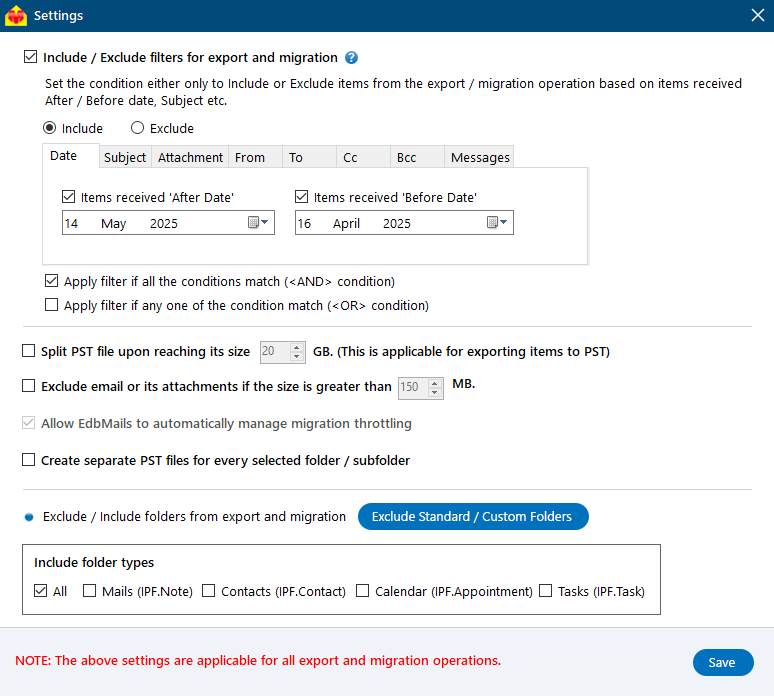
        EDB export advanced settings

      • Go to the Date tab and choose the 'After' and 'Before' filters to set your desired date range. Use the date picker to select the start and end dates, EdbMails will export all emails within that period.
      • You can also customize settings like skipping emails over a certain size or splitting the EDB file into smaller PST files.
      • After the recovery is complete, expand the mailbox and click on any folder to view all mailbox attributes emails, contacts, calendars, tasks, journals, and notes, in the right-side preview pane.
      • Select the mailboxes or folders you'd like to export, then click ‘Next’ to move forward.
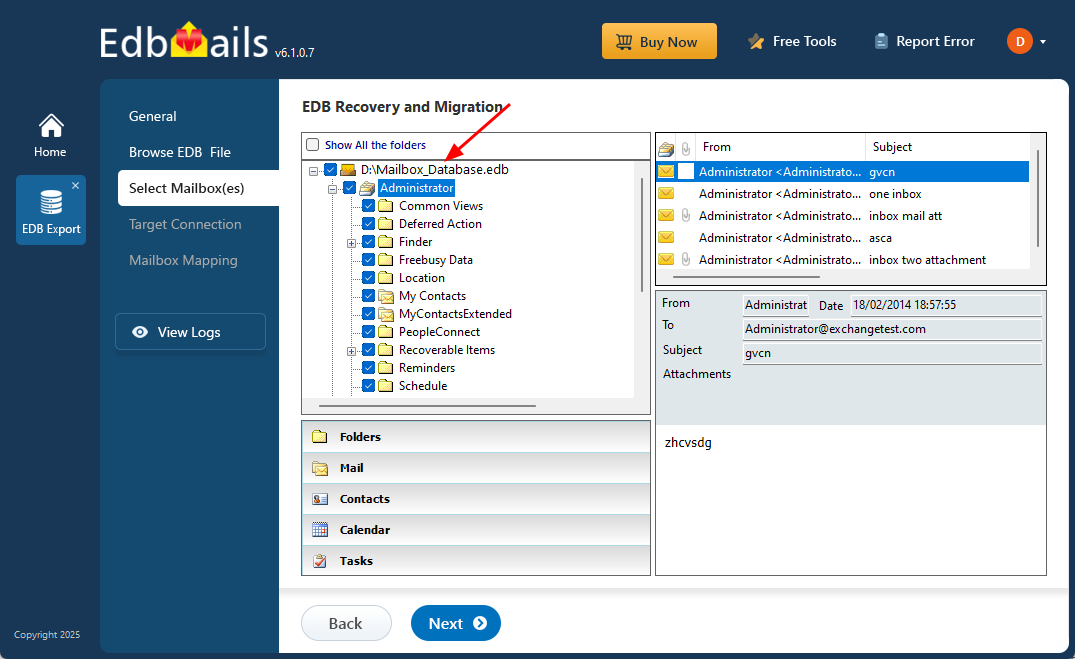
        Select mailboxes and folders

    • Step 3: Convert EDB to PST

      • Check the selected mailboxes and folders to confirm they’re ready for export. Make sure the 'Action' is set to 'Export', then click 'Start Export' to begin the export process.
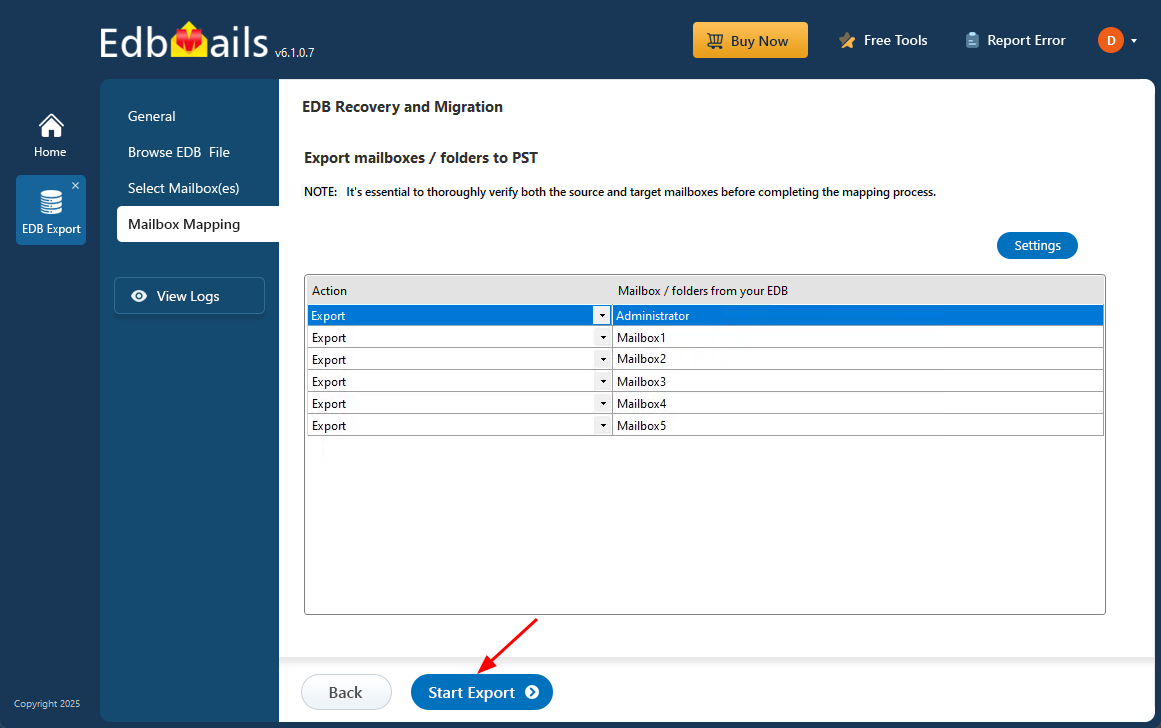
        Start EDB to PST conversion

      • EdbMails shows a progress window during the export, allowing you to pause or resume as needed. Once the export is finished, you can view a detailed summary of the operation in the 'View Log' section.
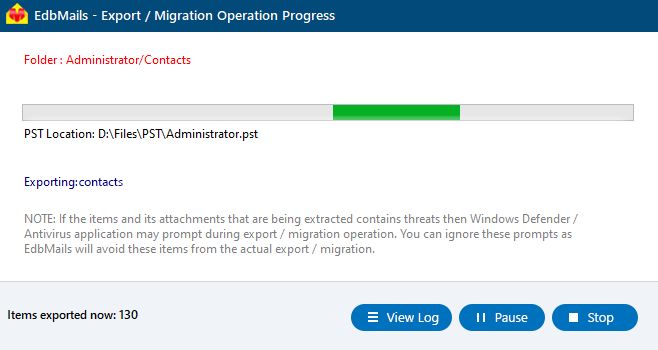
        EDB to PST conversion progress

Benefits and Features of EdbMails EDB recovery and migration software

A key benefit of using EdbMails for exporting Exchange server mailboxes is its ability to handle dismounted, corrupted, offline, or damaged EDB files. The software lets you open EDB files, browse through all available mailboxes, preview individual items, and convert the data to PST with ease—no need for Exchange Server or Active Directory access.

  1. EdbMails has a graphical user interface that allows you to select and export Exchange mailboxes to Outlook PST.
  2. You can filter mail items based on multiple conditions using the logical filters.
  3. The application is compatible with Windows 11, 10, 8.1, 8, 7 and XP and all Windows server versions.
  4. A highly practical feature of the application is that it also allows you to directly migrate EDB to another Exchange server, Hosted Exchange, Microsoft Office 365 or save items to HTML, EML and MHT formats.
  5. EdbMails can recover deleted, dismounted mailboxes and recover the EDB without log files.
  6. With EdbMails you can not only export user mailboxes but also export Exchange Public folders to Outlook PST and Archive mailboxes to PST.
  7. Preserves the exact folder structure and hierarchy of the old mailboxes when it is extracted into a new PST file.

Summing up everything

Exporting Exchange Server mailboxes within a specific date range is a frequent requirement in many practical situations. However, IT administrators often find the process challenging due to limited or unclear instructions. Although Exchange Management Shell (EMS) allows mailbox exports using PowerShell cmdlets, the procedure can be complicated and time-intensive, particularly for users without scripting expertise.

EdbMails Exchange Recovery tool provides a simpler and more efficient alternative. Using its built-in date-based filters, administrators can quickly extract and export Exchange mailbox data to PST files for a chosen time frame. The intuitive graphical interface removes the need for manual scripting, making the export process faster, easier, and accessible to users of all skill levels.


Additional resources:

  • Export Exchange Public folders to Outlook PST
  • Extract mailbox and export EDB to Outlook PST
  • Export Exchange Archive mailbox to PST
  • Resolve Exchange database fails to mount error
lady image

 In this manual

IntroductionPowerShell ExportSteps for MigrationBenefits of EdbMails

EDB Recovery and Migration

Just $99 Onwards

Buy Now

Need help?

24/7 Customer support

Contact us on Live chat

Personalized Demo

Book a personalized demo

Still need help?

Email us / Call us

© 2026 Shifttocloud Inc. Privacy Policy | Terms of Use | GDPR | Security | Press Releases

hidden msg
Live Chat

Hi, May I help you?

Hide Chat Now