EdbMails EDB Recovery and Migration software
  • Products
    EdbMails
    All-in-one Recovery and Migration

    Trusted and internationally recognized software that delivers award winning solutions.

    Explore our products
    • Offline Recovery Tools
    • Migration Tools
    • G Suite Migration
    • IMAP Migration
    • Duplicate Remover
    • Backup
    • Windows Data Recovery

    Exchange EDB / Email Recovery Tools

    EdbMails offers a comprehensive suite of tools to recover and convert offline EDB, OST, and PST files into Outlook PST, migrate mailboxes to Office 365 and live Exchange Server, and export and migrate data from NSF, MBOX, EML, and MSG formats.

    EDB Recovery and Migration
    Recover EDB to PST, EDB to Office 365 and Exchange NO Duplicate Migration
    NSF Export and Migration
    Export NSF to PST, NSF to Office 365 and Exchange Migration
    OST Recovery and Migration
    Recover OST to PST, OST to Office 365 and Exchange Migration
    EML to PST Export
    EML files export to Outlook PST format
    PST Recovery and Migration
    Recover Outlook PST, PST to Office 365 and Exchange Migration
    PST to MSG Export
    Outlook PST files export to MSG format
    MBOX Export and Migration
    Export MBOX to PST, MBOX to Office 365 and Exchange Migration
    MSG to PST Export
    Export MSG files to Outlook PST files

    Exchange, Office 365, IMAP, SharePoint, OneDrive, Teams

    EdbMails lets you securely migrate mailboxes across Microsoft 365, Exchange, Google Workspace (G Suite), and IMAP-supported servers such as Outlook, Gmail, Zimbra, Zoho Mail, and cPanel, ensuring zero downtime.

    Exchange Server Migration
    Migrate between any Exchange Servers, Exchange to Office 365, Exchange to PST, PST files to Exchange.
    SharePoint Online Migration
    Migrate documents, lists, files and folders from SharePoint sites.
    Office 365 Migration
    Migrate between Office 365 tenants, Office 365 to Exchange, Office 365 to PST, PST files to Office 365.
    OneDrive for Business Migration
    Migrate documents, lists, files and folders from OneDrive.
    Microsoft Teams Migration
    Migrate Teams, chats, channels, documents, files and folders etc.

    Google Workspace / G Suite Migration

    EdbMails G Suite Migration Tool lets you easily migrate emails, calendars, contacts, tasks, and more from G Suite to Office 365, Exchange Server, and IMAP servers using a Google Admin account without requiring individual user credentials.

    G Suite Migration
    Migrate emails, calendars, contacts, tasks from G Suite to Office 365, G Suite to Exchange, G Suite to IMAP Servers
    G Suite to Office 365
    Migrate emails, calendars, contacts, tasks from Google Workspace / G Suite to Office 365
    G Suite to Exchange Server
    Migrate emails, calendars, contacts, tasks from Google Workspace / G Suite to on-Premise Exchange Server
    G Suite to IMAP
    Migrate emails, calendars, contacts, tasks from Google Workspace / G Suite to IMAP, Outlook, Zimbra, Zoho etc.

    IMAP Migration

    EdbMails IMAP Migration tool lets you easily migrate emails from IMAP servers such as Outlook, Gmail, Zoho Mail, Zimbra, cPanel, and more. Supports IMAP to IMAP, Office 365, Exchange Server, PST, and bulk PST to IMAP migration.

    IMAP Email Backup & Migration
    Backup and migrate emails from IMAP servers to PST, Office 365, and On-Premises Exchange Server
    IMAP to Office 365
    Migrate emails, folders, and attachments from IMAP servers to Office 365
    IMAP to Exchange
    Migrate emails, folders, and attachments from IMAP servers to on-premises Exchange Server
    IMAP to PST
    Export emails, folders, and attachments from IMAP servers to Outlook PST files for backup
    PST to IMAP
    Migrate emails, folders, and attachments from bulk PST files to IMAP serverss

    Duplicate Remover

    EdbMails Duplicate Remover lets you easily remove duplicate items from Office 365 and Exchange Server, and from IMAP, Outlook, Gmail, Zimbra, Zoho Mail, etc., ensuring a clean and organized mailbox.

    Remove Duplicates from Office 365
    Remove duplicate emails, calendars, contacts, journal tasks, etc. from Office 365.
    Remove Duplicates from Exchange Server
    Remove duplicate emails, calendars, contacts, journal tasks, etc. from live Exchange Server.
    Remove Duplicates from IMAP, Outlook
    Remove duplicate emails, attachments from IMAP, Outlook, Gmail, Zimbra, Zoho Mail etc.

    Exchange, SharePoint, OneDrive, Teams and Office 365 Backup

    EdbMails enables secure, automated backup and recovery for Microsoft 365 services including Exchange Online, SharePoint, OneDrive, Teams, and Live Exchange Server with complete data protection and restore flexibility.

    Office 365 Backup
    Incremental, Granular, Encrypted and Compressed Office 365 Mailboxes Backup
    Exchange Server Backup
    Incremental, Granular, Encrypted and Compressed Exchange Mailboxes Backup
    SharePoint, OneDrive & Teams Backup
    Backup Online site collections, Team sites, Office 365 groups, all documents etc.

    Windows Data Recovery

    EdbMails Windows Data Recovery Software lets you recover permanently deleted data, including photos, videos, documents, and archived files, from partitions on hard drives, SSDs, USB drives, SD cards, and external storage devices.

    Windows Data Recovery
    Recover and restore permanently deleted data from hard drives, SSDs, USB drives, SD cards, and etc.
    Whitepaper
    Request a Demo
    Sign Up
  • Features
  • FAQ
  • Pricing
  • Download
  • Support
  • Sign in
User’s Manual
EDB Recovery and Migration

User Manual

User Manual

  • Overview
  • System Requirements
  • Installation
    • Installation process
    • Reinstall or Upgrade
    • How to uninstall
  • Initial Setup
  • FAQ
    • EDB to PST
    • EDB to Office 365 Migration
    • EDB to Exchange Migration
    • EDB Public Folder to Office 365
    • EDB Archive Mailbox to Office 365
    • EDB Public Folder to Exchange
    • EDB Archive Mailbox to Exchange
  • Videos
    • EDB to PST Converter
    • EDB to Office 365 Migration
    • EDB to Exchange Migration
    • EDB Public Folder to Office 365
    • EDB Archive Mailbox to Office 365
    • EDB Public Folder to Exchange
    • EDB Archive Mailbox to Exchange
  • Screenshots
    • EDB to PST
    • EDB to Office 365 Migration
    • EDB to Exchange Migration
    • EDB Public Folder to Office 365
    • EDB Archive Mailbox to Office 365
    • EDB Public Folder to Exchange
    • EDB Archive Mailbox to Exchange
  • How it works?
    • EDB to PST Converter
    • EDB to Office 365 Migration
    • EDB to Exchange Migration
    • EDB Public Folder to Office 365
    • EDB Public Folder to Exchange
    • EDB Archive Mailbox to Office 365
    • EDB Archive Mailbox to Exchange
  • Connect to Exchange server for multiple mailboxes migration
    • Connect with Global Admin
    • Connect to multiple users using CSV file
    • Connect using full access permission
    • Connect individual users for Single / Specific user Migration
  • Connect to Hosted Exchange for its Migration
    • Connect with Full Access permissions
    • Using multiple user credentials with CSV file
    • Connecting to Individual user for its migration
  • Connect to target Office 365
  • Modern Authentication Using OAuth 2.0
    • Microsoft 365 modern authentication
    • Automatic Registration
    • Manual Registration
  • Set Exchange Server Impersonation rights
    • Exchange 2007 and below
    • Exchange 2010, 2013, 2016 and 2019
    • Set using Exchange Server GUI
  • Knowledge Base
    • How to recover Microsoft Exchange server from Jet Errors
    • Repair a corrupted Exchange database (EDB) file
    • Open and view an EDB file without Exchange server
    • Recover data from an Exchange server crash
    • Open and view an Exchange EDB file
    • Export a disconnected Exchange mailbox
    • Resolve Exchange database consistency check failure
    • Import an Exchange database file (.EDB) into a new Exchange
    • Recover deleted Exchange server mailboxes
    • Resolve Dirty Shutdown error of Exchange database
    • Restore an Exchange server database
    • Export Exchange mailboxes to Outlook PST
    • Export Exchange Public folders to Outlook PST
    • Extract mailbox and export EDB to Outlook PST
    • Export Exchange emails to PST by specific date
    • Export Exchange Archive mailbox to PST
    • Resolve Exchange database fails to mount error
    • Fix Content Index State Failed and suspended error
    • Recover emails from a dismounted Exchange database
    • Exchange database is mandatory on UserMailbox
    • Exchange database status unknown error
    • Restore Exchange 2016 mailbox from Recovery database
    • Move Exchange mailbox to another database
    • Check Exchange database health
    • Backup Exchange server database
    • Reduce Exchange database file size
    • Unable to Mount Database (hr=0x80004005, ec=1108)
    • Exchange Server Disaster Recovery Plan
    • Exchange database in clean shutdown fails to mount
    • Offline EDB Recovery
    • Reduce the size of bulky Exchange server
    • Dial Tone Recovery
    • Recover deleted mailboxes
    • Filter Settings
  • Incremental Migration
  • Exchange Throttling Policy
  • Set Office 365 Impersonation rights
    • Using PowerShell commands
    • Using Office 365 GUI
  • Multifactor Authentication
    • Enable MFA in Office 365
    • Map the Mailboxes
    • Create App password for MFA
    • Disable Security Defaults
    • Disable MFA in Office 365
  1. Home
  2. Product
  3. How to Migrate EDB Public Folder to Office 365?
Download Buy Now

EDB Public Folder to Office 365 Migration Guide

Migrating public folders from an Exchange offline EDB file to Office 365 is made easy with EdbMails EDB to Office 365 Migrator. This Microsoft-partnered migration tool simplifies the entire process, allowing you to transfer your public folder data to Office 365 in just a few easy steps, with minimal effort required.

EdbMails leverages secure OAuth 2.0 authentication, ensuring that your migration process is safe and reliable. The tool offers incremental migration, meaning only newly modified data is transferred, significantly reducing system load and speeding up the process during subsequent migration operations. Additionally, EdbMails ensures high-performance migration, capable of handling large amounts of data with optimal speed.
Convert EDB Public folder to Office 365

With zero downtime during the migration, you can continue your daily operations without disruption. EdbMails also preserves the integrity of your folder structures, permissions, and all associated data, providing a smooth and secure transition to Office 365. Whether you're migrating public folders or other data, EdbMails guarantees a secure, high-performance migration with minimal impact on your productivity.

The following sections outline the migration prerequisites, a step-by-step guide, and the benefits of using EdbMails for migrating EDB public folders to Office 365.

  1. Prerequisites to migrate EDB to Microsoft 365

    Before you import the mailboxes from EDB to Office 365, you must prepare the target Office 365 server as described in the following section.

    • Ensure that you meet the network and bandwidth requirements for the migration.

       See network and migration planning, performance factors and best practices.

    • Prepare your target Office 365 tenant. See tenant roadmap for Microsoft 365.
    • Ensure that you create and configure the Public folder mailboxes on the target server.

       Steps to Create Office 365 Public folder and assign admin permissions

    • Configure Office 365 to send and receive large messages

       Steps to increase the message size on Office 365 to 150MB.

    • If you have a custom email domain from the source to which you want to receive emails after the migration, you must add and verify the custom domain on Office 365.

       Steps to add a custom domain to Office 365 and steps to add DNS records to connect your domain.

  2. Steps to migrate from EDB Public folder to Office 365 using EdbMails

    • Step 1: Download and Install the EdbMails application

      • Download and install the EdbMails application on your computer running on Windows OS.
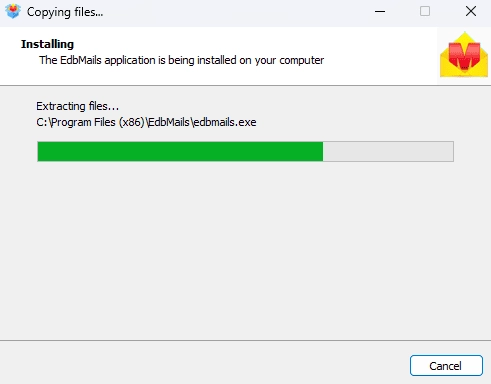
        EdbMails Software

      • Open the EdbMails application
      • Log in using your registered email address and password, then click ‘Login’, or choose ‘Start Your Free Trial’ if you have not created an account yet to access the trial version.

         Note: The Free Trial allows you to export all mailboxes, but only 30 items per folder. To unlock full export capability, a valid license is required.

         Click here to purchase the license from the EdbMails website

        After completing the purchase, simply restart the application and log in using the same email credentials to automatically activate your license.
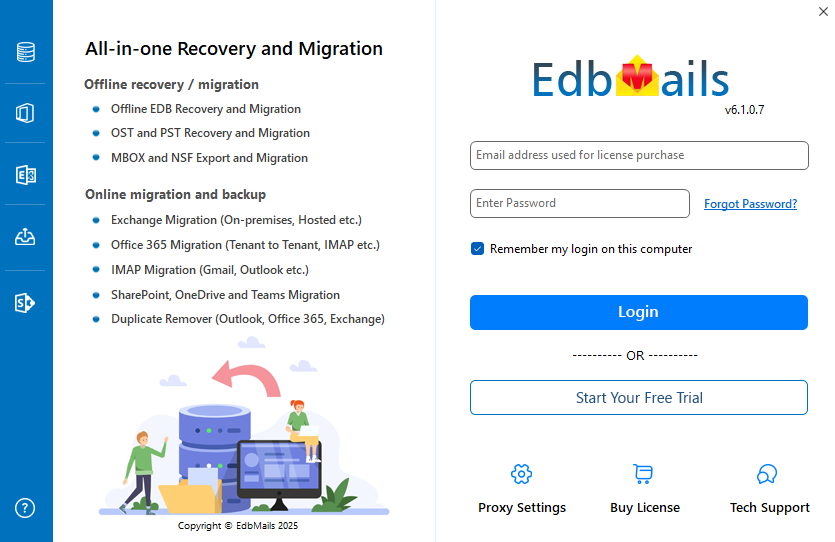
        Login to EdbMails application

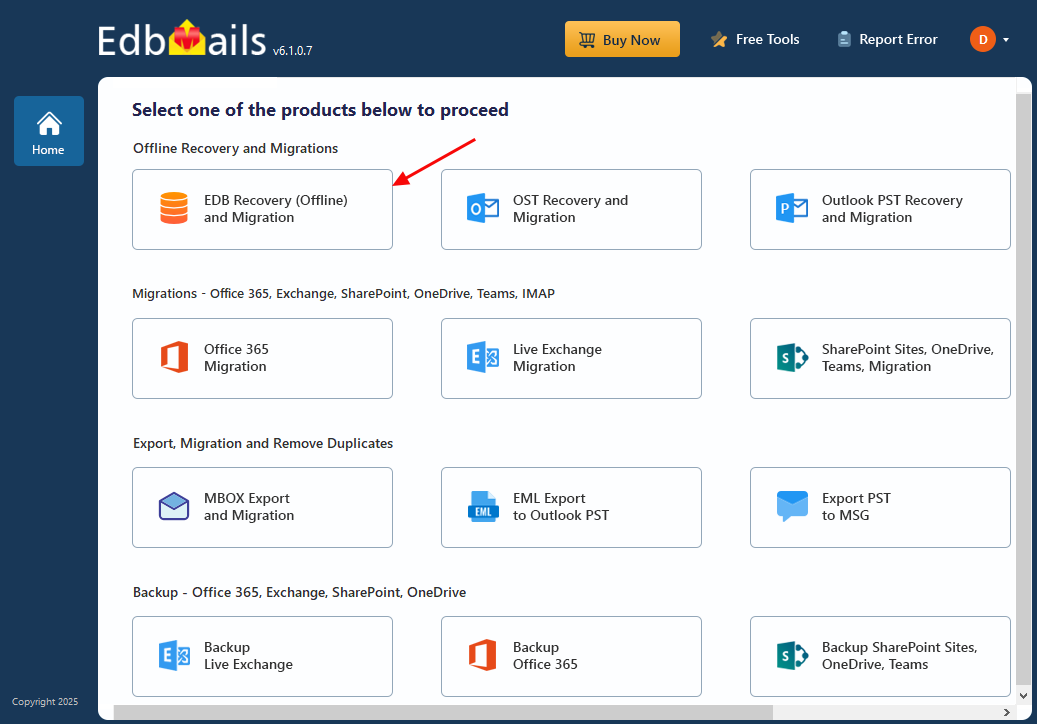
    • Step 2: Select EDB Recovery (Offline) and Migration

      • Select 'EDB Recovery and Migration'.

        Select EDB Recovery and Migration

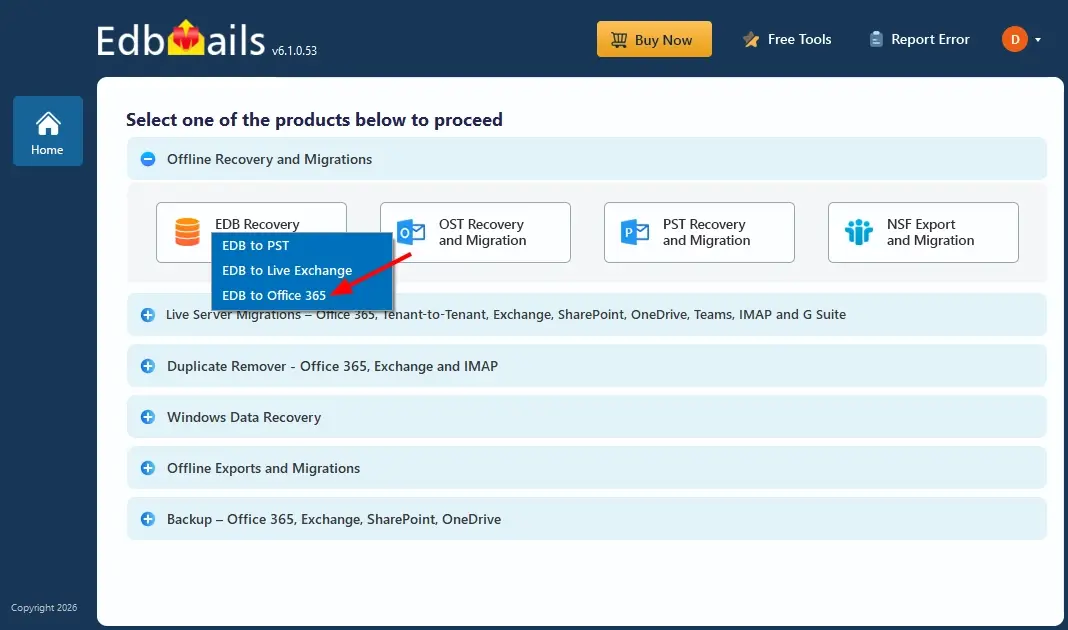
      • Select ‘EDB to Office 365’ option

        Select EDB to Office 365 option

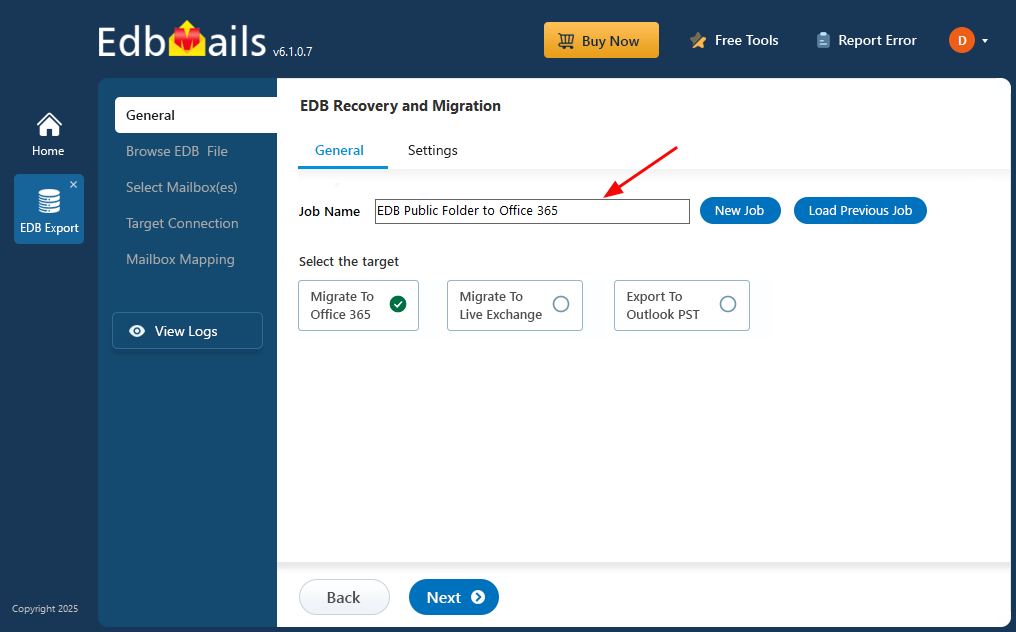
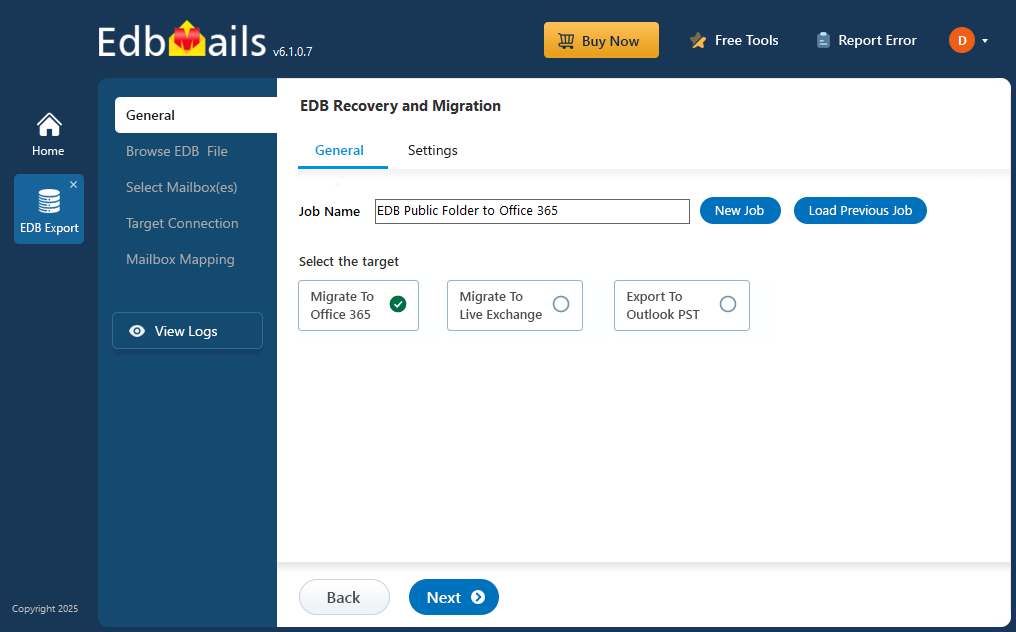
      • Either use the default job name or create a new one by selecting New Job.
      • Then click Next to continue.

        Enter EDB Public Folder to Office 365 job name

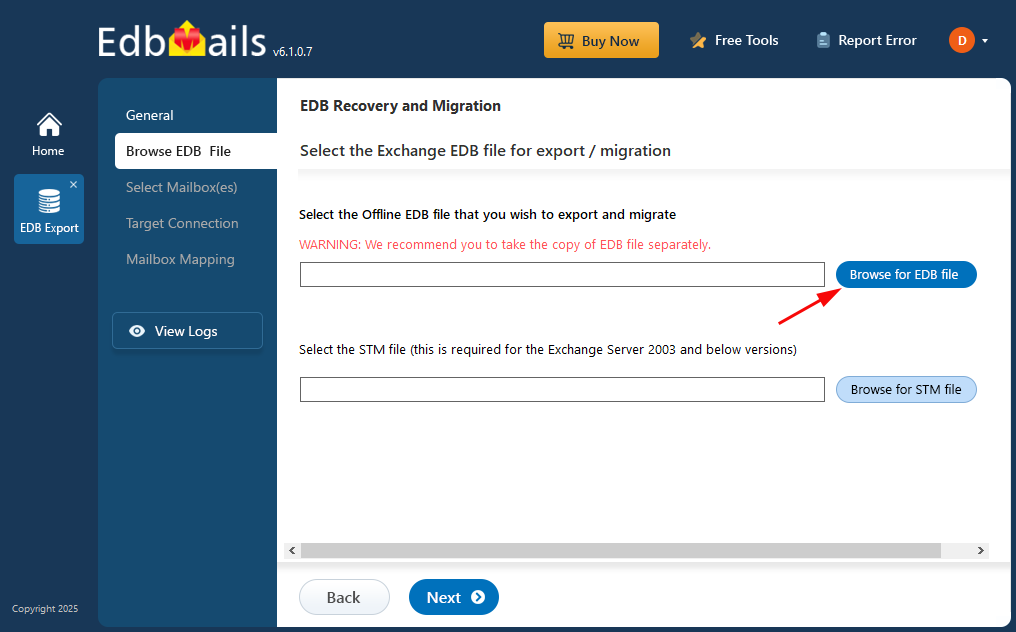
    • Step 3: Browse EDB files

      • Click ‘Browse for EDB file’ button

        Browse EDB file

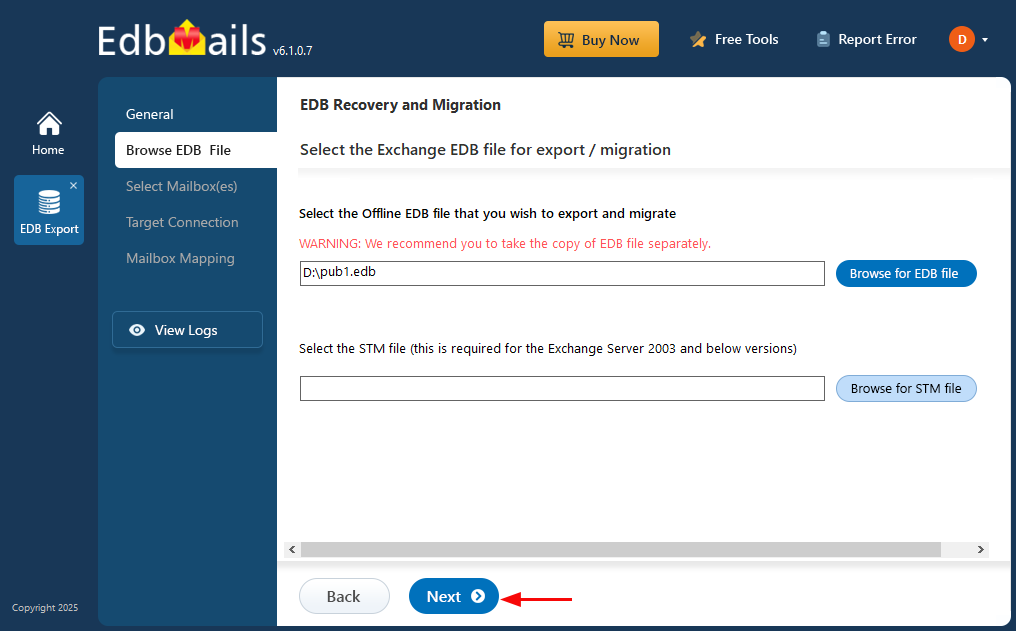
      • Browse the offline EDB file from your local drive, then click ‘Next’ to proceed with the process.
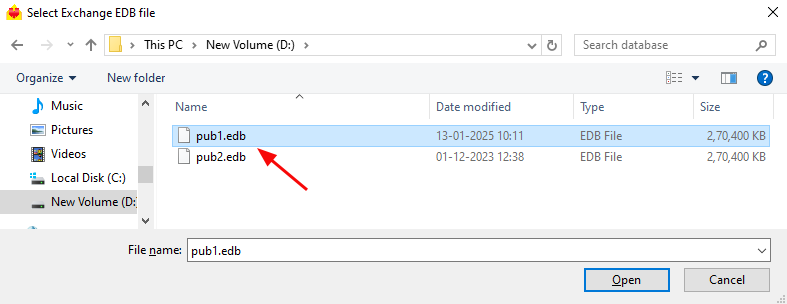
        Select EDB file

      • Click ‘Next’ to continue

        Click next

      • EdbMails thoroughly scans offline EDB files and recovers mailbox data even if the file is partially damaged or corrupt. It analyzes the internal structure of the database to retrieve emails, contacts, calendars, and other mailbox items. The scan time depends on the file size and the extent of corruption, so letting the process complete ensures a precise and full recovery.
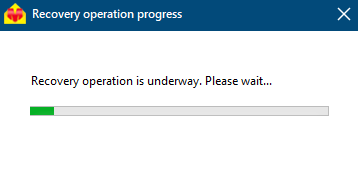
        Recovery Operation Progress

      • Once the recovery is complete, EdbMails displays your EDB file data with its original folder and subfolder structure intact. You can simply expand any folder to browse its contents and click on specific items such as Emails, Contacts, Notes, Tasks, or Calendar to preview them instantly on the right-side panel. With EdbMails EDB to PST Converter, you can access, view, and explore EDB files effortlessly, even without an active Exchange Server.
      • Choose the required EDB public folders and click the 'Next' button to proceed.
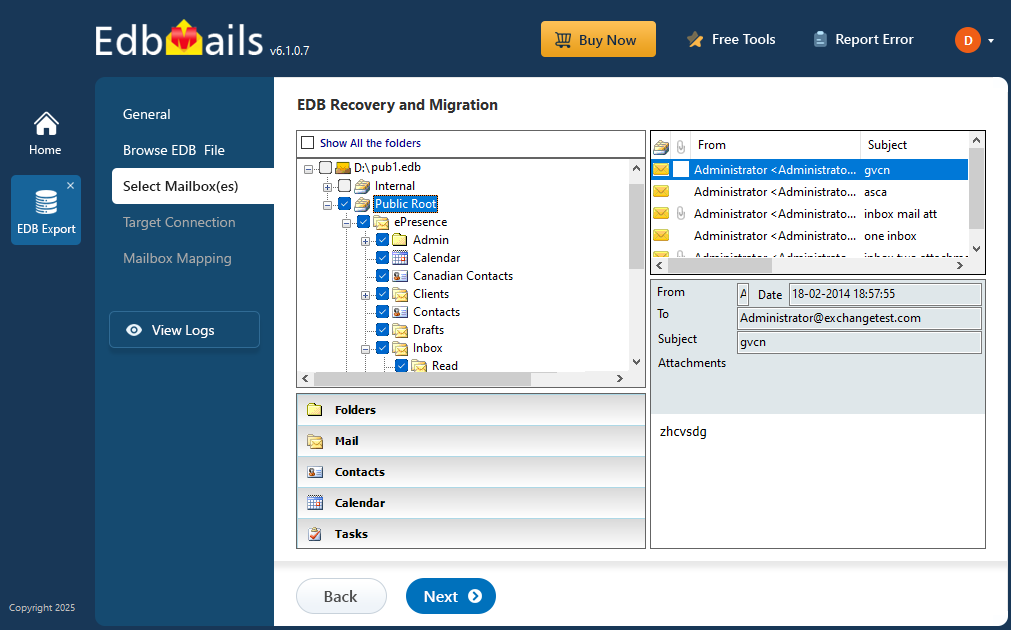
        Select EDB Public folders

    • Step 4: Connect to target Office 365 server

      • To create a new connection to your target Office 365, click the 'Add New Connection' button. If you wish to use an existing connection, simply select it from the list and click the 'Connect to Existing' button to continue.
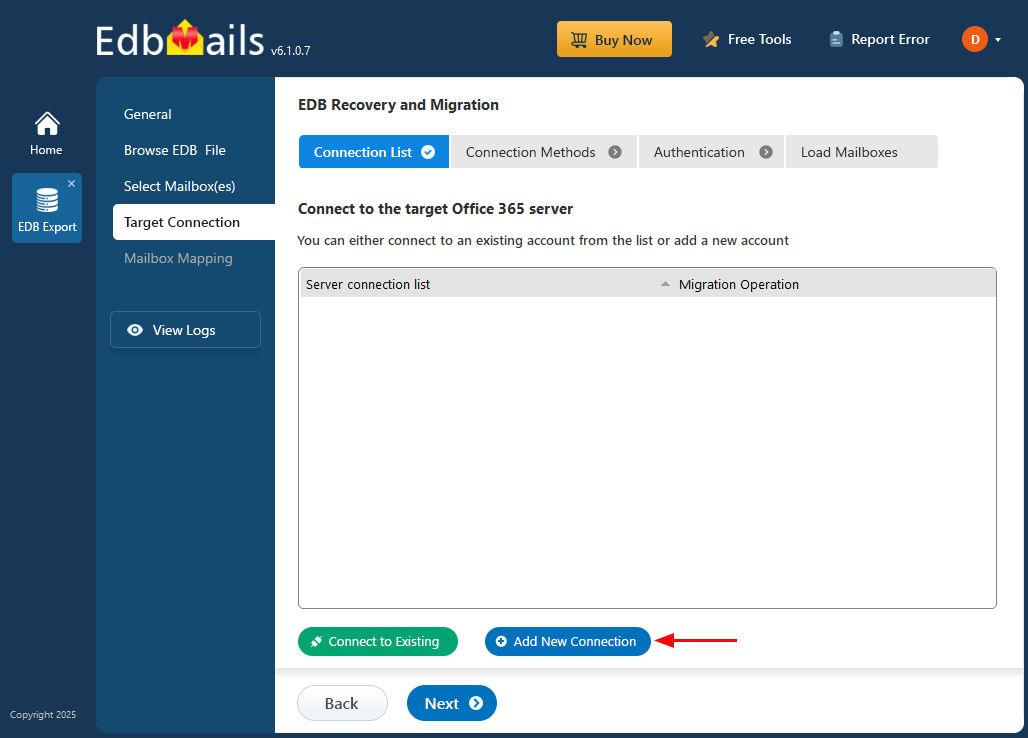
        Click add new connection

      • Choose the desired connection options and click the ‘Next’ button to continue.
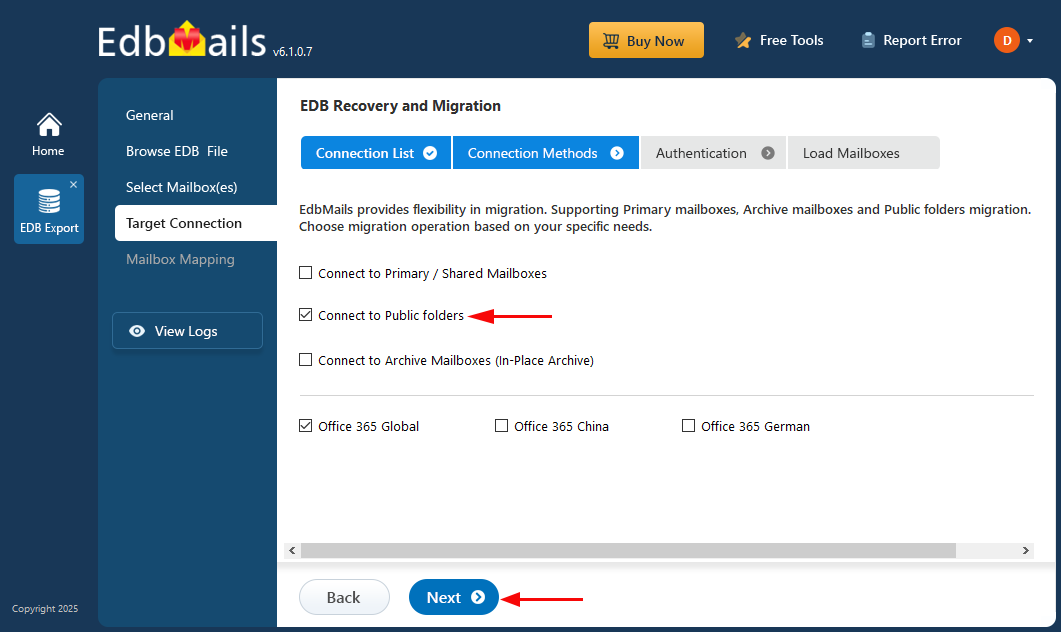
        Select connection option

      • Choose the appropriate authentication method, then click ‘Login’ to proceed.
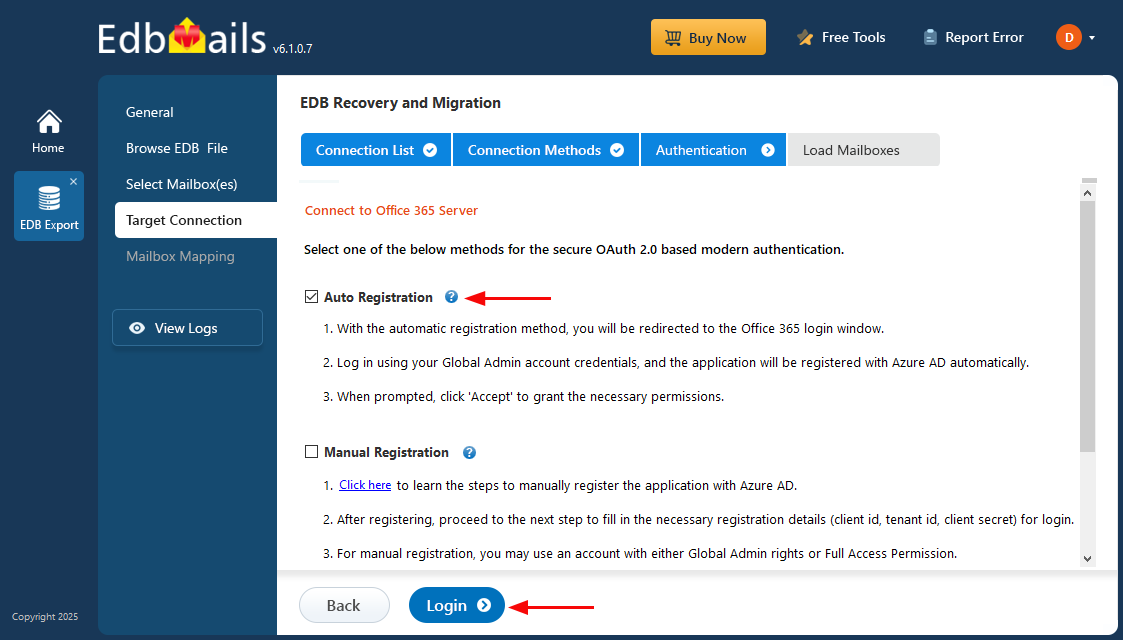
        Connect to target Office 365 server

      • Authenticate on Microsoft sign-in page.
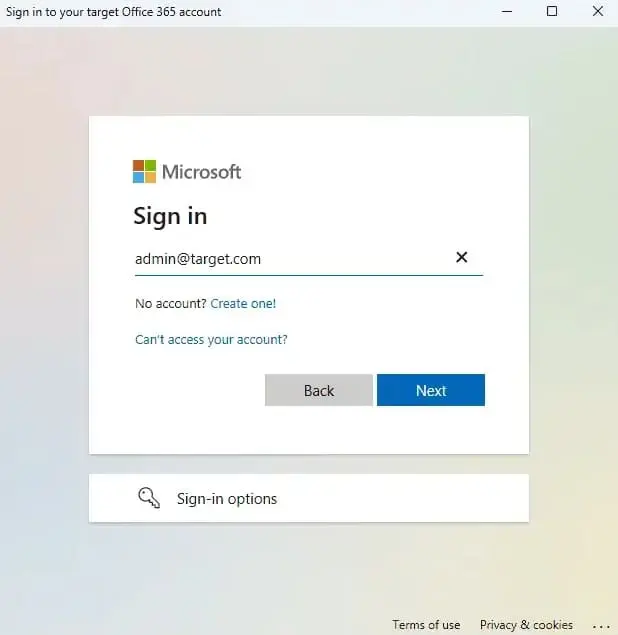
        Microsoft sign-in page

      • Choose a method to load the mailboxes and click on ‘Next’.
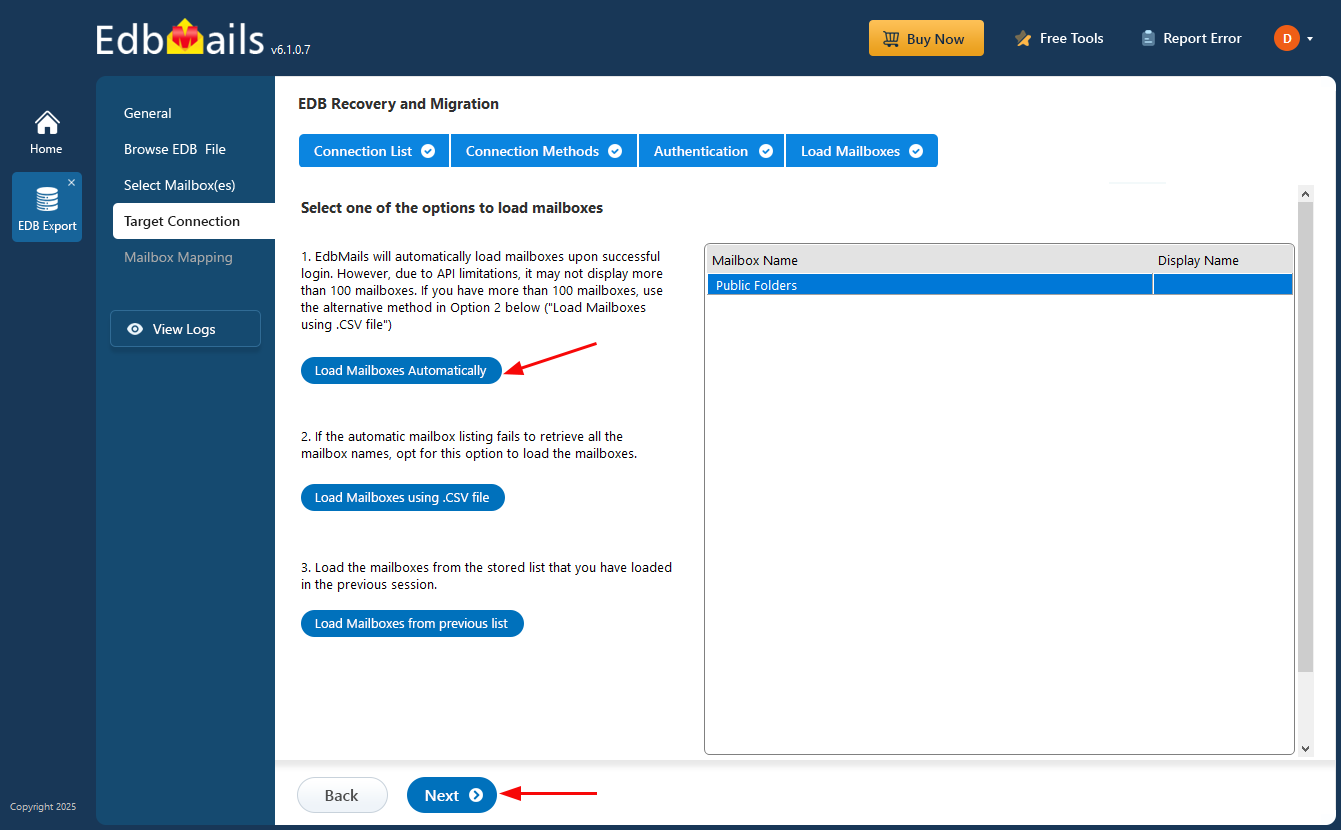
        Select options to load mailboxes

    • Step 5: Map source and target Public folders

      • EdbMails automatically maps the public folders between the source and the target server. You can also manually map the source public folders to the required target public folders.
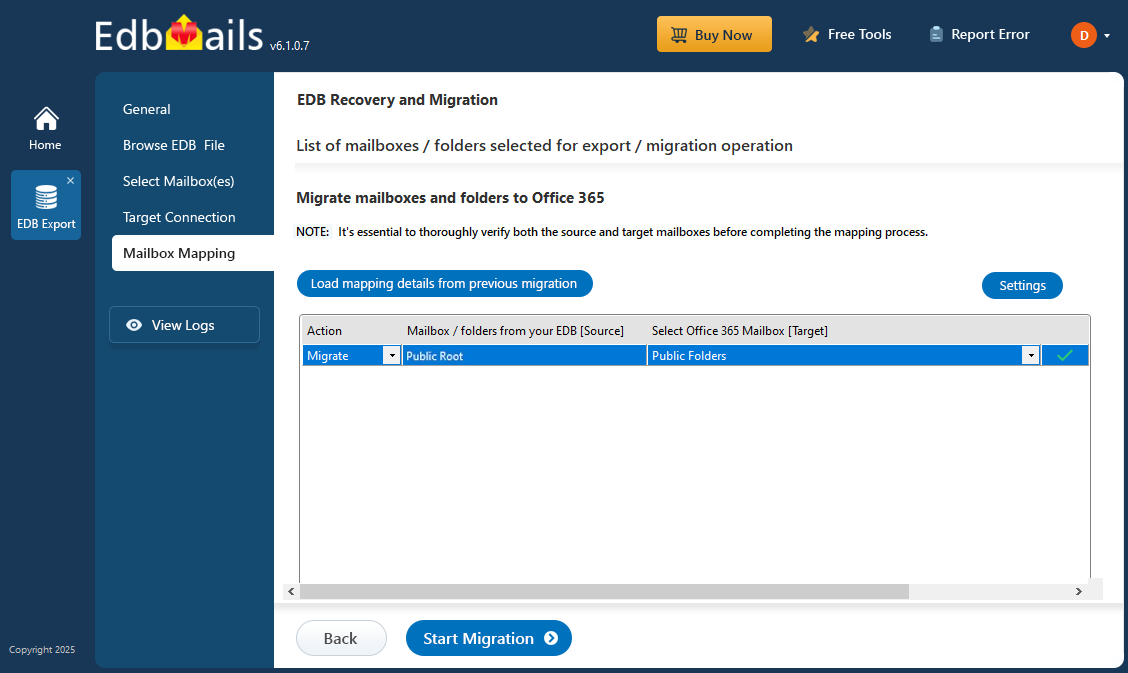
        EDB Public folders to Office 365 mailboxes mapping

    • Step 6: Start EDB Public folder to Office 365 migration

      • Click the ‘Start Migration’ button to begin the migration process.
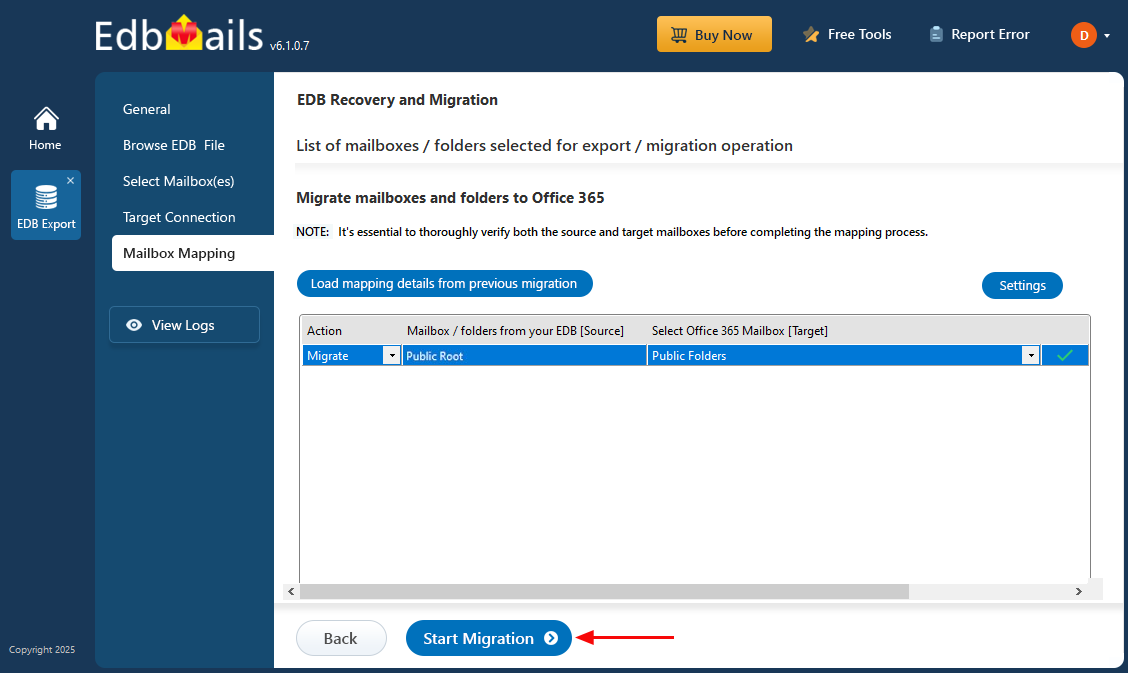
        Start EDB Public folder to Office 365 migration Process

      • That's it! During the migration, you can track the progress, with options to pause and resume the operation. A confirmation message will appear once the migration is complete.
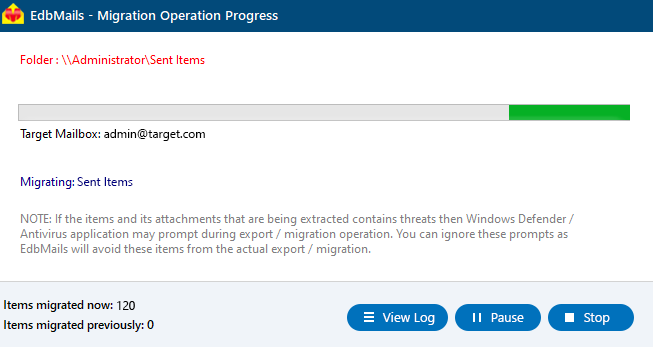
        EDB Public Folder to Office 365 Migration Progress

      • You can verify the migrated public folders and items using EdbMails' text-based migration log report.
      • Simply log in to your target Office 365 server to verify the migrated items.

Benefits of EdbMails for Public folder migration to Office 365

  1. EdbMails recovers corrupted public folders from offline EDB files and allows you to directly migrate to Office 365.
  2. Single recovery and migration tool for both Exchange and Office 365.
  3. Migrate Public folder from EDB to Office 365 without size limitations.
  4. Compatible with all Windows Operating systems and EDB files from all Exchange servers (2003-2019).
  5. EdbMails does not store your credentials and it uses secure OAuth 2.0 modern authentication with TLS encryption.
  6. You can recover and migrate deleted email items from EDB to Office 365. More Features
  7. Ensures smooth co-existence scenarios by supporting staged and multi-session migration of Public Folders.
  8. Ideal for legacy Exchange upgrades, allowing direct migrations from old on-premises Public Folder databases to Microsoft 365 without intermediate steps.
  9. Reduces administrative overhead with automated mapping, mailbox discovery, and retry handling.
  10. Helps organizations achieve hybrid-to-cloud transition goals with no disruption and reduced migration time.


Additional resources:

  • EdbMails EDB to PST converter
  • Steps to convert Exchange EDB to PST
  • Steps to migrate EDB to Live Exchange server
  • Steps to export Exchange Public folders to PST
  • Steps to migrate EDB Public folder to Exchange server
lady image


 In this manual

IntroductionMigration PrerequisitesMigration stepsEdbMails Benefits

EDB to Office 365 migration

Just $249 Onwards

Buy Now

Need help?

24/7 Customer support

Contact us on Live chat

Personalized Demo

Book a personalized demo

Still need help?

Email us / Call us

© 2026 Shifttocloud Inc. Privacy Policy | Terms of Use | GDPR | Security | Press Releases

hidden msg
Live Chat

Hi, May I help you?

Hide Chat Now