• Menu
    • Products
      EDB Recovery and Migration
      • Overview
      • Features
      • How it works
      • User Manual
      • FAQ
      • Videos
      • Pricing
      • Screenshots
      Exchange Server Migration
      • Overview
      • Features
      • How it works
      • User Manual
      • FAQ
      • Videos
      • Pricing
      • Screenshots
      Office 365 Migration
      • Overview
      • Features
      • How it works
      • User Manual
      • FAQ
      • Videos
      • Pricing
      • Screenshots
      SharePoint Online Migration
      • Overview
      • Features
      • How it works
      • FAQ
      • Videos
      • Pricing
      • Screenshots
      OneDrive for Business Migration
      • Overview
      • Features
      • How it works
      • FAQ
      • Videos
      • Pricing
      • Screenshots
      Microsoft Teams Migration
      • Overview
      • Features
      • How it works
      • FAQ
      • Videos
      • Pricing
      • Screenshots
      SharePoint Backup
      • Overview
      • Features
      • How it works
      • FAQ
      • Videos
      • Pricing
      • Screenshots
      OneDrive Backup
      • Overview
      • Features
      • How it works
      • FAQ
      • Videos
      • Pricing
      • Screenshots
      IMAP Email Backup & Migration
      • Overview
      • Features
      • How it works
      • User Manual
      • FAQ
      • Videos
      • Pricing
      • Screenshots
      Exchange Server Backup
      • Overview
      • Features
      • How it works
      • FAQ
      • Videos
      • Pricing
      • Screenshots
      Office 365 Backup
      • Overview
      • Features
      • How it works
      • FAQ
      • Videos
      • Pricing
      • Screenshots
      OST Recovery and Migration
      • Overview
      • Features
      • How it works
      • User Manual
      • FAQ
      • Videos
      • Pricing
      • Screenshots
      MBOX Export and Migration
      • Overview
      • Features
      • How it works
      • FAQ
      • Videos
      • Pricing
      • Screenshots
      NSF Export and Migration
      • Overview
      • Features
      • How it works
      • FAQ
      • Videos
      • Pricing
      • Screenshots
      PST Recovery and Migration
      • Overview
      • Features
      • How it works
      • User Manual
      • FAQ
      • Videos
      • Pricing
      • Screenshots
      EML to PST Export
      • Overview
      • How it works
      • Pricing
      PST to MSG Export
      • Overview
      • How it works
      • Pricing
      MSG to PST Export
      • Overview
      • How it works
      • Pricing
      • Screenshots
      G Suite Migration
      • Overview
      • How it works
      • Pricing
      • Screenshots
      Windows Recovery
      • Overview
      • How it works
      • Pricing
      • Screenshots
    • Free Tools
    • Features
    • Reseller
    • Free Trial
    • FAQ
    • Video Tutorials
    • Pricing
    • Download
    • Support
    • Account
EdbMails EDB Recovery and Migration software
  • Reseller
  • Products
    EdbMails
    All-in-one Recovery and Migration
    Explore our products
    • EDB Recovery and Migration
    • OST, PST, MBOX, NSF, EML, MSG
    • Office 365, Exchange Migration
    • SharePoint, OneDrive & Teams
    • G Suite Migration
    • IMAP Migration
    • Duplicate Remover
    • Windows Data Recovery
    • Backup Solutions

    EDB Recovery and Migration

    EdbMails lets you recover corrupted, damaged, and offline Exchange EDB files, convert EDB mailboxes to PST format, and directly migrate mailbox data to Office 365 and live Exchange Server.

    EDB to PST
    Recover corrupted, damaged, offline EDB files and convert Exchange EDB mailboxes to PST file format
    Public Folder to Exchange
    Migrate public folders from an Exchange offline EDB file to live Exchange Server
    EDB to Live Exchange Migration
    Directly migrate offline Exchange database (EDB) files to live Exchange server
    Archive Mailbox to Office 365
    Migrate archive mailboxes from offline EDB files directly to Office 365
    EDB to Office 365 Migration
    Directly migrate offline Exchange database (EDB) files to Office 365
    Public Folder to Office 365
    Migrate public folders from an offline Exchange EDB file to Office 365

    OST, PST, MBOX, NSF, EML, MSG Export and Migration

    EdbMails lets you to recover OST and PST files, export OST, PST, MBOX, NSF, EML, and MSG files to PST files, and directly migrate OST, PST, MBOX, and NSF mailbox data to Office 365 and live Exchange Server.

    OST Recovery and Migration
    Recover offline OST files, convert OST to PST, and migrate OST to Office 365 and Exchange Server
    PST Recovery and Migration
    Recover Outlook PST files , Export PST to PST, migrate PST to Office 365 and Exchange Server
    MBOX Export and Migration
    Export MBOX to PST, migrate MBOX to Office 365 and Exchange Server
    NSF Export and Migration
    Export NSF to PST, migrate NSF to Office 365 and Exchange Server
    EML to PST Export
    Convert EML files to Outlook PST files
    PST to MSG Export
    Convert Outlook PST file to MSG file format
    MSG to PST Export
    Export MSG files to Outlook PST files

    Office 365, Exchange Migration

    EdbMails lets you securely migrate mailboxes across Microsoft 365, Exchange, Google Workspace (G Suite), and IMAP-supported servers such as Outlook, Gmail, Zimbra, Zoho Mail, and cPanel, ensuring zero downtime.

    Office 365 Migration
    Migrate between Office 365 tenants, Office 365 to Exchange, Office 365 to PST, PST files to Office 365.
    Exchange Migration
    Migrate between any Exchange Servers, Exchange to Office 365, Exchange to PST, PST files to Exchange.
    Tenant to Tenant Migration
    Migrate Mailboxes, Public Folders, Archive Mailboxes between Office 365 Tenants.
    Exchange to Office 365
    Migrate Mailboxes, Public Folders, Archive Mailboxes from live Exchange server to Office 365.
    Office 365 to IMAP
    Migrate Office 365 to IMAP, Office 365 to Gmail, Office 365 to Outlook, Office 365 to Zoho etc.
    Exchange to IMAP
    Migrate from live Exchange Server to IMAP servers such as Gmail, Outlook, and Zoho Mail.
    Public Folder to Office 365
    Migrate Public Folders between Office 365 tenants with complete folder hierarchy and mailbox data integrity.
    Exchange to PST
    Export live Exchange Server mailboxes, public folders, and archive mailboxes to Outlook PST files.

    SharePoint, OneDrive & Microsoft Teams Migration

    EdbMails lets you migrate SharePoint sites, OneDrive data, Microsoft Teams, teams, channels, chats, permissions, and documents between Microsoft 365 tenants while maintaining the existing folder structure and data integrity.

    SharePoint Online Migration
    Migrate documents, lists, files and folders from SharePoint sites.
    OneDrive for Business Migration
    Migrate documents, lists, files, folders, private chats from OneDrive.
    Microsoft Teams Migration
    Migrate Teams, chats, channels, documents, files and folders etc.

    Google Workspace / G Suite Migration

    EdbMails G Suite Migration Tool lets you easily migrate emails, calendars, contacts, tasks, and more from G Suite to Office 365, Exchange Server, and IMAP servers using a Google Admin account without requiring individual user credentials.

    G Suite Migration
    Migrate emails, calendars, contacts, tasks from G Suite to Office 365, G Suite to Exchange, G Suite to IMAP Servers
    G Suite to Office 365
    Migrate emails, calendars, contacts, tasks from Google Workspace / G Suite to Office 365
    G Suite to Exchange Server
    Migrate emails, calendars, contacts, tasks from Google Workspace / G Suite to on-Premise Exchange Server
    G Suite to IMAP
    Migrate emails, calendars, contacts, tasks from Google Workspace / G Suite to IMAP, Outlook, Zimbra, Zoho etc.

    IMAP Migration

    EdbMails IMAP Migration tool lets you easily migrate emails from IMAP servers such as Outlook, Gmail, Zoho Mail, Zimbra, cPanel, and more. Supports IMAP to IMAP, Office 365, Exchange Server, PST, and bulk PST to IMAP migration.

    IMAP Email Backup & Migration
    Backup and migrate emails from IMAP servers to PST, Office 365, and On-Premises Exchange Server
    IMAP to Office 365
    Migrate emails, folders, and attachments from IMAP servers to Office 365
    IMAP to Exchange
    Migrate emails, folders, and attachments from IMAP servers to on-premises Exchange Server
    IMAP to PST
    Export emails, folders, and attachments from IMAP servers to Outlook PST files for backup
    PST to IMAP
    Migrate emails, folders, and attachments from bulk PST files to IMAP servers

    Duplicate Remover

    EdbMails Duplicate Remover lets you easily remove duplicate items from Office 365 and Exchange Server, and from IMAP, Outlook, Gmail, Zimbra, Zoho Mail, etc., ensuring a clean and organized mailbox.

    Remove Duplicates
    Easily clean up your Office 365, Exchange, Outlook and IMAP accounts by removing duplicate emails.
    Remove Duplicates from Office 365
    Remove duplicate emails, calendars, contacts, journal tasks, etc. from Office 365.
    Remove Duplicates from Exchange Server
    Remove duplicate emails, calendars, contacts, journal tasks, etc. from live Exchange Server.
    Remove Duplicates from IMAP, Outlook
    Remove duplicate emails, attachments from IMAP, Outlook, Gmail, Zimbra, Zoho Mail etc.

    Exchange, SharePoint, OneDrive, Teams and Office 365 Backup

    EdbMails enables secure, automated backup and recovery for Microsoft 365 services including Exchange Online, SharePoint, OneDrive, Teams, and Live Exchange Server with complete data protection and restore flexibility.

    Office 365 Backup
    Incremental, Granular, Encrypted and Compressed Office 365 Mailboxes Backup
    Exchange Server Backup
    Incremental, Granular, Encrypted and Compressed Exchange Mailboxes Backup
    SharePoint, OneDrive & Teams Backup
    Backup Online site collections, Team sites, Office 365 groups, all documents etc.

    Windows Data Recovery

    EdbMails Windows Data Recovery Software lets you recover permanently deleted data, including photos, videos, documents, and archived files, from partitions on hard drives, SSDs, USB drives, SD cards, and external storage devices.

    Windows Data Recovery
    Recover and restore permanently deleted data from hard drives, SSDs, USB drives, SD cards, and etc.
    Whitepaper
    Request a Demo
    Sign Up
  • Features
  • Video Tutorials
  • Free Tools
  • FAQ
  • Knowledge Base
  • Pricing
  • Download
  • Support
  • Sign in
  • Cart
  1. Home
  2. Office 365 Migration
  3. Automatic Office 365 Throttling Management | EdbMails
Office 365 Migration Features

EdbMails Office 365 Migration

Effortlessly migrate mailboxes, public folders and archive mailboxes from Office 365

Download Buy Now
Office 365 to Exchange Office 365 to PST Public Folder to Office 365 Archive Mailbox to Office 365 Office 365 to IMAP Tenant to Tenant Migration
Office 365 Migration Software Now on Azure Marketplace!
Product Menu
Automatic Throttling Management for Office 365 Migration
  • Overview
  • Features
  • How it works
  • User Manual
  • FAQ
  • Videos
  • Pricing
  • Screenshots

Office 365 Migration Features

  • Migrate with a few clicks; No PowerShell needed
  • Secure Office 365 Migration
  • Migrate everything from Office 365 mailboxes
  • Migrate mailboxes from Google, Zimbra, and other platforms to Office 365
  • Easy configuration of source and target Office 365 servers
  • Incremental (Delta) Office 365 migration
  • Pause and Resume migration operation
  • Automatically create target mailboxes
  • Automatically map source and target mailboxes
  • Apply date, time, and size filters for data migration
  • Concurrent mailbox migration
  • Migrate with zero downtime
  • Detailed migration reports
  • Cost-effective Office 365 migration
  • Multilingual support
  • Flexible migration scenarios
  • Batch migration support
  • Effortless Public folder migration
  • Archive mailbox transfer
  • Automatic server throttling management
  • CSV-based mailbox import
  • Office 365 Group mailbox migration
  • CalDav & CardDav Migration

Automatic Throttling Management for Office 365 Migration

Office 365 runs on shared server resources — no single user gets dedicated capacity. When a resource-heavy process like migration runs continuously, Microsoft steps in with throttling to balance the load. The result? Your migration slows down, timelines stretch, and productivity takes a hit. This article walks through how EdbMails tackles throttling head-on, keeping all your data moving in a single task — even when Office 365 servers are under peak load.
EdbMails Automatic throttling management

What is Office 365 Throttling, and how does it affect Migration?

Office 365 throttling is a built-in mechanism that limits the number of requests that will hit the Office 365 services during a given period, and migrations are one activity where these limits are most likely to be encountered. Once the throttling limits have been hit, the immediate impact of this on the migration process is as follows:

  1. Data is migrated slower, significantly delaying the whole timeline beyond initial estimation.
  2. Users will experience longer downtime, causing work to come to a halt.
  3. Items or folders will fail to be migrated, leaving gaps and holes in the migrated data.
  4. Duplicate data will start appearing in the destination, with no explicit cause.
  5. Data integrity becomes unstable, leaving the need for extra data consistency checks before the migration process can be regarded as complete.

What is Office 365 Throttling, and how does it affect Migration?

EdbMails tackles the throttling errors at their roots by detecting throttling errors during Office 365 migration and handling these without requiring any manual interference during migrations to maintain constant flow of data both during the busy and off-peak hours. Here is what that means in practice:

  • Data migration runs smoothly without unexpected interruptions along the way.
  • Large mailbox migrations don't need someone standing by to restart a stalled operation.
  • The risk of data loss and duplicate entries on the target server stays off the table.
  • Time and effort that would otherwise go into managing throttling errors gets saved.
  • Servers stay up throughout the migration — zero downtime, from start to finish.

EdbMails automatic throttling management is enabled by default. Follow the steps below for more details:

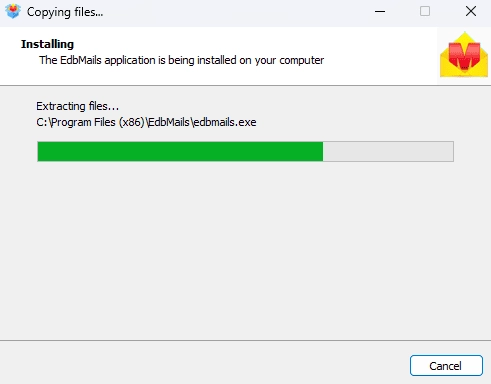
  • Step 1: Download and install the EdbMails application.

    EdbMails Installation

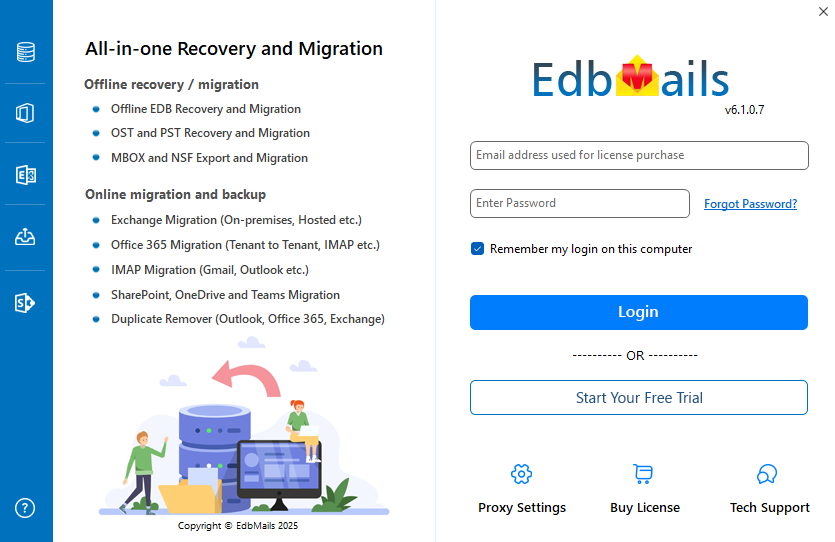
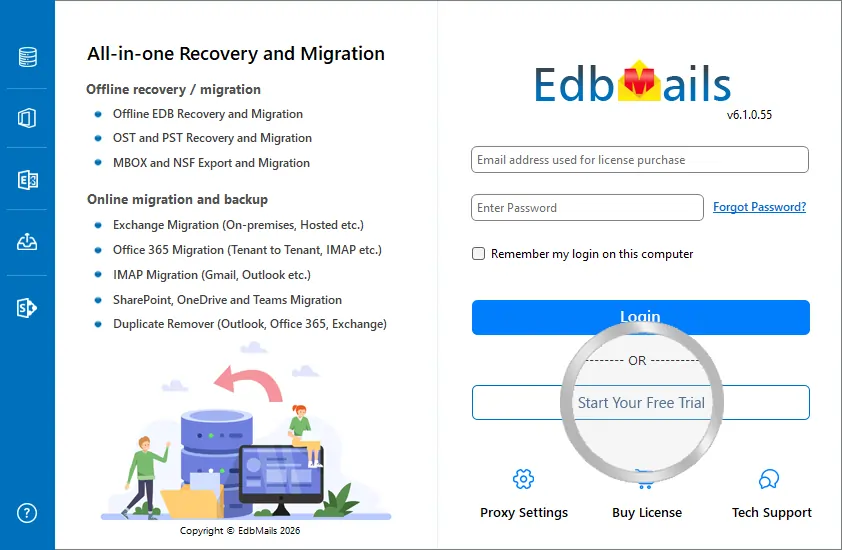
  • Step 2: Open the EdbMails application on your computer system. Enter your login credentials (email address and password) and click on the ‘Login’. If this is the first time that you are using EdbMails, then click on 'Start Your Free Trial' to continue with the trial version.

    EdbMails login

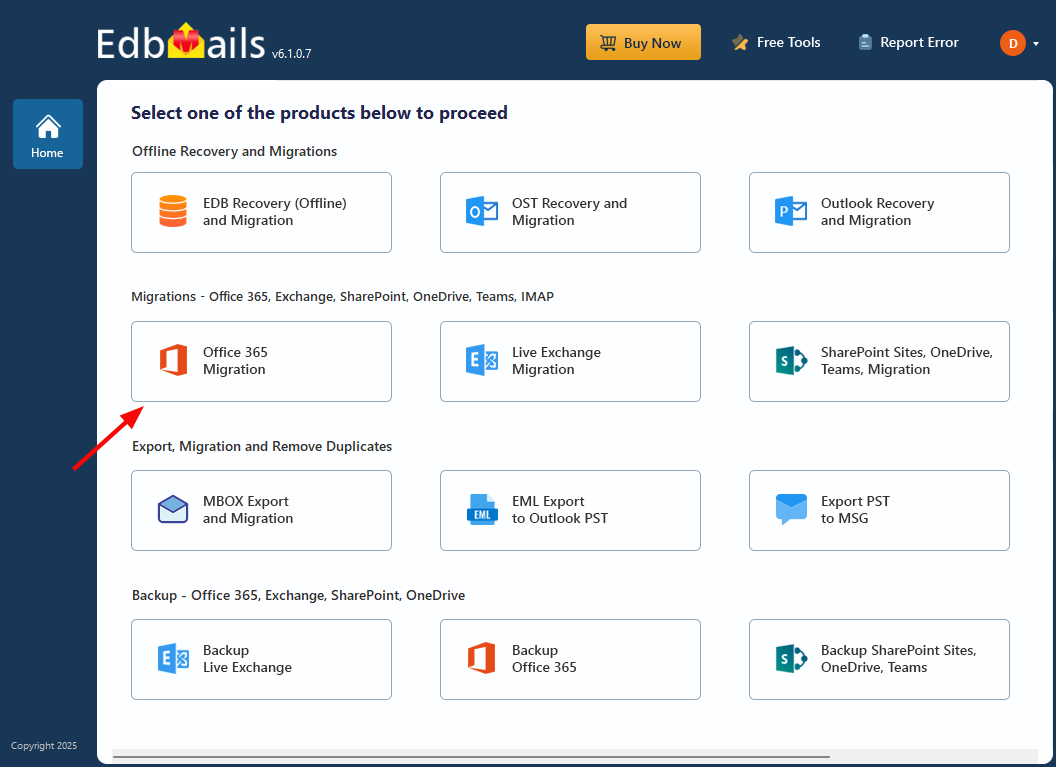
  • Step 3: Select the 'Office 365 Migration' option and continue.

    Select Office 365 Migration option

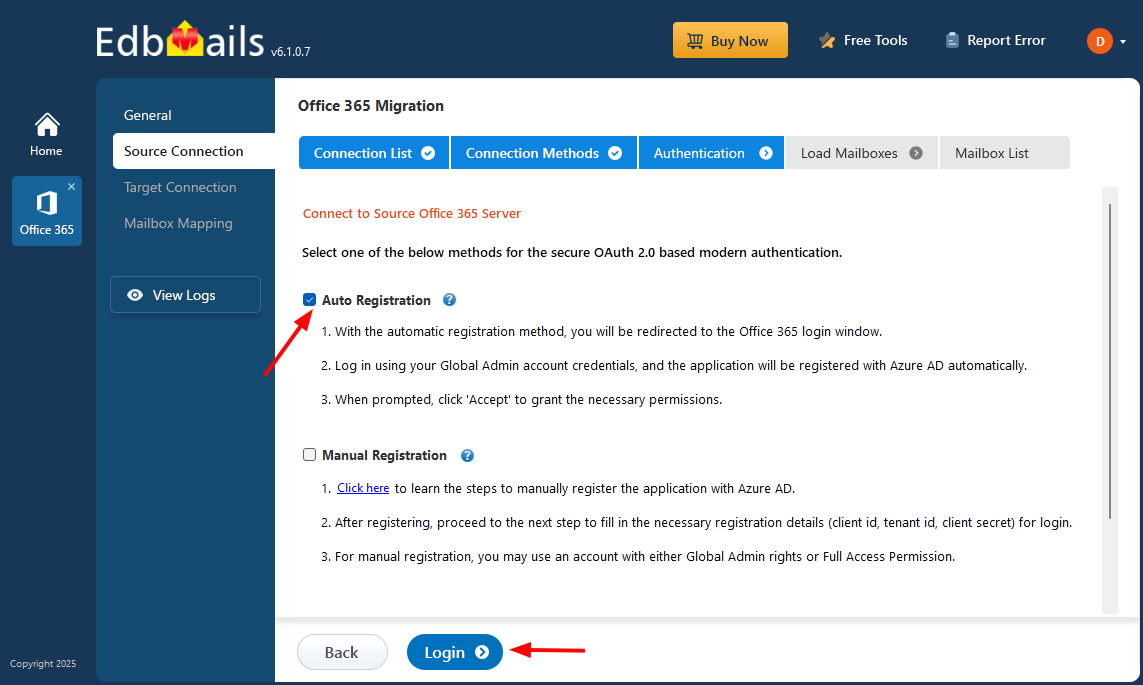
  • Step 4: Connect to your source server using a Global admin account.

    Connect to source server

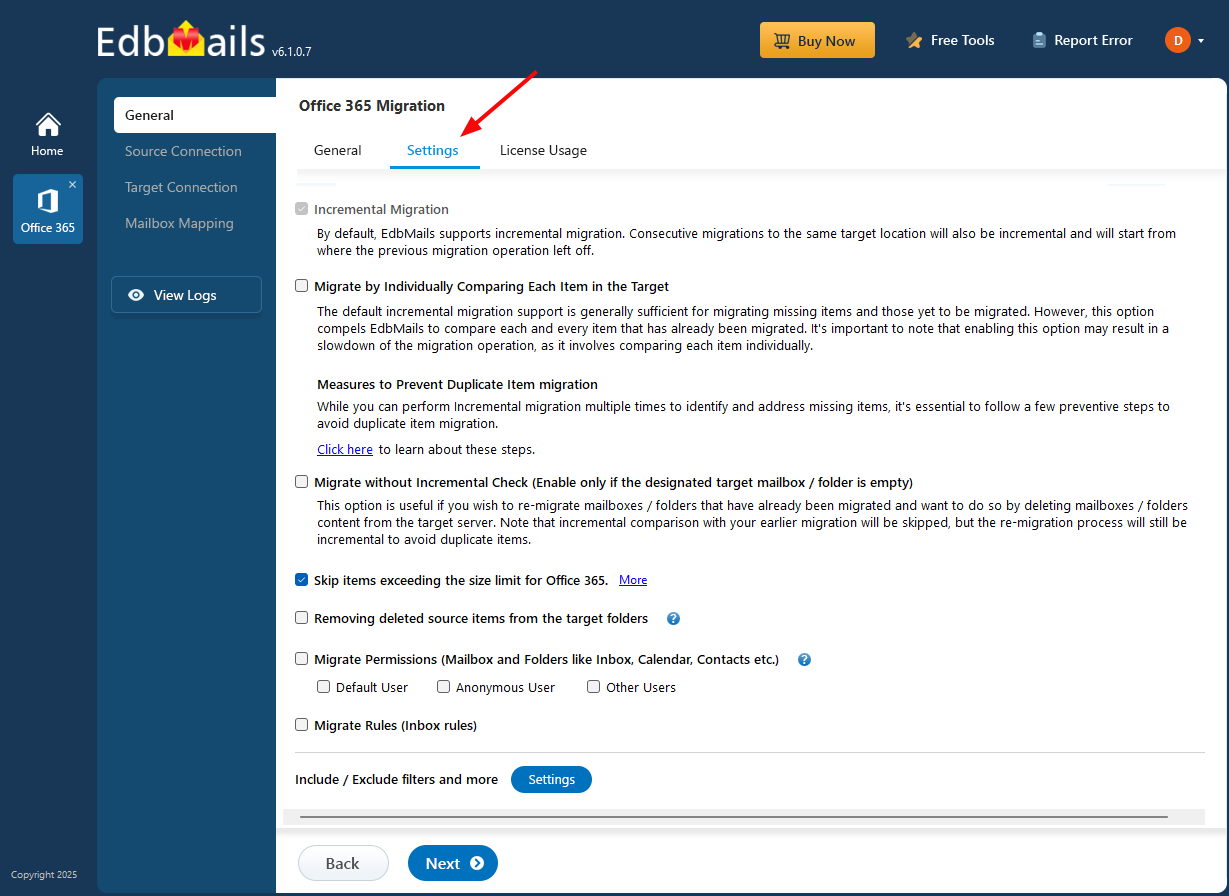
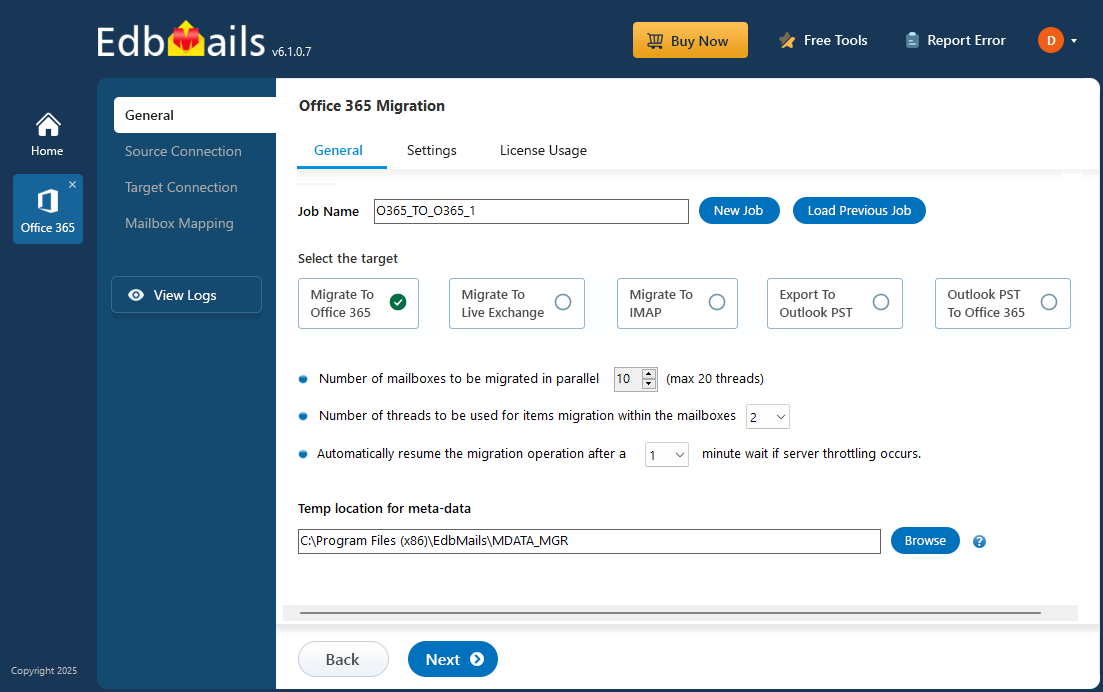
  • Step 5: Click ‘Settings’ on the main migration window.

    Click Office 365 Migration Settings

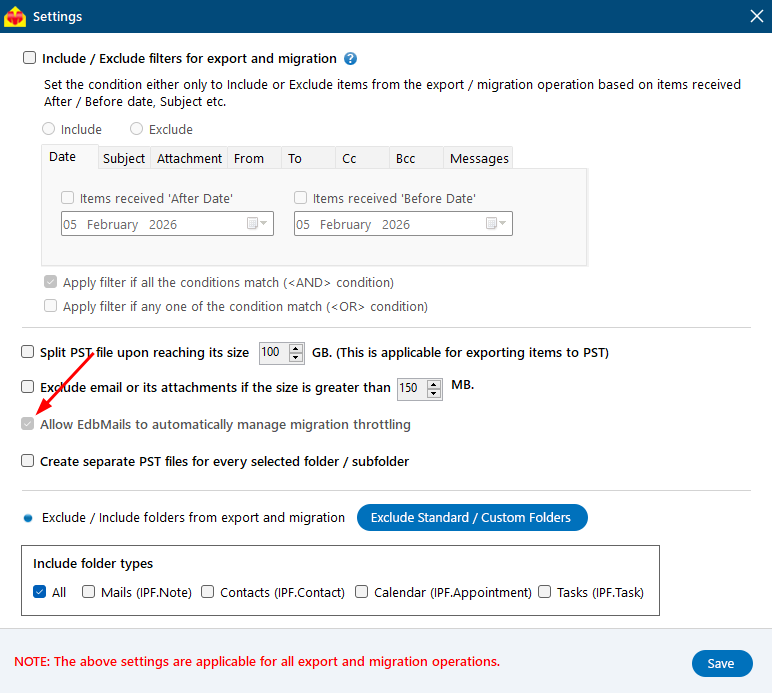
  • Step 6: Now you can see the built-in Automatic Office 365 throttling management option

    Automatic throttling management

      Click here for the Office 365 migration steps

Advantages of EdbMails for Office 365 Migration

  1. The software interface is designed for ease of use, perform migration within a few clicks.
  2. The automatic mailbox mapping feature avoids manual configuration efforts.
  3. EdbMails supports Modern Authentication and adheres to security standards like ISO 27001 for comprehensive data protection.
  4. Supports 10X Faster, High-Performance concurrent mailbox migrations.
  5. Migrates the complete mailbox data, including emails, calendars, contacts, tasks, notes, and journals, rules, permissions etc.
  6. Advanced filtering options such as Date, Subject, Attachment, From Address, To, Cc, Bcc etc. to migrate the selective data.
  7. Support for unlimited Office 365 public folder migration.
  8. Migrate Archive mailboxes between Office 365 Tenants.
  9. Incremental migration support without creating duplicate items on target server during consecutive migrations.
  10. Support for cutover, staged and hybrid migration.
hidden msg

EdbMails Demo / Trial Version

Step 1. Download and install EdbMails

Step 2. Click the 'Start Your Free Trial' button

Demo login EdbMails

  • Home
  • Features
  • Pricing
  • Support
  • Download
  • Sitemap
  • FAQ
  • Video Tutorials
  • Technical Support
  • Live Chat
  • Contact Us
Shifttocloud Inc.
Rehoboth Beach, DE
United States
+1 (302) 416-3056

Privacy Policy | Terms of Use | GDPR | Security | Press Releases

© 2026 Shifttocloud Inc.

Live Chat

Hi, May I help you?

Hide Chat Now

//