
• Menu
    • Products
      EDB Recovery and Migration
      • Overview
      • Features
      • How it works
      • User Manual
      • FAQ
      • Videos
      • Pricing
      • Screenshots
      Exchange Server Migration
      • Overview
      • Features
      • How it works
      • User Manual
      • FAQ
      • Videos
      • Pricing
      • Screenshots
      Office 365 Migration
      • Overview
      • Features
      • How it works
      • User Manual
      • FAQ
      • Videos
      • Pricing
      • Screenshots
      SharePoint Online Migration
      • Overview
      • Features
      • How it works
      • FAQ
      • Videos
      • Pricing
      • Screenshots
      OneDrive for Business Migration
      • Overview
      • Features
      • How it works
      • FAQ
      • Videos
      • Pricing
      • Screenshots
      Microsoft Teams Migration
      • Overview
      • Features
      • How it works
      • FAQ
      • Videos
      • Pricing
      • Screenshots
      SharePoint Backup
      • Overview
      • Features
      • How it works
      • FAQ
      • Videos
      • Pricing
      • Screenshots
      OneDrive Backup
      • Overview
      • Features
      • How it works
      • FAQ
      • Videos
      • Pricing
      • Screenshots
      IMAP Email Backup & Migration
      • Overview
      • Features
      • How it works
      • User Manual
      • FAQ
      • Videos
      • Pricing
      • Screenshots
      Exchange Server Backup
      • Overview
      • Features
      • How it works
      • FAQ
      • Videos
      • Pricing
      • Screenshots
      Office 365 Backup
      • Overview
      • Features
      • How it works
      • FAQ
      • Videos
      • Pricing
      • Screenshots
      OST Recovery and Migration
      • Overview
      • Features
      • How it works
      • User Manual
      • FAQ
      • Videos
      • Pricing
      • Screenshots
      MBOX Export and Migration
      • Overview
      • Features
      • How it works
      • FAQ
      • Videos
      • Pricing
      • Screenshots
      NSF Export and Migration
      • Overview
      • Features
      • How it works
      • FAQ
      • Videos
      • Pricing
      • Screenshots
      PST Recovery and Migration
      • Overview
      • Features
      • How it works
      • User Manual
      • FAQ
      • Videos
      • Pricing
      • Screenshots
      EML to PST Export
      • Overview
      • How it works
      • Pricing
      PST to MSG Export
      • Overview
      • How it works
      • Pricing
      MSG to PST Export
      • Overview
      • How it works
      • Pricing
      • Screenshots
      G Suite Migration
      • Overview
      • How it works
      • Pricing
      • Screenshots
      Windows Recovery
      • Overview
      • How it works
      • Pricing
      • Screenshots
    • Free Tools
    • Features
    • Reseller
    • Free Trial
    • FAQ
    • Video Tutorials
    • Pricing
    • Download
    • Support
    • Account
EdbMails EDB Recovery and Migration software
  • Reseller
  • Products
    EdbMails
    All-in-one Recovery and Migration
    Explore our products
    • EDB Recovery and Migration
    • OST, PST, MBOX, NSF, EML, MSG
    • Office 365, Exchange Migration
    • SharePoint, OneDrive & Teams
    • G Suite Migration
    • IMAP Migration
    • Duplicate Remover
    • Windows Data Recovery
    • Backup Solutions

    EDB Recovery and Migration

    EdbMails lets you recover corrupted, damaged, and offline Exchange EDB files, convert EDB mailboxes to PST format, and directly migrate mailbox data to Office 365 and live Exchange Server.

    EDB to PST
    Recover corrupted, damaged, offline EDB files and convert Exchange EDB mailboxes to PST file format
    Public Folder to Exchange
    Migrate public folders from an Exchange offline EDB file to live Exchange Server
    EDB to Live Exchange Migration
    Directly migrate offline Exchange database (EDB) files to live Exchange server
    Archive Mailbox to Office 365
    Migrate archive mailboxes from offline EDB files directly to Office 365
    EDB to Office 365 Migration
    Directly migrate offline Exchange database (EDB) files to Office 365
    Public Folder to Office 365
    Migrate public folders from an offline Exchange EDB file to Office 365

    OST, PST, MBOX, NSF, EML, MSG Export and Migration

    EdbMails lets you to recover OST and PST files, export OST, PST, MBOX, NSF, EML, and MSG files to PST files, and directly migrate OST, PST, MBOX, and NSF mailbox data to Office 365 and live Exchange Server.

    OST Recovery and Migration
    Recover offline OST files, convert OST to PST, and migrate OST to Office 365 and Exchange Server
    PST Recovery and Migration
    Recover Outlook PST files , Export PST to PST, migrate PST to Office 365 and Exchange Server
    MBOX Export and Migration
    Export MBOX to PST, migrate MBOX to Office 365 and Exchange Server
    NSF Export and Migration
    Export NSF to PST, migrate NSF to Office 365 and Exchange Server
    EML to PST Export
    Convert EML files to Outlook PST files
    PST to MSG Export
    Convert Outlook PST file to MSG file format
    MSG to PST Export
    Export MSG files to Outlook PST files

    Office 365, Exchange Migration

    EdbMails lets you securely migrate mailboxes across Microsoft 365, Exchange, Google Workspace (G Suite), and IMAP-supported servers such as Outlook, Gmail, Zimbra, Zoho Mail, and cPanel, ensuring zero downtime.

    Office 365 Migration
    Migrate between Office 365 tenants, Office 365 to Exchange, Office 365 to PST, PST files to Office 365.
    Exchange Migration
    Migrate between any Exchange Servers, Exchange to Office 365, Exchange to PST, PST files to Exchange.
    Tenant to Tenant Migration
    Migrate Mailboxes, Public Folders, Archive Mailboxes between Office 365 Tenants.
    Exchange to Office 365
    Migrate Mailboxes, Public Folders, Archive Mailboxes from live Exchange server to Office 365.
    Office 365 to IMAP
    Migrate Office 365 to IMAP, Office 365 to Gmail, Office 365 to Outlook, Office 365 to Zoho etc.
    Exchange to IMAP
    Migrate from live Exchange Server to IMAP servers such as Gmail, Outlook, and Zoho Mail.
    Public Folder to Office 365
    Migrate Public Folders between Office 365 tenants with complete folder hierarchy and mailbox data integrity.
    Exchange to PST
    Export live Exchange Server mailboxes, public folders, and archive mailboxes to Outlook PST files.

    SharePoint, OneDrive & Microsoft Teams Migration

    EdbMails lets you migrate SharePoint sites, OneDrive data, Microsoft Teams, teams, channels, chats, permissions, and documents between Microsoft 365 tenants while maintaining the existing folder structure and data integrity.

    SharePoint Online Migration
    Migrate documents, lists, files and folders from SharePoint sites.
    OneDrive for Business Migration
    Migrate documents, lists, files, folders, private chats from OneDrive.
    Microsoft Teams Migration
    Migrate Teams, chats, channels, documents, files and folders etc.

    Google Workspace / G Suite Migration

    EdbMails G Suite Migration Tool lets you easily migrate emails, calendars, contacts, tasks, and more from G Suite to Office 365, Exchange Server, and IMAP servers using a Google Admin account without requiring individual user credentials.

    G Suite Migration
    Migrate emails, calendars, contacts, tasks from G Suite to Office 365, G Suite to Exchange, G Suite to IMAP Servers
    G Suite to Office 365
    Migrate emails, calendars, contacts, tasks from Google Workspace / G Suite to Office 365
    G Suite to Exchange Server
    Migrate emails, calendars, contacts, tasks from Google Workspace / G Suite to on-Premise Exchange Server
    G Suite to IMAP
    Migrate emails, calendars, contacts, tasks from Google Workspace / G Suite to IMAP, Outlook, Zimbra, Zoho etc.

    IMAP Migration

    EdbMails IMAP Migration tool lets you easily migrate emails from IMAP servers such as Outlook, Gmail, Zoho Mail, Zimbra, cPanel, and more. Supports IMAP to IMAP, Office 365, Exchange Server, PST, and bulk PST to IMAP migration.

    IMAP Email Backup & Migration
    Backup and migrate emails from IMAP servers to PST, Office 365, and On-Premises Exchange Server
    IMAP to Office 365
    Migrate emails, folders, and attachments from IMAP servers to Office 365
    IMAP to Exchange
    Migrate emails, folders, and attachments from IMAP servers to on-premises Exchange Server
    IMAP to PST
    Export emails, folders, and attachments from IMAP servers to Outlook PST files for backup
    PST to IMAP
    Migrate emails, folders, and attachments from bulk PST files to IMAP servers

    Duplicate Remover

    EdbMails Duplicate Remover lets you easily remove duplicate items from Office 365 and Exchange Server, and from IMAP, Outlook, Gmail, Zimbra, Zoho Mail, etc., ensuring a clean and organized mailbox.

    Remove Duplicates
    Easily clean up your Office 365, Exchange, Outlook and IMAP accounts by removing duplicate emails.
    Remove Duplicates from Office 365
    Remove duplicate emails, calendars, contacts, journal tasks, etc. from Office 365.
    Remove Duplicates from Exchange Server
    Remove duplicate emails, calendars, contacts, journal tasks, etc. from live Exchange Server.
    Remove Duplicates from IMAP, Outlook
    Remove duplicate emails, attachments from IMAP, Outlook, Gmail, Zimbra, Zoho Mail etc.

    Exchange, SharePoint, OneDrive, Teams and Office 365 Backup

    EdbMails enables secure, automated backup and recovery for Microsoft 365 services including Exchange Online, SharePoint, OneDrive, Teams, and Live Exchange Server with complete data protection and restore flexibility.

    Office 365 Backup
    Incremental, Granular, Encrypted and Compressed Office 365 Mailboxes Backup
    Exchange Server Backup
    Incremental, Granular, Encrypted and Compressed Exchange Mailboxes Backup
    SharePoint, OneDrive & Teams Backup
    Backup Online site collections, Team sites, Office 365 groups, all documents etc.

    Windows Data Recovery

    EdbMails Windows Data Recovery Software lets you recover permanently deleted data, including photos, videos, documents, and archived files, from partitions on hard drives, SSDs, USB drives, SD cards, and external storage devices.

    Windows Data Recovery
    Recover and restore permanently deleted data from hard drives, SSDs, USB drives, SD cards, and etc.
    Whitepaper
    Request a Demo
    Sign Up
  • Features
  • Video Tutorials
  • Free Tools
  • FAQ
  • Knowledge Base
  • Pricing
  • Download
  • Support
  • Sign in
  • Cart
  1. Home
  2. Office 365 Migration
  3. Concurrent Office 365 Mailbox Migrations Empowered by EdbMails
Office 365 Migration Features

EdbMails Office 365 Migration

Effortlessly migrate mailboxes, public folders and archive mailboxes from Office 365

Download Buy Now
Office 365 to Exchange Office 365 to PST Public Folder to Office 365 Archive Mailbox to Office 365 Office 365 to IMAP Tenant to Tenant Migration
Office 365 Migration Software Now on Azure Marketplace!
Product Menu
Concurrent Office 365 Mailbox Migration
  • Overview
  • Features
  • How it works
  • User Manual
  • FAQ
  • Videos
  • Pricing
  • Screenshots

Office 365 Migration Features

  • Migrate with a few clicks; No PowerShell needed
  • Secure Office 365 Migration
  • Migrate everything from Office 365 mailboxes
  • Migrate mailboxes from Google, Zimbra, and other platforms to Office 365
  • Easy configuration of source and target Office 365 servers
  • Incremental (Delta) Office 365 migration
  • Pause and Resume migration operation
  • Automatically create target mailboxes
  • Automatically map source and target mailboxes
  • Apply date, time, and size filters for data migration
  • Concurrent mailbox migration
  • Migrate with zero downtime
  • Detailed migration reports
  • Cost-effective Office 365 migration
  • Multilingual support
  • Flexible migration scenarios
  • Batch migration support
  • Effortless Public folder migration
  • Archive mailbox transfer
  • Automatic server throttling management
  • CSV-based mailbox import
  • Office 365 Group mailbox migration
  • CalDav & CardDav Migration

Concurrent Mailbox Migration

Office 365 mailbox migration is rarely straightforward, especially migrating a few hundred or thousands of users within an extremely limited time frame. Conventional step-by-step migration techniques can take a large amount of time and may not be compatible with enterprise deadlines. Concurrent mailbox migration is a solution that allows multiple mailboxes to be migrated in parallel, rather than waiting for the completion of each individual mailbox.

EdbMails is specifically designed to handle large migration projects. Its concurrent migration engine processes multiple mailboxes simultaneously. This speeds up the migration, at the same time minimizing the risk of the migration being throttled. Built-in features include automatic mailbox mapping and session management. It has an easy-to-use interface providing maximum control over the migration process.
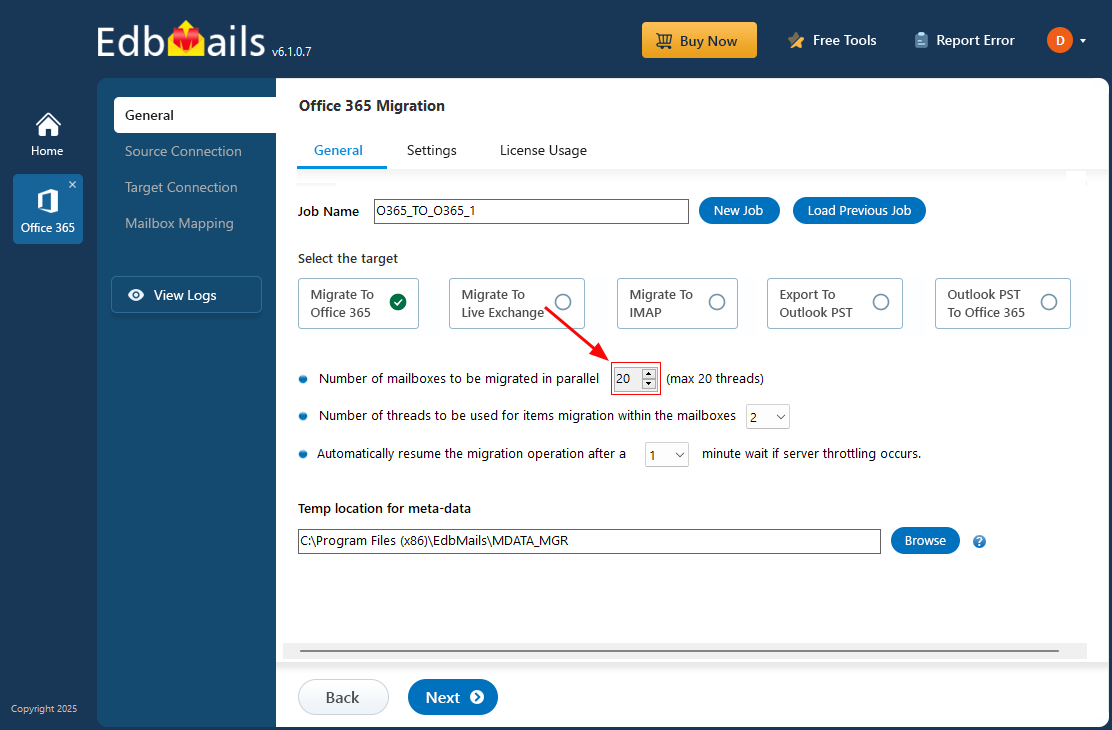
Concurrent Office 365 Mailbox Migration

Security is built into every step. EdbMails uses OAuth 2.0 authentication and TLS encryption, securing all your data throughout the migration process. The end product: a fast, reliable and absolutely hassle-free Office 365 migration process maintaining performance, stability and entire data integrity from start to finish.

To delve deeper into EdbMails streamlined approach to Office 365 migration, continue reading this article.

Why Concurrent migration is crucial for modern organisations

  • Quick Mailbox Transfers: Concurrent migration transfers multiple mailboxes at once, making it much quicker then migrate them one by one.
  • Avoids Office 365 Throttling Delays: There are limitations to the number of connections that you can make to Microsoft simultaneously. EdbMails handles this efficiently by distributing work over multiple threads so that it doesn't delay.
  • Reduces Overall Migration Time: Running mailboxes in parallel shortens the total time needed to complete large-scale migrations.
  • Automatic Error Handling: The tool automatically retries failed or interrupted mailbox connections, saving time and manual effort.
  • Ease in Hybrid moves: It enables faster mailbox transfers between on-premises Exchange and Office 365 in hybrid environments.
  • Mailbox Data Synchronized: Simultaneous migration prevents inconsistency of mailbox data, no missed and delayed mails.

Why Choose EdbMails for Office 365 Mailbox Migration?

  • Concurrent Mailbox Migration for Enhanced Performance

    EdbMails supports concurrent mailbox migration which helps to improve the efficiency. It helps to accelerate the migration by migrating more than one mailbox at the same time. It automatically migrates up to 10 mailboxes at a time. And you can set it to a maximum of 20 mailboxes to further increase the efficiency and speed.

  • Automatic Throttling Management to Optimize Migration Efficiency

    Automated Office 365 throttling management feature for migration consistency makes it possible to migrate all your content into one migration task and successfully migrate during Office 365 server peak times. EdbMails simplifies the migration process, making it much easier while adapting to Microsoft throttling settings.

  • Achieve Zero Downtime with Data Integrity

    EdbMails helps you achieve zero downtime mailbox migration by taking complete care of your mailbox migration. EdbMails uses a unique migration technology where both your source and target mailboxes are least affected, and your email communication stays same throughout the process of migration. This means that your team can continue to send and receive the emails without any interruption, maintaining smooth business operation. EdbMails takes great care to minimize any potential downtime and ensure to get the smooth migration of your mailbox to the new server.

  • Secure & Reliable Mailbox Migration with OAuth 2.0

    EdbMails migrates with secure Microsoft APIs and as per the Microsoft guide flow. Your Office 365 credentials are never stored at any point — OAuth 2.0 and TLS encryption keep them safe during authentication. It uses modern authentication built on MSAL (Microsoft Authentication Library) and Microsoft Graph, along with OAuth 2.0, which is known to be a secure authentication method to access your Microsoft Office 365 account.

  • User-friendly Interface with Automatic Mailbox Mapping Functionality

    The application offers a simplified user interface that enables effortless and easy Office 365 migration. One can easily carry out single or multiple mailbox migrations in a few clicks. The application is featured with modern authentication and automatic mailbox mapping that further streamlines accessing and mapping the mailbox on the source and target server.

  • Comprehensive Support for Full and Incremental Migrations

    EdbMails supports both full and incremental migrations. During the full migration, it transfers the entire data from the chosen mailbox, and during subsequent migrations to the same destination, EdbMails uses an incremental migration. It considers only new entries that have not been previously migrated by comparing the current migration data with previously migrated data. This process avoids item redundancy, saves bandwidth, and improves migration speed.

  • Personalize your Migration Destination Folder Choice

    EdbMails allows you to manually map source mailbox folders with the designated target mailbox folders during the migration operation. This feature offers you to migrate the data to the preferred folders in the target mailbox. By defining these manual mappings, you can ensure migration of your mailbox data to a folder of your choice.

  • Other Office 365 Migration Scenarios

    EdbMails is very efficient for many migration scenarios in Office 365, including Tenant to Tenant migration, Office 365 to on-premises Exchange migration, IMAP Server migration, Public folder migration, and PST import. This range of supported migration tasks provides organizations with flexibility when migrating within the Office 365 environment.

 Step-by-step guide to perform concurrent mailbox migration to Office 365

hidden msg

EdbMails Demo / Trial Version

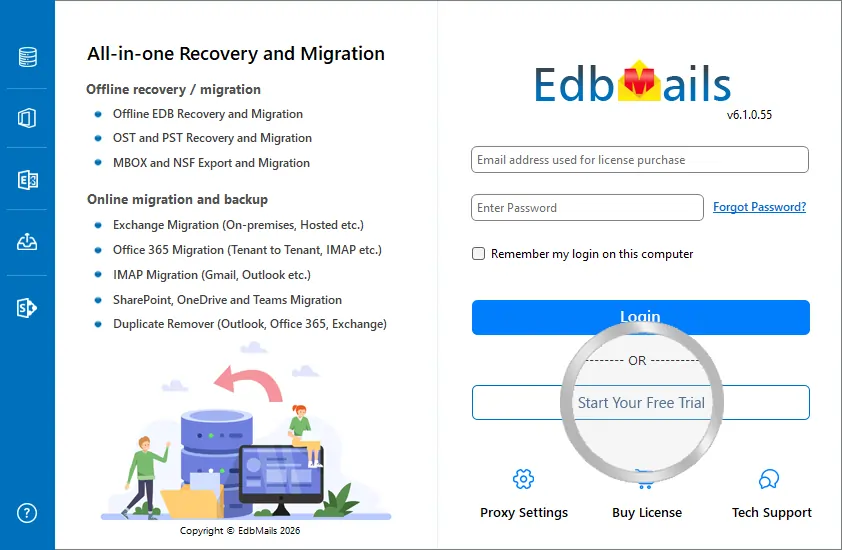
Step 1. Download and install EdbMails

Step 2. Click the 'Start Your Free Trial' button

Demo login EdbMails

  • Home
  • Features
  • Pricing
  • Support
  • Download
  • Sitemap
  • FAQ
  • Video Tutorials
  • Technical Support
  • Live Chat
  • Contact Us
Shifttocloud Inc.
Rehoboth Beach, DE
United States
+1 (302) 416-3056

Privacy Policy | Terms of Use | GDPR | Security | Press Releases

© 2026 Shifttocloud Inc.

Live Chat

Hi, May I help you?

Hide Chat Now

//