• Menu
    • Products
      EDB Recovery and Migration
      • Overview
      • Features
      • How it works
      • User Manual
      • FAQ
      • Videos
      • Pricing
      • Screenshots
      Exchange Server Migration
      • Overview
      • Features
      • How it works
      • User Manual
      • FAQ
      • Videos
      • Pricing
      • Screenshots
      Office 365 Migration
      • Overview
      • Features
      • How it works
      • User Manual
      • FAQ
      • Videos
      • Pricing
      • Screenshots
      SharePoint Online Migration
      • Overview
      • Features
      • How it works
      • FAQ
      • Videos
      • Pricing
      • Screenshots
      OneDrive for Business Migration
      • Overview
      • Features
      • How it works
      • FAQ
      • Videos
      • Pricing
      • Screenshots
      Microsoft Teams Migration
      • Overview
      • Features
      • How it works
      • FAQ
      • Videos
      • Pricing
      • Screenshots
      SharePoint Backup
      • Overview
      • Features
      • How it works
      • FAQ
      • Videos
      • Pricing
      • Screenshots
      OneDrive Backup
      • Overview
      • Features
      • How it works
      • FAQ
      • Videos
      • Pricing
      • Screenshots
      IMAP Email Backup & Migration
      • Overview
      • Features
      • How it works
      • User Manual
      • FAQ
      • Videos
      • Pricing
      • Screenshots
      Exchange Server Backup
      • Overview
      • Features
      • How it works
      • FAQ
      • Videos
      • Pricing
      • Screenshots
      Office 365 Backup
      • Overview
      • Features
      • How it works
      • FAQ
      • Videos
      • Pricing
      • Screenshots
      OST Recovery and Migration
      • Overview
      • Features
      • How it works
      • User Manual
      • FAQ
      • Videos
      • Pricing
      • Screenshots
      MBOX Export and Migration
      • Overview
      • Features
      • How it works
      • FAQ
      • Videos
      • Pricing
      • Screenshots
      NSF Export and Migration
      • Overview
      • Features
      • How it works
      • FAQ
      • Videos
      • Pricing
      • Screenshots
      PST Recovery and Migration
      • Overview
      • Features
      • How it works
      • User Manual
      • FAQ
      • Videos
      • Pricing
      • Screenshots
      EML to PST Export
      • Overview
      • How it works
      • Pricing
      PST to MSG Export
      • Overview
      • How it works
      • Pricing
      MSG to PST Export
      • Overview
      • How it works
      • Pricing
      • Screenshots
      G Suite Migration
      • Overview
      • How it works
      • Pricing
      • Screenshots
      Windows Recovery
      • Overview
      • How it works
      • Pricing
      • Screenshots
    • Free Tools
    • Features
    • Reseller
    • Free Trial
    • FAQ
    • Video Tutorials
    • Pricing
    • Download
    • Support
    • Account
EdbMails EDB Recovery and Migration software
  • Reseller
  • Products
    EdbMails
    All-in-one Recovery and Migration

    Trusted and internationally recognized software that delivers award winning solutions.

    Explore our products
    • Offline Recovery Tools
    • Migration Tools
    • G Suite Migration
    • IMAP Migration
    • Duplicate Remover
    • Backup
    • Windows Data Recovery

    Exchange EDB / Email Recovery Tools

    EdbMails offers a comprehensive suite of tools to recover and convert offline EDB, OST, and PST files into Outlook PST, migrate mailboxes to Office 365 and live Exchange Server, and export and migrate data from NSF, MBOX, EML, and MSG formats.

    EDB Recovery and Migration
    Recover EDB to PST, EDB to Office 365 and Exchange NO Duplicate Migration
    NSF Export and Migration
    Export NSF to PST, NSF to Office 365 and Exchange Migration
    OST Recovery and Migration
    Recover OST to PST, OST to Office 365 and Exchange Migration
    EML to PST Export
    EML files export to Outlook PST format
    PST Recovery and Migration
    Recover Outlook PST, PST to Office 365 and Exchange Migration
    PST to MSG Export
    Outlook PST files export to MSG format
    MBOX Export and Migration
    Export MBOX to PST, MBOX to Office 365 and Exchange Migration
    MSG to PST Export
    Export MSG files to Outlook PST files

    Exchange, Office 365, IMAP, SharePoint, OneDrive, Teams

    EdbMails lets you securely migrate mailboxes across Microsoft 365, Exchange, Google Workspace (G Suite), and IMAP-supported servers such as Outlook, Gmail, Zimbra, Zoho Mail, and cPanel, ensuring zero downtime.

    Exchange Server Migration
    Migrate between any Exchange Servers, Exchange to Office 365, Exchange to PST, PST files to Exchange.
    SharePoint Online Migration
    Migrate documents, lists, files and folders from SharePoint sites.
    Office 365 Migration
    Migrate between Office 365 tenants, Office 365 to Exchange, Office 365 to PST, PST files to Office 365.
    OneDrive for Business Migration
    Migrate documents, lists, files and folders from OneDrive.
    Microsoft Teams Migration
    Migrate Teams, chats, channels, documents, files and folders etc.

    Google Workspace / G Suite Migration

    EdbMails G Suite Migration Tool lets you easily migrate emails, calendars, contacts, tasks, and more from G Suite to Office 365, Exchange Server, and IMAP servers using a Google Admin account without requiring individual user credentials.

    G Suite Migration
    Migrate emails, calendars, contacts, tasks from G Suite to Office 365, G Suite to Exchange, G Suite to IMAP Servers
    G Suite to Office 365
    Migrate emails, calendars, contacts, tasks from Google Workspace / G Suite to Office 365
    G Suite to Exchange Server
    Migrate emails, calendars, contacts, tasks from Google Workspace / G Suite to on-Premise Exchange Server
    G Suite to IMAP
    Migrate emails, calendars, contacts, tasks from Google Workspace / G Suite to IMAP, Outlook, Zimbra, Zoho etc.

    IMAP Migration

    EdbMails IMAP Migration tool lets you easily migrate emails from IMAP servers such as Outlook, Gmail, Zoho Mail, Zimbra, cPanel, and more. Supports IMAP to IMAP, Office 365, Exchange Server, PST, and bulk PST to IMAP migration.

    IMAP Email Backup & Migration
    Backup and migrate emails from IMAP servers to PST, Office 365, and On-Premises Exchange Server
    IMAP to Office 365
    Migrate emails, folders, and attachments from IMAP servers to Office 365
    IMAP to Exchange
    Migrate emails, folders, and attachments from IMAP servers to on-premises Exchange Server
    IMAP to PST
    Export emails, folders, and attachments from IMAP servers to Outlook PST files for backup
    PST to IMAP
    Migrate emails, folders, and attachments from bulk PST files to IMAP serverss

    Duplicate Remover

    EdbMails Duplicate Remover lets you easily remove duplicate items from Office 365 and Exchange Server, and from IMAP, Outlook, Gmail, Zimbra, Zoho Mail, etc., ensuring a clean and organized mailbox.

    Remove Duplicates from Office 365
    Remove duplicate emails, calendars, contacts, journal tasks, etc. from Office 365.
    Remove Duplicates from Exchange Server
    Remove duplicate emails, calendars, contacts, journal tasks, etc. from live Exchange Server.
    Remove Duplicates from IMAP, Outlook
    Remove duplicate emails, attachments from IMAP, Outlook, Gmail, Zimbra, Zoho Mail etc.

    Exchange, SharePoint, OneDrive, Teams and Office 365 Backup

    EdbMails enables secure, automated backup and recovery for Microsoft 365 services including Exchange Online, SharePoint, OneDrive, Teams, and Live Exchange Server with complete data protection and restore flexibility.

    Office 365 Backup
    Incremental, Granular, Encrypted and Compressed Office 365 Mailboxes Backup
    Exchange Server Backup
    Incremental, Granular, Encrypted and Compressed Exchange Mailboxes Backup
    SharePoint, OneDrive & Teams Backup
    Backup Online site collections, Team sites, Office 365 groups, all documents etc.

    Windows Data Recovery

    EdbMails Windows Data Recovery Software lets you recover permanently deleted data, including photos, videos, documents, and archived files, from partitions on hard drives, SSDs, USB drives, SD cards, and external storage devices.

    Windows Data Recovery
    Recover and restore permanently deleted data from hard drives, SSDs, USB drives, SD cards, and etc.
    Whitepaper
    Request a Demo
    Sign Up
  • Features
  • Video Tutorials
  • Free Tools
  • FAQ
  • Knowledge Base
  • Pricing
  • Download
  • Support
  • Sign in
  • Cart
  1. Home
  2. Office 365 Migration
  3. Migrate Office 365 Emails, Calendars, Contacts and more | EdbMails
Office 365 Migration Features

EdbMails Office 365 Migration

Effortlessly migrate mailboxes, public folders and archive mailboxes from Office 365

Download Buy Now
Office 365 to Exchange Office 365 to PST Public Folder to Office 365 Archive Mailbox to Office 365 Office 365 to IMAP Tenant to Tenant Migration
Office 365 Migration Software Now on Azure Marketplace!
Product Menu
Migrate Office 365 Emails, Calendars, Contacts and more
  • Overview
  • Features
  • How it works
  • User Manual
  • FAQ
  • Videos
  • Pricing
  • Screenshots

Office 365 Migration Features

  • Migrate with a few clicks; No PowerShell needed
  • Secure Office 365 Migration
  • Migrate everything from Office 365 mailboxes
  • Migrate mailboxes from Google, Zimbra, and other platforms to Office 365
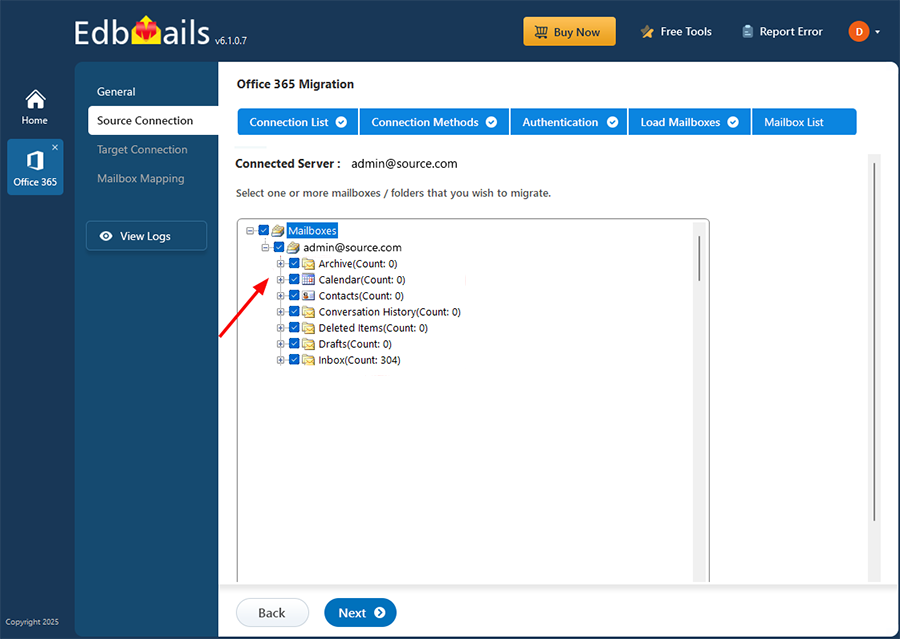
  • Easy configuration of source and target Office 365 servers
  • Incremental (Delta) Office 365 migration
  • Pause and Resume migration operation
  • Automatically create target mailboxes
  • Automatically map source and target mailboxes
  • Apply date, time, and size filters for data migration
  • Concurrent mailbox migration
  • Migrate with zero downtime
  • Detailed migration reports
  • Cost-effective Office 365 migration
  • Multilingual support
  • Flexible migration scenarios
  • Batch migration support
  • Effortless Public folder migration
  • Archive mailbox transfer
  • Automatic server throttling management
  • CSV-based mailbox import
  • Office 365 Group mailbox migration
  • CalDav & CardDav Migration

Migrate Office 365 Emails, Calendars, Contacts and more

EdbMails Office 365 Migration Software migrates Office 365 mailboxes, including public folders, shared mailboxes, archive mailboxes, and group mailboxes, ensuring complete transfer from your Office 365 environment. It supports migration of all mailbox folders and subfolders such as, emails, inbox rules, calendars, contacts, tasks, notes, journals, and distribution groups, from one Office 365 account to another, live Exchange servers, IMAP-enabled servers, or for export to Outlook PST files. EdbMails offers a secure way to access and migrate mailboxes to Office 365, transferring them from the source to the target tenant while preserving the original folder structure.

Migrate Office 365 emails, calendars, contacts

Migrate all entities from Office 365 mailboxes

EdbMails supports the migration of all Outlook item types, ensuring a smooth transfer of your data. This includes:

  • Emails: Migrates all email properties, including attachments, metadata, and folder structures.
  • Contacts: Transfers complete contact information, such as phone numbers, addresses, and notes.
  • Calendars: Migrates all calendar events, appointments, recurring events, and reminders.
  • Tasks: Transfers all task details, including status, due dates, and priority levels.
  • Notes: Migrates all notes with their original formatting and content.
  • Journals: Transfers all journal entries with associated details.
  • Public Folders: Migrate public folders along with their permissions when included in the migration.

Advanced Features for Optimal Migration

EdbMails is equipped with a range of advanced features designed to ensure the most efficient and effective migration process possible. From incremental migration to prevent data duplication, to a user-friendly interface for ease of use, EdbMails optimizes every aspect of the migration process. Whether you're handling small-scale migrations or large enterprise-level projects, EdbMails delivers optimal performance and reliability.

  • User-friendly Software Interface: EdbMails features a simple and intuitive software interface designed for users of all skill levels. Its clean layout and straightforward navigation make it easy to manage and execute migrations.
  • Secure Data Migration: EdbMails places a strong emphasis on the security and integrity of your data throughout the migration process. With advanced encryption protocols and robust security measures, EdbMails ensures that all data is protected from unauthorized access and potential breaches.

     Click here to discover how EdbMails guarantees data security throughout your Office 365 migration.

  • Migrate Multiple Mailboxes: EdbMails supports concurrent mailbox migration, ensuring efficient and timely transfer of multiple mailboxes simultaneously without compromising data integrity or performance.
  • Avoid Duplicate Items: EdbMails supports incremental migration, transferring only the items that have not been included in previous migration runs. This approach prevents duplicates on the target server during consecutive migrations.
  • Selective Data Migration: With EdbMails, you can migrate specific items using advanced filters like date ranges (messages received after and before specific dates), email attachment names, sender and recipient addresses (to, cc, bcc), and message read/unread status. This precise control ensures only relevant data is transferred during migration. Moreover, EdbMails allows you to exclude both standard and custom folders from migration, giving you the flexibility to customize the process according to your specific requirements.
  • Zero Data Loss: EdbMails guarantees seamless data migration with zero tolerance for data loss, ensuring every piece of information is transferred accurately and securely. By employing advanced migration algorithms and secure protocols, EdbMails facilitates uninterrupted data transfer without any server downtime.
  • Map Mailboxes Automatically: EdbMails Automatically maps mailboxes between source and target servers, ensuring precise matching without the need for manual intervention. This streamlined process significantly saves time during migrations.

Customize Office 365 migration

EdbMails provides flexible migration options tailored to your organization’s requirements. With advanced filtering, you can selectively include or exclude specific mailbox items, prioritize the migration of emails or contacts, and handle other items later. You can also skip custom folders as needed. The time-based filter adds even more flexibility, enabling you to create an optimal migration strategy.

Conclusion

EdbMails provides a reliable solution for Office 365 migration, allowing you to transfer all your organization’s mailboxes with just a few clicks. Whether migrating entire mailboxes or selectively transferring specific items, EdbMails ensures a seamless and efficient migration process, preserving all properties of emails, calendars, contacts, and journals.


Additional Resources:

  • Office 365 Tenant to Tenant migration steps
  • Secure Office 365 Migration using EdbMails
  • Office 365 Incremental (Delta) Migration
  • Enable Office 365 Archive mailboxes
FREE DOWNLOADBUY NOW!
lady image


hidden msg

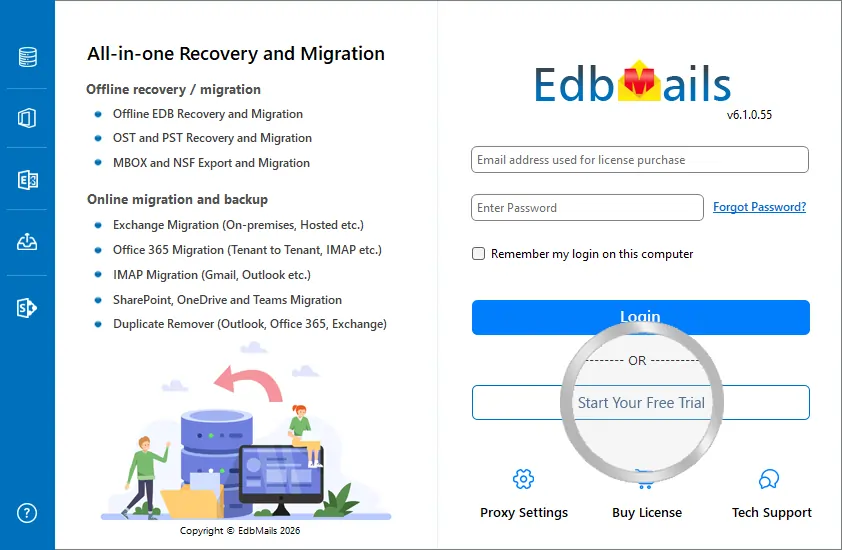
EdbMails Demo / Trial Version

Step 1. Download and install EdbMails

Step 2. Click the 'Start Your Free Trial' button

Demo login EdbMails

  • Home
  • Features
  • Pricing
  • Support
  • Download
  • Sitemap
  • FAQ
  • Video Tutorials
  • Technical Support
  • Live Chat
  • Contact Us
Shifttocloud Inc.
Rehoboth Beach, DE
United States
+1 (302) 416-3056

Privacy Policy | Terms of Use | GDPR | Security | Press Releases

© 2026 Shifttocloud Inc.

Live Chat

Hi, May I help you?

Hide Chat Now

//