EdbMails EDB Recovery and Migration software
  • Products
    EdbMails
    All-in-one Recovery and Migration Tool
    • EDB recovery and Migration
    • OST, PST, MBOX, NSF, EML, MSG
    • Office 365, Exchange Migration
    • SharePoint, OneDrive & Teams
    • G Suite Migration
    • IMAP Migration
    • Duplicate Remover
    • EdbMails Data Recovery
    • Backup Solutions
    All Products

    EDB Recovery and Migration

    EdbMails lets you recover corrupted, damaged, and offline Exchange EDB files, convert EDB mailboxes to PST format, and directly migrate mailbox data to Office 365 and live Exchange Server.

    EDB to PST
    Recover corrupted, damaged, offline EDB files and convert Exchange EDB mailboxes to PST file format
    Public Folder to Exchange
    Migrate public folders from an Exchange offline EDB file to live Exchange Server
    EDB to Live Exchange Migration
    Directly migrate offline Exchange database (EDB) files to live Exchange server
    Archive Mailbox to Office 365
    Migrate archive mailboxes from offline EDB files directly to Office 365
    EDB to Office 365 Migration
    Directly migrate offline Exchange database (EDB) files to Office 365
    Public Folder to Office 365
    Migrate public folders from an offline Exchange EDB file to Office 365

    OST, PST, MBOX, NSF, EML, MSG Export and Migration

    EdbMails lets you to recover OST and PST files, export OST, PST, MBOX, NSF, EML, and MSG files to PST files, and directly migrate OST, PST, MBOX, and NSF mailbox data to Office 365 and live Exchange Server.

    OST Recovery and Migration
    Recover offline OST files, convert OST to PST, and migrate OST to Office 365 and Exchange Server
    PST Recovery and Migration
    Recover Outlook PST files , Export PST to PST, migrate PST to Office 365 and Exchange Server
    MBOX Export and Migration
    Export MBOX to PST, migrate MBOX to Office 365 and Exchange Server
    NSF Export and Migration
    Export NSF to PST, migrate NSF to Office 365 and Exchange Server
    EML to PST Export
    Convert EML files to Outlook PST files
    PST to MSG Export
    Convert Outlook PST file to MSG file format
    MSG to PST Export
    Export MSG files to Outlook PST files

    Office 365, Exchange Migration

    EdbMails lets you securely migrate mailboxes across Microsoft 365, Exchange, Google Workspace (G Suite), and IMAP-supported servers such as Outlook, Gmail, Zimbra, Zoho Mail, and cPanel, ensuring zero downtime.

    Office 365 Migration
    Migrate between Office 365 tenants, Office 365 to Exchange, Office 365 to PST, PST files to Office 365.
    Exchange Migration
    Migrate between any Exchange Servers, Exchange to Office 365, Exchange to PST, PST files to Exchange.
    Tenant to Tenant Migration
    Migrate Mailboxes, Public Folders, Archive Mailboxes between Office 365 Tenants.
    Exchange to Office 365
    Migrate Mailboxes, Public Folders, Archive Mailboxes from live Exchange server to Office 365.
    Office 365 to IMAP
    Migrate Office 365 to IMAP, Office 365 to Gmail, Office 365 to Outlook, Office 365 to Zoho etc.
    Exchange to IMAP
    Migrate from live Exchange Server to IMAP servers such as Gmail, Outlook, and Zoho Mail.
    Public Folder to Office 365
    Migrate Public Folders between Office 365 tenants with complete folder hierarchy and mailbox data integrity.
    Exchange to PST
    Export live Exchange Server mailboxes, public folders, and archive mailboxes to Outlook PST files.

    SharePoint, OneDrive & Microsoft Teams Migration

    EdbMails lets you migrate SharePoint sites, OneDrive data, Microsoft Teams, teams, channels, chats, permissions, and documents between Microsoft 365 tenants while maintaining the existing folder structure and data integrity.

    SharePoint Online Migration
    Migrate documents, lists, files and folders from SharePoint sites.
    OneDrive for Business Migration
    Migrate documents, lists, files, folders, private chats from OneDrive.
    Microsoft Teams Migration
    Migrate Teams, chats, channels, documents, files and folders etc.

    Google Workspace / G Suite Migration

    EdbMails G Suite Migration Tool lets you easily migrate emails, calendars, contacts, tasks, and more from G Suite to Office 365, Exchange Server, and IMAP servers using a Google Admin account without requiring individual user credentials.

    G Suite Migration
    Migrate emails, calendars, contacts, tasks from G Suite to Office 365, G Suite to Exchange, G Suite to IMAP Servers
    G Suite to Office 365
    Migrate emails, calendars, contacts, tasks from Google Workspace / G Suite to Office 365
    G Suite to Exchange Server
    Migrate emails, calendars, contacts, tasks from Google Workspace / G Suite to on-Premise Exchange Server
    G Suite to IMAP
    Migrate emails, calendars, contacts, tasks from Google Workspace / G Suite to IMAP, Outlook, Zimbra, Zoho etc.

    IMAP Migration

    EdbMails IMAP Migration tool lets you easily migrate emails from IMAP servers such as Outlook, Gmail, Zoho Mail, Zimbra, cPanel, and more. Supports IMAP to IMAP, Office 365, Exchange Server, PST, and bulk PST to IMAP migration.

    IMAP Email Backup & Migration
    Backup and migrate emails from IMAP servers to PST, Office 365, and On-Premises Exchange Server
    IMAP to Office 365
    Migrate emails, folders, and attachments from IMAP servers to Office 365
    IMAP to Exchange
    Migrate emails, folders, and attachments from IMAP servers to on-premises Exchange Server
    IMAP to PST
    Export emails, folders, and attachments from IMAP servers to Outlook PST files for backup
    PST to IMAP
    Migrate emails, folders, and attachments from bulk PST files to IMAP servers

    Duplicate Remover

    EdbMails Duplicate Remover lets you easily remove duplicate items from Office 365 and Exchange Server, and from IMAP, Outlook, Gmail, Zimbra, Zoho Mail, etc., ensuring a clean and organized mailbox.

    Remove Duplicates
    Easily clean up your Office 365, Exchange, Outlook and IMAP accounts by removing duplicate emails.
    Remove Duplicates from Office 365
    Remove duplicate emails, calendars, contacts, journal tasks, etc. from Office 365.
    Remove Duplicates from Exchange Server
    Remove duplicate emails, calendars, contacts, journal tasks, etc. from live Exchange Server.
    Remove Duplicates from IMAP, Outlook
    Remove duplicate emails, attachments from IMAP, Outlook, Gmail, Zimbra, Zoho Mail etc.

    Exchange, SharePoint, OneDrive, Teams and Office 365 Backup

    EdbMails enables secure, automated backup and recovery for Microsoft 365 services including Exchange Online, SharePoint, OneDrive, Teams, and Live Exchange Server with complete data protection and restore flexibility.

    Office 365 Backup
    Incremental, Granular, Encrypted and Compressed Office 365 Mailboxes Backup
    Exchange Server Backup
    Incremental, Granular, Encrypted and Compressed Exchange Mailboxes Backup
    SharePoint, OneDrive & Teams Backup
    Backup Online site collections, Team sites, Office 365 groups, all documents etc.

    EdbMails Data Recovery

    EdbMails Data Recovery Software lets you recover permanently deleted data, including photos, videos, documents, and archived files, from partitions on hard drives, SSDs, USB drives, SD cards, and external storage devices.

    EdbMails Data Recovery
    Recover and restore permanently deleted data from hard drives, SSDs, USB drives, SD cards, and etc.
    Whitepaper
    Request a Demo
    Sign Up
  • Features
  • FAQ
  • Offers
  • Pricing
  • Download
  • Support
  • Sign in
User’s Manual
OST Recovery and Migration

User Manual

User Manual

  • Overview
  • System Requirements
  • Installation
    • Installation process
    • Reinstall or Upgrade
    • How to uninstall
  • Initial Setup
  • FAQ
    • OST to PST
    • OST to Office 365 Migration
    • OST to Exchange Migration
  • Videos
    • OST to PST Converter
    • OST to Office 365 Migration
    • OST to Exchange Migration
  • Screenshots
    • OST to PST
    • OST to Office 365 Migration
    • OST to Exchange Migration
  • How it works?
    • OST to PST Converter
    • OST to Office 365 Migration
    • OST to Exchange Migration
  • Connect to Exchange server for multiple mailboxes migration
    • Connect with Global Admin
    • Connect to multiple users using CSV file
    • Connect using full access permission
    • Connect individual users for Single / Specific user Migration
  • Connect to Hosted Exchange for its Migration
    • Connect with Full Access permissions
    • Using multiple user credentials with CSV file
    • Connecting to Individual user for its migration
  • Connect to target Office 365
  • Modern Authentication Using OAuth 2.0
    • Microsoft 365 modern authentication
    • Automatic Registration
    • Manual Registration
  • Set Exchange Server Impersonation rights
    • Exchange 2007 and below
    • Exchange 2010, 2013, 2016 and 2019
    • Set using Exchange Server GUI
  • Knowledge Base
    • Corrupt OST file recovery
    • Unicode and ANSI OST format
    • Split OST file
    • Rebuild OST file
    • Exchange mailbox backup
    • Recover orphaned OST file
    • Recover all Exchange and Outlook OST files
    • Recover metadata and attachments
    • Export unlimited OST files to PST
    • Free OST file viewer
    • Granular recovery of OST file
    • Recover encrypted OST file
    • Recover deleted mailboxes from OST
    • Export email, calendars, contacts
    • Selective OST export
    • Migrate OST to Office 365
    • OST to Live Exchange
    • Outlook OST cannot be accessed
    • Log report
    • Fix Outlook not connecting to server error
    • Fix Outlook the set of folders cannot be opened
    • Fix Outlook not syncing error
    • Outlook Cached Exchange mode
    • Fix Outlook data file cannot be accessed
    • Fix the error Outlook inbox not updating
    • Your mailbox has been temporarily moved on Exchange server
    • Open OST file in Outlook
    • Repair corrupted OST files from Outlook 365
    • Save Outlook emails to hard drive
    • Import OST file into Outlook
    • Your Outlook data file cannot be configured
    • Errors have been detected in the OST
  • Incremental Migration
  • Exchange Throttling Policy
  • Set Office 365 Impersonation rights
    • Using PowerShell commands
    • Using Office 365 GUI
  • Map the Mailboxes
  • Multifactor Authentication
    • Enable MFA in Office 365
    • Create App password for MFA
    • Disable Security Defaults
    • Disable MFA in Office 365
  1. Home
  2. OST Recovery and Migration
  3. How to recover metadata and attachments from OST files?
Download Buy Now

Recover Metadata and Attachments from OST Files

Every email contains more than the message; it contains critical information that provides context and credibility to the message. Email metadata includes headers, subject lines, sender and recipient information, date/time stamps, and CC/BCC fields, and attachments preserve the full context of each message. When an OST file is not accessible due to profile issues, corruption, or file-level damage, it becomes difficult to retrieve this data. In such cases, Outlook’s built-in export options are often limited and can miss important metadata or attachments, resulting in incomplete and unreliable backups.

To get over such limitations, EdbMails OST to PST Converter provides a complete solution to recover mailbox data from orphaned, encrypted, or damaged OST files. The tool maintains full metadata and attachments, original folder structure, formatting, and message integrity, thus exported PST files are fully compatible with Outlook.
Exchange mailbox backup using OST

We’ll guide you through the recovery process step by step using EdbMails in the guide below. This guide will walk you through all the steps from loading your OST file and previewing its contents to applying filters and exporting selected items so that your data is restored accurately and ready for access or migration without any loss.

Common Uses of Metadata and Attachments in Emails

  1. Sender and Recipient Details: The metadata in the email contains important information such as the sender address, the recipient address, CC, BCC, and routing information. This information is very important to know who sent the email and to whom it has been sent, especially in business communication. When converting OST data to PST, EdbMails maintains complete sender and recipient metadata and does not lose any communication details.
  2. Compliance, verification, and legal requirements: Metadata and attachments are often needed for audits, compliance checks, and legal investigations. They help verify emails, timelines, and ownership of messages. EdbMails preserves original headers, timestamps, and attachments so that the exported PST files are compliant and can be used for legal review.
  3. Keeping Proper Email Records: Emails and attachments are considered official records. Information like sent time, received time, and message ID is useful when you want to see when a message was exchanged. EdbMails guarantees that all the metadata fields are accurately retained during OST to PST conversion for reliable record keeping.
  4. Advanced Search and Selective Export: Metadata makes it simple to locate emails with filters such as sender name, recipient address, subject, date, or attachment name. This can be especially useful for large mailboxes. EdbMails provides users the ability to search and export only the needed emails or folders by using selective export based on metadata.
  5. Spam Analysis: Email headers and metadata are key to separating legitimate emails and spam by determining the source and route of a message. EdbMails fully recovers email headers and metadata so that emails can be properly analyzed and traced after export.

EdbMails OST to PST converter tool recovers and exports all the metadata information from OST to PST, thus maintaining data consistency. You can save background images, attachments (with all extensions), appointments, and meeting schedules from inaccessible OST files and export them to PST. You no longer have to worry about data consistency and integrity with EdbMails.

  • How to convert OST to PST from any Outlook version?

    • Use EdbMails OST to PST Converter, you can easily and quickly convert the OST files to PST irrespective of the Outlook versions.
    • Supports all major versions of Outlook, including Outlook 2021, 2019, 2016, 2013, 2010, 2007, and 2003 to maintain data consistency during conversion.
    • Whether it's emails, folder structure, calendar entries, or special characters, metadata, EdbMails preserves everything. There will be no data loss in the entire migration process.
    • EdbMails helps you to get a high-end conversion by converting old Outlook OST versions into a straightforward process without demanding any PowerShell scripting and technical expertise.
    • You can also easily filter and choose the emails and items that you want to extract, allowing you to fully manage your recovered data.
  • Steps to extract metadata and attachments from OST to PST

    Step 1: Download and install EdbMails OST to PST converter tool

    • Download and install the EdbMails application on any Windows-based computer.
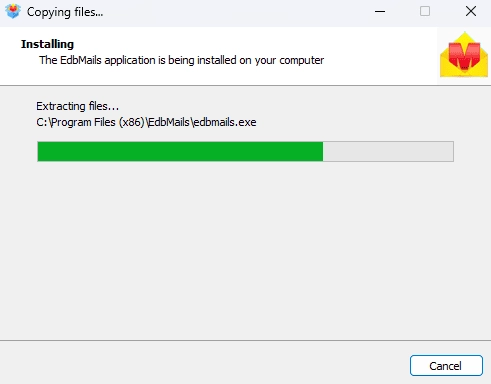
      EdbMails software installation

    • Open the EdbMails application
    • Enter your email address and password, then click ‘Login’. If you don’t have an account, click ‘Start Your Free Trial’ to continue using the trial version.
        Note: The Free Trial version lets you explore the software features and export up to 30 items from each and every folder. To unlock full functionality, you need to purchase a valid license from the EdbMails website.

       Click here to purchase the license from the EdbMails website.

      After completing the purchase, close and relaunch the EdbMails application, then login using the same email address and password used during the purchase to activate your license.
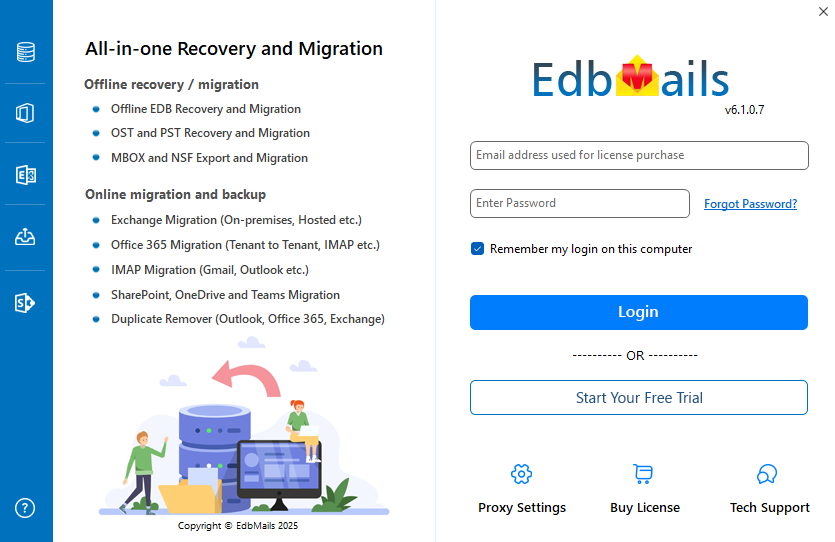
      Login to EdbMails application

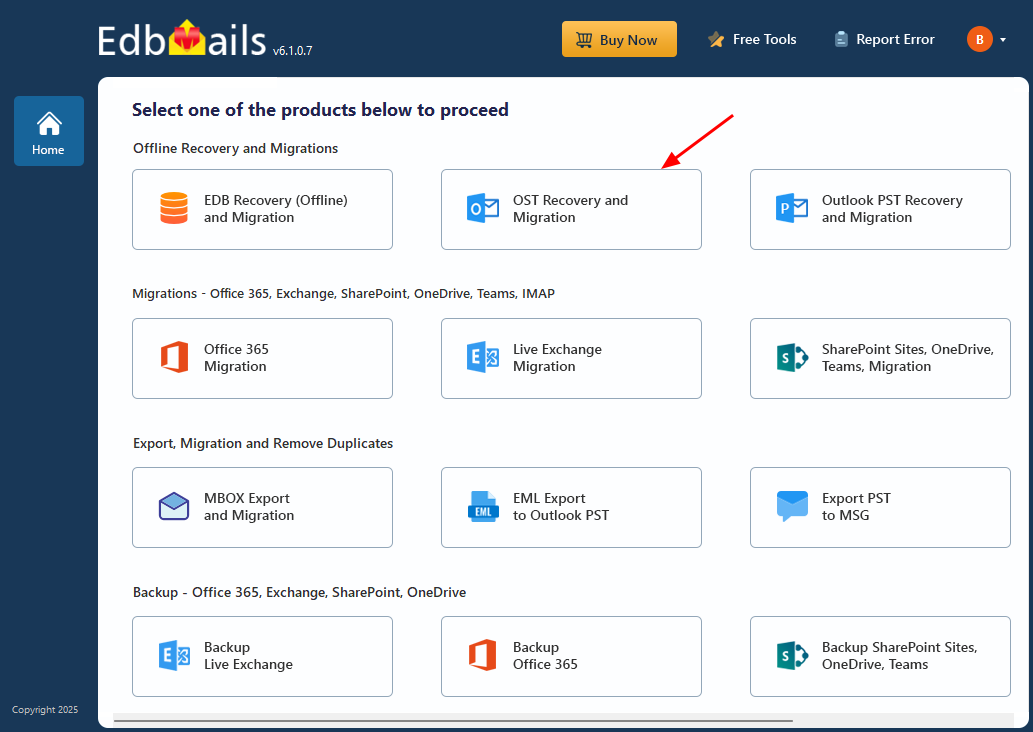
    • Select ‘OST Recovery and Migration’.

      Select OST Recovery and Migration

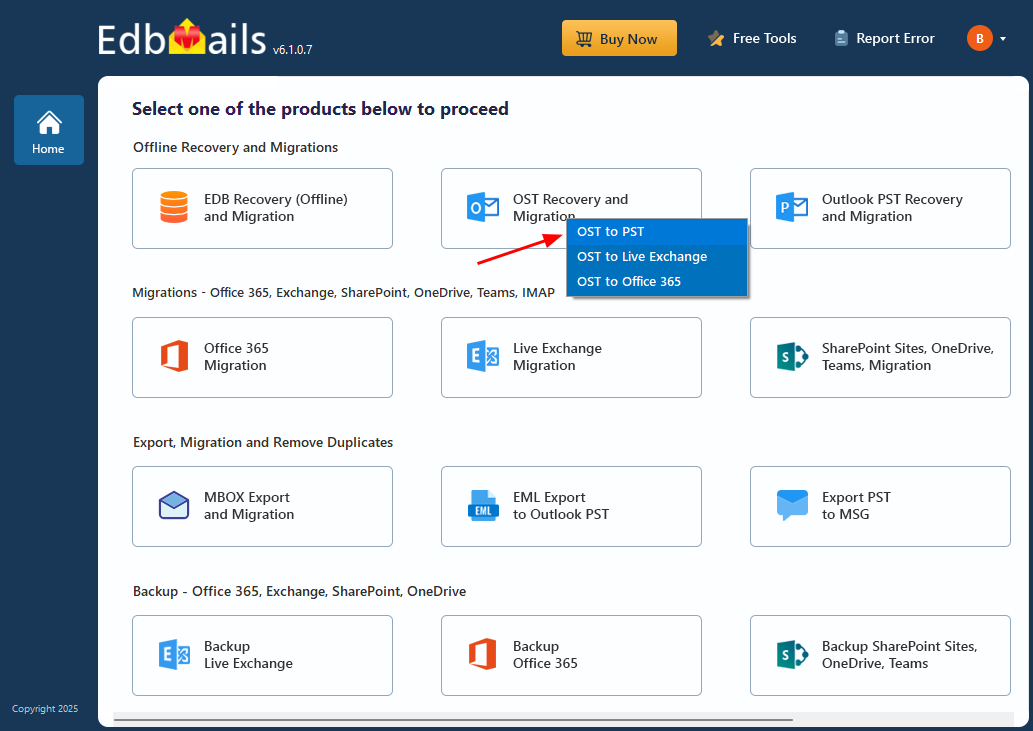
    • Select ‘OST to PST’.

      Select OST to PST

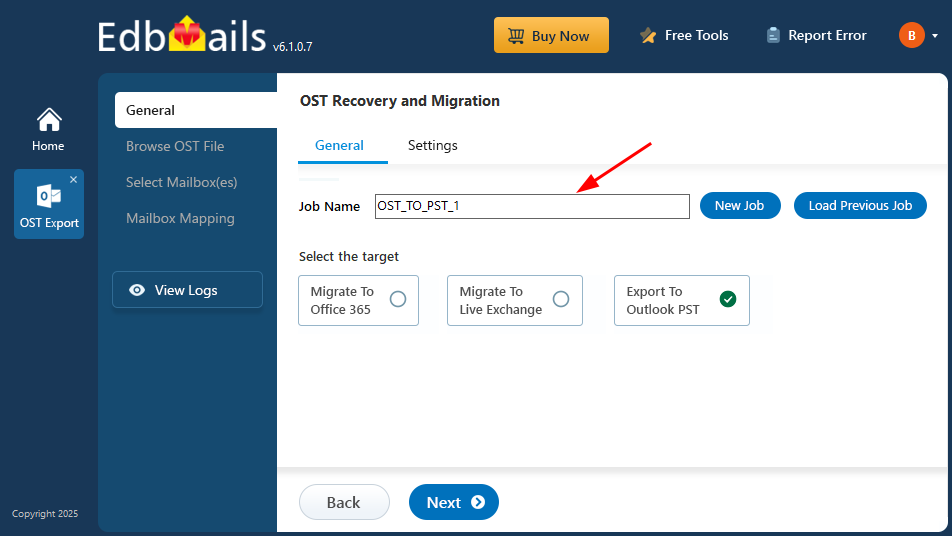
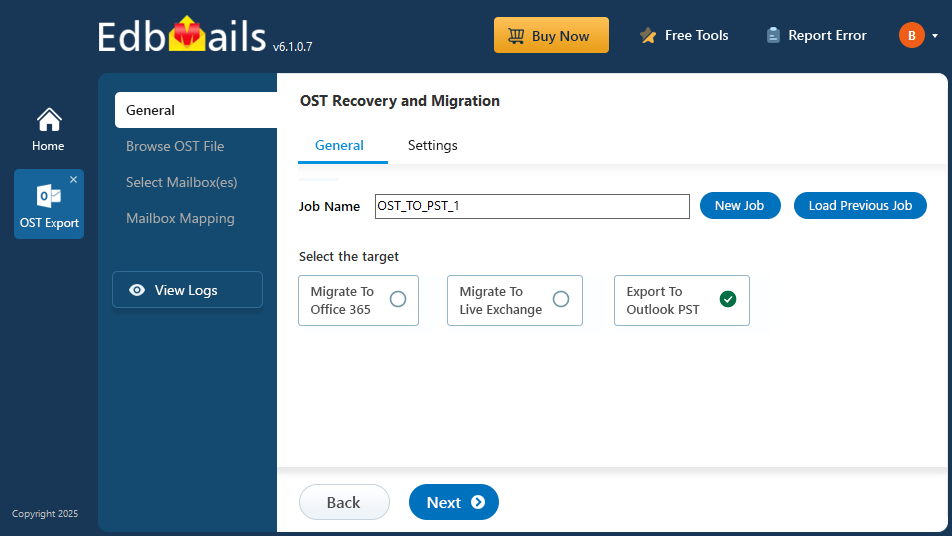
    • You can retain the default job name or click the ‘New Job’ button to change the job name.
    • Then click 'Next' to continue.

      Enter export job name

    Step 2: Select the OST file containing your mailbox data

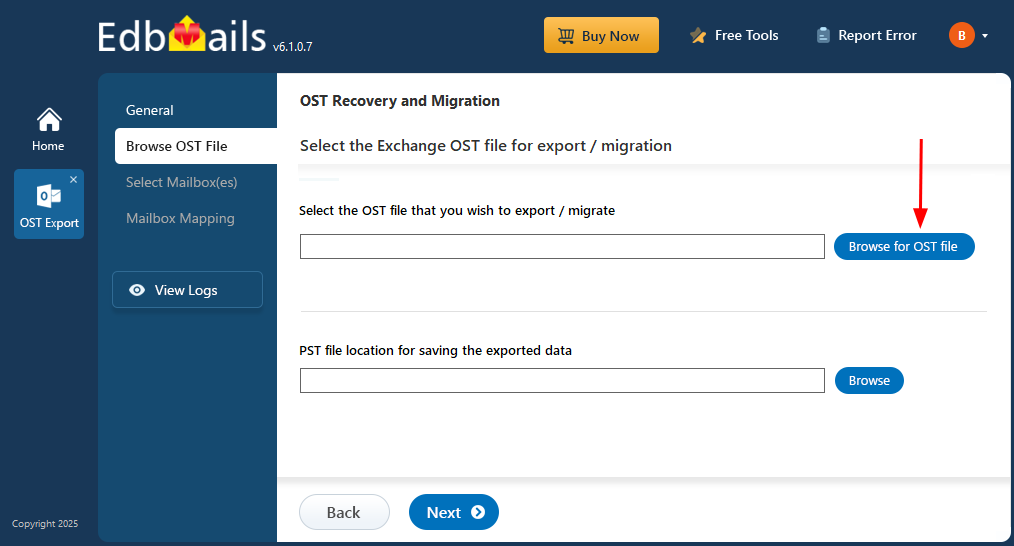
    • Click ‘Browse for OST file'.

      Browse for EDB file

    • Select the offline OST file from your local drive, then click the ‘Next’ button to continue. You can also share the OST file on a network with read and write permissions assigned.
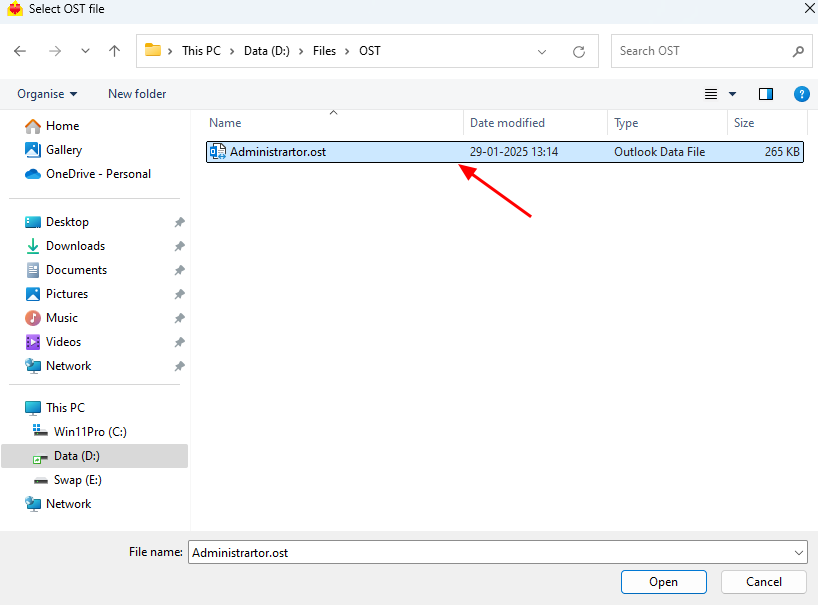
      Select OST file

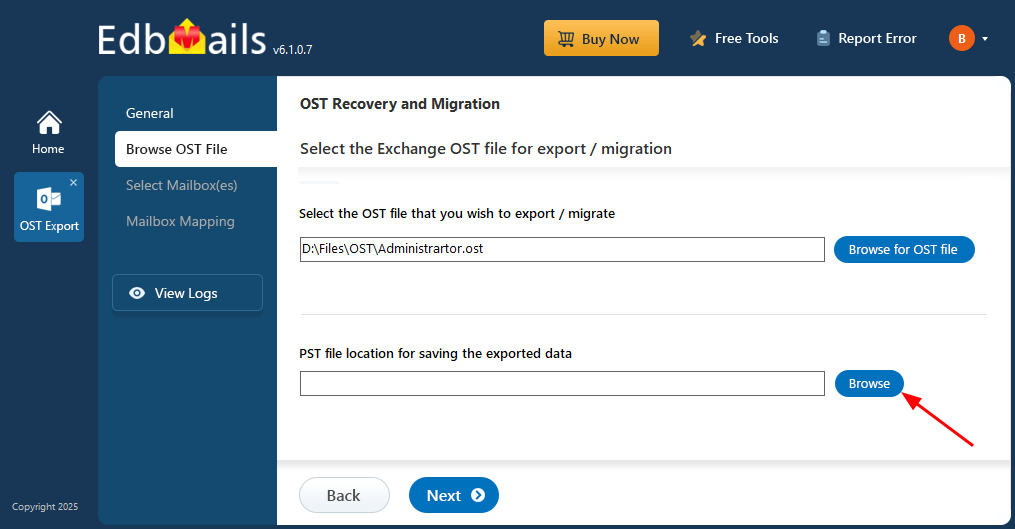
    • Click ‘Browse’.

      Click Browse

    • Choose the destination folder for saving the exported PST files and make sure the drive has sufficient free space to accommodate the data.
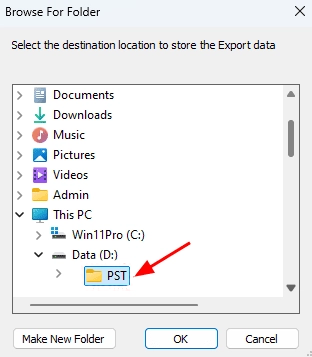
      Select PST location

    • Even if the OST file is damaged/corrupted, EdbMails scans the offline OST file and recovers mailbox data. In this process the tool scans the file structure and content to extract emails and other mailbox items. This will take some time, depending on the size of the file and how corrupt it is. Wait for the scan to finish to make sure it is fully recovered.
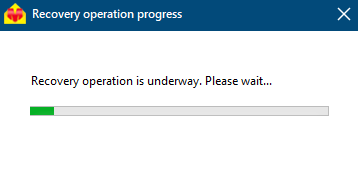
      Recovery operation progress

    • After the process of recovery is over, you can view the data of the OST file in the application interface with all the folder and subfolder structure. You can open any folder or sub-folder to see what it contains. You can choose a folder, for example, Emails, Contacts, Notes, Tasks, or Calendar. The app will then display all of the items in the folder and a detailed preview of the selected item on the right-hand side of the interface. Using the EdbMails OST to PST Converter, you can access OST files without Outlook .

    Step 3: Preview and select the mailbox

    • Select the required mailboxes/folders and click the ‘Next’ button.
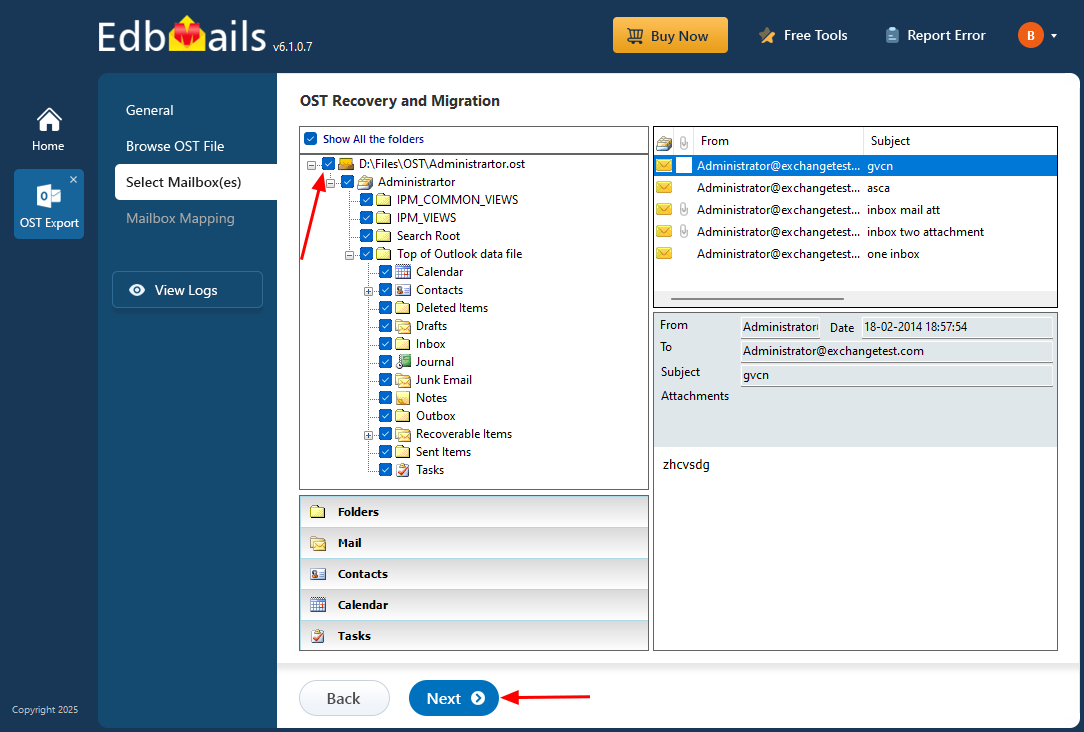
      Select mailboxes or folders

      EdbMails allows you to apply filters to customize your export process. For example, you can use date filters to export items within a specific date range. To do this, go to the ‘General’ tab on the left side and then click the ‘Settings’ tab at the top right.

       Click here to learn more about setting date filters for OST to PST conversion.

    Step 4: Export the rebuilt OST file to PST

    • EdbMails OST to PST converter gives fast and accurate conversion of offline OST files to PST format. Check the mailboxes and folders selected for the export operation. Ensure the ‘Action’ is set to ‘Export’ and then click on the ‘Start Export’ button to initiate the export process.
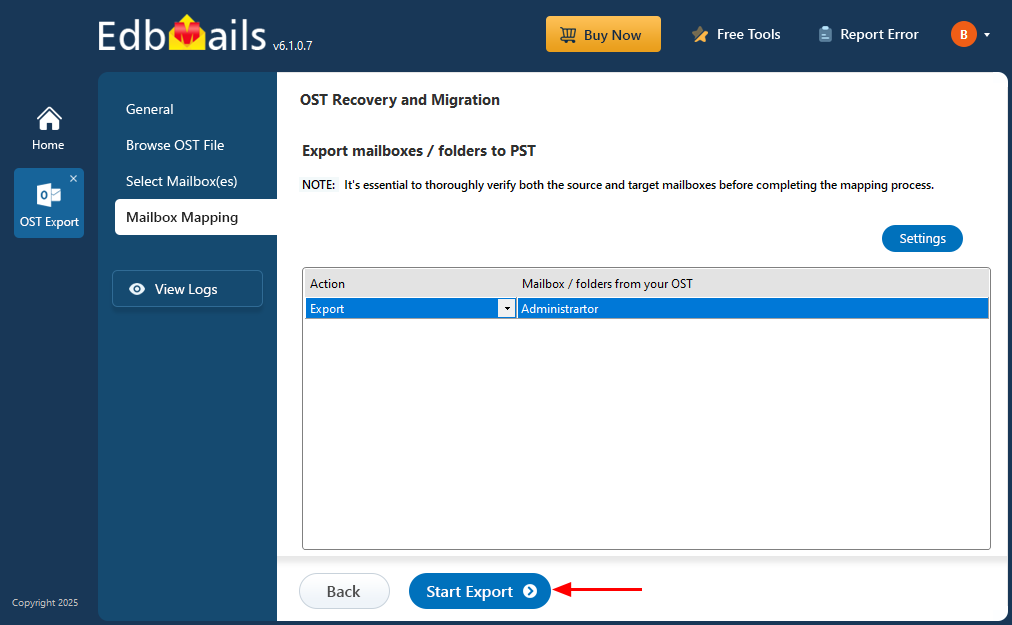
      Start OST to PST Export

    • The export is in progress, and the status bar shows the progress. The interface displays the mailbox and folder to be exported, the location of the destination PST file, and the number of items exported successfully. After the export is complete, EdbMails will show a message that the operation has completed.
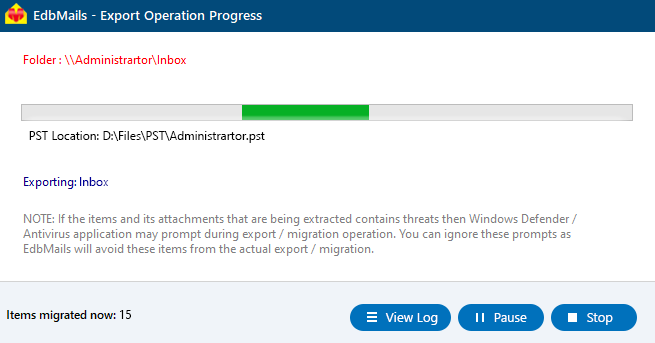
      OST to PST Export progress

    • When the export is done, you can import the PST file back into Outlook and open up all the attachments as usual. With EdbMails, you can also extract individual mail items and save them as HTML, EML, or MHT for easy viewing and archiving.

Additional resources:

  • Recover Orphaned OST file
  • Recover all Exchange and Outlook OST files
  • Export unlimited OST files to PST
  • Free OST file viewer
additional resource

 In this manual

IntroductionMetadata common usesSteps to convert OST to PST

OST Recovery and Migration

Just $45 Onwards

Buy Now

Need help?

24/7 Customer support

Contact us on Live chat

Personalized Demo

Book a personalized demo

Still need help?

Email us / Call us

© 2026 Shifttocloud Inc. Privacy Policy | Terms of Use | GDPR | Security | Press Releases

hidden msg
Live Chat

Hi, May I help you?

Hide Chat Now