


Split an Oversized OST File into Multiple PST Files
Outlook OST files contain a complete copy of the mailbox data including emails, contacts, calendars, tasks, and notes. With increased mailbox usage over time these OST files can grow to be very large. If the file size becomes too large, it can slow Outlook down, create synchronisation issues, or even crash, especially if it is at or above the size limits for Outlook.
To maintain Outlook’s gradual performance and to ensure a steady access to data, it is often necessary to split huge OST files into smaller PST files. It’s easier to handle, better organised, and more convenient to back up and migrate smaller files, especially when it comes to older or archived mailbox data.
EdbMails OST to PST Converter is a powerful tool for precise conversion. It extracts data from large OST files and allows you to split them into multiple PSTs without losing folder structure and data integrity. You will be shown how to do it smoothly and securely in this step-by-step guide.
How to Split Oversized OST Files to Multiple PST Files during Export
- EdbMails OST to PST Converter: You can use EdbMails OST to PST Converter. It has a built-in option to split OST files into multiple PST files in the export process, which makes it easier to manage the output files and easier to import them back to Outlook.
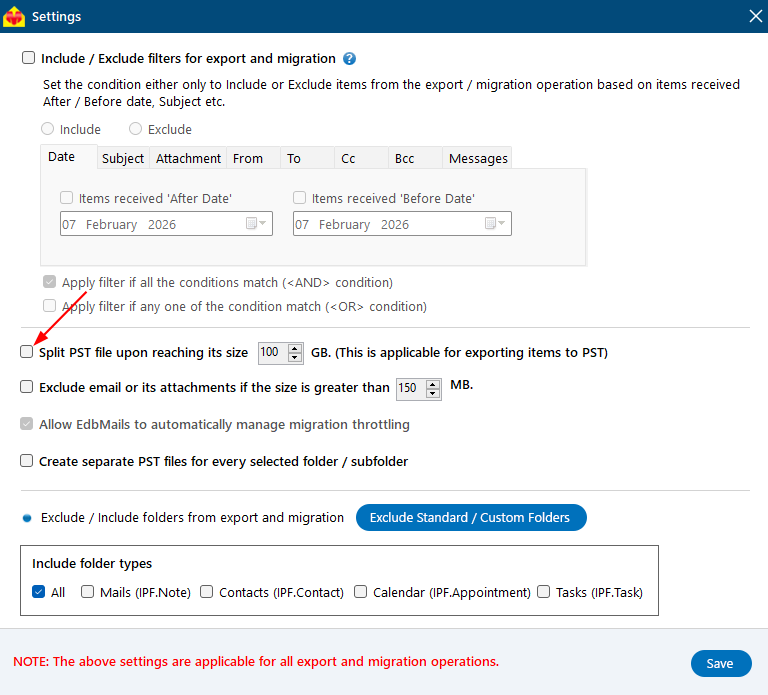
- Enable PST Split Option: To enable the above feature, Open the ‘Settings’ menu and select – Automatically split PST file upon reaching the size during export. Specify the maximum size of each PST file to suit your needs.
- Configure and Run the Export Process: Now that the size limit is in place, you can go ahead and do the conversion. The tool preserves the configuration and generates multiple PST files rather than one large file.
- Ensure Safe and Smooth Export: This process saves PST from corruption, increases manageability and smoothens and makes the conversion of large OST files efficient.
Real time scenarios of EdbMails OST file split function
- Large email archives: Organisations that use MS Outlook for email communication frequently end up with large amounts of email data over time. Managing this data in one large OST file can become difficult to handle properly. EdbMails can split the OST file into multiple PST files that can be organised better, can be managed easily and can improve performance.
- Limited Storage Space: If you have limited storage space on your computer then managing large OST files can be a challenge. The splitting OST file into multiple PST files helps you to export and manage your email data more efficiently. It helps you to overcome the storage limitations along with keeping your Outlook performance uninterrupted.
- Enhanced data access: Break down large OST files into multiple PST files for simpler access to specific data. If you break the data into smaller files that are more structured , you can quickly search and access the information you need . It makes your work more efficient and the data easier to use.
- Compliance needs: Organizations may have certain compliance regulations demanding for specific file format or file sizes when it comes to storing email data. EdbMails can help you break OST into PST files in a hassle free way, which can satisfy such requirements and efficiently organize the data.


