


Best Exchange Migration Software
EdbMails provides a comprehensive solution for Exchange Migration. The software enables secure migration of mailboxes, public folders, archive mailboxes, and shared mailboxes from source Exchange servers to different destinations such as Exchange, Office 365, and Hosted Exchange environments. It also allows Exchange data to be migrated to PST files and supports large-scale PST migration to Exchange servers.
EdbMails enables direct mailbox migration between different Exchange Server versions, including Exchange 2019, 2016, 2013, 2010, and 2007. The migration process runs smoothly without double-hop methods, complex PowerShell scripts, or the need to create PST files, ensuring a simple and efficient migration experience.
With powerful capabilities such as incremental migration, concurrent mailbox migration, cross-domain and cross-forest migration, along with automatic throttling control, EdbMails is widely trusted as a reliable solution for Exchange migration. It ensures smooth mailbox migration with zero downtime while maintaining consistent performance throughout the process.
Exchange Migration Common Challenges
Exchange migration faces many challenges such as data loss, duplication, Exchange server throttling, hybrid configurations etc., affecting the overall success of the migration. Let's explore the common challenges in more detail.
- Data Loss or Corruption: Incorrect data mapping during migration can lead to data loss or corruption, resulting in discrepancies and integrity issues in the migrated data.
- Data Duplication: Lack of de-duplication can cause data replication before or during migration, leading to inaccuracies and data redundancy in the new system.
- Exchange Throttling: Exchange server throttling can affect the efficiency of data migration, requiring careful management for a successful migration.
- Hybrid Configuration: Integrating on-premises Exchange with cloud-based services in a hybrid setup can introduce complexities, impacting data migration and synchronization.
- Coexistence: Maintaining coexistence between old and new systems during migration can be complex, necessitating thorough planning for a smooth migration.
- Cross-forest / Cross-domain Migration: Migrating data between different forests or domains introduces complexity, including diverse directory structures and access control challenges.
- Performance Issues: Large-scale Exchange migrations can strain system performance, causing slowdowns and impeding data access in the new system.
- Inconsistent Data: Inconsistent data may arise when data isn't adequately validated or tested before migration, potentially resulting in errors and inaccuracies.
- Technical Challenges: Compatibility issues between systems or network connectivity problems can affect the migration process, leading to errors or delays.
EdbMails Exchange migration software addresses all the above-mentioned challenges and ensures a smooth and successful migration.
Native Microsoft tools vs. third-party software
| What you need | Native Microsoft tools | EdbMails |
| Setup | PowerShell scripting or manual configuration of cutover/staged/hybrid migrations | Guided interface, no scripting required |
| Downtime | Often required, especially with cutover migrationnal cutover | None, mailboxes stay accessible during the migration |
| Mailbox limits | Cutover migration is capped at a few hundred mailboxes | No practical mailbox limit |
| Resuming after failure | Usually requires restarting the process | Resumes and supports incremental sync, migrating only new or modified items without creating duplicates |
| Filtering options | Limited, requires custom scripting | Built-in filters by date, folder, sender, and more |
| Cross-forest or cross-domain moves | Needs additional configuration and often a double-hop | Handled natively |
| Migration monitoring | Command-line output, minimal visibility | Visual dashboards and detailed logs |
| Support | Microsoft documentation and community forums | Free 24/7 live support |
Migration Scenarios Supported by EdbMails
EdbMails handles a wide range of migration scenarios, including direct mailbox migration between servers in different Active Directory forests, and moving data from Exchange 2010 or later straight to Exchange 2016/2019, so you can skip the double-hop process usually needed when migrating from Exchange 2010 to 2019.
Migrate between any Exchange Servers
Migrate mailbox data directly between on-premises Exchange servers. Supports Exchange 2007 through 2019, and you can choose exactly which server to migrate to.
Learn more about the steps to migrate Exchange servers
Migrate from Exchange server to Office 365
Migrate directly from Exchange 2010 or later (including Exchange 2019) to Microsoft 365. No need for PST export/import or hybrid setup.
Learn more about the steps to migrate from an Exchange server to Office 365
Migrate from Exchange to IMAP
Migrate mailboxes from Exchange to IMAP-based platforms such as Gmail, Zimbra, and Zoho etc.
Learn more about the steps to migrate from Exchange server to IMAP
Export Exchange mailbox to PST
Export full mailbox data to PST files for backup or archiving. Large mailboxes can be split into smaller PST files using the Split PST option.
Learn more about exporting Exchange to PST
Restore PST to Exchange Server
Bulk import multiple PST files into an on-premises Exchange server, including emails, calendars, and contacts. Handy for consolidating data from legacy systems.
What Makes EdbMails Stand Out for Exchange Mailbox Migration
EdbMails comes packed with features built for a smooth and secure migration, including concurrent mailbox migration, support for multiple migration types, incremental migration, automatic mailbox creation, and auto mapping.
Easy to Set Up: Getting started takes just a few minutes. A guided wizard walks you through connecting your source and target servers, so there's no need to run PowerShell commands. The interface is designed to get your migration done in just a few clicks.
Concurrent Mailbox Migration: EdbMails supports concurrent mailbox migration, enhancing the efficiency of the migration process. This feature enables the simultaneous migration of multiple mailboxes for improved performance and faster results.
Built with Security in Mind: EdbMails uses secure Microsoft APIs and follows Microsoft's recommended migration flow. Your credentials and data are never stored on our servers. For Office 365 migrations, authentication is handled through OAuth 2.0 and TLS encryption, using modern authentication based on MSAL and Microsoft Graph.
Incremental Migration: Also known as delta migration, this feature migrates only new or changed items between the same source and destination mailbox. It helps avoid duplicate data, saves time, and reduces bandwidth and storage use on the target server.
Unlimited Public Folder Migration: Migrate as many Exchange public folders as needed for a domain (this uses 50 mailbox licenses). Public folders can be migrated to mailboxes, other public folders, or archive mailboxes on the target server.
Automatic Mailbox Creation: EdbMails creates mailboxes on the target server automatically, so there's no manual setup involved. This keeps things accurate and saves time.
Mailbox Auto-mapping: Source and target mailboxes are matched automatically, though manual mapping is also available if you need more control. This is especially useful for large migrations.
Zero Downtime: Your Exchange servers stay up and running throughout the migration, even during business hours. Users can keep accessing their mailboxes without interruption, and you can switch over to the target server as soon as the migration finishes.
Detailed Migration Reports: EdbMails provides detailed Exchange migration reports that give you a clear, transparent view of your migration's progress. These reports include insights into items that have been migrated, any errors encountered, and the overall completion status, so you always know exactly where things stand.
24/7 Free Tech Support: Round-the-clock support is available via live chat or phone, so help is always within reach if you run into any issues during migration.
Cost-effective Pricing: Pricing is based on the number of source mailboxes, making it easier to plan your budget. Lifetime plans scale with your business, and every plan includes free 24/7 support and free software upgrades.
Steps to Perform Exchange Server Migration Using EdbMails
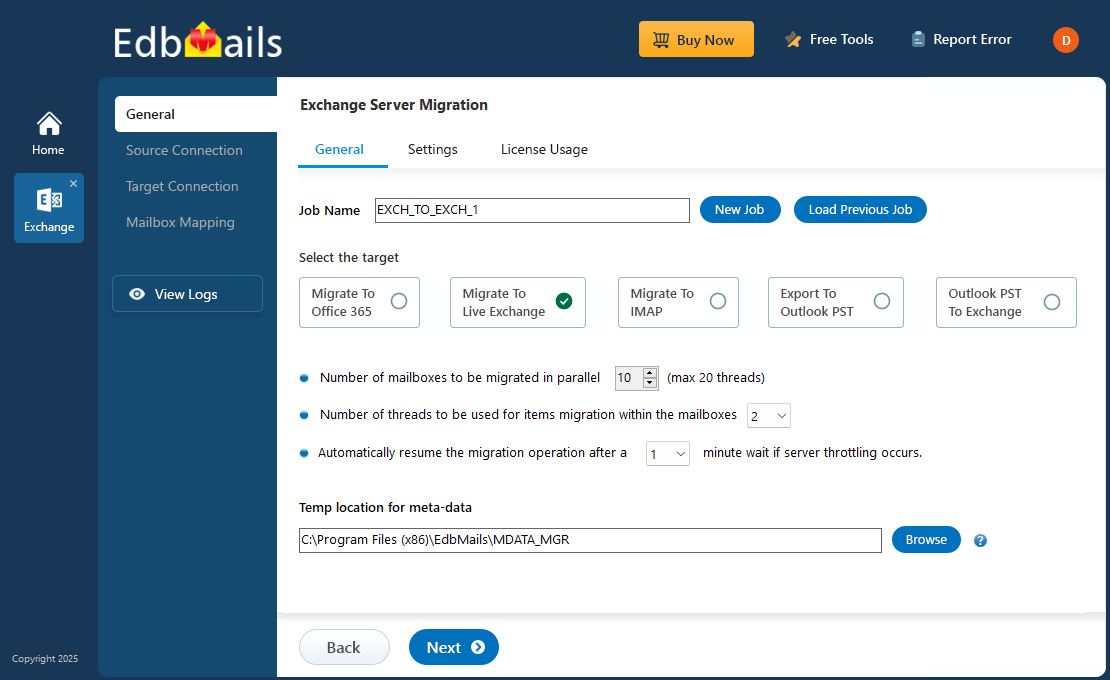
EdbMails makes Exchange server migration straightforward with a guided process for moving mailboxes between Exchange servers. The following steps outline how to perform the migration using the EdbMails application.
Step 1: Download and launch the EdbMails application.
Step 2: Select Live Exchange Migration and connect to the source Exchange server.
Step 3: Select the source mailboxes you want to migrate.
Step 4: Connect to the target Exchange server.
Step 5: Start the Exchange migration process.
See the step-by-step guide to perform Exchange to Exchange migration
Frequently Asked Questions
Which is the best software for Exchange migration?
EdbMails consistently ranks as the best software for Exchange migration. Its intuitive interface, extensive feature set, and impressive performance make it a standout option for organizations in need of a trustworthy Exchange migration tool.
Is there a trial option available for EdbMails Exchange server migration before making a purchase?
Yes, EdbMails provides a Free Trial to evaluate the best tool for Exchange Migration features. This version allows you to explore all the functionalities of the software before making a purchase.
Does EdbMails support migrations from hosted Exchange environments?
Yes. EdbMails supports migrations from hosted Exchange environments. To successfully migrate from hosted Exchange services, the following requirements should be met:
If you are using a global admin account to connect your Exchange servers, it is necessary to grant impersonation rights to that account on both the source and target servers to facilitate the migration of all other mailboxes. In the case of migrating to Office 365, EdbMails automatically configures impersonation rights for Office 365 global admin accounts.
If your migration involves multiple mailboxes with 'Full Access Permissions', you should create a CSV file containing a list of matched source and target mailboxes for the purpose of loading these mailboxes. The CSV file should include the email addresses or Domain Name of all the mailboxes that are part of the migration process.
Does EdbMails support migrating archive mailboxes (In-Place Archives)?
Yes, EdbMails supports the migration of archive mailboxes from your Exchange server. You can select the mailbox type as 'Connect to Archive Mailbox' in the 'Connect to Exchange server (Source/Destination)' window. You can migrate the contents of source archive mailboxes to primary mailboxes, public folders, or archive mailboxes on your target Exchange server.
Do I need to pay for tech support for EdbMails Exchange server migration?
No, there are no additional charges for technical support. EdbMails provides free 24/7 technical support for all its products.
Can I buy additional licenses for Exchange mailbox migration?
Yes, you can purchase additional licenses for the same account as you have used previously in the EdbMails for purchasing the license. Simply login to EdbMails website with the appropriate account and purchase the number of licenses you want.
Can EdbMails be used to migrate public folders within the same Active Directory forest?
No, you cannot create a secondary public folder infrastructure within the same AD forest due to limitations in Exchange Server. EdbMails Exchange Migration supports public folder migration only in a cross-forest migration scenario.
You can migrate public folders in a hybrid environment, from on-premises Exchange to Office 365 (Microsoft 365) with additional configurations as detailed in this article, since having public folders simultaneously in both on-premises Exchange and Office 365 (Microsoft 365) is not supported.
Does the EdbMails software result in any data deletion from the source server during the migration process?
No, EdbMails does not make any alterations to the data on your source or destination servers. It migrates the data and keeps the exact folder structure from the source server to the target server.


