EdbMails EDB Recovery and Migration software
  • Products
    EdbMails
    All-in-one Recovery and Migration
    Explore our products
    • EDB recovery and Migration
    • OST, PST, MBOX, NSF, EML, MSG
    • Office 365, Exchange Migration
    • SharePoint, OneDrive & Teams
    • G Suite Migration
    • IMAP Migration
    • Duplicate Remover
    • Windows Data Recovery
    • Backup Solutions

    EDB Recovery and Migration

    EdbMails lets you recover corrupted, damaged, and offline Exchange EDB files, convert EDB mailboxes to PST format, and directly migrate mailbox data to Office 365 and live Exchange Server.

    EDB to PST
    Recover corrupted, damaged, offline EDB files and convert Exchange EDB mailboxes to PST file format
    Public Folder to Exchange
    Migrate public folders from an Exchange offline EDB file to live Exchange Server
    EDB to Live Exchange Migration
    Directly migrate offline Exchange database (EDB) files to live Exchange server
    Archive Mailbox to Office 365
    Migrate archive mailboxes from offline EDB files directly to Office 365
    EDB to Office 365 Migration
    Directly migrate offline Exchange database (EDB) files to Office 365
    Public Folder to Office 365
    Migrate public folders from an offline Exchange EDB file to Office 365

    OST, PST, MBOX, NSF, EML, MSG Export and Migration

    EdbMails lets you to recover OST and PST files, export OST, PST, MBOX, NSF, EML, and MSG files to PST files, and directly migrate OST, PST, MBOX, and NSF mailbox data to Office 365 and live Exchange Server.

    OST Recovery and Migration
    Recover offline OST files, convert OST to PST, and migrate OST to Office 365 and Exchange Server
    PST Recovery and Migration
    Recover Outlook PST files , Export PST to PST, migrate PST to Office 365 and Exchange Server
    MBOX Export and Migration
    Export MBOX to PST, migrate MBOX to Office 365 and Exchange Server
    NSF Export and Migration
    Export NSF to PST, migrate NSF to Office 365 and Exchange Server
    EML to PST Export
    Convert EML files to Outlook PST files
    PST to MSG Export
    Convert Outlook PST file to MSG file format
    MSG to PST Export
    Export MSG files to Outlook PST files

    Office 365, Exchange Migration

    EdbMails lets you securely migrate mailboxes across Microsoft 365, Exchange, Google Workspace (G Suite), and IMAP-supported servers such as Outlook, Gmail, Zimbra, Zoho Mail, and cPanel, ensuring zero downtime.

    Office 365 Migration
    Migrate between Office 365 tenants, Office 365 to Exchange, Office 365 to PST, PST files to Office 365.
    Exchange Migration
    Migrate between any Exchange Servers, Exchange to Office 365, Exchange to PST, PST files to Exchange.
    Tenant to Tenant Migration
    Migrate Mailboxes, Public Folders, Archive Mailboxes between Office 365 Tenants.
    Exchange to Office 365
    Migrate Mailboxes, Public Folders, Archive Mailboxes from live Exchange server to Office 365.
    Office 365 to IMAP
    Migrate Office 365 to IMAP, Office 365 to Gmail, Office 365 to Outlook, Office 365 to Zoho etc.
    Exchange to IMAP
    Migrate from live Exchange Server to IMAP servers such as Gmail, Outlook, and Zoho Mail.
    Public Folder to Office 365
    Migrate Public Folders between Office 365 tenants with complete folder hierarchy and mailbox data integrity.
    Exchange to PST
    Export live Exchange Server mailboxes, public folders, and archive mailboxes to Outlook PST files.

    SharePoint, OneDrive & Microsoft Teams Migration

    EdbMails lets you migrate SharePoint sites, OneDrive data, Microsoft Teams, teams, channels, chats, permissions, and documents between Microsoft 365 tenants while maintaining the existing folder structure and data integrity.

    SharePoint Online Migration
    Migrate documents, lists, files and folders from SharePoint sites.
    OneDrive for Business Migration
    Migrate documents, lists, files, folders, private chats from OneDrive.
    Microsoft Teams Migration
    Migrate Teams, chats, channels, documents, files and folders etc.

    Google Workspace / G Suite Migration

    EdbMails G Suite Migration Tool lets you easily migrate emails, calendars, contacts, tasks, and more from G Suite to Office 365, Exchange Server, and IMAP servers using a Google Admin account without requiring individual user credentials.

    G Suite Migration
    Migrate emails, calendars, contacts, tasks from G Suite to Office 365, G Suite to Exchange, G Suite to IMAP Servers
    G Suite to Office 365
    Migrate emails, calendars, contacts, tasks from Google Workspace / G Suite to Office 365
    G Suite to Exchange Server
    Migrate emails, calendars, contacts, tasks from Google Workspace / G Suite to on-Premise Exchange Server
    G Suite to IMAP
    Migrate emails, calendars, contacts, tasks from Google Workspace / G Suite to IMAP, Outlook, Zimbra, Zoho etc.

    IMAP Migration

    EdbMails IMAP Migration tool lets you easily migrate emails from IMAP servers such as Outlook, Gmail, Zoho Mail, Zimbra, cPanel, and more. Supports IMAP to IMAP, Office 365, Exchange Server, PST, and bulk PST to IMAP migration.

    IMAP Email Backup & Migration
    Backup and migrate emails from IMAP servers to PST, Office 365, and On-Premises Exchange Server
    IMAP to Office 365
    Migrate emails, folders, and attachments from IMAP servers to Office 365
    IMAP to Exchange
    Migrate emails, folders, and attachments from IMAP servers to on-premises Exchange Server
    IMAP to PST
    Export emails, folders, and attachments from IMAP servers to Outlook PST files for backup
    PST to IMAP
    Migrate emails, folders, and attachments from bulk PST files to IMAP servers

    Duplicate Remover

    EdbMails Duplicate Remover lets you easily remove duplicate items from Office 365 and Exchange Server, and from IMAP, Outlook, Gmail, Zimbra, Zoho Mail, etc., ensuring a clean and organized mailbox.

    Remove Duplicates
    Easily clean up your Office 365, Exchange, Outlook and IMAP accounts by removing duplicate emails.
    Remove Duplicates from Office 365
    Remove duplicate emails, calendars, contacts, journal tasks, etc. from Office 365.
    Remove Duplicates from Exchange Server
    Remove duplicate emails, calendars, contacts, journal tasks, etc. from live Exchange Server.
    Remove Duplicates from IMAP, Outlook
    Remove duplicate emails, attachments from IMAP, Outlook, Gmail, Zimbra, Zoho Mail etc.

    Exchange, SharePoint, OneDrive, Teams and Office 365 Backup

    EdbMails enables secure, automated backup and recovery for Microsoft 365 services including Exchange Online, SharePoint, OneDrive, Teams, and Live Exchange Server with complete data protection and restore flexibility.

    Office 365 Backup
    Incremental, Granular, Encrypted and Compressed Office 365 Mailboxes Backup
    Exchange Server Backup
    Incremental, Granular, Encrypted and Compressed Exchange Mailboxes Backup
    SharePoint, OneDrive & Teams Backup
    Backup Online site collections, Team sites, Office 365 groups, all documents etc.

    Windows Data Recovery

    EdbMails Windows Data Recovery Software lets you recover permanently deleted data, including photos, videos, documents, and archived files, from partitions on hard drives, SSDs, USB drives, SD cards, and external storage devices.

    Windows Data Recovery
    Recover and restore permanently deleted data from hard drives, SSDs, USB drives, SD cards, and etc.
    Whitepaper
    Request a Demo
    Sign Up
  • Features
  • FAQ
  • Pricing
  • Download
  • Support
  • Sign in
User’s Manual
Exchange Server Migration

User Manual

User Manual

  • Exchange Migration Overview
  • Initial Setup
  • System Requirements
  • Migration Scenarios
  • Installation
    • Installation process
    • Reinstall or Upgrade
    • How to uninstall
  • FAQ
    • General
    • Migration Free Trial / Demo
    • Migration License
    • Before Migration
    • Migration - Steps
    • After Migration
  • Videos
    • Exchange to Exchange
    • Exchange to Office 365
    • Exchange to IMAP
    • Exchange to PST
    • Public Folder to Office 365
    • Archive Mailbox to Office 365
    • Public Folder to Exchange
    • Archive Mailbox to Exchange
    • Restore Bulk PST files to Exchange
  • Screenshots
    • Exchange to Exchange
    • Exchange to Office 365
    • Exchange to PST
  • Understanding the Application
    • Migration
    • Migration Speed
    • Incremental Migration
    • Exchange Throttling Policy
  • How it works?
    • Exchange to Exchange
    • Exchange to Office 365
    • Exchange to PST
    • Exchange to IMAP
    • Exchange Public Folder to Office 365
    • Exchange Public Folder to Exchange
    • Exchange 2010 to 2016 Public folder
    • Exchange 2013 Public folder to Office 365
    • Exchange 2016 Public folder to Office 365
    • Exchange Public Folder to Shared Mailbox
    • Archive Mailbox to Office 365
    • Archive Mailbox to Exchange
    • Hosted Exchange Migration
    • Hosted Exchange to Live Exchange Migration
    • Hosted Exchange to Office 365 Migration
    • Live Exchange to Hosted Exchange Migration
    • Hosted Exchange Public Folder to Office 365 Migration
    • Cross-forest migration from Exchange 2013 to Exchange 2019/2016
    • Hybrid Migration
    • Public folder Migration in Hybrid Environment
    • Disable msExchMailboxGuid
    • Exchange to Gmail Migration
    • Multiple PST to Exchange server
    • Hosted Exchange to Office 365 Shared mailbox
  • Connect to Exchange server for multiple mailboxes migration
    • Connect with Global Admin
    • Connect to Multiple users using CSV file
    • Connect using full access permission
    • Connect individual users for Single / Specific user Migration
  • Connect to Hosted Exchange for its Migration
    • Connect with Full Access permissions
    • Connect to multiple users using CSV file
    • Connect to Individual user for migration
  • Connect to target Office 365
  • Modern Authentication Using OAuth 2.0
    • Microsoft 365 modern authentication
    • Automatic Registration
    • Manual Registration
  • Set Exchange Server Impersonation rights
    • Exchange 2007 and below
    • Exchange 2010, 2013, 2016 and 2019
    • Set using Exchange Server GUI
  • Knowledge Base
    • Exchange to Exchange Migration
    • Exchange to Office 365 Migration
    • Migrate Legacy Exchange to Latest Exchange
    • Cross-forest and cross-domain migration
    • Public folder, Shared mailbox migration
    • Archive mailbox migration
    • Hosted Exchange Migration
    • Incremental migration
    • Cutover, staged and hybrid migration
    • Migrate SBS 2003, 2008, 2011 to a Modern Exchange Environment
    • Export Exchange Mailbox to PST
    • Secure Exchange Migration
    • Selective Mailbox / Folder Migration
    • Automatic Mailbox Mapping
    • Assign Public Folder to one target destination
    • Multiple PST Restore
    • No Impact on users - Zero downtime
    • Migrate Email Rules, Forwarding and Junk Email Configuration
    • Exchange migration speed and throttling management
    • Support for all the languages
    • Advanced settings and options
    • GAL and all address lists Migration
    • Exchange migration reports
    • Best Exchange Migration software
    • Exchange migration checklist
    • Exchange migration manager
    • Feature rich Exchange migration software
    • Exchange to Office 365 migration planning
    • Exchange server migration tips
    • Export Exchange server users to CSV
    • Create a Public folder in Exchange Server 2010
    • Load Exchange mailboxes from CSV file
    • Language settings on Exchange server
    • Export and import Exchange Retention Policy Tags
    • Fix Outlook security alert after migration
    • Assign public folders to Exchange
    • Connect to Exchange with Default Connection
    • Connect to Exchange with Autodiscover Email
  • Set Office 365 Impersonation rights
    • Using PowerShell commands
    • Using Office 365 GUI
  • Migration Types
    • Cutover Migration
    • Staged Migration
    • Hybrid Migration
  • Map the Mailboxes
  • Migration Walkthrough
    • From Exchange 2003
    • From Exchange 2007
    • From Exchange 2010 to Exchange 2019
    • From Exchange 2010 to Exchange 2016
    • From Exchange 2010 to Office 365
    • From Exchange 2013 to Exchange 2019
    • From Exchange 2013 to Exchange 2016
    • From Exchange 2013 to Office 365
    • From Exchange 2016 to Exchange 2019
    • From Exchange 2016 to Office 365
    • From Exchange 2019 to Office 365
    • From Office 365
    • Exchange 2013 mailbox to PST
    • Exchange 2016 mailbox to PST
    • Exchange 2019 mailbox to PST
    • Exchange 2010 mailbox to PST
  • Multifactor Authentication
    • Enable MFA in Office 365
    • Create App password for MFA
    • Disable Security Defaults
    • Disable MFA in Office 365
  1. Home
  2. Product
  3. How to Export Exchange 2013 Mailboxes to PST
Download Buy Now

Export Exchange 2013 Mailbox to PST

With Microsoft ending support for Exchange Server 2013 on April 11, 2023, organizations still using it now face higher risks in terms of security, compliance, and system stability. Without ongoing updates or technical support, Exchange 2013 environments become more exposed to cyber threats and unexpected issues. Because of this, it’s important for IT teams to act early, protect mailbox data, and plan a smooth migration or reliable long-term archiving strategy to avoid disruptions.

One of the most effective strategies is to export Exchange 2013 mailboxes to PST (Personal Storage Table) files. This keeps important data like emails, attachments, calendars, contacts, and tasks safe and easy to access. PST files play a key role in backup, recovery, and compliance, while also supporting smooth migration to modern platforms such as Exchange Online (Microsoft 365) or Exchange Server 2019.
Export Exchange 2013 mailbox to PST

EdbMails Exchange Migration Software provides a comprehensive and reliable solution to export Exchange 2013 mailboxes to PST. The software supports incremental exports, ensuring that only new or changed items are exported without duplicating data. With features like PST file splitting, granular mailbox selection, and auto-reconnect during network interruptions, EdbMails makes the entire process fast, efficient, and user-friendly.

As a Microsoft-partnered solution, EdbMails is widely used by organizations for reliable Exchange data management and migration. Whether you're upgrading your server, archiving old mailboxes, or setting up backups for disaster recovery, EdbMails maintains a secure and smooth experience. EdbMails helps keep your data protected and ensures compliance in the post-Exchange 2013 environment

The sections below cover the export prerequisites, step-by-step procedure, and the advantages of using EdbMails to export Exchange 2013 mailboxes to PST files

  1. Prerequisites to export Exchange 2013 mailbox to PST

    • Set the impersonation rights to global admin user

      If you are using a global admin account to connect to your source Exchange server, ensure to set impersonation rights.

       Set the impersonation rights for the admin user account

    • Install Microsoft Outlook on your computer

      For exporting mailboxes to PST by using EdbMails, you need to have Microsoft Outlook installed on your computer. Install the latest applicable updates for MS Outlook and ensure that you have sufficient space on your computer to save the output PST file.

    • Create a profile in Outlook

      For a successful PST export operation, you must create a new Outlook profile.

       See how to create an Outlook profile

  2. Steps to Export Exchange 2013 Mailbox to PST

    • Step 1: Download and Install EdbMails Exchange migration software

      • Download and install EdbMails on your computer.

          System requirements to export Exchange 2013 mailbox to PST.
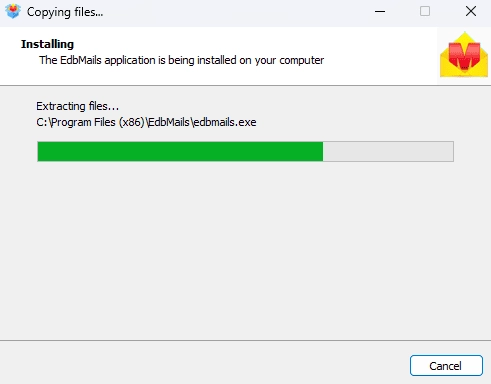
        EdbMails software installation

      • Start the EdbMails application on your system.
      • Enter your registered email ID and password and click ‘Login’. If you are a new user, select ‘Start Your Free Trial’ to proceed with the trial version.
         Note: The trial version provides access to all key features and supports migration of up to 30 items per folder. For unlimited migration, purchase Exchange Migration license from the EdbMails website.

          Click here to view the Exchange Migration pricing details.

        After completing the purchase, close and reopen the application. Then log in using the same email ID and password used during the purchase to activate the license successfully.
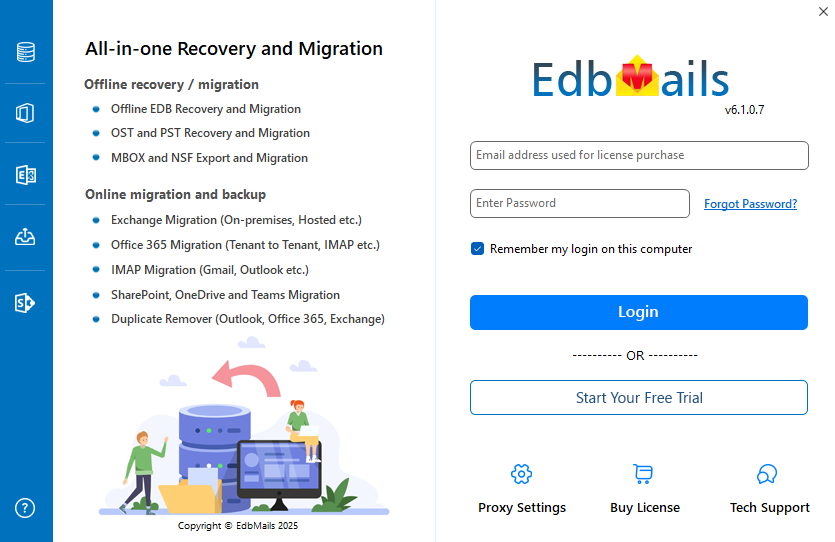
        Login to EdbMails application

      • Choose the ‘Live Exchange Migration’ option.
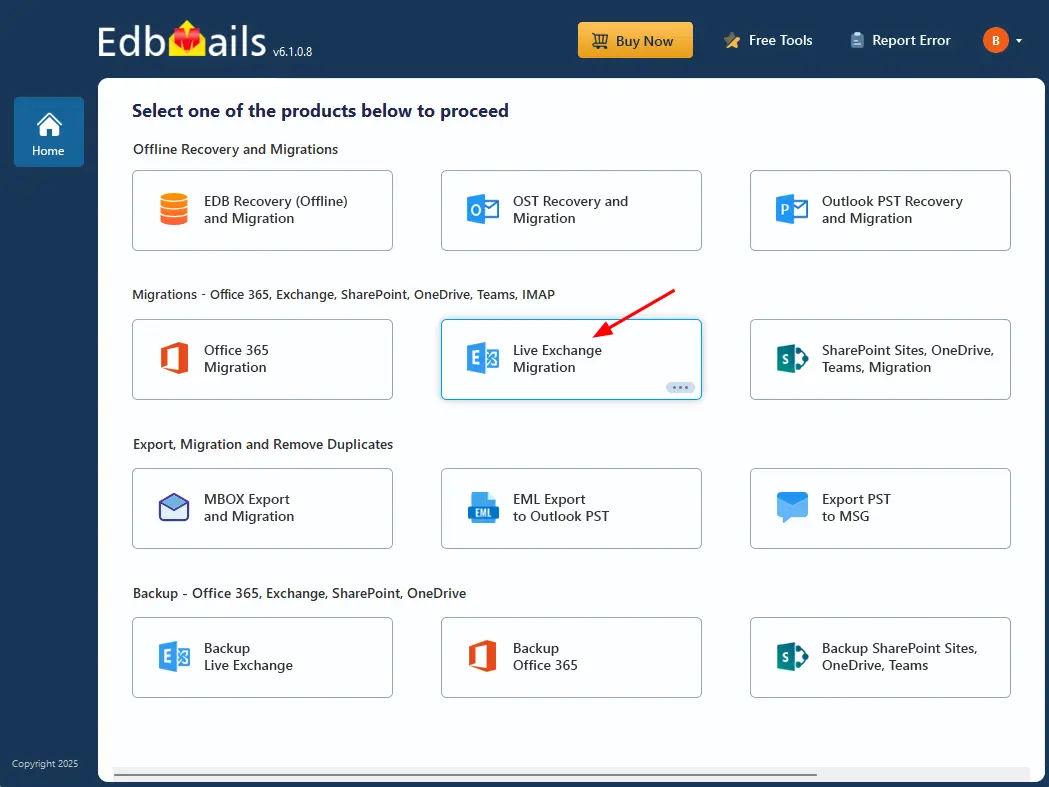
        Choose ‘Live Exchange Migration’ option

      • Select 'Live Exchange to PST Export’ option.
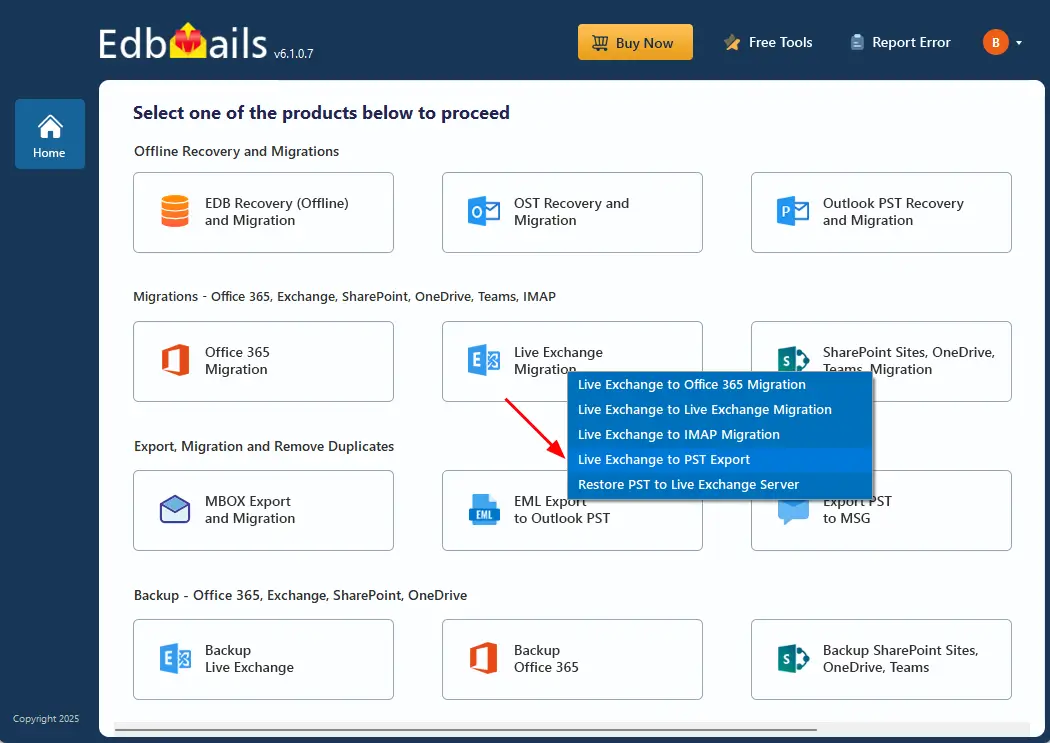
        Choose ‘Live Exchange Migration’ option

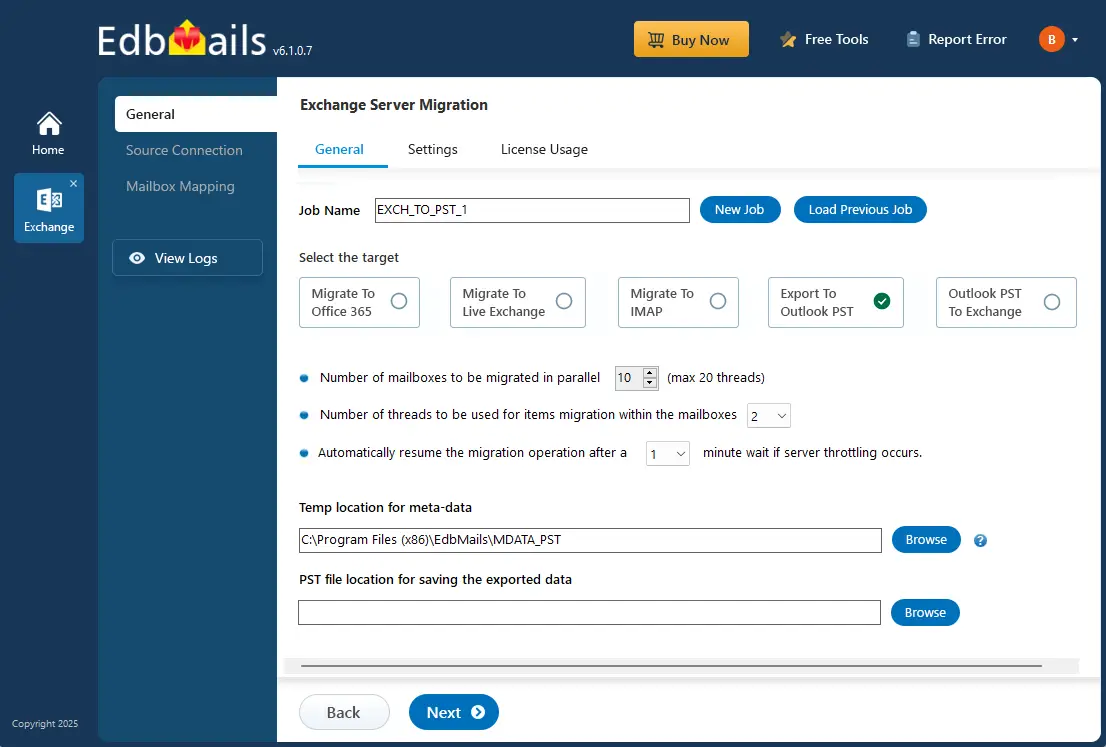
      • You can either keep the default job name or click the ‘New Job’ button to change.
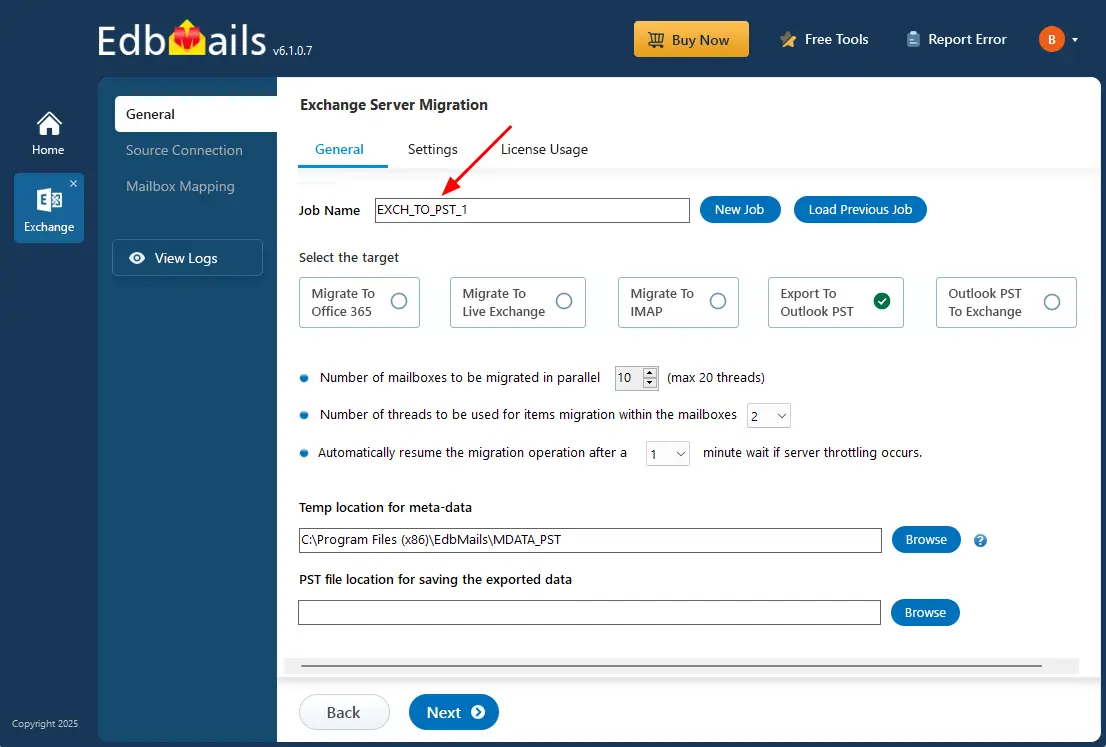
        Exchange 2013 to PST export job name

      • Click the ‘Browse’ button and select the destination location where the PST file will be saved for the exported data.
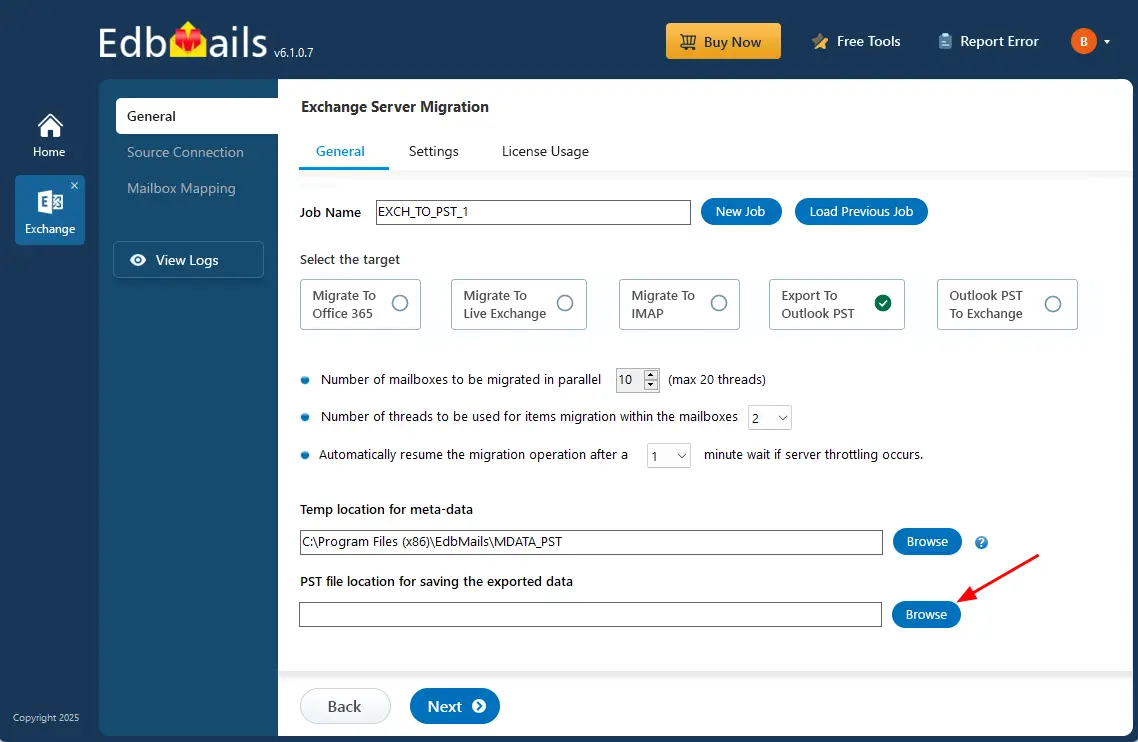
        Click the ‘Browse’ button

      • Select the location to save the exported PST files. Also, ensure that you have enough storage space to save the PST files.
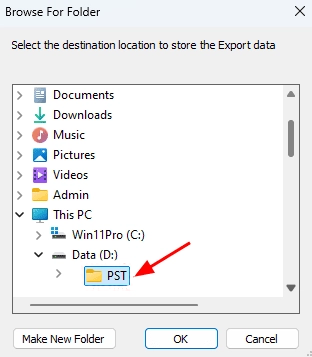
        Select PST location

    • Step 2: Connect to source Exchange 2013 server

      • Click ‘Add New Connection’ to create a connection with the source Exchange server. If a connection is already configured, select it from the list and click ‘Connect to Existing’ to continue.
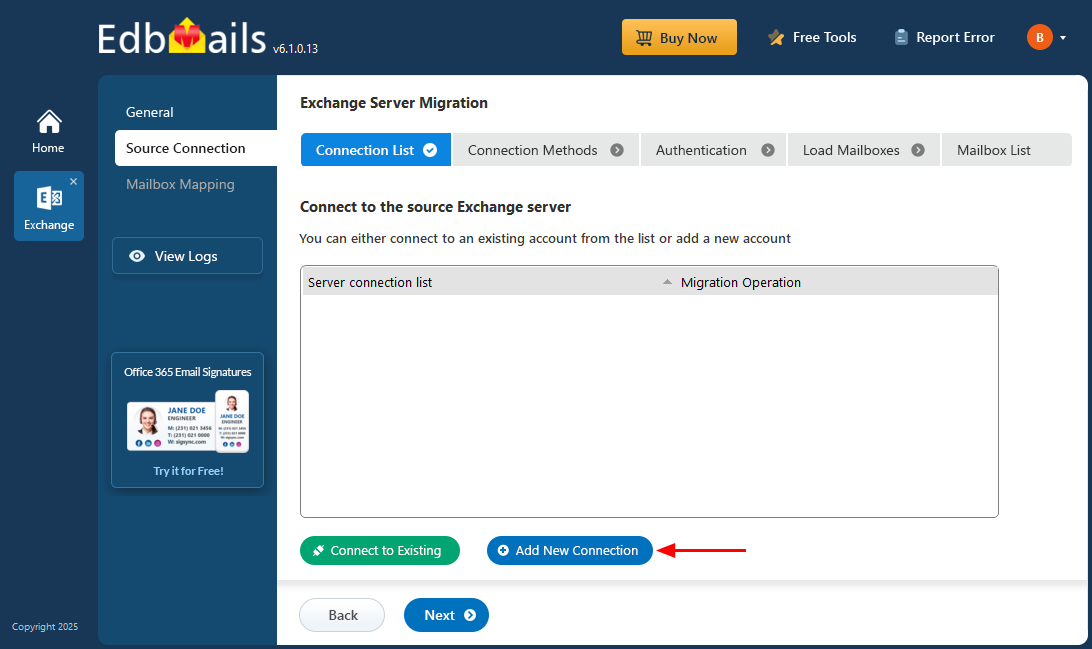
        Click Add New Source Exchange Connection

      • Choose the required connection options and click the ‘Next’ button.

         Learn more about Exchange server connection methods available in EdbMails.

         Using EdbMails, you can export mailboxes, public folders, and archive mailboxes from your Exchange server to Outlook PST files.
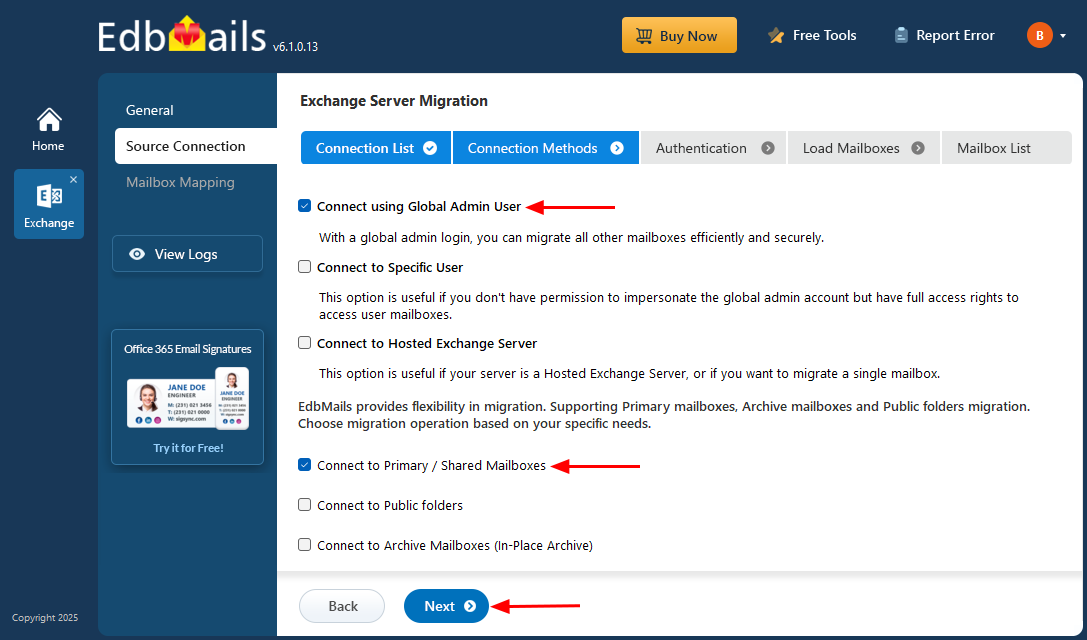
        Source Exchange server connection

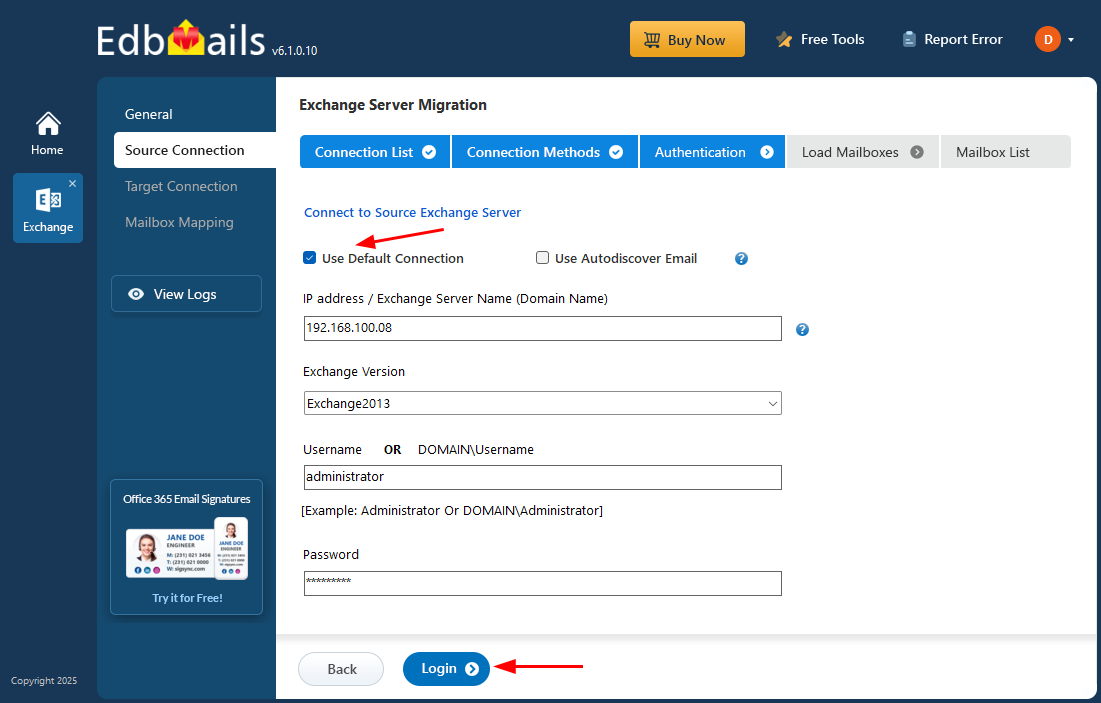
      • Provide the source Exchange 2013 Server details such as the IP address (Domain name), Exchange version, username, and password.
      • Click the ‘Login’ button to continue.

        Login to source Exchange server

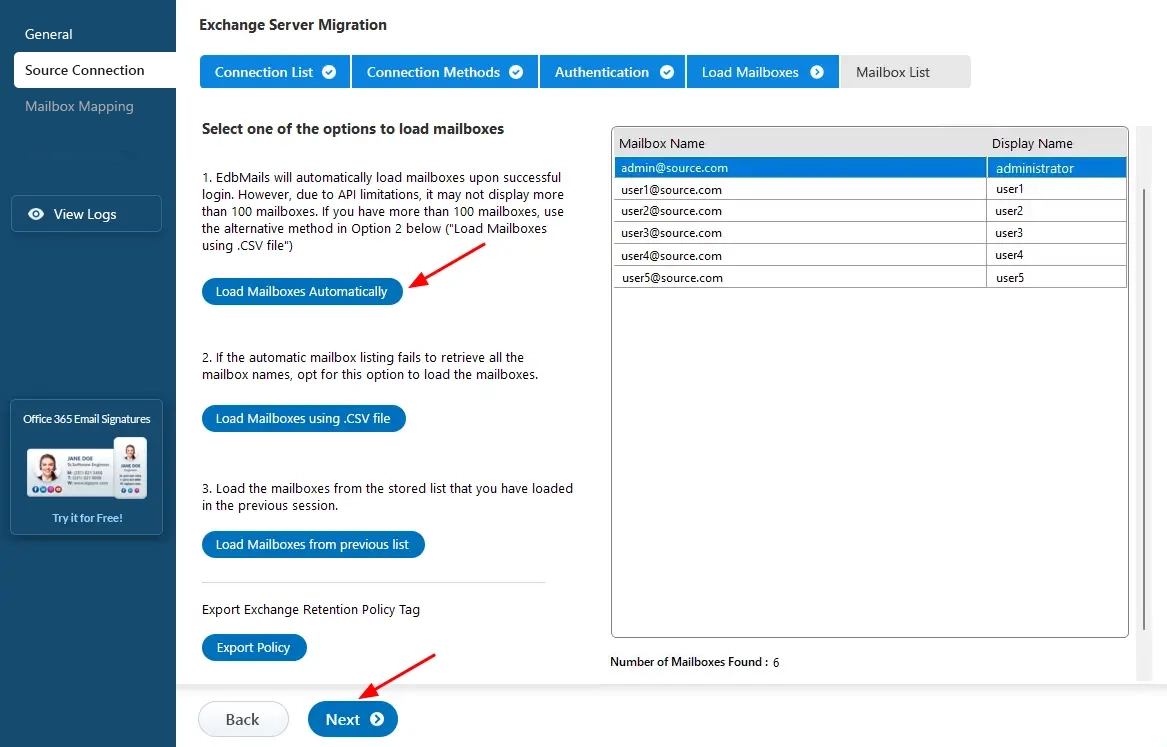
      • After successfully signing in to the source Exchange server, choose a suitable method to load the mailboxes. EdbMails automatically loads the mailboxes for you. However, due to Microsoft API limitations, only up to 100 mailboxes may be displayed. If your environment contains more than 100 mailboxes, use the ‘Load Mailboxes using .CSV file’ option.

         See how to load Exchange server mailboxes using CSV file.

      • Click the ‘Next’ button to continue.

        Select the option to load mailboxes

    • Step 3: Select the Exchange 2013 server mailboxes

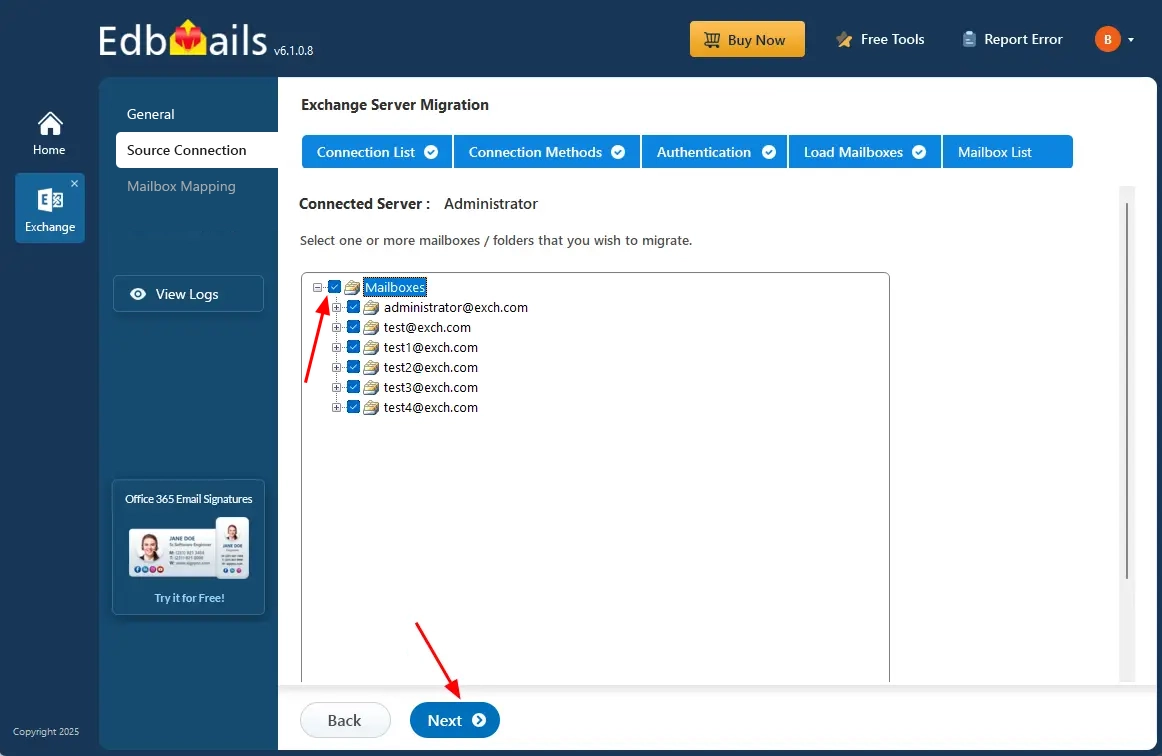
      • Choose the specific mailboxes/folders you wish to export from the source Exchange server
      • Click the ‘Next’ button to proceed.

        Select source Exchange server mailboxes

    • Step 4: Start Exchange 2013 to PST export operation

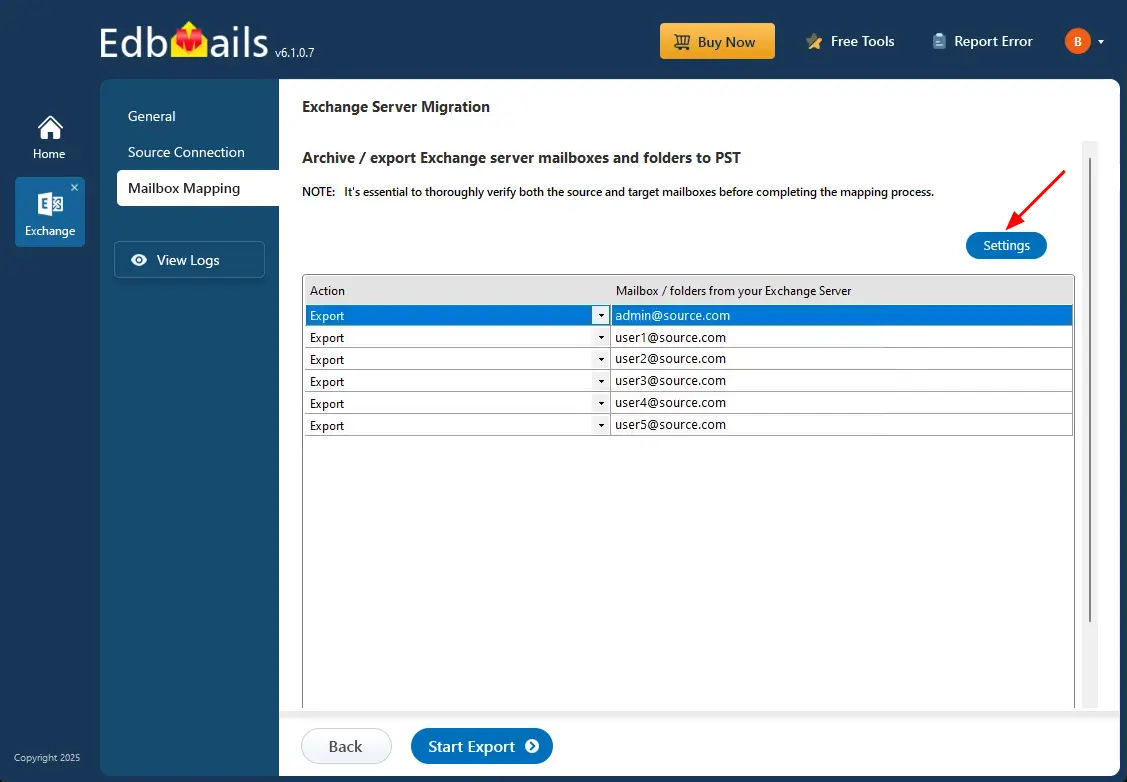
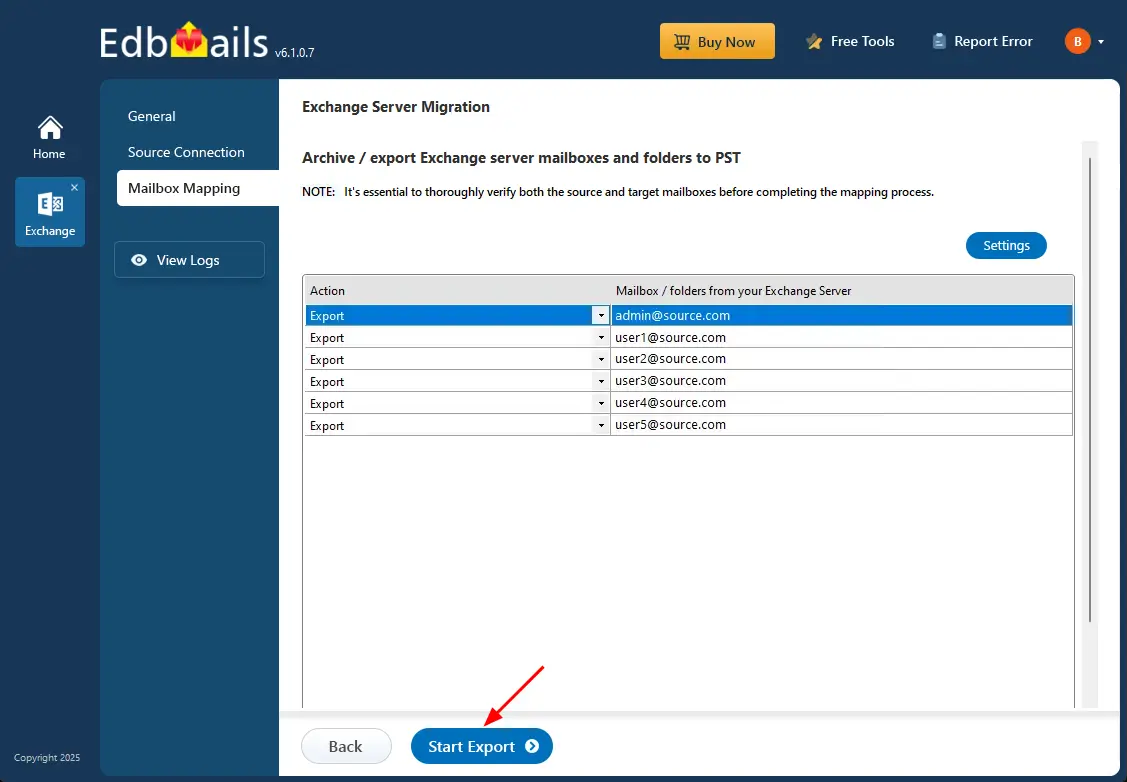
      • Review the selected mailboxes and make sure the ‘Action’ is set to ‘Export’.
      • Click the ‘Settings’ option to apply filters such as date range, sender, recipient, CC/BCC, or message status. You can also enable PST splitting if required. If you don’t need any filters, continue without changes.
      • Save your settings to proceed.

        Exchange to PST export settings

      • Click the 'Start Export' button.

        Start export

      • The migration process has now started, and you can track its progress through the progress bar.
      • Once completed, you will receive a notification to review the migration status report. Click ‘View Logs’ to check the detailed report.
      • You can pause or resume the migration at any time based on your requirement
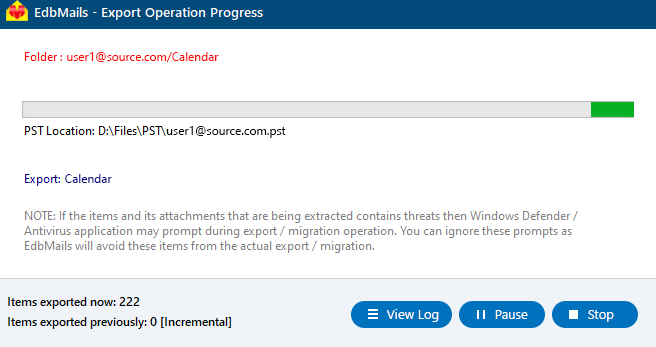
        Exchange 2013 to PST Progress

      • Open the export PST files on your Outlook and verify the items.

Advantages of EdbMails to export Exchange 2013 mailbox to PST

  • Granular Export Options:

    EdbMails provides granular export options, allowing users to selectively export specific mailboxes, folders, or items. This feature ensures that only the necessary data is exported, minimizing storage use and speeding up the process without affecting overall performance.

  • Folder-Based PST Creation:

    EdbMails allows you to create separate PST files for individual folders within a mailbox. This feature helps in organizing data efficiently, making it easier to manage large mailboxes and simplifying future data retrieval or migration tasks.

  • Compatible with all Windows OS Versions:

    EdbMails is fully compatible with all versions of Windows operating systems including Windows 11, 10, 8.1, 8, 7, Vista, and XP. Whether you are using the latest Windows version or an older one, EdbMails ensures a flawless and error-free experience throughout the export process, offering flexibility across different environments.

  • End-to-End export Solution:

    EdbMails offers a complete end-to-end solution to export Exchange 2013 mailboxes to PST. From initiating the export to completing the process, it handles everything with precision, reducing manual effort and ensuring smooth and uninterrupted migration.

  • Advanced Security and Compliance Protocols:

    EdbMails integrates advanced security and compliance protocols, ensuring that all exported data remains protected during the process. This includes encryption and regulatory compliance measures, giving administrators peace of mind while handling sensitive business data.

  • Concurrent Export Operation:

    EdbMails allows for concurrent export operations, enabling users to export multiple mailboxes at once, significantly reducing the time required for large migrations and enhancing overall efficiency.

  • Automatic Throttling Management:

    EdbMails includes automatic throttling management that handles Exchange throttling policies to maintain migration consistency. Although throttling can slow backup or migration speed, EdbMails helps minimize its impact.

  • Exclude Junk Email:

    EdbMails enables you to exclude the Junk Email folder during export. Its filter settings indicate that folders like deleted Items, conversation history, and junk email are excluded. This ensures unwanted or unnecessary items are not included in the final export.


Additional resources:

  • EdbMails Exchange migration software
  • Export Exchange 2010 mailbox to PST
  • Export Exchange 2016 mailbox to PST
  • Export Exchange 2019 mailbox to PST
  • Exchanger to Exchange migration
  • Exchange to Office 365 migration
  • Exchange to IMAP migration
lady image

 In this manual

IntroductionExport PrerequisitesExport StepsAdvantages of EdbMails

Live Exchange Migration

100 Mailboxes $299 Only

Buy Now

Need help?

24/7 Customer support

Contact us on Live chat

Personalized Demo

Book a personalized demo

Still need help?

Email us / Call us

© 2026 Shifttocloud Inc. Privacy Policy | Terms of Use | GDPR | Security | Press Releases

hidden msg
Live Chat

Hi, May I help you?

Hide Chat Now