EdbMails EDB Recovery and Migration software
  • Products
    Exchange EDB / Email Recovery Tools
    • EDB Recovery and MigrationRecover EDB to PST, EDB to Office 365 and Exchange NO Duplicate Migration
    • OST Recovery and MigrationRecover OST to PST, OST to Office 365 and Exchange Migration
    • PST Recovery and MigrationRecover Outlook PST, PST to Office 365 and Exchange Migration
    • MBOX Export and MigrationExport MBOX to PST, MBOX to Office 365 and Exchange Migration
    • NSF Export and MigrationExport NSF to PST, NSF to Office 365 and Exchange Migration
    • EML to PST ExportEML files export to Outlook PST format
    • PST to MSG ExportOutlook PST files export to MSG format
    • MSG to PST ExportExport MSG files Outlook PST files
    Exchange and Office 365 Migration
    • Exchange Server MigrationMigrate between any Exchange Servers, Exchange to Office 365, Export Exchange to PST, Migrate PST files to Exchange server
    • Office 365 MigrationMigrate between Office 365 tenants, Office 365 to Exchange, Export Office 365 to PST, Migrates PST files to Office 365
    • IMAP Email Backup & MigrationMigrate between any IMAP Servers (Gmail, Outlook, Zimbra, Zoho, Yahoo etc.), IMAP to Office 365, Exchange, IMAP to PST, PST to IMAP
    • G Suite MigrationMigrate emails, contacts, calendars from G Suite /Google Work Space to Office 365, Exchange, IMAP
    • SharePoint Online MigrationMigrate documents, lists, files and folders from SharePoint sites
    • OneDrive for Business MigrationMigrate documents, lists, files and folders from OneDrive
    • Microsoft Teams MigrationMigrate Teams, chats, channels, documents, files and folders etc.
    Exchange and Office 365 Backup
    • Office 365 BackupIncremental, Granular, Encrypted and Compressed Office 365 Mailboxes Backup
    • Exchange Server BackupIncremental, Granular, Encrypted and Compressed Exchange Mailboxes Backup
    • SharePoint, OneDrive & Teams BackupBackup Online site collections, Team sites, Office 365 groups, all documents etc.
    • Duplicate Remover - Office 365, Exchange, IMAP & Outlook Remove duplicate emails, calendars, contacts, journal etc. from Office 365, Exchange, IMAP, Outlook, Gmail, Zimbra, Zoho Mail etc.
    • Windows Data Recovery Recover and restore permanently deleted data from partitions across hard drives, SSDs, USB drives, SD cards, and external storage devices.
    • More Products
  • Features
  • FAQ
  • Pricing
  • Download
  • Support
  • Sign in
User’s Manual
Exchange Server Migration

User Manual

User Manual

  • Exchange Migration Overview
  • Initial Setup
  • System Requirements
  • Migration Scenarios
  • Installation
    • Installation process
    • Reinstall or Upgrade
    • How to uninstall
  • FAQ
    • General
    • Migration Free Trial / Demo
    • Migration License
    • Before Migration
    • Migration - Steps
    • After Migration
  • Videos
    • Exchange to Exchange
    • Exchange to Office 365
    • Exchange to IMAP
    • Exchange to PST
    • Public Folder to Office 365
    • Archive Mailbox to Office 365
    • Public Folder to Exchange
    • Archive Mailbox to Exchange
    • Restore Bulk PST files to Exchange
  • Screenshots
    • Exchange to Exchange
    • Exchange to Office 365
    • Exchange to PST
  • Understanding the Application
    • Migration
    • Migration Speed
    • Incremental Migration
    • Exchange Throttling Policy
  • How it works?
    • Exchange to Exchange
    • Exchange to Office 365
    • Exchange to PST
    • Exchange to IMAP
    • Exchange Public Folder to Office 365
    • Exchange Public Folder to Exchange
    • Exchange 2010 to 2016 Public folder
    • Exchange 2013 Public folder to Office 365
    • Exchange 2016 Public folder to Office 365
    • Exchange Public Folder to Shared Mailbox
    • Archive Mailbox to Office 365
    • Archive Mailbox to Exchange
    • Hosted Exchange Migration
    • Hosted Exchange to Live Exchange Migration
    • Hosted Exchange to Office 365 Migration
    • Live Exchange to Hosted Exchange Migration
    • Hosted Exchange Public Folder to Office 365 Migration
    • Cross-forest migration from Exchange 2013 to Exchange 2019/2016
    • Hybrid Migration
    • Public folder Migration in Hybrid Environment
    • Disable msExchMailboxGuid
    • Exchange to Gmail Migration
    • Multiple PST to Exchange server
    • Hosted Exchange to Office 365 Shared mailbox
  • Connect to Exchange server for multiple mailboxes migration
    • Connect with Global Admin
    • Connect to Multiple users using CSV file
    • Connect using full access permission
    • Connect individual users for Single / Specific user Migration
  • Connect to Hosted Exchange for its Migration
    • Connect with Full Access permissions
    • Connect to multiple users using CSV file
    • Connect to Individual user for migration
  • Connect to target Office 365
  • Modern Authentication Using OAuth 2.0
    • Microsoft 365 modern authentication
    • Automatic Registration
    • Manual Registration
  • Set Exchange Server Impersonation rights
    • Exchange 2007 and below
    • Exchange 2010, 2013, 2016 and 2019
    • Set using Exchange Server GUI
  • Knowledge Base
    • Exchange to Exchange Migration
    • Exchange to Office 365 Migration
    • Migrate Legacy Exchange to Latest Exchange
    • Cross-forest and cross-domain migration
    • Public folder, Shared mailbox migration
    • Archive mailbox migration
    • Hosted Exchange Migration
    • Incremental migration
    • Cutover, staged and hybrid migration
    • Migrate SBS 2003, 2008, 2011 to a Modern Exchange Environment
    • Export Exchange Mailbox to PST
    • Secure Exchange Migration
    • Selective Mailbox / Folder Migration
    • Automatic Mailbox Mapping
    • Assign Public Folder to one target destination
    • Multiple PST Restore
    • No Impact on users - Zero downtime
    • Migrate Email Rules, Forwarding and Junk Email Configuration
    • Exchange migration speed and throttling management
    • Support for all the languages
    • Advanced settings and options
    • GAL and all address lists Migration
    • Exchange migration reports
    • Best Exchange Migration software
    • Exchange migration checklist
    • Exchange migration manager
    • Feature rich Exchange migration software
    • Exchange to Office 365 migration planning
    • Exchange server migration tips
    • Export Exchange server users to CSV
    • Create a Public folder in Exchange Server 2010
    • Load Exchange mailboxes from CSV file
    • Language settings on Exchange server
    • Export and import Exchange Retention Policy Tags
    • Fix Outlook security alert after migration
    • Assign public folders to Exchange
    • Connect to Exchange with Default Connection
    • Connect to Exchange with Autodiscover Email
  • Set Office 365 Impersonation rights
    • Using PowerShell commands
    • Using Office 365 GUI
  • Migration Types
    • Cutover Migration
    • Staged Migration
    • Hybrid Migration
  • Map the Mailboxes
  • Migration Walkthrough
    • From Exchange 2003
    • From Exchange 2007
    • From Exchange 2010 to Exchange 2019
    • From Exchange 2010 to Exchange 2016
    • From Exchange 2010 to Office 365
    • From Exchange 2013 to Exchange 2019
    • From Exchange 2013 to Exchange 2016
    • From Exchange 2013 to Office 365
    • From Exchange 2016 to Exchange 2019
    • From Exchange 2016 to Office 365
    • From Exchange 2019 to Office 365
    • From Office 365
    • Exchange 2013 mailbox to PST
    • Exchange 2016 mailbox to PST
    • Exchange 2019 mailbox to PST
    • Exchange 2010 mailbox to PST
  • Multifactor Authentication
    • Enable MFA in Office 365
    • Create App password for MFA
    • Disable Security Defaults
    • Disable MFA in Office 365
  1. Home
  2. Product
  3. Connect to Exchange Server with Autodiscover Email | EdbMails
Download Buy Now

Connect to Exchange Server using Autodiscover Email

EdbMails Exchange Migration Software provides a simple connection option called ‘Use Autodiscover Email’, designed to make it easier to identify and connect to your Exchange server. Instead of manually providing the server name, IP address, or Exchange version, this option automatically detects the correct server configuration using the Autodiscover service based on the email address you enter. This approach works well in environments where Autodiscover is properly configured, reduces manual input and helps organizations quickly authenticate and start the migration without handling technical server settings.

How to Use Autodiscover Email to Connect to Your Exchange Server

Before connecting to your Exchange Server, verify the system requirements. After confirming the requirements, download and install the EdbMails application on your computer to proceed with the migration process.

  1. Select ‘Live Exchange Migration’ and configure the job name by either keeping the default or clicking ‘New Job’ to specify a custom name.
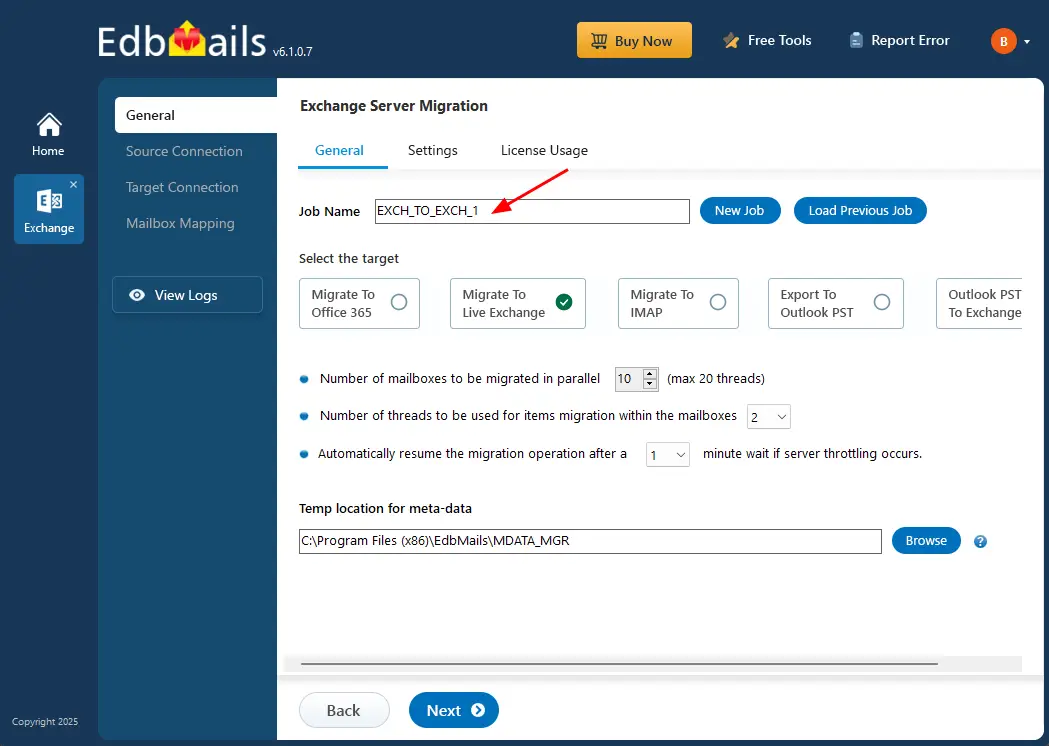
    Enter job name

  2. Next, click the ‘Add New Connection’ button to establish a new connection to the source Exchange server. To use a previous connection, you can select it from the connection list and click ‘Connect to Existing’. In this case, we will go with a new connection.
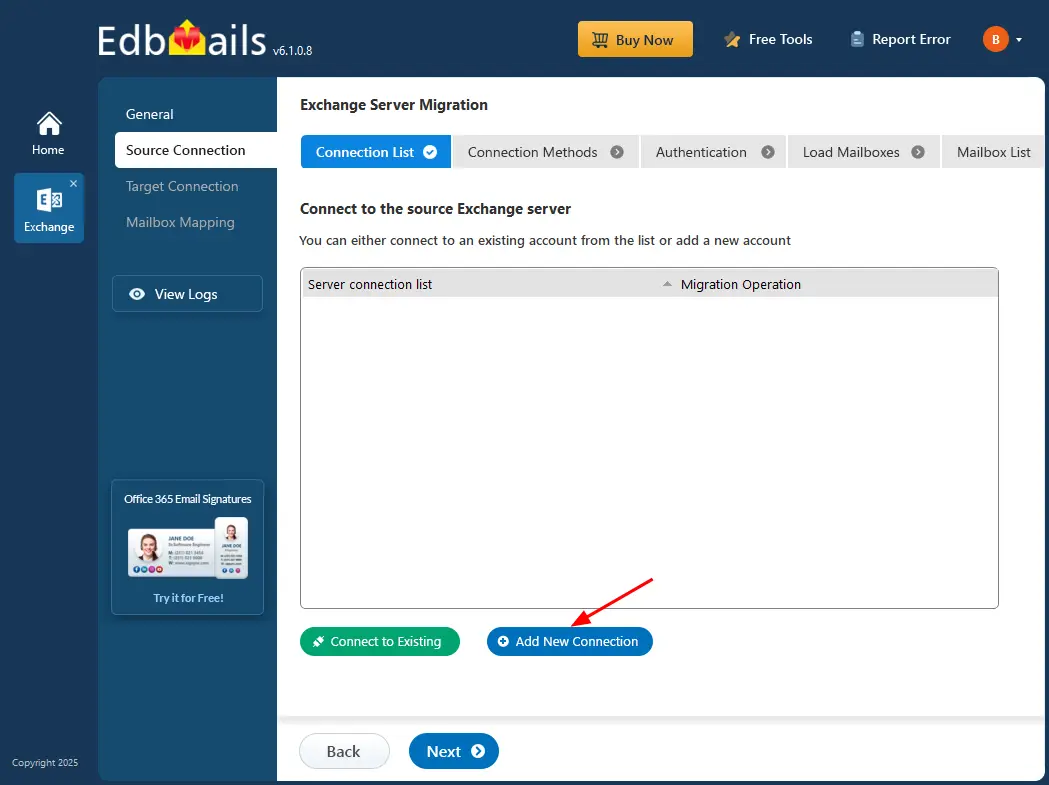
    Click Add New Source Exchange Connection

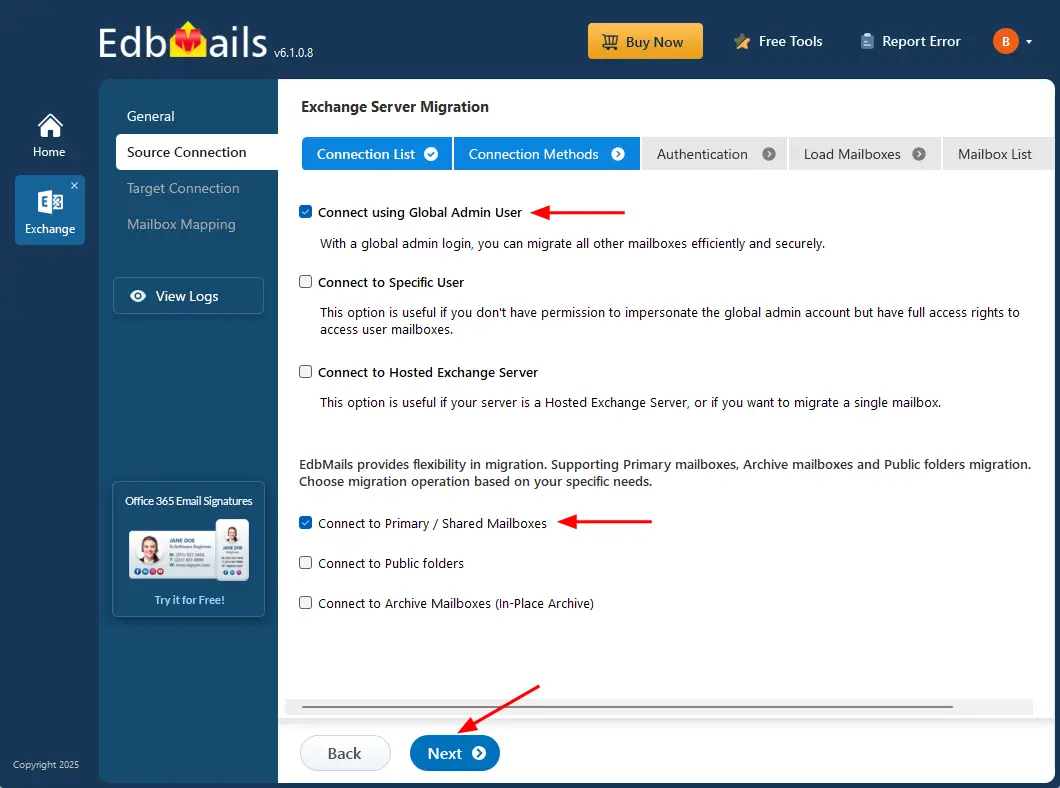
  3. The Exchange Server source connection opens a wizard to configure the migration. Choose ‘Connect using Global Admin User’ as the connection method and specify the mailbox type to migrate all mailboxes efficiently and securely.

     Connect to Specific User

     Connect to Hosted Exchange Server

    Select required connection option

  4. Choose ‘Use Autodiscover Email’, enter the email address and password, and click the ‘Login’ button to establish the source Exchange connection.
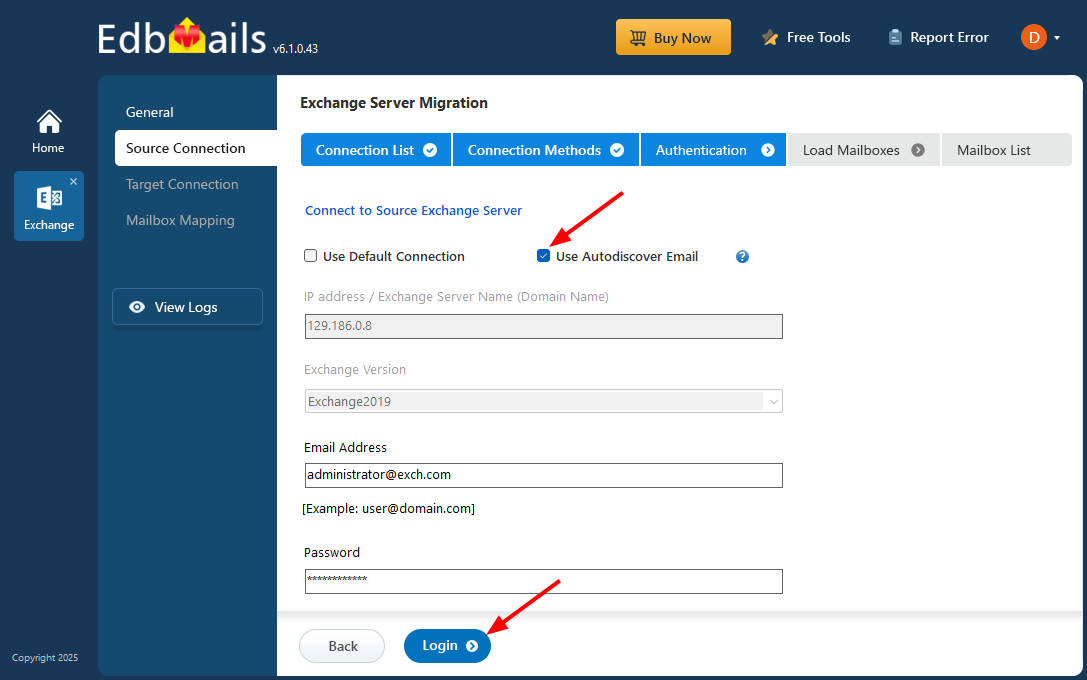
    Choose Autodiscover Email

  5. Once you’ve successfully logged into your source Exchange server, choose a method to load the mailboxes.
    1. Load Mailboxes automatically
    2. Load Mailboxes Using .CSV file
    3. Load Mailboxes from previous list

    EdbMails will automatically load the mailboxes; however, due to Microsoft API limitations, it may display a maximum of 100 mailboxes at a time. If your organization has more than 100 mailboxes, use the ‘Load Mailboxes using .CSV file’ option to import all mailboxes efficiently and prepare them for migration.
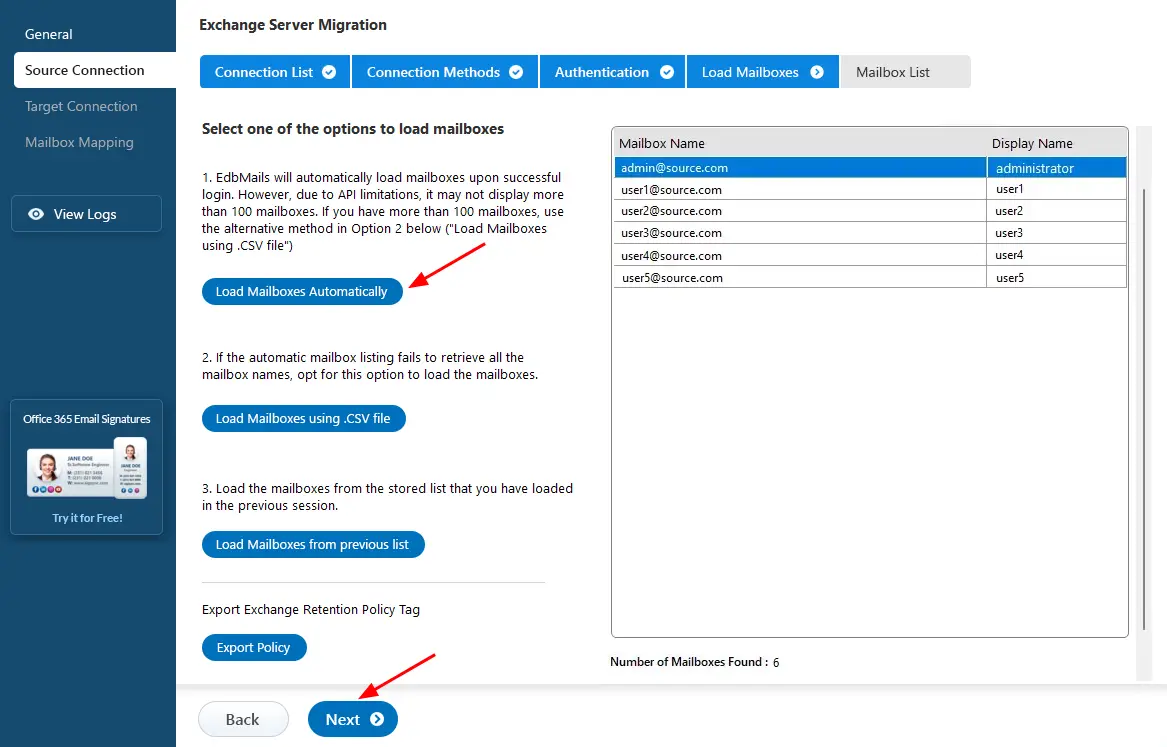
    Select the option to load mailboxes

  6. After loading all the mailboxes, select the mailboxes or folders you want to migrate from the source Exchange server.
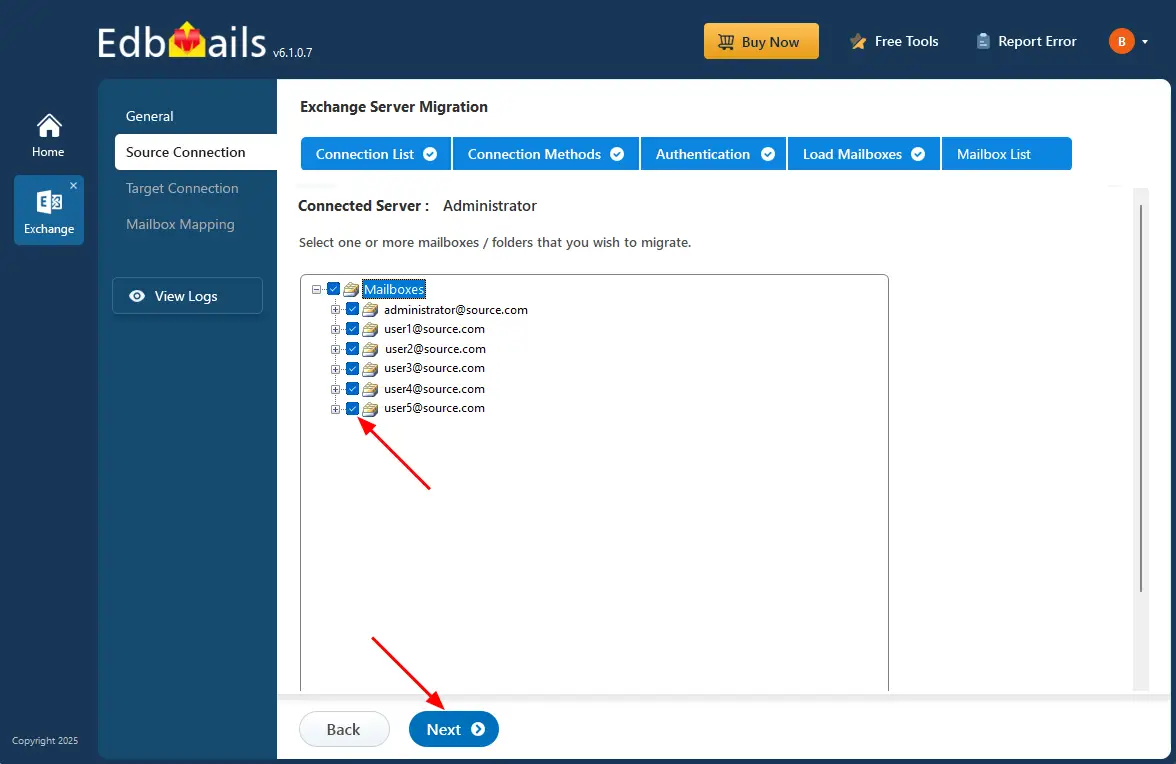
    Select the mailboxes and click ‘Next’ to continue

    Once the source Exchange server connection is successfully configured and the required mailboxes are selected, the source setup is complete. You can now proceed to configure the target connection to continue with the migration process.

     Click here to know the steps to migrate Exchange to Exchange server

     Click here to know the steps to migrate Exchange to Office 365

Advantages of Using Autodiscover Email

  • Simplified setup, the server configuration is automatically detected without requiring IP addresses or server names.
  • Reduces configuration errors. Since the server details are fetched automatically, it minimizes incorrect inputs or outdated server information.
  • When server IPs or endpoints change frequently, Autodiscover always fetches the latest configuration.
  • Ideal for quick connectivity, it helps users connect faster without requiring technical knowledge of the server environment.
  • Best suited for well-configured environments, it works smoothly when Autodiscover is properly enabled, making the connection process more reliable.

Conclusion

The Autodiscover Email option in EdbMails provides a fast and user-friendly way to connect to your Exchange server without requiring technical knowledge of server names, IP addresses, or configuration details. By automatically detecting the correct server settings, it eliminates manual entry, minimizes errors, and provides a smooth start to your migration process. Once the connection is established and mailboxes are loaded, you can continue with the migration.


Additional Resources:

  • Exchange Server Using Default Connection
  • Exchange migration step by step guide
  • Exchange Archive mailbox migration
  • Migrate between Hosted Exchange servers
lady image

 In this manual

Using Autodiscover EmailAdvantage

Live Exchange Migration

100 Mailboxes $299 Only

Buy Now

Need help?

24/7 Customer support

Contact us on Live chat

Personalized Demo

Book a personalized demo

Still need help?

Email us / Call us

© 2026 Shifttocloud Inc. Privacy Policy | Terms of Use | GDPR | Security | Press Releases

hidden msg
Live Chat

Hi, May I help you?

Hide Chat Now