EdbMails EDB Recovery and Migration software
  • Products
    EdbMails
    All-in-one Recovery and Migration
    Explore our products
    • EDB recovery and Migration
    • OST, PST, MBOX, NSF, EML, MSG
    • Office 365, Exchange Migration
    • SharePoint, OneDrive & Teams
    • G Suite Migration
    • IMAP Migration
    • Duplicate Remover
    • Windows Data Recovery
    • Backup Solutions

    EDB Recovery and Migration

    EdbMails lets you recover corrupted, damaged, and offline Exchange EDB files, convert EDB mailboxes to PST format, and directly migrate mailbox data to Office 365 and live Exchange Server.

    EDB to PST
    Recover corrupted, damaged, offline EDB files and convert Exchange EDB mailboxes to PST file format
    Public Folder to Exchange
    Migrate public folders from an Exchange offline EDB file to live Exchange Server
    EDB to Live Exchange Migration
    Directly migrate offline Exchange database (EDB) files to live Exchange server
    Archive Mailbox to Office 365
    Migrate archive mailboxes from offline EDB files directly to Office 365
    EDB to Office 365 Migration
    Directly migrate offline Exchange database (EDB) files to Office 365
    Public Folder to Office 365
    Migrate public folders from an offline Exchange EDB file to Office 365

    OST, PST, MBOX, NSF, EML, MSG Export and Migration

    EdbMails lets you to recover OST and PST files, export OST, PST, MBOX, NSF, EML, and MSG files to PST files, and directly migrate OST, PST, MBOX, and NSF mailbox data to Office 365 and live Exchange Server.

    OST Recovery and Migration
    Recover offline OST files, convert OST to PST, and migrate OST to Office 365 and Exchange Server
    PST Recovery and Migration
    Recover Outlook PST files , Export PST to PST, migrate PST to Office 365 and Exchange Server
    MBOX Export and Migration
    Export MBOX to PST, migrate MBOX to Office 365 and Exchange Server
    NSF Export and Migration
    Export NSF to PST, migrate NSF to Office 365 and Exchange Server
    EML to PST Export
    Convert EML files to Outlook PST files
    PST to MSG Export
    Convert Outlook PST file to MSG file format
    MSG to PST Export
    Export MSG files to Outlook PST files

    Office 365, Exchange Migration

    EdbMails lets you securely migrate mailboxes across Microsoft 365, Exchange, Google Workspace (G Suite), and IMAP-supported servers such as Outlook, Gmail, Zimbra, Zoho Mail, and cPanel, ensuring zero downtime.

    Office 365 Migration
    Migrate between Office 365 tenants, Office 365 to Exchange, Office 365 to PST, PST files to Office 365.
    Exchange Migration
    Migrate between any Exchange Servers, Exchange to Office 365, Exchange to PST, PST files to Exchange.
    Tenant to Tenant Migration
    Migrate Mailboxes, Public Folders, Archive Mailboxes between Office 365 Tenants.
    Exchange to Office 365
    Migrate Mailboxes, Public Folders, Archive Mailboxes from live Exchange server to Office 365.
    Office 365 to IMAP
    Migrate Office 365 to IMAP, Office 365 to Gmail, Office 365 to Outlook, Office 365 to Zoho etc.
    Exchange to IMAP
    Migrate from live Exchange Server to IMAP servers such as Gmail, Outlook, and Zoho Mail.
    Public Folder to Office 365
    Migrate Public Folders between Office 365 tenants with complete folder hierarchy and mailbox data integrity.
    Exchange to PST
    Export live Exchange Server mailboxes, public folders, and archive mailboxes to Outlook PST files.

    SharePoint, OneDrive & Microsoft Teams Migration

    EdbMails lets you migrate SharePoint sites, OneDrive data, Microsoft Teams, teams, channels, chats, permissions, and documents between Microsoft 365 tenants while maintaining the existing folder structure and data integrity.

    SharePoint Online Migration
    Migrate documents, lists, files and folders from SharePoint sites.
    OneDrive for Business Migration
    Migrate documents, lists, files, folders, private chats from OneDrive.
    Microsoft Teams Migration
    Migrate Teams, chats, channels, documents, files and folders etc.

    Google Workspace / G Suite Migration

    EdbMails G Suite Migration Tool lets you easily migrate emails, calendars, contacts, tasks, and more from G Suite to Office 365, Exchange Server, and IMAP servers using a Google Admin account without requiring individual user credentials.

    G Suite Migration
    Migrate emails, calendars, contacts, tasks from G Suite to Office 365, G Suite to Exchange, G Suite to IMAP Servers
    G Suite to Office 365
    Migrate emails, calendars, contacts, tasks from Google Workspace / G Suite to Office 365
    G Suite to Exchange Server
    Migrate emails, calendars, contacts, tasks from Google Workspace / G Suite to on-Premise Exchange Server
    G Suite to IMAP
    Migrate emails, calendars, contacts, tasks from Google Workspace / G Suite to IMAP, Outlook, Zimbra, Zoho etc.

    IMAP Migration

    EdbMails IMAP Migration tool lets you easily migrate emails from IMAP servers such as Outlook, Gmail, Zoho Mail, Zimbra, cPanel, and more. Supports IMAP to IMAP, Office 365, Exchange Server, PST, and bulk PST to IMAP migration.

    IMAP Email Backup & Migration
    Backup and migrate emails from IMAP servers to PST, Office 365, and On-Premises Exchange Server
    IMAP to Office 365
    Migrate emails, folders, and attachments from IMAP servers to Office 365
    IMAP to Exchange
    Migrate emails, folders, and attachments from IMAP servers to on-premises Exchange Server
    IMAP to PST
    Export emails, folders, and attachments from IMAP servers to Outlook PST files for backup
    PST to IMAP
    Migrate emails, folders, and attachments from bulk PST files to IMAP servers

    Duplicate Remover

    EdbMails Duplicate Remover lets you easily remove duplicate items from Office 365 and Exchange Server, and from IMAP, Outlook, Gmail, Zimbra, Zoho Mail, etc., ensuring a clean and organized mailbox.

    Remove Duplicates
    Easily clean up your Office 365, Exchange, Outlook and IMAP accounts by removing duplicate emails.
    Remove Duplicates from Office 365
    Remove duplicate emails, calendars, contacts, journal tasks, etc. from Office 365.
    Remove Duplicates from Exchange Server
    Remove duplicate emails, calendars, contacts, journal tasks, etc. from live Exchange Server.
    Remove Duplicates from IMAP, Outlook
    Remove duplicate emails, attachments from IMAP, Outlook, Gmail, Zimbra, Zoho Mail etc.

    Exchange, SharePoint, OneDrive, Teams and Office 365 Backup

    EdbMails enables secure, automated backup and recovery for Microsoft 365 services including Exchange Online, SharePoint, OneDrive, Teams, and Live Exchange Server with complete data protection and restore flexibility.

    Office 365 Backup
    Incremental, Granular, Encrypted and Compressed Office 365 Mailboxes Backup
    Exchange Server Backup
    Incremental, Granular, Encrypted and Compressed Exchange Mailboxes Backup
    SharePoint, OneDrive & Teams Backup
    Backup Online site collections, Team sites, Office 365 groups, all documents etc.

    Windows Data Recovery

    EdbMails Windows Data Recovery Software lets you recover permanently deleted data, including photos, videos, documents, and archived files, from partitions on hard drives, SSDs, USB drives, SD cards, and external storage devices.

    Windows Data Recovery
    Recover and restore permanently deleted data from hard drives, SSDs, USB drives, SD cards, and etc.
    Whitepaper
    Request a Demo
    Sign Up
  • Features
  • FAQ
  • Pricing
  • Download
  • Support
  • Sign in
User’s Manual
Exchange Server Migration

User Manual

User Manual

  • Exchange Migration Overview
  • Initial Setup
  • System Requirements
  • Migration Scenarios
  • Installation
    • Installation process
    • Reinstall or Upgrade
    • How to uninstall
  • FAQ
    • General
    • Migration Free Trial / Demo
    • Migration License
    • Before Migration
    • Migration - Steps
    • After Migration
  • Videos
    • Exchange to Exchange
    • Exchange to Office 365
    • Exchange to IMAP
    • Exchange to PST
    • Public Folder to Office 365
    • Archive Mailbox to Office 365
    • Public Folder to Exchange
    • Archive Mailbox to Exchange
    • Restore Bulk PST files to Exchange
  • Screenshots
    • Exchange to Exchange
    • Exchange to Office 365
    • Exchange to PST
  • Understanding the Application
    • Migration
    • Migration Speed
    • Incremental Migration
    • Exchange Throttling Policy
  • How it works?
    • Exchange to Exchange
    • Exchange to Office 365
    • Exchange to PST
    • Exchange to IMAP
    • Exchange Public Folder to Office 365
    • Exchange Public Folder to Exchange
    • Exchange 2010 to 2016 Public folder
    • Exchange 2013 Public folder to Office 365
    • Exchange 2016 Public folder to Office 365
    • Exchange Public Folder to Shared Mailbox
    • Archive Mailbox to Office 365
    • Archive Mailbox to Exchange
    • Hosted Exchange Migration
    • Hosted Exchange to Live Exchange Migration
    • Hosted Exchange to Office 365 Migration
    • Live Exchange to Hosted Exchange Migration
    • Hosted Exchange Public Folder to Office 365 Migration
    • Cross-forest migration from Exchange 2013 to Exchange 2019/2016
    • Hybrid Migration
    • Public folder Migration in Hybrid Environment
    • Disable msExchMailboxGuid
    • Exchange to Gmail Migration
    • Multiple PST to Exchange server
    • Hosted Exchange to Office 365 Shared mailbox
  • Connect to Exchange server for multiple mailboxes migration
    • Connect with Global Admin
    • Connect to Multiple users using CSV file
    • Connect using full access permission
    • Connect individual users for Single / Specific user Migration
  • Connect to Hosted Exchange for its Migration
    • Connect with Full Access permissions
    • Connect to multiple users using CSV file
    • Connect to Individual user for migration
  • Connect to target Office 365
  • Modern Authentication Using OAuth 2.0
    • Microsoft 365 modern authentication
    • Automatic Registration
    • Manual Registration
  • Set Exchange Server Impersonation rights
    • Exchange 2007 and below
    • Exchange 2010, 2013, 2016 and 2019
    • Set using Exchange Server GUI
  • Knowledge Base
    • Exchange to Exchange Migration
    • Exchange to Office 365 Migration
    • Migrate Legacy Exchange to Latest Exchange
    • Cross-forest and cross-domain migration
    • Public folder, Shared mailbox migration
    • Archive mailbox migration
    • Hosted Exchange Migration
    • Incremental migration
    • Cutover, staged and hybrid migration
    • Migrate SBS 2003, 2008, 2011 to a Modern Exchange Environment
    • Export Exchange Mailbox to PST
    • Secure Exchange Migration
    • Selective Mailbox / Folder Migration
    • Automatic Mailbox Mapping
    • Assign Public Folder to one target destination
    • Multiple PST Restore
    • No Impact on users - Zero downtime
    • Migrate Email Rules, Forwarding and Junk Email Configuration
    • Exchange migration speed and throttling management
    • Support for all the languages
    • Advanced settings and options
    • GAL and all address lists Migration
    • Exchange migration reports
    • Best Exchange Migration software
    • Exchange migration checklist
    • Exchange migration manager
    • Feature rich Exchange migration software
    • Exchange to Office 365 migration planning
    • Exchange server migration tips
    • Export Exchange server users to CSV
    • Create a Public folder in Exchange Server 2010
    • Load Exchange mailboxes from CSV file
    • Language settings on Exchange server
    • Export and import Exchange Retention Policy Tags
    • Fix Outlook security alert after migration
    • Assign public folders to Exchange
    • Connect to Exchange with Default Connection
    • Connect to Exchange with Autodiscover Email
  • Set Office 365 Impersonation rights
    • Using PowerShell commands
    • Using Office 365 GUI
  • Migration Types
    • Cutover Migration
    • Staged Migration
    • Hybrid Migration
  • Map the Mailboxes
  • Migration Walkthrough
    • From Exchange 2003
    • From Exchange 2007
    • From Exchange 2010 to Exchange 2019
    • From Exchange 2010 to Exchange 2016
    • From Exchange 2010 to Office 365
    • From Exchange 2013 to Exchange 2019
    • From Exchange 2013 to Exchange 2016
    • From Exchange 2013 to Office 365
    • From Exchange 2016 to Exchange 2019
    • From Exchange 2016 to Office 365
    • From Exchange 2019 to Office 365
    • From Office 365
    • Exchange 2013 mailbox to PST
    • Exchange 2016 mailbox to PST
    • Exchange 2019 mailbox to PST
    • Exchange 2010 mailbox to PST
  • Multifactor Authentication
    • Enable MFA in Office 365
    • Create App password for MFA
    • Disable Security Defaults
    • Disable MFA in Office 365
  1. Home
  2. Product
  3. Hosted Exchange to Office 365 Shared Mailbox Migration | EdbMails
Download Buy Now

Hosted Exchange to Office 365 Shared mailbox

As businesses grow, the need for flexible, secure, and cost-effective email solutions becomes increasingly important. Transitioning from Hosted Exchange to an Office 365 Shared Mailbox is a strategic move that enhances collaboration and simplifies administration. While Hosted Exchange offers reliable email management, it often faces challenges with scalability and updates. Office 365’s cloud-native infrastructure eliminates the need for costly server maintenance and integrates seamlessly with Microsoft services like Teams, OneDrive, and SharePoint.

By migrating to Office 365 Shared Mailbox, organizations benefit from a unified platform that offers real-time collaboration, robust security compliance, and advanced productivity tools. This migration future-proofs your communication infrastructure with features like enhanced access controls, real-time synchronization across devices, and built-in encryption protocols. If you're still using Hosted Exchange, transitioning to Office 365 is a clear step toward modernizing your business without sacrificing security or functionality.

EdbMails Exchange migration software streamlines this migration process, eliminating complexities with its direct migration capabilities, bypassing intermediate steps. It ensures a seamless transfer of mailbox items such as emails, calendars, contacts, tasks, and public folders, while preserving folder structure and data integrity. EdbMails is designed to handle mailboxes of any size efficiently, offering advanced filtering options to migrate only relevant data, thereby reducing storage costs. Its incremental migration feature ensures that only new data is transferred after the initial migration, preventing data duplication. Additionally, EdbMails automatically resumes the migration if interrupted, ensuring no data is lost. With built-in encryption and compliance with industry standards, it guarantees secure and compliant migrations. EdbMails makes the transition to Office 365 not only easy and efficient but also secure and hassle-free, allowing businesses to focus on growth rather than managing server upgrades or infrastructure.
Hosted Exchange to Office 365 Shared mailbox

  1. Hosted Exchange to Office 365 Shared mailbox migration planning

    Before initiating Hosted Exchange to Office 365 shared mailbox migration process, it is crucial to evaluate the necessary requirements and prerequisites for a successful transition. Please refer to the following checklist to ensure that your environment is adequately prepared for the migration.

    1. Assess the total size and quantity of mailboxes designated for migration.
    2. Set up shared mailboxes on the destination server.
    3. Decide whether you prefer to migrate all data at once or in phases.
    4. Evaluate your internet connection speed and overall network setup.
    5. Keep in mind that shared mailboxes have a 50GB size limit. If you plan to migrate larger public folders, consider partitioning them or reducing their size beforehand.
    6. Determine the nature of your current migration environment, whether it is Hybrid or non-Hybrid.
  2. Pre-migration activities for Hosted Exchange to Office 365 Shared mailbox

    Step 1: Set the impersonation role to the admin user on the source

    If you are using global admin account to connect to source Hosted Exchange server, then set the Application Impersonation permissions to list and migrate other user mailboxes

    Step 2: Create shared mailboxes on the target Office 365 server

    Ensure to have a user account with admin privileges to create and manage shared mailboxes. This account is necessary for administrative tasks, even if you don't have standard user mailboxes.

    You can choose the option to automatically create Office 365 mailboxes in EdbMails. However, if you want to create mailboxes manually, refer to the links below:

    • Add users and assign licenses to Office 365 users
    • Assign Microsoft 365 licenses to user accounts

     Steps to create shared mailboxes

    Step 3: Add a custom domain to Office 365 (Optional)

    If you have a custom email domain from your hosting provider to which you want to migrate and receive emails, you must add and verify the domain on Office 365.

     Steps to add custom domain to Office 365

    Step 4: Configure Office 365 to send and receive large messages

     Increase the message size limit on Office 365 to 150 MB. This option enables you to bypass message size limitations during the migration.

  3. Steps to migrate Hosted Exchange to Office 365 Shared mailbox

    • Step 1: Download and install EdbMails software

      • Download and install EdbMails on any computer running on Windows that is connected to the source Exchange server.

         System requirements for Hosted Exchange to Office 365 migration

      • Open the application and choose 'Login' or 'Start Your Free Trial' to continue.
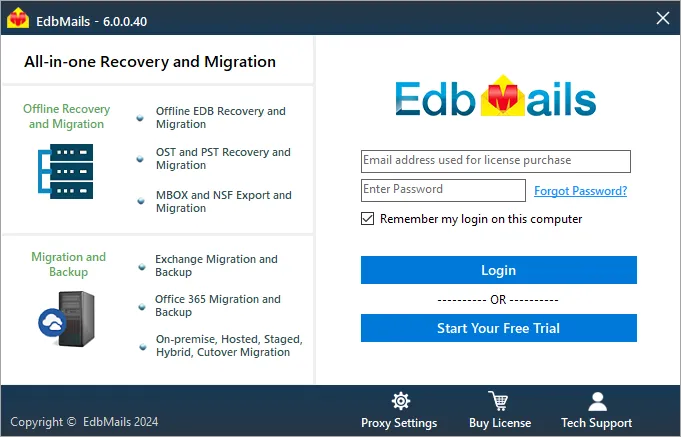
         Login to EdbMails application

      • Select 'Live Exchange migration' from the drop-down list.
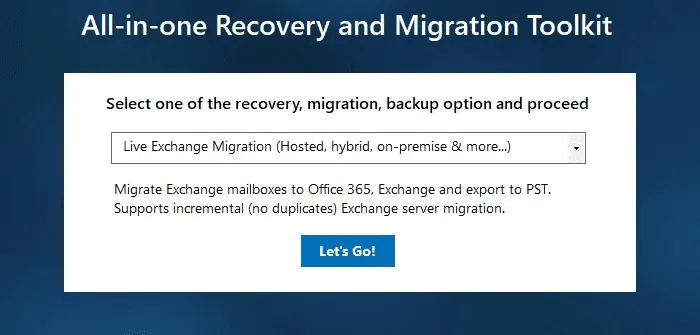
        Select ‘Live Exchange Migration’ option

    • Step 2: Connect to the source Hosted Exchange server

      • Choose 'Connect Hosted Exchange Server'

         Different options to connect to Exchange server

      • With EdbMails, you can migrate mailboxes, public folders, and archive mailboxes from Hosted Exchange to Office 365 Shared mailbox.
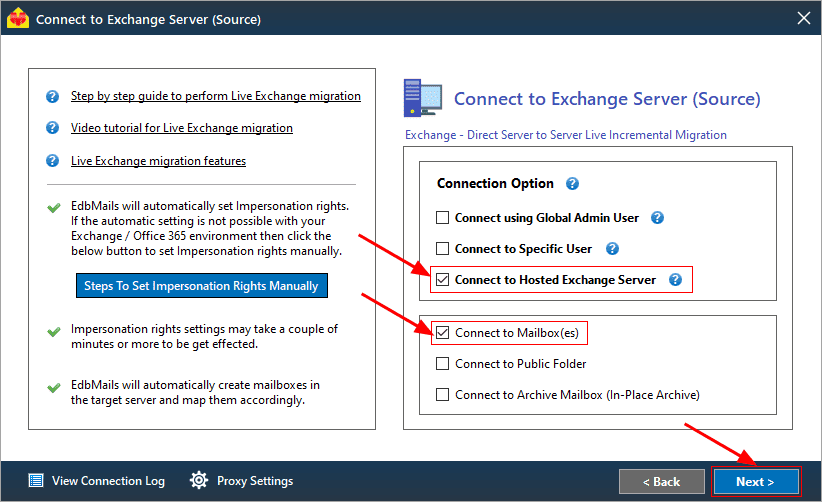
        Connect to source Hosted Exchange server

      • Select the required option to perform ‘Multiple user migration’ or ‘Single User migration’.
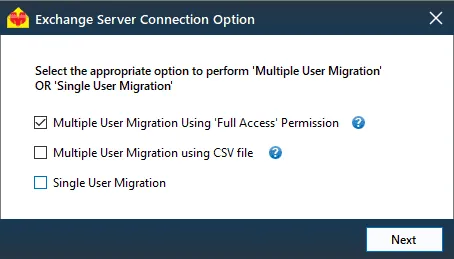
        Select the connection option

         Different options to connect to Hosted Exchange server

      • You can either select 'Connect Using Autodiscover Email' and provide your email address or password for your Hosted Exchange server with Autodiscover service enabled, or choose 'Default Connection' by entering the domain name or IP address.
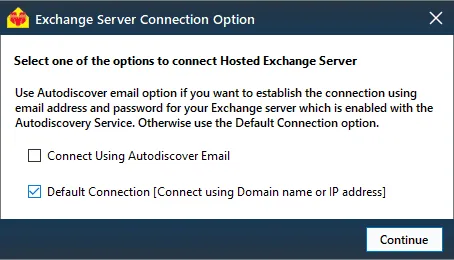
        Select the option to connect to Hosted Exchange server

      • Enter source hosted Exchange server details and click the ‘Login’ button
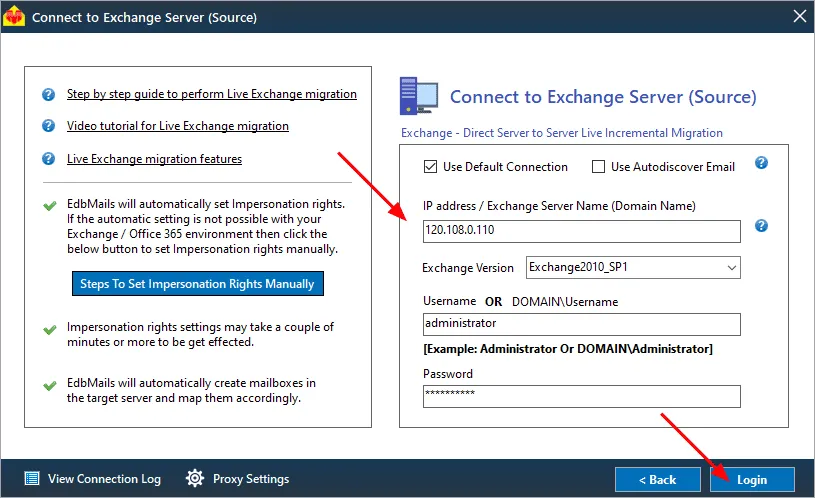
        Login to source Hosted Exchange server

      • Choose the desired option to load the mailboxes. EdbMails will automatically retrieve mailboxes from your source Hosted Exchange server. Alternatively, you can load mailboxes using a csv file.
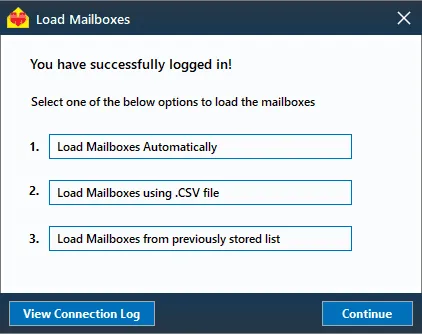
        Choose the load mailbox option

    • Step 3: Select Hosted Exchange server mailboxes

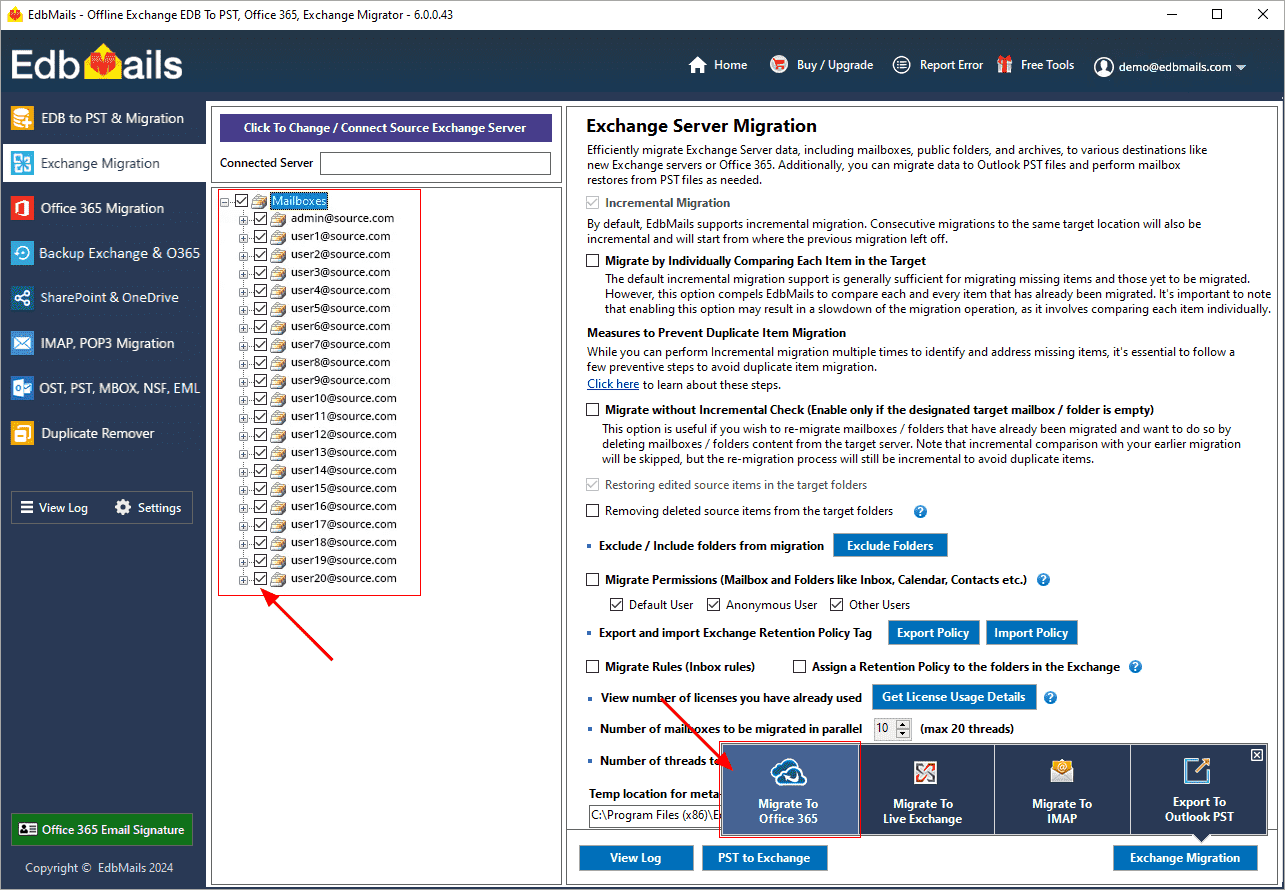
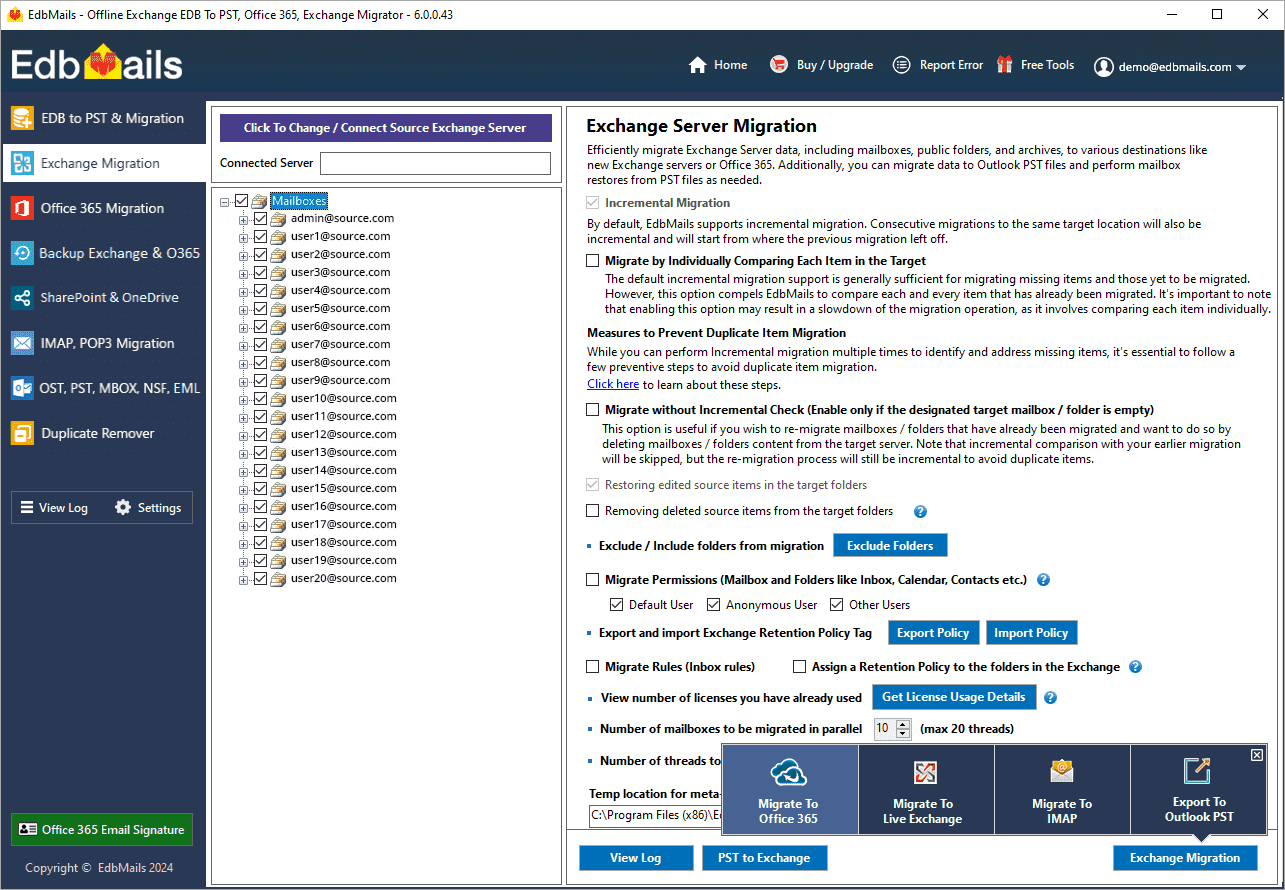
      • After the mailboxes have been successfully loaded into the migration window, select the mailboxes and folders from the Hosted Exchange server that you want to migrate to Office 365.
      • Click 'Migrate to Office 365'

        Migrate to Office 365

    • Step 4: Connect to target Office 365 server

      • Choose the preferred method for secure OAuth-based modern authentication. The default option, ‘Auto Registration,’ requires Global admin access. Alternatively, in the Manual Registration method, you can use either a Global admin account or any user account with full access rights.

        Connect to target Office 365 server

      • Next, select the desired migration option and proceed with the login on the Microsoft sign-in page.

        Select migration option

      • After logging in successfully, choose one of the options to load the mailboxes from the target Office 365 server. You can also load mailboxes using a CSV file.

        Choose load mailbox option

    • Step 5: Map source and target mailboxes

      • Choose the required mailbox mapping option

        Select mailbox mapping option

      • EdbMails automatically maps the mailboxes and folders between the source and target servers, which is particularly advantageous for large-scale migrations. Alternatively, you can manually map source folders and subfolders to specific target locations as needed.
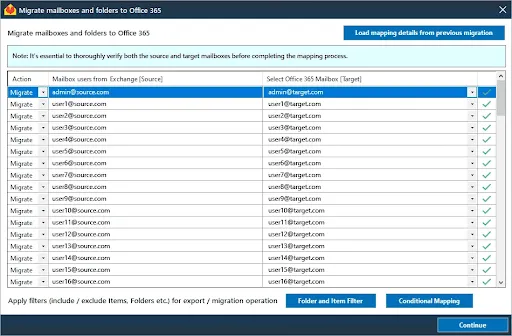
        Include Exclude mailboxes

      • Click the ‘Folder and Item Filter’ button to customize the migration process. For instance, the date filter lets users to migrate items based on a specified date range, allowing them to selectively transfer only the emails received during that period.
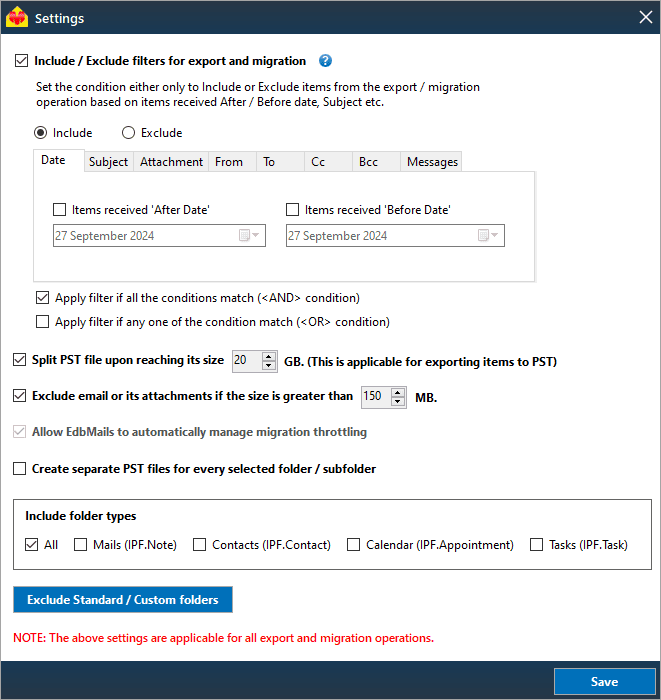
        Include Exclude mailboxes

    • Step 6: Start Hosted Exchange to Office 365 Shared mailbox migration

      • After mapping the mailboxes, enter the job name and initiate the migration process. Click the ‘View Log’ button to view the migration report that details verify the number of migrated emails, folders, and mailbox items.
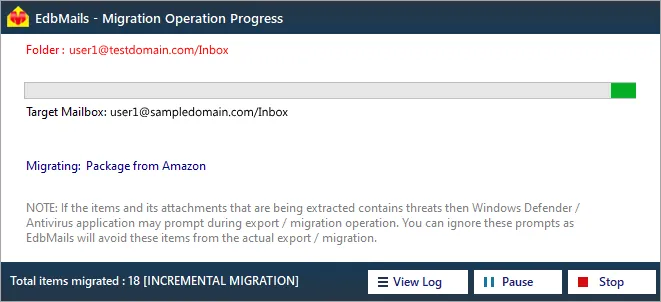
        Start Hosted Exchange to Office 365 Shared mailbox migration progress

  4. Hosted Exchange to Office 365 Shared mailbox post-migration activities

    Step 1: Update Office 365 MX records in your DNS

    Update your MX records in your DNS to start receiving messages on Office 365. This switch ensures smooth email operation with your newly migrated server. Additionally, set up the Autodiscover record for the Outlook connectivity to the migrated mailboxes.

    Step 2: Create Outlook Profiles for the new domain users

    If Outlook encounters connectivity hiccups with Office 365, create fresh Outlook profiles for each user in your domain. This action will help troubleshoot and establish proper connections.

  5. Hosted Exchange to Office 365 Shared mailbox migration troubleshooting

      For potential solutions to migration errors, refer to the Exchange migration troubleshooting guide. For further information regarding EdbMails Hosted Exchange migration, visit the Frequently Asked Questions.

Benefits of EdbMails for Hosted Exchange to Office 365 Shared mailbox migration

  1. Concurrent migration

    EdbMails allows for the simultaneous migration of multiple mailboxes, reducing the overall time required for large-scale migrations. This feature ensures that businesses can transition efficiently without delays, making it ideal for organizations with extensive Hosted Exchange environments.

  2. User-friendly interface

    EdbMails offers a simple and intuitive interface that allows even non-technical users to navigate the migration process effortlessly. Its clear design ensures that every step is straightforward, minimizing the learning curve and enhancing the overall user experience.

  3. Automatic mailbox mapping

    EdbMails simplifies the process by automatically mapping mailboxes between Hosted Exchange and Office 365. This feature eliminates manual intervention, ensuring that all mailboxes are transferred accurately and efficiently, which reduces errors during migration.

  4. Migrate with zero downtime

    With EdbMails, migrations occur without any disruption to your daily operations. The zero-downtime feature ensures that employees can continue accessing their emails and services while the migration runs in the background seamlessly.

  5. 24/7 free tech support

    EdbMails provides 24/7 free technical support at no extra cost. Whether it’s troubleshooting or answering migration-related questions, their dedicated support team is always available to ensure a smooth and stress-free migration experience.


Additional resources:

  • Exchange Public Folder to Exchange migration
  • Exchange 2010 to 2016 Public folder migration
  • Exchange 2013 Public folder to Office 365 migration
  • Exchange 2016 Public folder to Office 365 migration
  • Exchange Public Folder to Shared Mailbox migration
  • Archive Mailbox to Office 365 migration
additional resource

 In this manual

Shared mailbox planningPre-migration activitiesSteps to migratePost migration activitiesTroubleshootingBenefits of Hosted Exchange

Live Exchange Migration

100 Mailboxes $299 Only

Buy Now

Need help?

24/7 Customer support

Contact us on Live chat

Personalized Demo

Book a personalized demo

Still need help?

Email us / Call us

© 2026 Shifttocloud Inc. Privacy Policy | Terms of Use | GDPR | Security | Press Releases

hidden msg
Live Chat

Hi, May I help you?

Hide Chat Now