EdbMails EDB Recovery and Migration software
  • Products
    EdbMails
    All-in-one Recovery and Migration
    Explore our products
    • EDB recovery and Migration
    • OST, PST, MBOX, NSF, EML, MSG
    • Office 365, Exchange Migration
    • SharePoint, OneDrive & Teams
    • G Suite Migration
    • IMAP Migration
    • Duplicate Remover
    • Windows Data Recovery
    • Backup Solutions

    EDB Recovery and Migration

    EdbMails lets you recover corrupted, damaged, and offline Exchange EDB files, convert EDB mailboxes to PST format, and directly migrate mailbox data to Office 365 and live Exchange Server.

    EDB to PST
    Recover corrupted, damaged, offline EDB files and convert Exchange EDB mailboxes to PST file format
    Public Folder to Exchange
    Migrate public folders from an Exchange offline EDB file to live Exchange Server
    EDB to Live Exchange Migration
    Directly migrate offline Exchange database (EDB) files to live Exchange server
    Archive Mailbox to Office 365
    Migrate archive mailboxes from offline EDB files directly to Office 365
    EDB to Office 365 Migration
    Directly migrate offline Exchange database (EDB) files to Office 365
    Public Folder to Office 365
    Migrate public folders from an offline Exchange EDB file to Office 365

    OST, PST, MBOX, NSF, EML, MSG Export and Migration

    EdbMails lets you to recover OST and PST files, export OST, PST, MBOX, NSF, EML, and MSG files to PST files, and directly migrate OST, PST, MBOX, and NSF mailbox data to Office 365 and live Exchange Server.

    OST Recovery and Migration
    Recover offline OST files, convert OST to PST, and migrate OST to Office 365 and Exchange Server
    PST Recovery and Migration
    Recover Outlook PST files , Export PST to PST, migrate PST to Office 365 and Exchange Server
    MBOX Export and Migration
    Export MBOX to PST, migrate MBOX to Office 365 and Exchange Server
    NSF Export and Migration
    Export NSF to PST, migrate NSF to Office 365 and Exchange Server
    EML to PST Export
    Convert EML files to Outlook PST files
    PST to MSG Export
    Convert Outlook PST file to MSG file format
    MSG to PST Export
    Export MSG files to Outlook PST files

    Office 365, Exchange Migration

    EdbMails lets you securely migrate mailboxes across Microsoft 365, Exchange, Google Workspace (G Suite), and IMAP-supported servers such as Outlook, Gmail, Zimbra, Zoho Mail, and cPanel, ensuring zero downtime.

    Office 365 Migration
    Migrate between Office 365 tenants, Office 365 to Exchange, Office 365 to PST, PST files to Office 365.
    Exchange Migration
    Migrate between any Exchange Servers, Exchange to Office 365, Exchange to PST, PST files to Exchange.
    Tenant to Tenant Migration
    Migrate Mailboxes, Public Folders, Archive Mailboxes between Office 365 Tenants.
    Exchange to Office 365
    Migrate Mailboxes, Public Folders, Archive Mailboxes from live Exchange server to Office 365.
    Office 365 to IMAP
    Migrate Office 365 to IMAP, Office 365 to Gmail, Office 365 to Outlook, Office 365 to Zoho etc.
    Exchange to IMAP
    Migrate from live Exchange Server to IMAP servers such as Gmail, Outlook, and Zoho Mail.
    Public Folder to Office 365
    Migrate Public Folders between Office 365 tenants with complete folder hierarchy and mailbox data integrity.
    Exchange to PST
    Export live Exchange Server mailboxes, public folders, and archive mailboxes to Outlook PST files.

    SharePoint, OneDrive & Microsoft Teams Migration

    EdbMails lets you migrate SharePoint sites, OneDrive data, Microsoft Teams, teams, channels, chats, permissions, and documents between Microsoft 365 tenants while maintaining the existing folder structure and data integrity.

    SharePoint Online Migration
    Migrate documents, lists, files and folders from SharePoint sites.
    OneDrive for Business Migration
    Migrate documents, lists, files, folders, private chats from OneDrive.
    Microsoft Teams Migration
    Migrate Teams, chats, channels, documents, files and folders etc.

    Google Workspace / G Suite Migration

    EdbMails G Suite Migration Tool lets you easily migrate emails, calendars, contacts, tasks, and more from G Suite to Office 365, Exchange Server, and IMAP servers using a Google Admin account without requiring individual user credentials.

    G Suite Migration
    Migrate emails, calendars, contacts, tasks from G Suite to Office 365, G Suite to Exchange, G Suite to IMAP Servers
    G Suite to Office 365
    Migrate emails, calendars, contacts, tasks from Google Workspace / G Suite to Office 365
    G Suite to Exchange Server
    Migrate emails, calendars, contacts, tasks from Google Workspace / G Suite to on-Premise Exchange Server
    G Suite to IMAP
    Migrate emails, calendars, contacts, tasks from Google Workspace / G Suite to IMAP, Outlook, Zimbra, Zoho etc.

    IMAP Migration

    EdbMails IMAP Migration tool lets you easily migrate emails from IMAP servers such as Outlook, Gmail, Zoho Mail, Zimbra, cPanel, and more. Supports IMAP to IMAP, Office 365, Exchange Server, PST, and bulk PST to IMAP migration.

    IMAP Email Backup & Migration
    Backup and migrate emails from IMAP servers to PST, Office 365, and On-Premises Exchange Server
    IMAP to Office 365
    Migrate emails, folders, and attachments from IMAP servers to Office 365
    IMAP to Exchange
    Migrate emails, folders, and attachments from IMAP servers to on-premises Exchange Server
    IMAP to PST
    Export emails, folders, and attachments from IMAP servers to Outlook PST files for backup
    PST to IMAP
    Migrate emails, folders, and attachments from bulk PST files to IMAP servers

    Duplicate Remover

    EdbMails Duplicate Remover lets you easily remove duplicate items from Office 365 and Exchange Server, and from IMAP, Outlook, Gmail, Zimbra, Zoho Mail, etc., ensuring a clean and organized mailbox.

    Remove Duplicates
    Easily clean up your Office 365, Exchange, Outlook and IMAP accounts by removing duplicate emails.
    Remove Duplicates from Office 365
    Remove duplicate emails, calendars, contacts, journal tasks, etc. from Office 365.
    Remove Duplicates from Exchange Server
    Remove duplicate emails, calendars, contacts, journal tasks, etc. from live Exchange Server.
    Remove Duplicates from IMAP, Outlook
    Remove duplicate emails, attachments from IMAP, Outlook, Gmail, Zimbra, Zoho Mail etc.

    Exchange, SharePoint, OneDrive, Teams and Office 365 Backup

    EdbMails enables secure, automated backup and recovery for Microsoft 365 services including Exchange Online, SharePoint, OneDrive, Teams, and Live Exchange Server with complete data protection and restore flexibility.

    Office 365 Backup
    Incremental, Granular, Encrypted and Compressed Office 365 Mailboxes Backup
    Exchange Server Backup
    Incremental, Granular, Encrypted and Compressed Exchange Mailboxes Backup
    SharePoint, OneDrive & Teams Backup
    Backup Online site collections, Team sites, Office 365 groups, all documents etc.

    Windows Data Recovery

    EdbMails Windows Data Recovery Software lets you recover permanently deleted data, including photos, videos, documents, and archived files, from partitions on hard drives, SSDs, USB drives, SD cards, and external storage devices.

    Windows Data Recovery
    Recover and restore permanently deleted data from hard drives, SSDs, USB drives, SD cards, and etc.
    Whitepaper
    Request a Demo
    Sign Up
  • Features
  • FAQ
  • Pricing
  • Download
  • Support
  • Sign in
User’s Manual
Office 365 Migration

User Manual

User Manual

  • Office 365 Migration Overview
  • Initial setup
  • System Requirements
  • Migration Scenarios
  • Software Setup
    • EdbMails Installation Process
    • Upgrading the Software
    • How to uninstall
    • Reinstallation
  • Understanding the Application
    • Software's Main Components
    • Understanding the Migration
  • FAQ
    • General
    • Migration Free Trial / Demo
    • Migration License
    • Before Migration
    • Migration - Steps
    • After Migration
  • Videos
    • Office 365 to Office 365
    • Office 365 to Exchange
    • Office 365 to IMAP
    • Office 365 to PST
    • Public Folder to Office 365
    • Archive Mailbox to Office 365
    • Public Folder to Exchange
    • Archive Mailbox to Exchange
    • Restore Bulk PST files to Office 365
    • Automatically Create Office 365
    • Export Office 365 user to CSV file
  • Screenshots
    • Office 365 to Office 365
    • Office 365 to Exchange
    • Office 365 to PST
    • Office 365 to IMAP
  • How it works?
    • Office 365 to Office 365
    • Office 365 to Exchange
    • Office 365 to IMAP
    • Office 365 to PST
    • Public Folder to Office 365
    • Public Folder to Exchange
    • Public Folder to Shared Mailbox
    • Archive Mailbox to Office 365
    • Archive Mailbox to Exchange
    • Office 365 to Hosted Exchange
    • Multiple PST to Office 365
    • Office 365 to Gmail Migration
    • Office 365 Shared mailbox to Exchange
    • Office 365 Public folders to PST
    • Office 365 archive mailbox to PST
    • Office 365 Shared mailbox to PST
    • Office 365 shared mailbox to Public folder
    • Office 365 Archive mailbox to Shared mailbox
    • Office 365 Shared mailbox to Archive mailbox
    • Office 365 to Zoho migration
    • Office 365 group mailbox to shared mailbox
    • Shared mailbox to Office 365 Groups mailbox
    • Office 365 Groups mailbox to Regular mailbox
  • Connect to source Office 365
  • Connect to target Office 365
  • Modern Authentication Using OAuth 2.0
    • Microsoft 365 modern authentication
    • Automatic Registration
    • Manual Registration
  • Connect to Exchange server
  • Knowledge Base
    • Migrate between Office 365 tenants
    • Migrate Office 365 mailbox
    • Public folder migration
    • Office 365 to Exchange Migration
    • Office 365 Migration with same Domain
    • Office 365 Group Migration
    • Selective Mailbox Migration
    • Migration to Exchange 2007, 2010, 2013, 2016 and 2019
    • User-Defined Mailbox/Folder Mapping
    • Export Office 365 users to CSV
    • GoDaddy to Microsoft 365 migration
    • Rackspace to Office 365 migration
    • Office 365 migration methods
    • Office 365 migration checklist
    • Migrate Shared mailbox to Office 365
    • Office 365 migration best practices
    • Office 365 migration challenges
    • Convert shared mailbox to regular mailbox
    • Office 365 to Exchange 2019 migration
    • Office 365 multiple mailbox migration
    • Office 365 Server to Server Migration
    • Cross-Tenant Office 365 migration
    • EWS throttling in Exchange Online
    • Office 365 migration common use cases and solutions
    • Language settings on Office 365 Server
    • Office 365 to iCloud migration
    • Office 365 to Yahoo Mail migration
    • Microsoft 365 sign-in issue
    • Batch create Outlook profiles Intune
  • Set Office 365 Impersonation rights
    • Using PowerShell commands
    • Using Office 365 GUI
  • Migration Types
    • Cutover Migration
    • Staged Migration
  • Set Exchange Server Impersonation rights
  • Map the Mailboxes
  • Migration Walkthrough
    • Office 365 tenant to tenant migration
    • Office 365 to Exchange migration
    • Office 365 to PST Export
  • Multifactor Authentication
    • Enable MFA in Office 365
    • Create App password for MFA
    • Disable Security Defaults
  1. Home
  2. Product
  3. How to Export Archive Mailbox to PST in Office 365?
Download Buy Now

Export Office 365 archive mailbox to PST

Many organizations today choose to use archive mailboxes to manage older, non-accessed emails instead of the regular mailbox. The archive mailbox benefits the storage capacity of your system and helps in retaining old emails to comply with data retention policies, as well as keeping your regular mailbox from overflowing. Further, in the process of exporting older archived mailboxes to PST is often essential for legal, backup, or audit purposes.

On the contrary, exporting Office 365 archive mailboxes to PST by using native method is complicated and time-consuming. It requires several manual tasks, some parts of it will have to be done using the PowerShell script, which will introduce data loss or mistakes. When large-scale migration or archiving is required due to compliance reasons, the native method is complicated for the company.
Export Office 365 archive mailbox to PST

EdbMails Office 365 migration software takes a lot of the friction out of exporting archive mailboxes to PST, a far more intuitive and efficient solution compared to the native method. Batch migrations let organizations export multiple archive mailboxes at the same time, which cuts down both the time and effort. For organizations operating across different regions, EdbMails supports multilingual environments, making it practical for global enterprises. The advanced filtering options give administrators precise control over what gets exported — date, subject, and sender, so only the data that actually needs to come out ends up in the PST file. Taken together, it's a more secure, flexible, and straightforward approach than anything the native tools offer.

  1. Reasons to Export Office 365 Archive Mailbox to PST

    1. Avoid data loss

      When data is exported from the archives to PST files, it provides an extra layer of security in the case that cloud storage fails the data is backed up and saved in a PST file.

    2. Retain Mailbox contents for an extended period

      It will enable you to save mailbox contents for a long duration of time, without relying on cloud-based systems.

    3. Protect Your Data From Unpredictable Attacks

      By exporting the mailbox to PST files, you can protect your data from unplanned attacks such as system failure or unwanted data deletion.

    4. Protect your data from Cloud Ransomware attacks

      Exporting mailbox contents to PST files can help protect data from cloud ransomware attacks in the cloud.

    5. Mailbox archiving in Office 365 for audit compliance

      Exporting mailbox data into PST files ensures email data is readily available to for audits or during legal processes.

  2. Pre-requisites to export Office 365 archive mailbox to PST

    • Make sure Microsoft Outlook with a profile is installed on the computer on which you will export the Office 365 archive mailbox to PST.
    • Make sure you have enough space on your computer's drive to store the PST file you will be exporting.
  3. Steps to export Office 365 archive mailbox to PST using EdbMails

    • Step 1: Download and Install EdbMails application

      • Download and install the EdbMails application on your computer running on Windows OS.
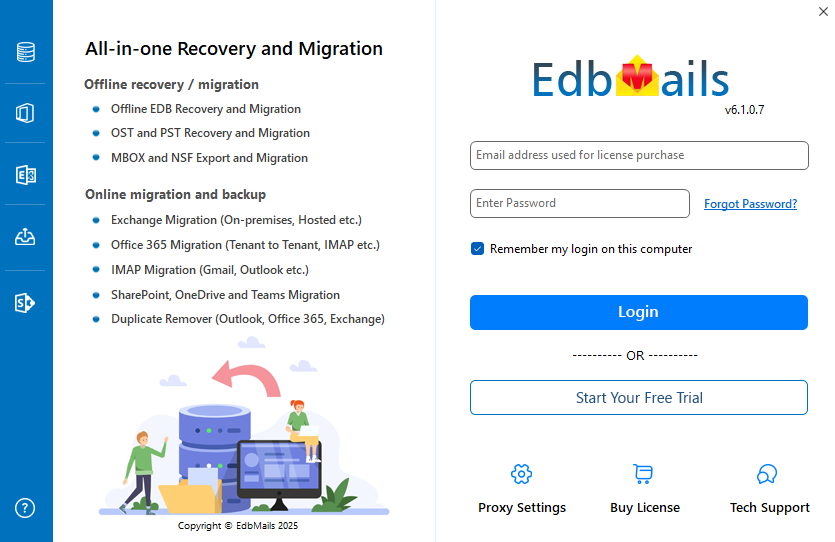
      • Open up the application, fill out your information and click the 'Login' button, or just hit the ‘Start your Free Trial’ button.
        Login to EdbMails application

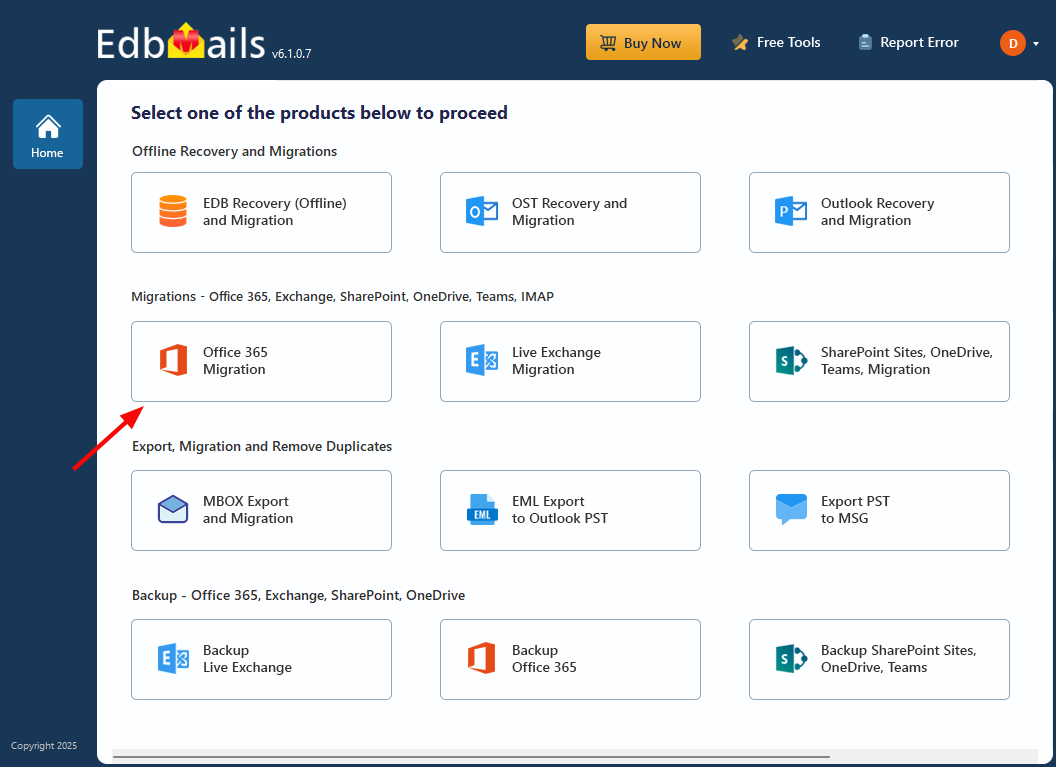
      • Select the ‘Office 365 Migration’ option.
        Select the ‘Office 365 Migration’ option

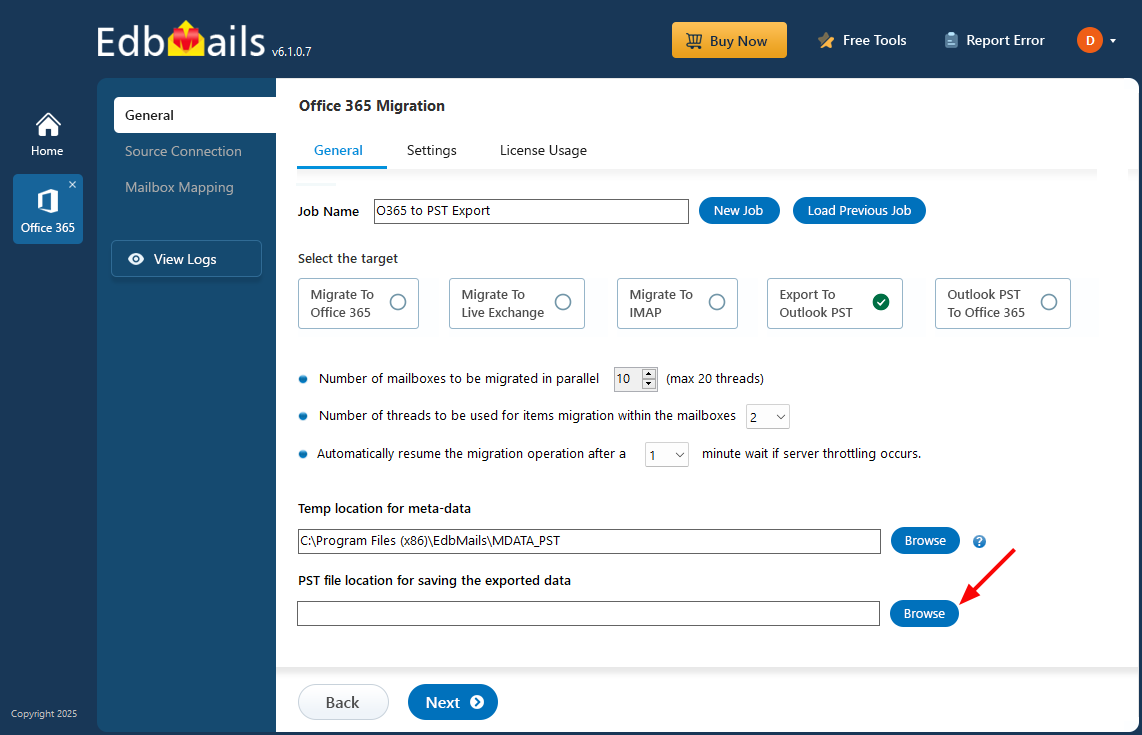
      • Choose the 'Office 365 to PST Export’ option.
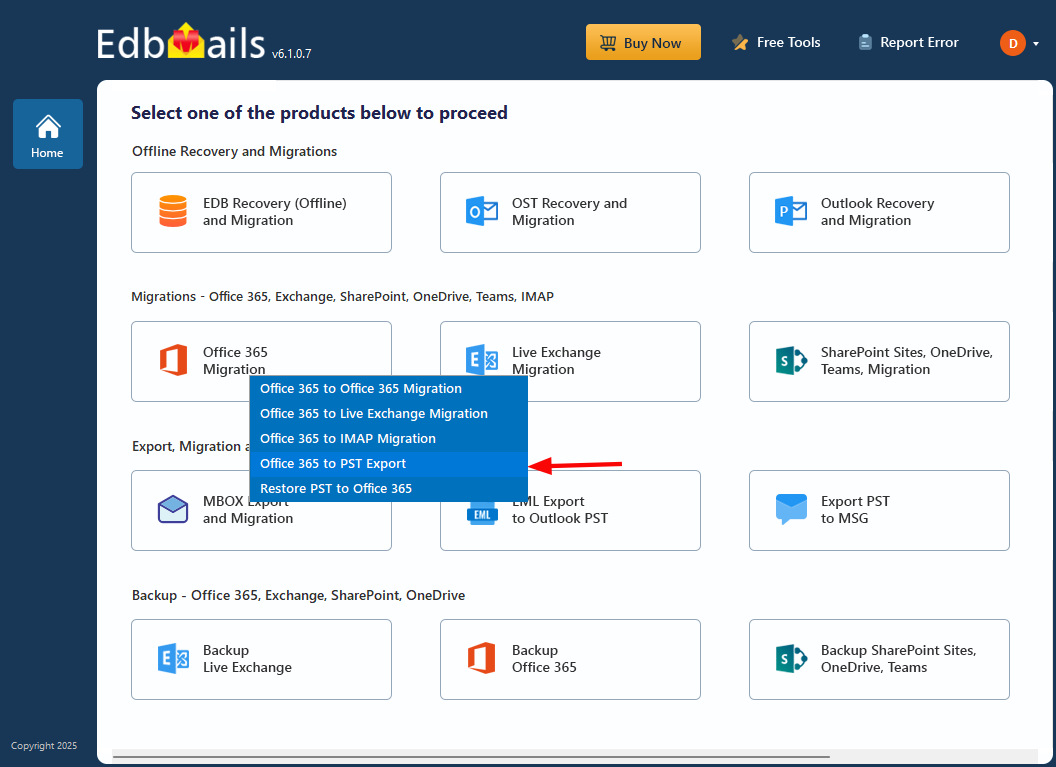
        Select the Office 365 to PST export option

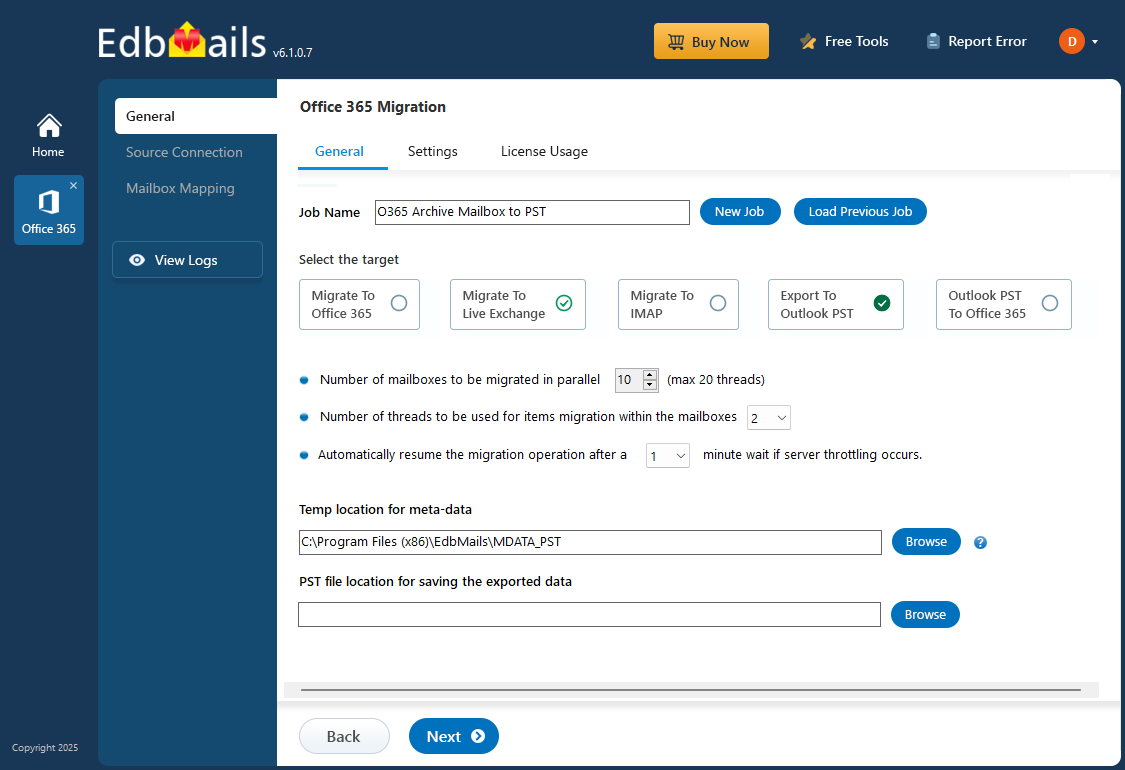
      • You can either proceed with the default job name or click the 'New Job' button to enter a custom name.
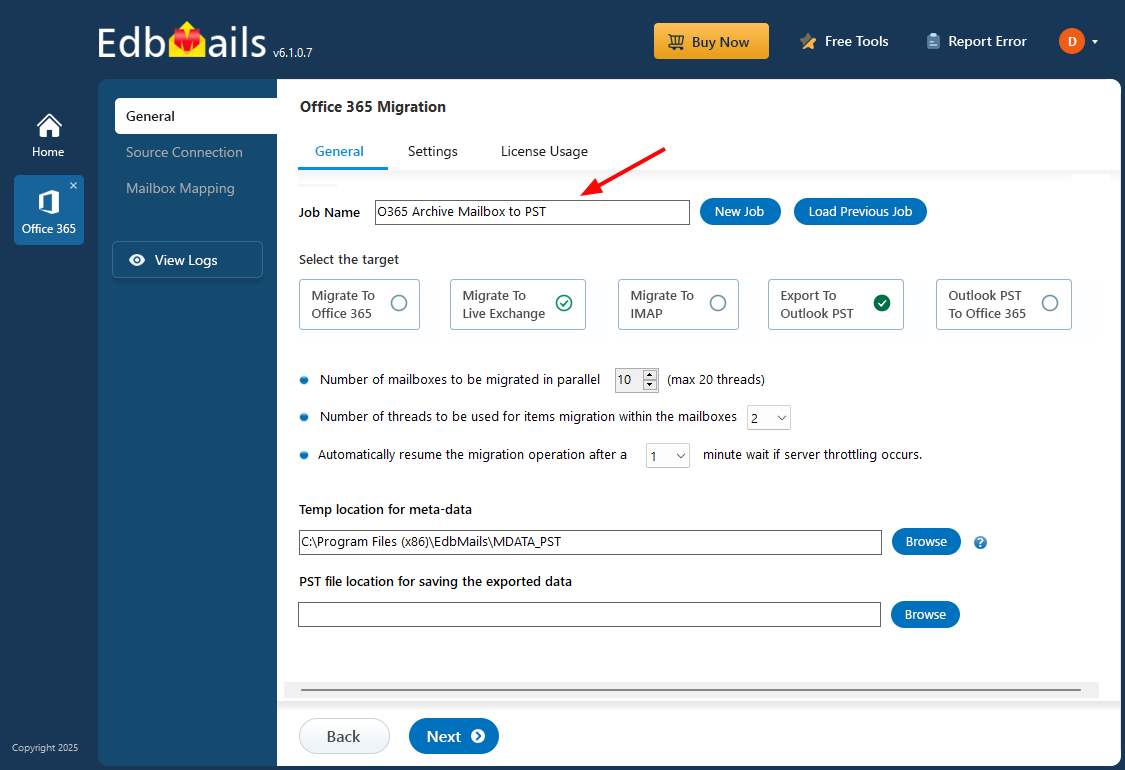
        Enter Office 365 Archive mailbox to PST job name

      • Click ‘Browse’.

        Click browse

      • Select the folder where the exported PST files need to go — the drive should have enough free space to handle the output without running into storage issues.
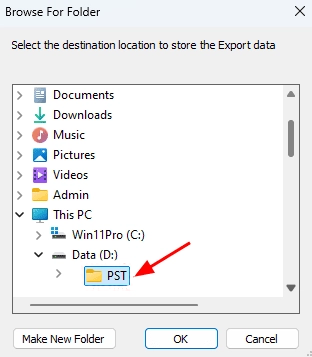
        Select PST location

    • Step 2: Connect to source Office 365 server

      • For a fresh connection to the source Office 365, click 'Add New Connection' or if there's already a connection set up, select it from the list and hit 'Connect to Existing' to continue.
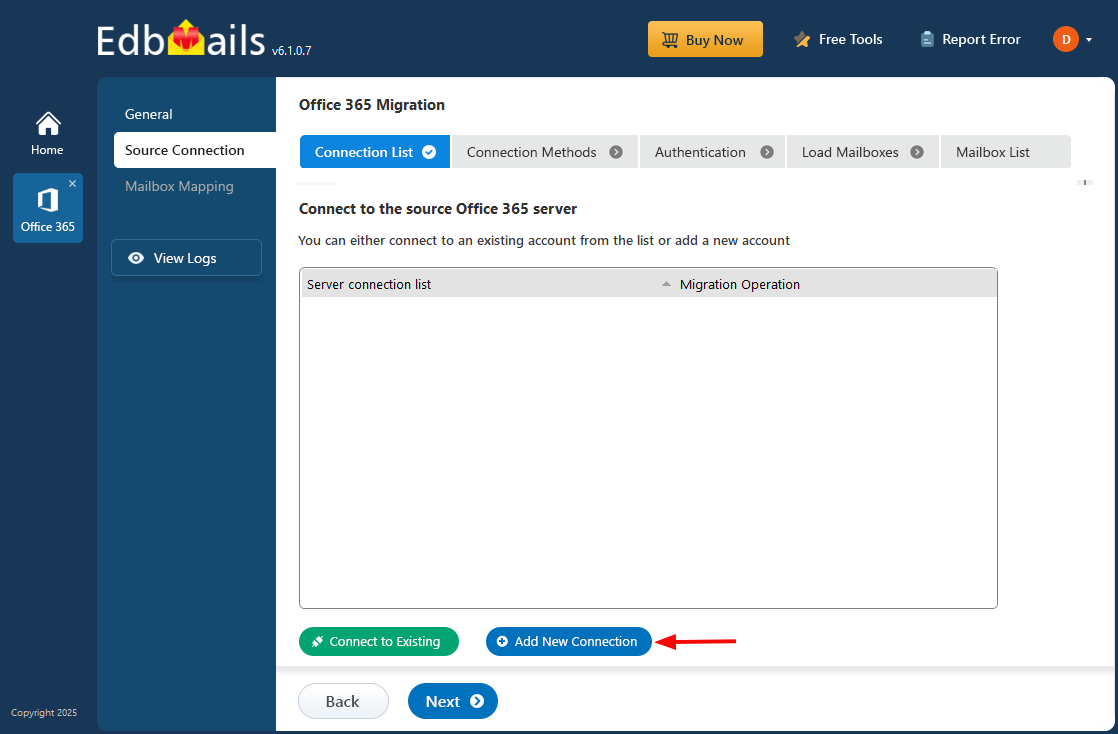
        Click add new connection

      • Select 'Connect to Archive Mailboxes (In-Place Archive)' and then click 'Next' to proceed.
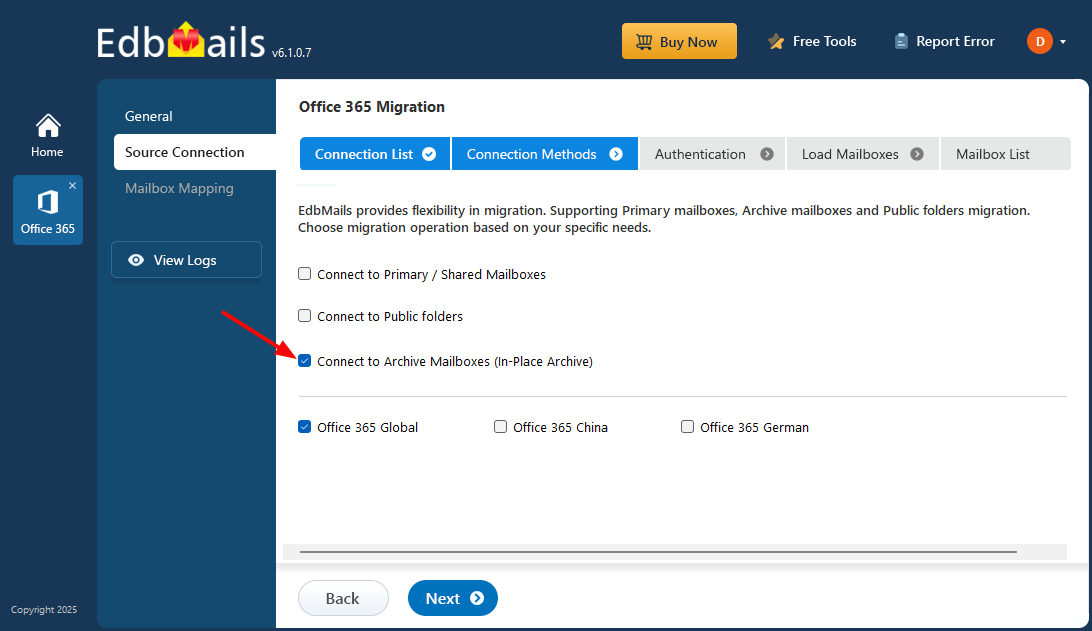
        Choose ‘Connect to Archive Mailboxes’

      • Select the authentication method you prefer and click ‘Login’ button.
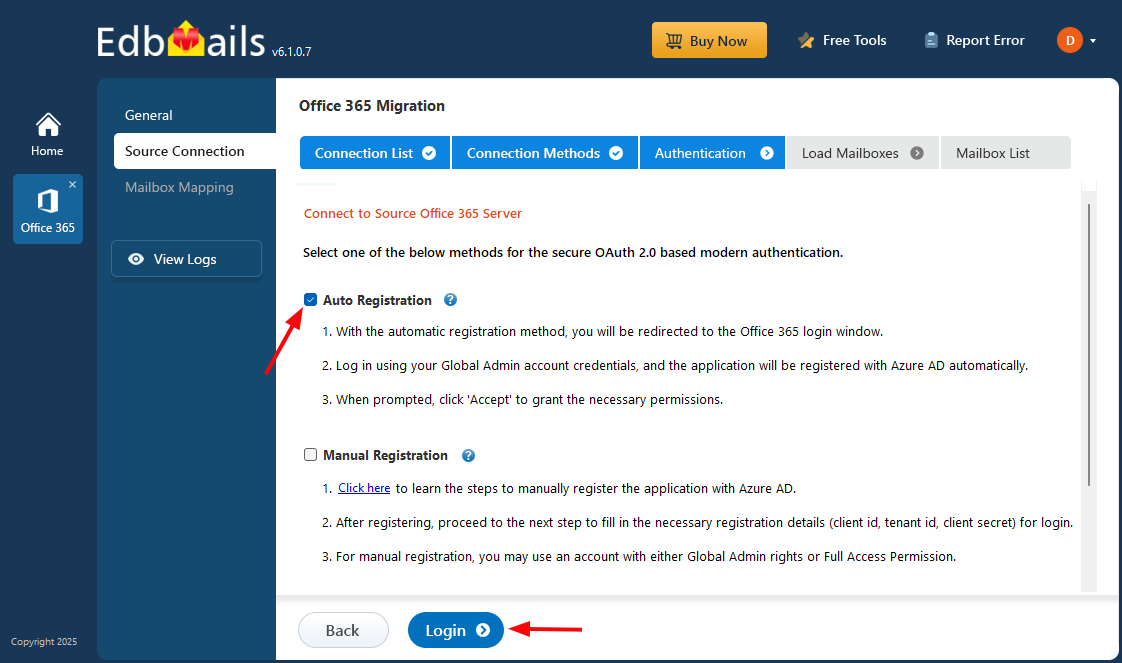
        Connect to source Office 365 server

         Connect to Office 365 server using secure modern authentication

      • Sign in on the Microsoft authentication page using a global admin account
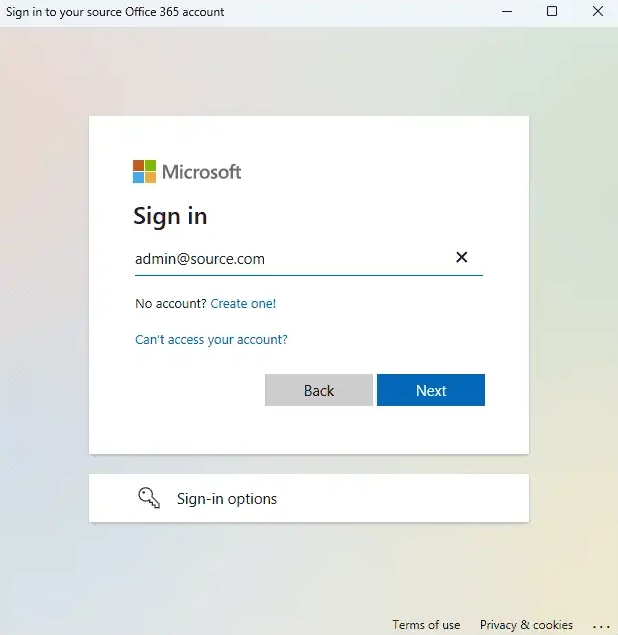
        Microsoft sign-in

      • Once authentication is successful, select a method to load the mailboxes. Alternatively, you can load and migrate mailboxes using a CSV file.
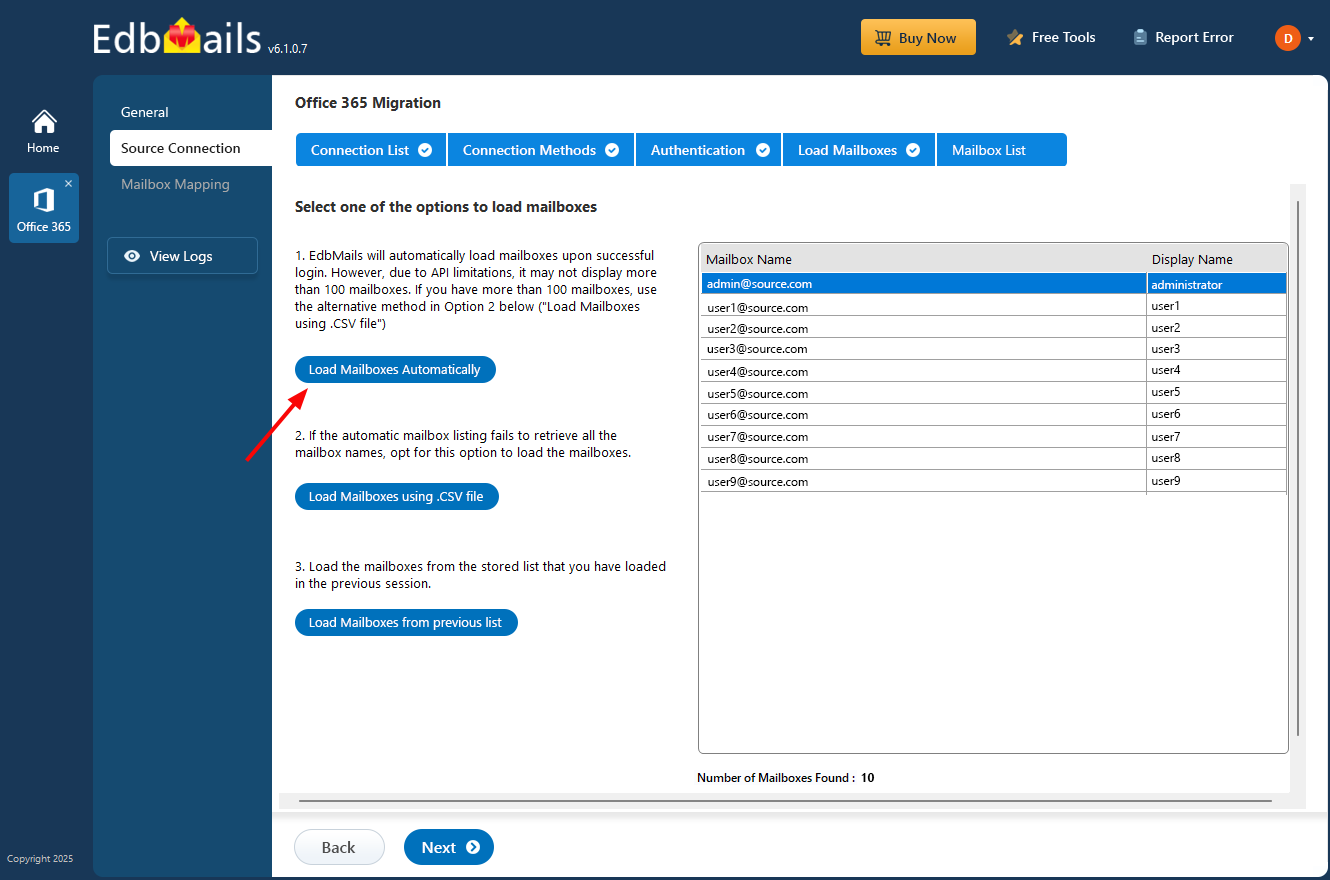
        Choose the load mailboxes option

    • Step 3: Select Office 365 archive mailboxes

      • Select the archive mailboxes you want to migrate, and click 'Next' to connect to the target server.
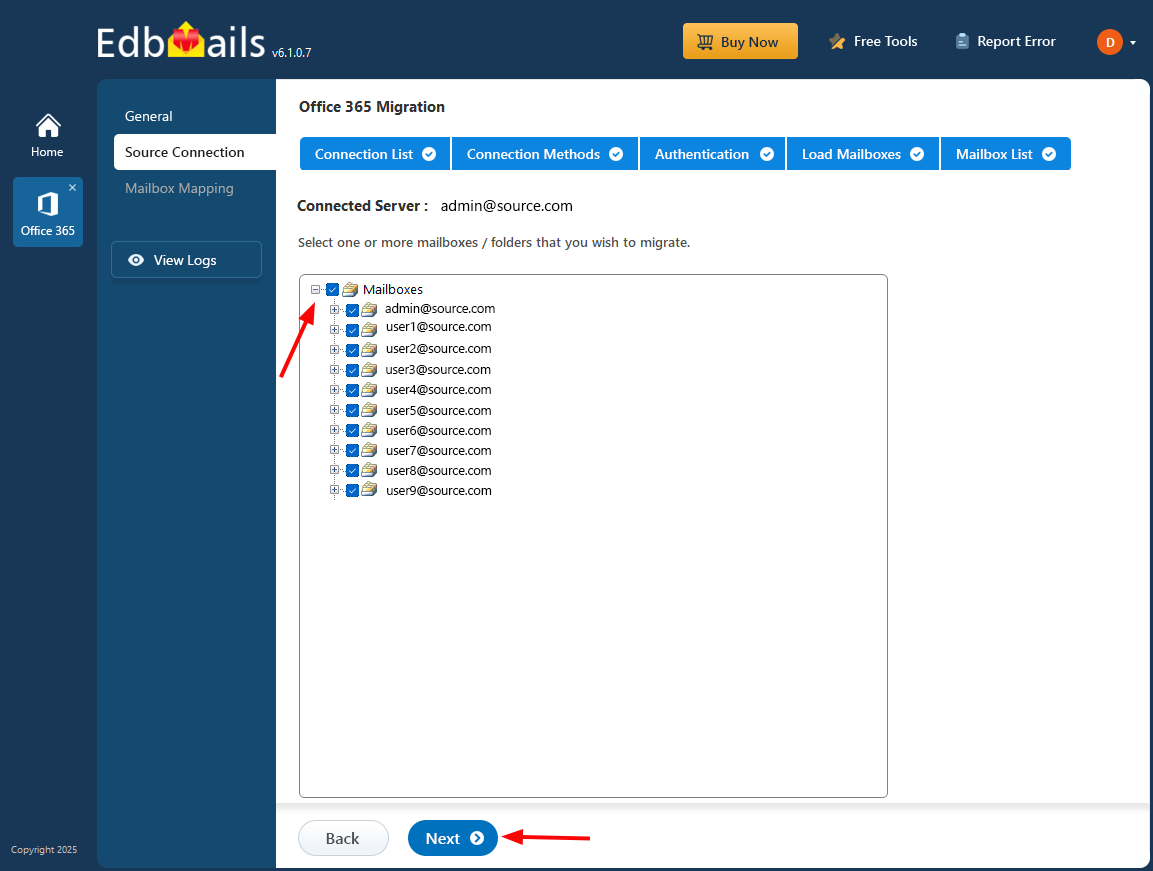
        Select the Office 365 archive mailboxes

    • Step 4: Start Office 365 archive mailbox to PST export operation

      • Verify the archive mailboxes for the export operation and ensure to Set the ‘Action’ as ‘Export’.
      • Click ‘Start Export’ button to begin the export process.
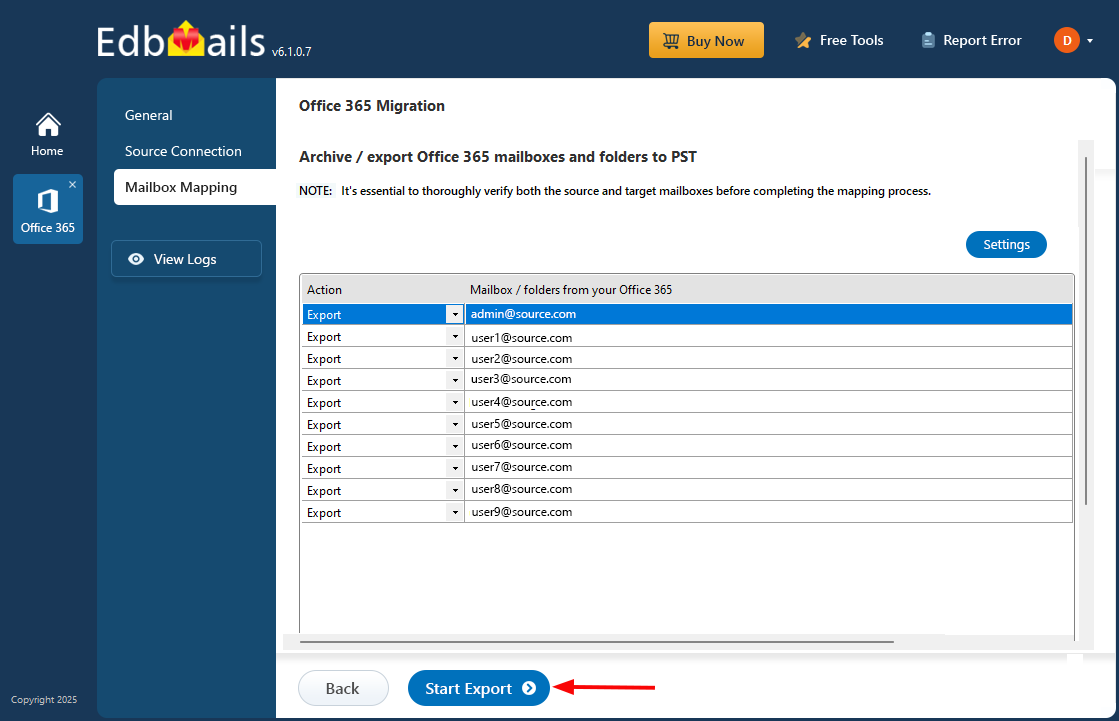
        Start Office 365 archive mailbox to PST export operation

      • That's it! During export operation, you can view the progress as shown below.
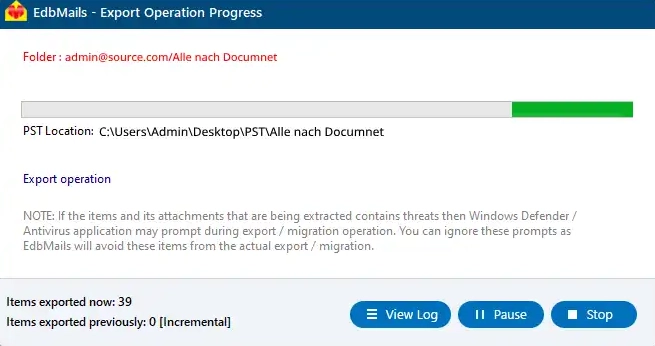
        Office 365 archive mailbox to PST export operation progress

      • After the export process finishes, you'll receive the completion notice. EdbMails generates export operation logs and you'll be able to see it after clicking the ‘View Logs’ button.
      • After the export process completes, please open the generated PST file using Outlook and make sure that the items like email, calendar, contact, etc. are exported.

Benefits of EdbMails for Office 365 Export Archive Mailbox to PST

  1. Scalable and Flexible for Various Migration Needs

    The EdbMails offers an easily scalable solution for exporting Office 365 archive mailboxes to PST. Whether you're looking to export a couple of or huge numbers of archive mailboxes, the tool is easy and convenient to manage the various kinds of migrations.

  2. Metadata Integrity

    During the export of email data, EdbMails maintains all the metadata of emails, which includes email timestamp, sender and receiver details, folder hierarchy, etc. The security of the data is kept intact and without risk of corruption or deletion, making the migration smoother.

  3. AES 256-bit Military Level Encryption

    Security has been considered a key priority in the design of EdbMails software. EdbMails employs an AES 256-bit encryption to secure and safely transfer your data while performing the export. Military-level encryption in EdbMails keeps your Office 365 archive mailbox secure without having the fear of unauthorized access.

  4. Lifetime license

    EdbMails comes with a lifetime license for Office 365 mailbox migration. After purchasing the software, you can use it and receive updates from time to time, ensuring it meets all your mailbox export needs without any additional cost.

  5. Free PST Viewer

    EdbMails offers a Free PST Viewer that lets you examine the PST file before exporting it, without requiring any extra license. It proves to be an easy, accessible, and cost-effective tool if you wish to view PST files.


Additional resources:

  • Archive Mailbox to Exchange
  • Office 365 to Hosted Exchange
  • Multiple PST to Office 365
  • Office 365 to Gmail Migration
  • Office 365 to Exchange 2019 migration
  • Office 365 multiple mailbox migration
  • Office 365 Server to Server Migration
lady image

 In this manual

IntroductionReasons for migrationMigration PrerequisitesMigration StepsEdbMails Benefits

Office 365 Migration

100 Mailboxes $299 Only

Buy Now

Need help?

24/7 Customer support

Contact us on Live chat

Personalized Demo

Book a personalized demo

Still need help?

Email us / Call us

© 2026 Shifttocloud Inc. Privacy Policy | Terms of Use | GDPR | Security | Press Releases

hidden msg
Live Chat

Hi, May I help you?

Hide Chat Now