EdbMails EDB Recovery and Migration software
  • Products
    EdbMails
    All-in-one Recovery and Migration
    Explore our products
    • EDB recovery and Migration
    • OST, PST, MBOX, NSF, EML, MSG
    • Office 365, Exchange Migration
    • SharePoint, OneDrive & Teams
    • G Suite Migration
    • IMAP Migration
    • Duplicate Remover
    • Windows Data Recovery
    • Backup Solutions

    EDB Recovery and Migration

    EdbMails lets you recover corrupted, damaged, and offline Exchange EDB files, convert EDB mailboxes to PST format, and directly migrate mailbox data to Office 365 and live Exchange Server.

    EDB to PST
    Recover corrupted, damaged, offline EDB files and convert Exchange EDB mailboxes to PST file format
    Public Folder to Exchange
    Migrate public folders from an Exchange offline EDB file to live Exchange Server
    EDB to Live Exchange Migration
    Directly migrate offline Exchange database (EDB) files to live Exchange server
    Archive Mailbox to Office 365
    Migrate archive mailboxes from offline EDB files directly to Office 365
    EDB to Office 365 Migration
    Directly migrate offline Exchange database (EDB) files to Office 365
    Public Folder to Office 365
    Migrate public folders from an offline Exchange EDB file to Office 365

    OST, PST, MBOX, NSF, EML, MSG Export and Migration

    EdbMails lets you to recover OST and PST files, export OST, PST, MBOX, NSF, EML, and MSG files to PST files, and directly migrate OST, PST, MBOX, and NSF mailbox data to Office 365 and live Exchange Server.

    OST Recovery and Migration
    Recover offline OST files, convert OST to PST, and migrate OST to Office 365 and Exchange Server
    PST Recovery and Migration
    Recover Outlook PST files , Export PST to PST, migrate PST to Office 365 and Exchange Server
    MBOX Export and Migration
    Export MBOX to PST, migrate MBOX to Office 365 and Exchange Server
    NSF Export and Migration
    Export NSF to PST, migrate NSF to Office 365 and Exchange Server
    EML to PST Export
    Convert EML files to Outlook PST files
    PST to MSG Export
    Convert Outlook PST file to MSG file format
    MSG to PST Export
    Export MSG files to Outlook PST files

    Office 365, Exchange Migration

    EdbMails lets you securely migrate mailboxes across Microsoft 365, Exchange, Google Workspace (G Suite), and IMAP-supported servers such as Outlook, Gmail, Zimbra, Zoho Mail, and cPanel, ensuring zero downtime.

    Office 365 Migration
    Migrate between Office 365 tenants, Office 365 to Exchange, Office 365 to PST, PST files to Office 365.
    Exchange Migration
    Migrate between any Exchange Servers, Exchange to Office 365, Exchange to PST, PST files to Exchange.
    Tenant to Tenant Migration
    Migrate Mailboxes, Public Folders, Archive Mailboxes between Office 365 Tenants.
    Exchange to Office 365
    Migrate Mailboxes, Public Folders, Archive Mailboxes from live Exchange server to Office 365.
    Office 365 to IMAP
    Migrate Office 365 to IMAP, Office 365 to Gmail, Office 365 to Outlook, Office 365 to Zoho etc.
    Exchange to IMAP
    Migrate from live Exchange Server to IMAP servers such as Gmail, Outlook, and Zoho Mail.
    Public Folder to Office 365
    Migrate Public Folders between Office 365 tenants with complete folder hierarchy and mailbox data integrity.
    Exchange to PST
    Export live Exchange Server mailboxes, public folders, and archive mailboxes to Outlook PST files.

    SharePoint, OneDrive & Microsoft Teams Migration

    EdbMails lets you migrate SharePoint sites, OneDrive data, Microsoft Teams, teams, channels, chats, permissions, and documents between Microsoft 365 tenants while maintaining the existing folder structure and data integrity.

    SharePoint Online Migration
    Migrate documents, lists, files and folders from SharePoint sites.
    OneDrive for Business Migration
    Migrate documents, lists, files, folders, private chats from OneDrive.
    Microsoft Teams Migration
    Migrate Teams, chats, channels, documents, files and folders etc.

    Google Workspace / G Suite Migration

    EdbMails G Suite Migration Tool lets you easily migrate emails, calendars, contacts, tasks, and more from G Suite to Office 365, Exchange Server, and IMAP servers using a Google Admin account without requiring individual user credentials.

    G Suite Migration
    Migrate emails, calendars, contacts, tasks from G Suite to Office 365, G Suite to Exchange, G Suite to IMAP Servers
    G Suite to Office 365
    Migrate emails, calendars, contacts, tasks from Google Workspace / G Suite to Office 365
    G Suite to Exchange Server
    Migrate emails, calendars, contacts, tasks from Google Workspace / G Suite to on-Premise Exchange Server
    G Suite to IMAP
    Migrate emails, calendars, contacts, tasks from Google Workspace / G Suite to IMAP, Outlook, Zimbra, Zoho etc.

    IMAP Migration

    EdbMails IMAP Migration tool lets you easily migrate emails from IMAP servers such as Outlook, Gmail, Zoho Mail, Zimbra, cPanel, and more. Supports IMAP to IMAP, Office 365, Exchange Server, PST, and bulk PST to IMAP migration.

    IMAP Email Backup & Migration
    Backup and migrate emails from IMAP servers to PST, Office 365, and On-Premises Exchange Server
    IMAP to Office 365
    Migrate emails, folders, and attachments from IMAP servers to Office 365
    IMAP to Exchange
    Migrate emails, folders, and attachments from IMAP servers to on-premises Exchange Server
    IMAP to PST
    Export emails, folders, and attachments from IMAP servers to Outlook PST files for backup
    PST to IMAP
    Migrate emails, folders, and attachments from bulk PST files to IMAP servers

    Duplicate Remover

    EdbMails Duplicate Remover lets you easily remove duplicate items from Office 365 and Exchange Server, and from IMAP, Outlook, Gmail, Zimbra, Zoho Mail, etc., ensuring a clean and organized mailbox.

    Remove Duplicates
    Easily clean up your Office 365, Exchange, Outlook and IMAP accounts by removing duplicate emails.
    Remove Duplicates from Office 365
    Remove duplicate emails, calendars, contacts, journal tasks, etc. from Office 365.
    Remove Duplicates from Exchange Server
    Remove duplicate emails, calendars, contacts, journal tasks, etc. from live Exchange Server.
    Remove Duplicates from IMAP, Outlook
    Remove duplicate emails, attachments from IMAP, Outlook, Gmail, Zimbra, Zoho Mail etc.

    Exchange, SharePoint, OneDrive, Teams and Office 365 Backup

    EdbMails enables secure, automated backup and recovery for Microsoft 365 services including Exchange Online, SharePoint, OneDrive, Teams, and Live Exchange Server with complete data protection and restore flexibility.

    Office 365 Backup
    Incremental, Granular, Encrypted and Compressed Office 365 Mailboxes Backup
    Exchange Server Backup
    Incremental, Granular, Encrypted and Compressed Exchange Mailboxes Backup
    SharePoint, OneDrive & Teams Backup
    Backup Online site collections, Team sites, Office 365 groups, all documents etc.

    Windows Data Recovery

    EdbMails Windows Data Recovery Software lets you recover permanently deleted data, including photos, videos, documents, and archived files, from partitions on hard drives, SSDs, USB drives, SD cards, and external storage devices.

    Windows Data Recovery
    Recover and restore permanently deleted data from hard drives, SSDs, USB drives, SD cards, and etc.
    Whitepaper
    Request a Demo
    Sign Up
  • Features
  • FAQ
  • Pricing
  • Download
  • Support
  • Sign in
User’s Manual
Office 365 Migration

User Manual

User Manual

  • Office 365 Migration Overview
  • Initial setup
  • System Requirements
  • Migration Scenarios
  • Software Setup
    • EdbMails Installation Process
    • Upgrading the Software
    • How to uninstall
    • Reinstallation
  • Understanding the Application
    • Software's Main Components
    • Understanding the Migration
  • FAQ
    • General
    • Migration Free Trial / Demo
    • Migration License
    • Before Migration
    • Migration - Steps
    • After Migration
  • Videos
    • Office 365 to Office 365
    • Office 365 to Exchange
    • Office 365 to IMAP
    • Office 365 to PST
    • Public Folder to Office 365
    • Archive Mailbox to Office 365
    • Public Folder to Exchange
    • Archive Mailbox to Exchange
    • Restore Bulk PST files to Office 365
    • Automatically Create Office 365
    • Export Office 365 user to CSV file
  • Screenshots
    • Office 365 to Office 365
    • Office 365 to Exchange
    • Office 365 to PST
    • Office 365 to IMAP
  • How it works?
    • Office 365 to Office 365
    • Office 365 to Exchange
    • Office 365 to IMAP
    • Office 365 to PST
    • Public Folder to Office 365
    • Public Folder to Exchange
    • Public Folder to Shared Mailbox
    • Archive Mailbox to Office 365
    • Archive Mailbox to Exchange
    • Office 365 to Hosted Exchange
    • Multiple PST to Office 365
    • Office 365 to Gmail Migration
    • Office 365 Shared mailbox to Exchange
    • Office 365 Public folders to PST
    • Office 365 archive mailbox to PST
    • Office 365 Shared mailbox to PST
    • Office 365 shared mailbox to Public folder
    • Office 365 Archive mailbox to Shared mailbox
    • Office 365 Shared mailbox to Archive mailbox
    • Office 365 to Zoho migration
    • Office 365 group mailbox to shared mailbox
    • Shared mailbox to Office 365 Groups mailbox
    • Office 365 Groups mailbox to Regular mailbox
  • Connect to source Office 365
  • Connect to target Office 365
  • Modern Authentication Using OAuth 2.0
    • Microsoft 365 modern authentication
    • Automatic Registration
    • Manual Registration
  • Connect to Exchange server
  • Knowledge Base
    • Migrate between Office 365 tenants
    • Migrate Office 365 mailbox
    • Public folder migration
    • Office 365 to Exchange Migration
    • Office 365 Migration with same Domain
    • Office 365 Group Migration
    • Selective Mailbox Migration
    • Migration to Exchange 2007, 2010, 2013, 2016 and 2019
    • User-Defined Mailbox/Folder Mapping
    • Export Office 365 users to CSV
    • GoDaddy to Microsoft 365 migration
    • Rackspace to Office 365 migration
    • Office 365 migration methods
    • Office 365 migration checklist
    • Migrate Shared mailbox to Office 365
    • Office 365 migration best practices
    • Office 365 migration challenges
    • Convert shared mailbox to regular mailbox
    • Office 365 to Exchange 2019 migration
    • Office 365 multiple mailbox migration
    • Office 365 Server to Server Migration
    • Cross-Tenant Office 365 migration
    • EWS throttling in Exchange Online
    • Office 365 migration common use cases and solutions
    • Language settings on Office 365 Server
    • Office 365 to iCloud migration
    • Office 365 to Yahoo Mail migration
    • Microsoft 365 sign-in issue
    • Batch create Outlook profiles Intune
  • Set Office 365 Impersonation rights
    • Using PowerShell commands
    • Using Office 365 GUI
  • Migration Types
    • Cutover Migration
    • Staged Migration
  • Set Exchange Server Impersonation rights
  • Map the Mailboxes
  • Migration Walkthrough
    • Office 365 tenant to tenant migration
    • Office 365 to Exchange migration
    • Office 365 to PST Export
  • Multifactor Authentication
    • Enable MFA in Office 365
    • Create App password for MFA
    • Disable Security Defaults
  1. Home
  2. Product
  3. How to Migrate Emails from Office 365 to Yahoo Mail?
Download Buy Now

Office 365 to Yahoo Mail Migration

EdbMails Office 365 Migration Software offers a secure and dependable solution to migrate emails and mailbox data from Office 365 to Yahoo Mail while preserving folder structure, metadata, and data integrity. If you are planning to discontinue your Office 365 subscription and switch to a more cost-effective email service like Yahoo Mail, this guide provides step-by-step instructions to migrate your Office 365 mailbox smoothly and securely without data loss or service interruptions.

Office 365 is widely used for its advanced email and collaboration capabilities, making it suitable for organizations with complex communication needs. However, its recurring subscription costs and feature complexity may not align with the requirements of individuals or small businesses seeking a simpler email platform.

Yahoo Mail serves as a practical alternative by offering a free and user-friendly email service with generous storage, smart inbox organization, and powerful search features, all without ongoing subscription fees. This makes it an appealing option for users looking to reduce costs while maintaining reliable email access.

Office 365 to Yahoo Mail migration

Whether you are consolidating accounts, simplifying your email environment, or moving away from enterprise software, migrating from Office 365 to Yahoo Mail can be a practical decision. EdbMails supports Office 365 to Yahoo Mail migration through its Office 365 to IMAP migration feature, enabling selective migration, automatic mailbox mapping, and secure OAuth 2.0 authentication to ensure a smooth and controlled migration process from start to finish.

To simplify and secure this transition, EdbMails offers a reliable and feature-rich Office 365 Migration Tool that ensures smooth data transfer with zero data loss. It supports selective migration, automatic mailbox mapping, secure authorization via OAuth 2.0, and multi-factor authentication, making it the ideal solution for hassle-free migration.

  1. Best Professional Solution for Office 365 to Yahoo Mail Migration

    For organizations seeking a secure and hassle-free way to migrate from Office 365 to Yahoo Mail, EdbMails Office 365 Migration Tool offers a reliable and professional solution. Its intuitive, user-friendly interface simplifies the migration process for both technical and non-technical users, enabling quick setup and smooth execution.

    Certified with ISO 27001, the tool ensures enterprise-grade data security throughout the migration. EdbMails also provides cost-effective licensing options for individuals, small businesses, and large enterprises, delivering excellent value without compromising performance. With advanced features such as concurrent mailbox migration, selective data migration, automatic mailbox mapping, and high-accuracy data transfer, it ensures a smooth, secure, and risk-free Office 365 to Yahoo Mail migration.

  2. Office 365 to Yahoo Mail migration: Pre-migration activities

    Before initiating the migration process from Office 365 to a Yahoo Mail server, ensure the following preparatory tasks are completed:

    • On the source Office 365 server side :
      1. For Auto Registration of the EdbMails application in Entra ID (Azure Active Directory), a global administrator account with an associated mailbox is required. If you prefer Manual Registration, you can use either a global admin account or any user account that has full mailbox access permissions.
      2. Assign the suitable Office 365 licenses for the mailboxes you wish to migrate

         Click here to assign Microsoft 365 licenses to user accounts

      3. To migrate Office 365 public folders, archive mailboxes and shared mailboxes, ensure that you configure them appropriately.

         Click here to create Office 365 Public folder and assign admin permissions.

         Click here to create Shared mailboxes on Office 365 and set the required permission.

         Click here to enable archive mailboxes on Office 365.

      4. Verify that you have enough bandwidth for Office 365 migration

         Click here for network and migration planning, performance factors and best practices for Office 365 migration.

      5. For large messages(items) migration, configure Office 365 to increase the message size limit.

         Click here for the steps to increase the message size on Office 365 to 150MB.

    • On the target IMAP server side :
      1. Get your Yahoo Mail account IMAP host name, port number, email address and password required for login.
      2. If you're migrating multiple mailboxes, download the sample CSV file from EdbMails and fill in the required details, including the email address, password, Yahoo Mail IMAP server hostname, and port number.
  3. How to migrate emails from Office 365 to Yahoo Mail using EdbMails

    Step 1: Download and Install EdbMails software

    • Download and install the EdbMails application on your computer.
    • Launch the EdbMails software login with your email address and password or ‘Start Your Free Trial’ to begin.

       See EdbMails system requirements for Office 365 to Yahoo Mail migration
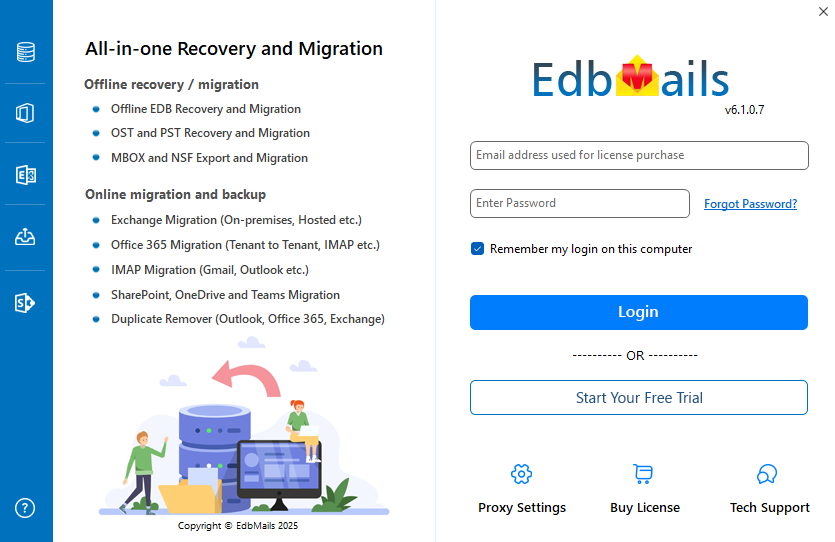
      Launch EdbMails software

    Step 2: Select the Office 365 to IMAP migration option

    • Choose the ‘Office 365 Migration’ option and select ‘Office 365 to IMAP migration’.
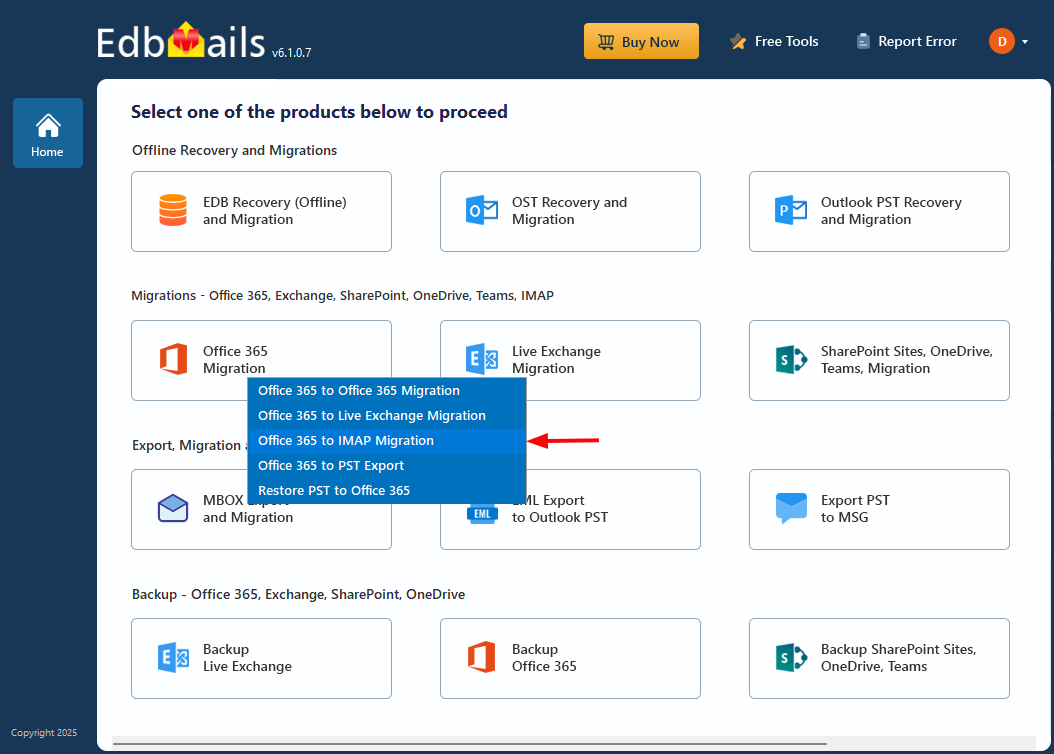
      Select Office 365 to IMAP migration

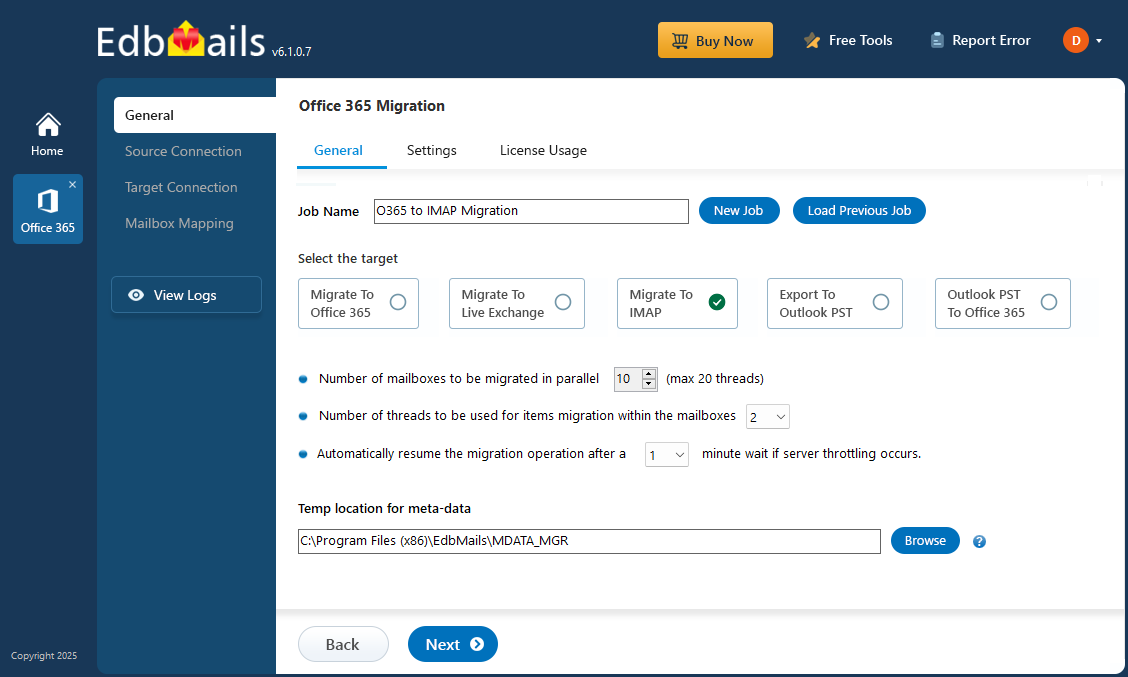
    • Proceed with the default job name or click ‘New Job’ to change.

    Step 3: Connect to source Office 365 server

    • Click ‘Add New Connection’ to set up a new connection with the source Office 365 server, or choose ‘Connect to Existing’ to reuse a previously configured connection.
    • Choose the appropriate connection options and proceed by clicking ‘Next’.
    • Then, select your preferred authentication method and hit the ‘Login’ button to continue.
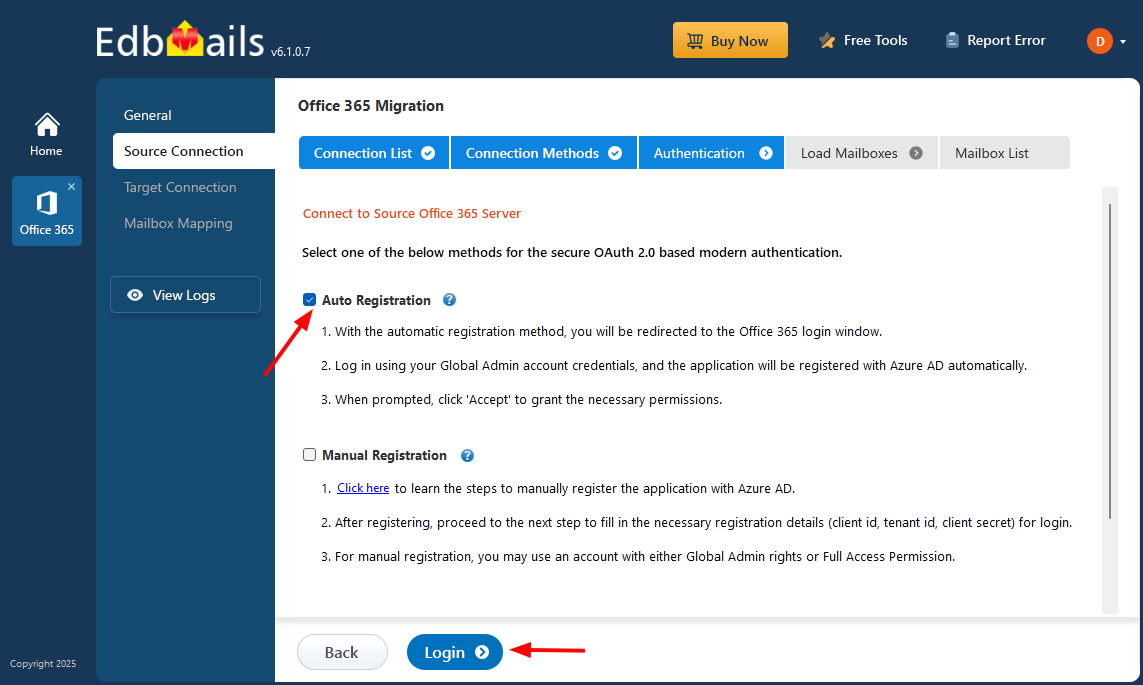
      Connect to source Office 365 server

    • Sign in through the Microsoft authentication page and load the mailboxes.
    • Choose the mailboxes you want to migrate and click ‘Next’ to proceed.
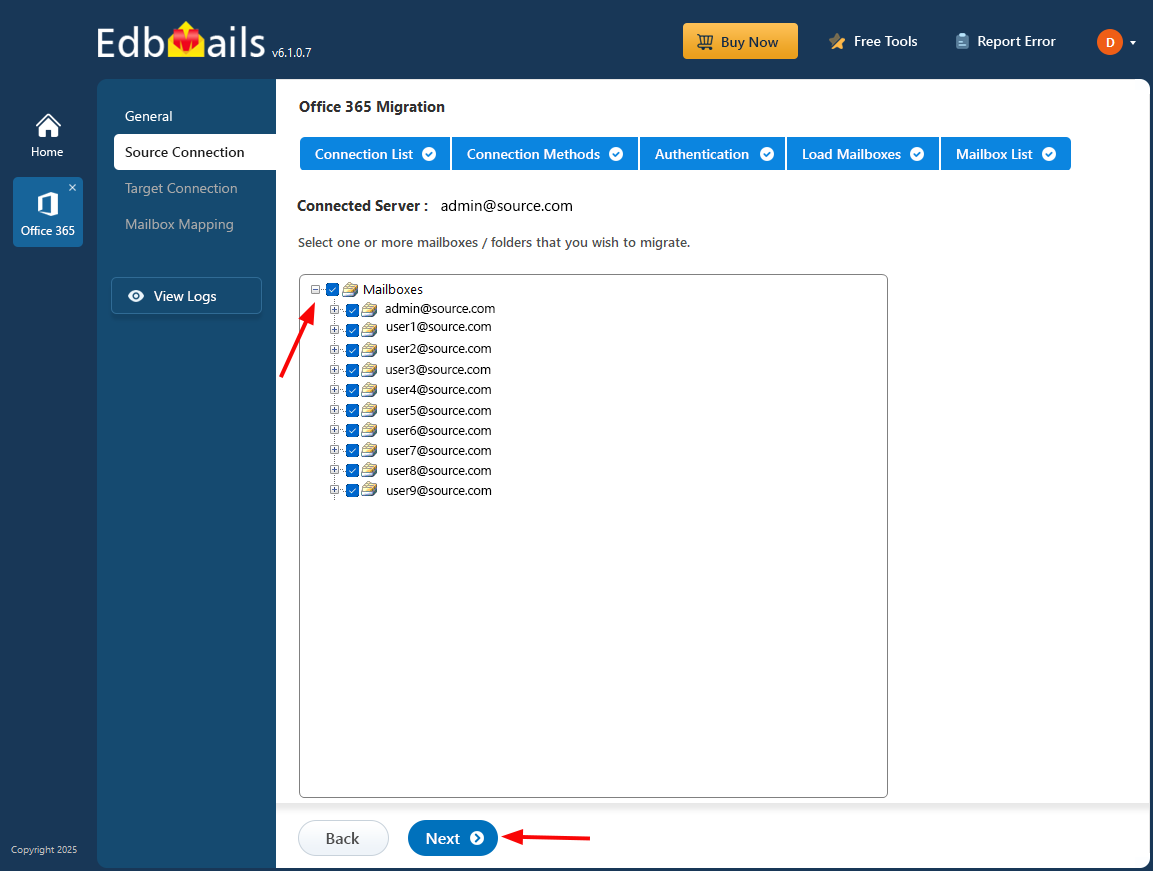
      Select the Office 365 mailboxes

        Connect to Office 365 server using secure modern authentication

    Step 4: Connect to target Yahoo Mail server

    • Select ‘Connect to IMAP’ or ‘Connect to POP3’ depending on your destination server. For a single user, choose ‘Single User / Account Migration’ and provide the target account details along with the IMAP host.
    • Click ‘Login’ to connect to the target mailbox, allow it to load, and then click ‘Next’ to move forward.
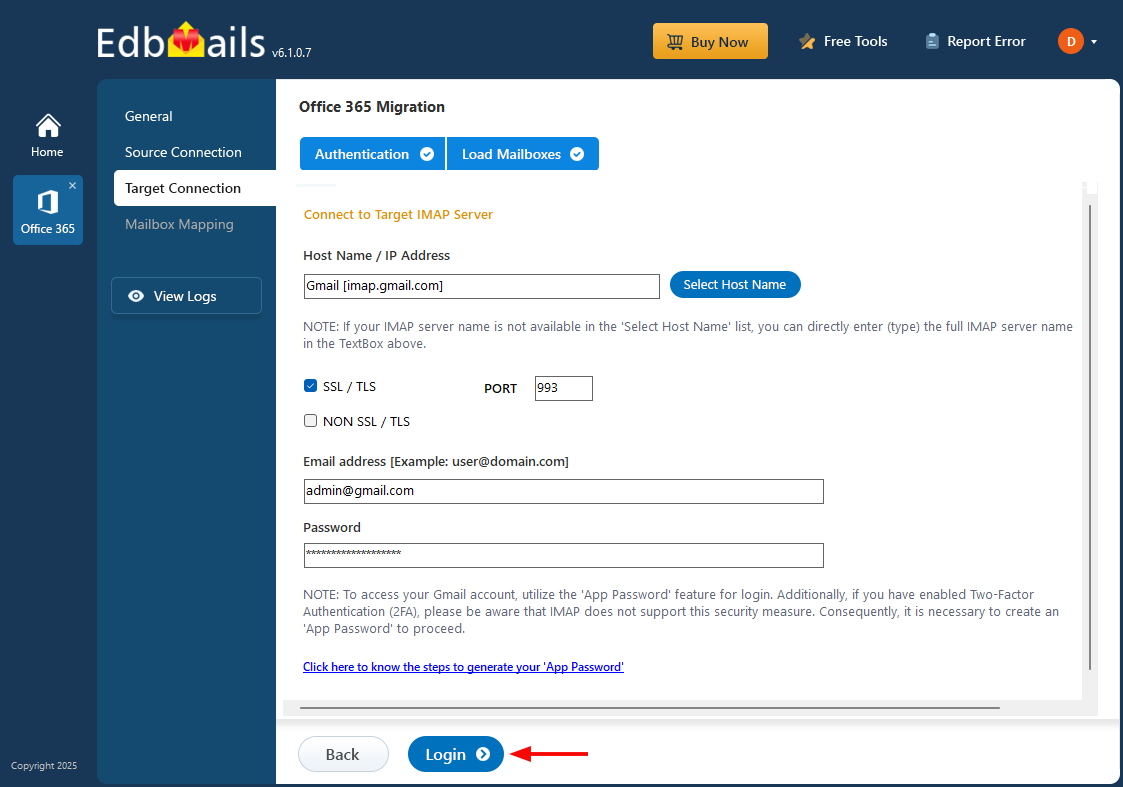
      Connect to single user account

    • For bulk migration, choose ‘Multiple (Bulk) Users/Accounts Migration’ and proceed by clicking ‘Next’.
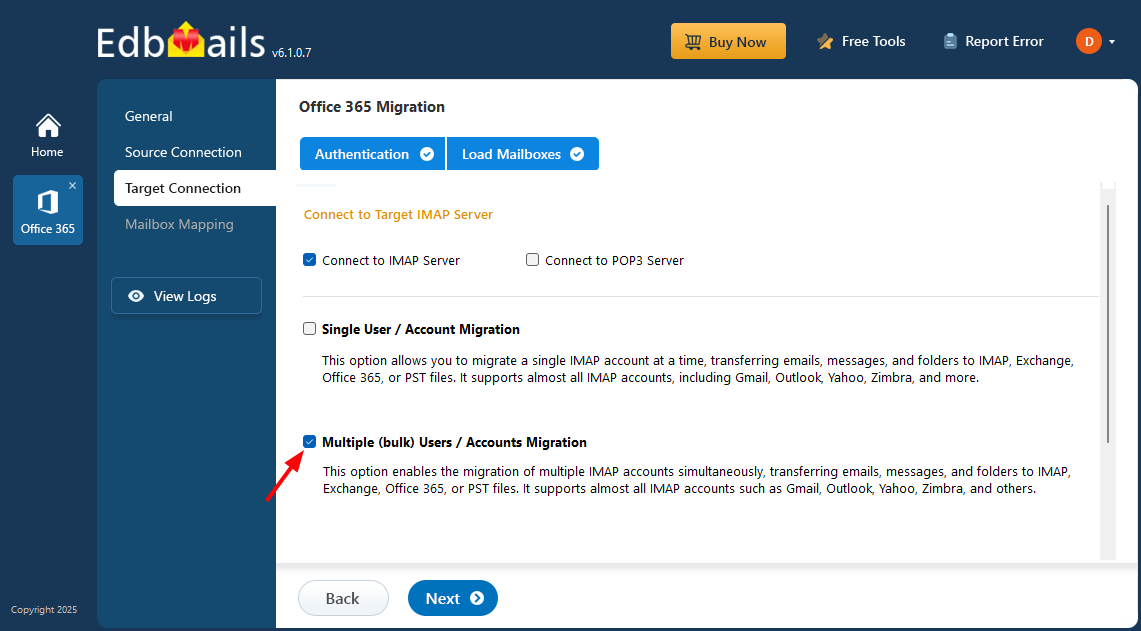
      Login to multiple IMAP servers

    • Select ‘IMAP Migration CSV File’ to proceed.
    • A prompt will appear to download the sample .csv file. Select a folder on your computer where you would like to save it.
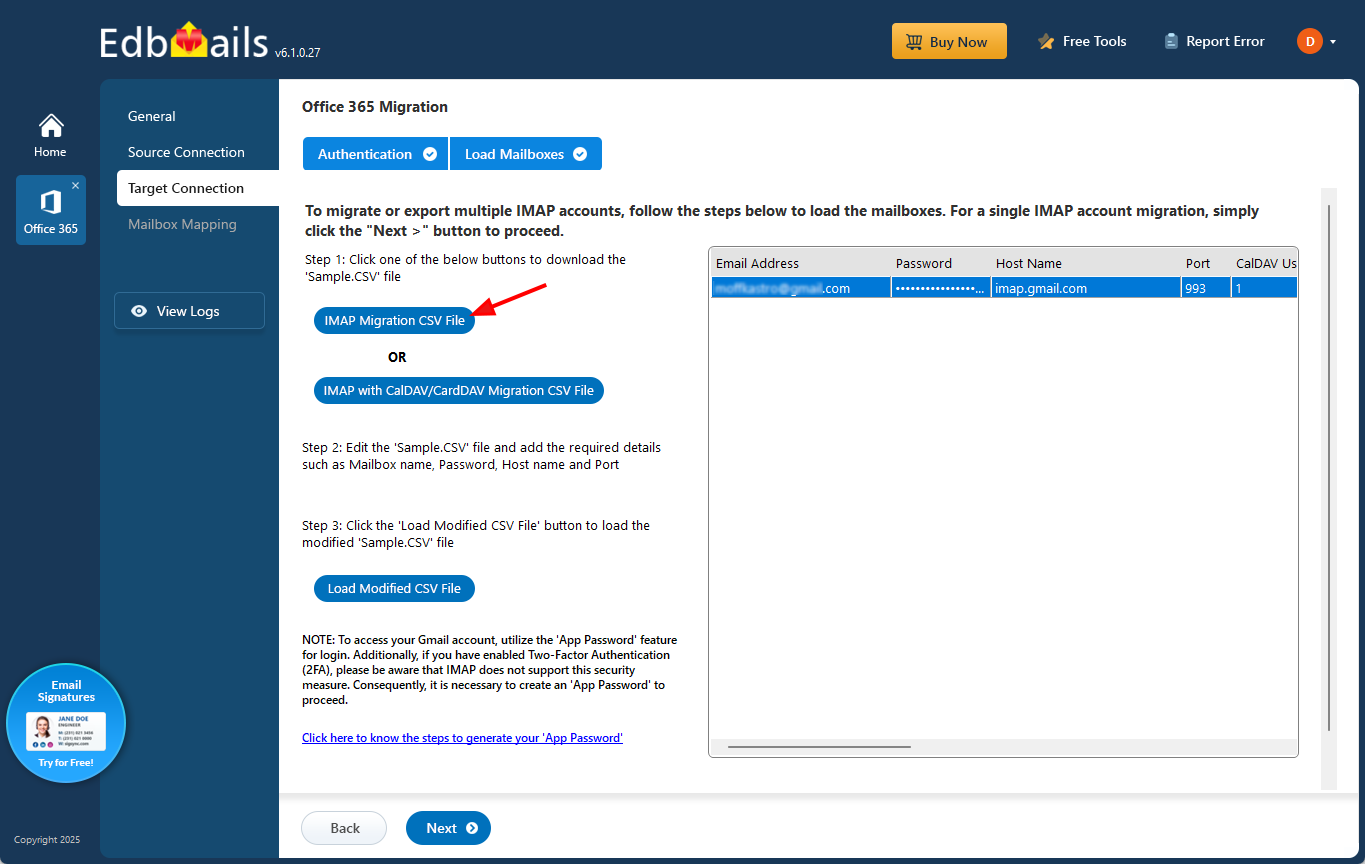
      IMAP migration CSV file

    • Open the downloaded CSV file and enter the necessary details, such as email address (mailbox name), password, host name, and port. Fields not required for the migration can be set to ‘NA’. Once all updates are made, save and close the file.

      Office 365 to Yahoo CSV file

    • Click ‘Load Modified CSV File’ to select your updated CSV.
    • Review the listed mailboxes, and then click ‘Next’ to continue.
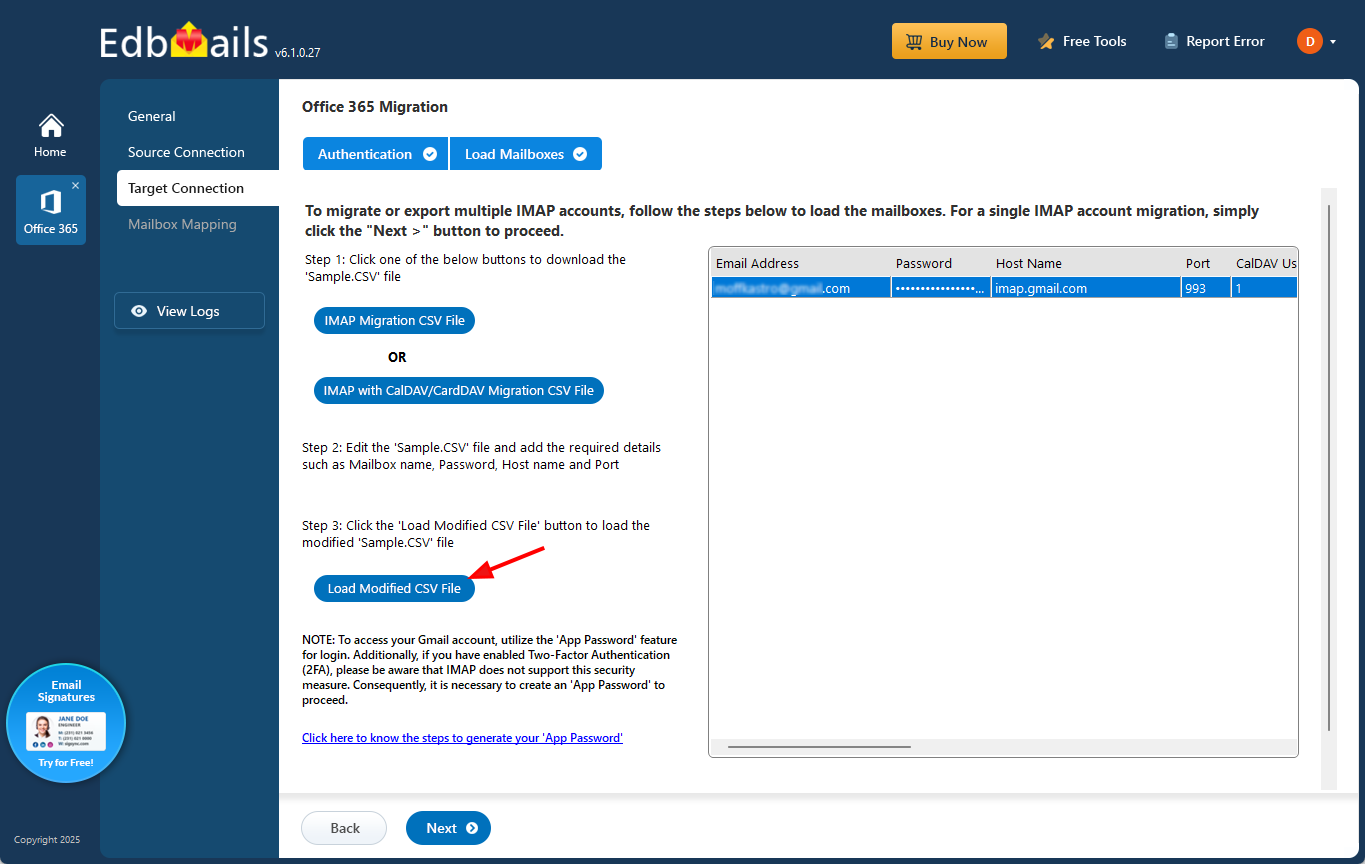
      Load CSV file

    • CalDAV/CardDAV Migration

      To migrate emails, calendars, and contacts from Office 365 to Yahoo platform with CalDAV/CardDAV support, select ‘IMAP with CalDAV/CardDAV Migration CSV File’ and proceed.
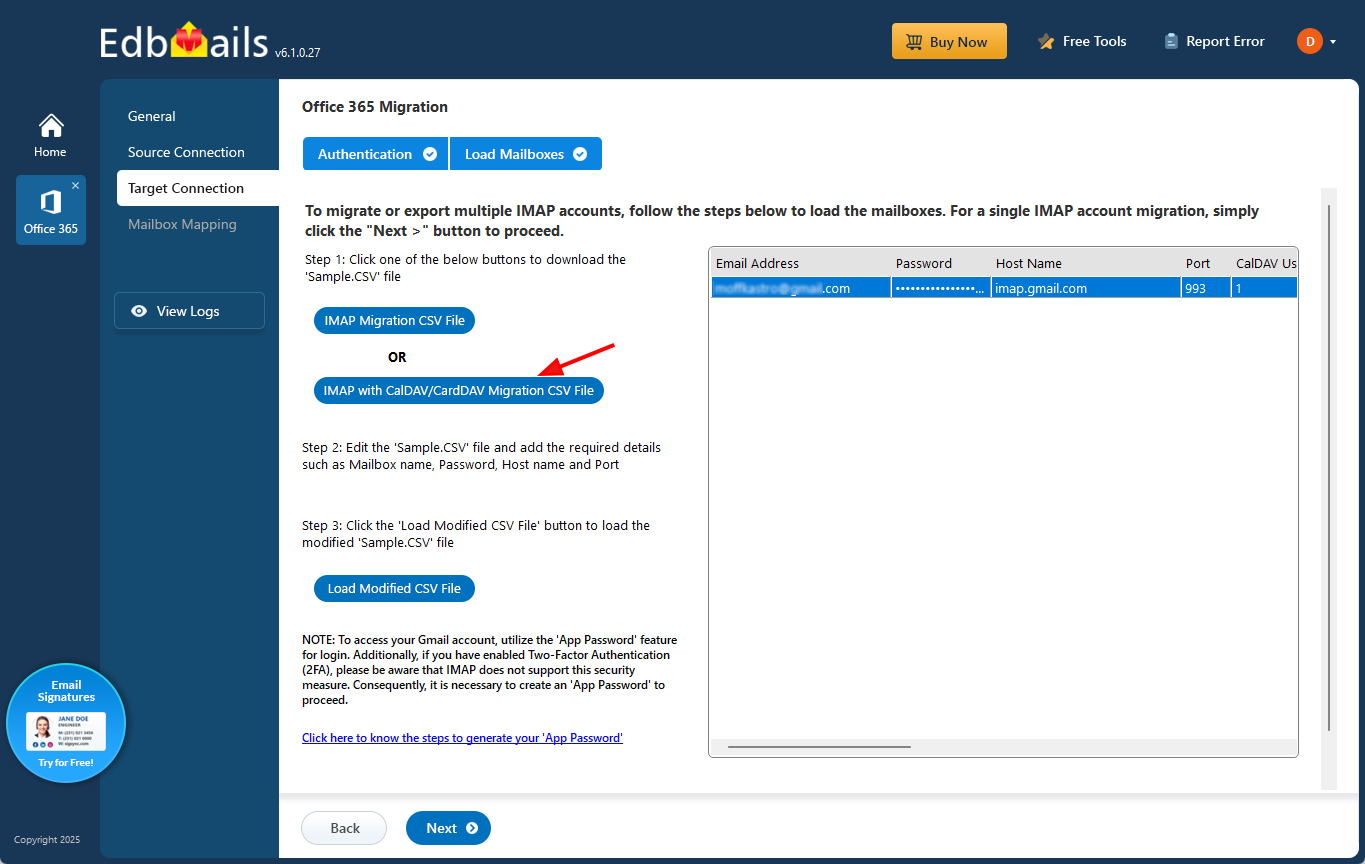
      IMAP with CalDav and CardDav

    • You will be prompted to download a sample CSV file. Choose a suitable location on your computer and save the file.
    • Open the CSV file and enter the required information, including Source Mailbox Name, Password, Host, Port, CalDAV Username, CalDAV Password, CalDAV Server, CalDAV Folder, CardDAV Username, CardDAV Password, CardDAV Server, and CardDAV Folder. After completing the updates, save and close the file.

      CalDav and CardDav CSV file

    • Click ‘Load Modified CSV File’, browse to the folder where your updated CSV is saved, and load it into the application to proceed.

    Step 5: Map Office 365 to Yahoo Mail mailboxes

    • Select the mailbox mapping option as needed.
    • EdbMails automatically maps Office 365 and Yahoo Mail mailboxes. You can also map them manually if needed.
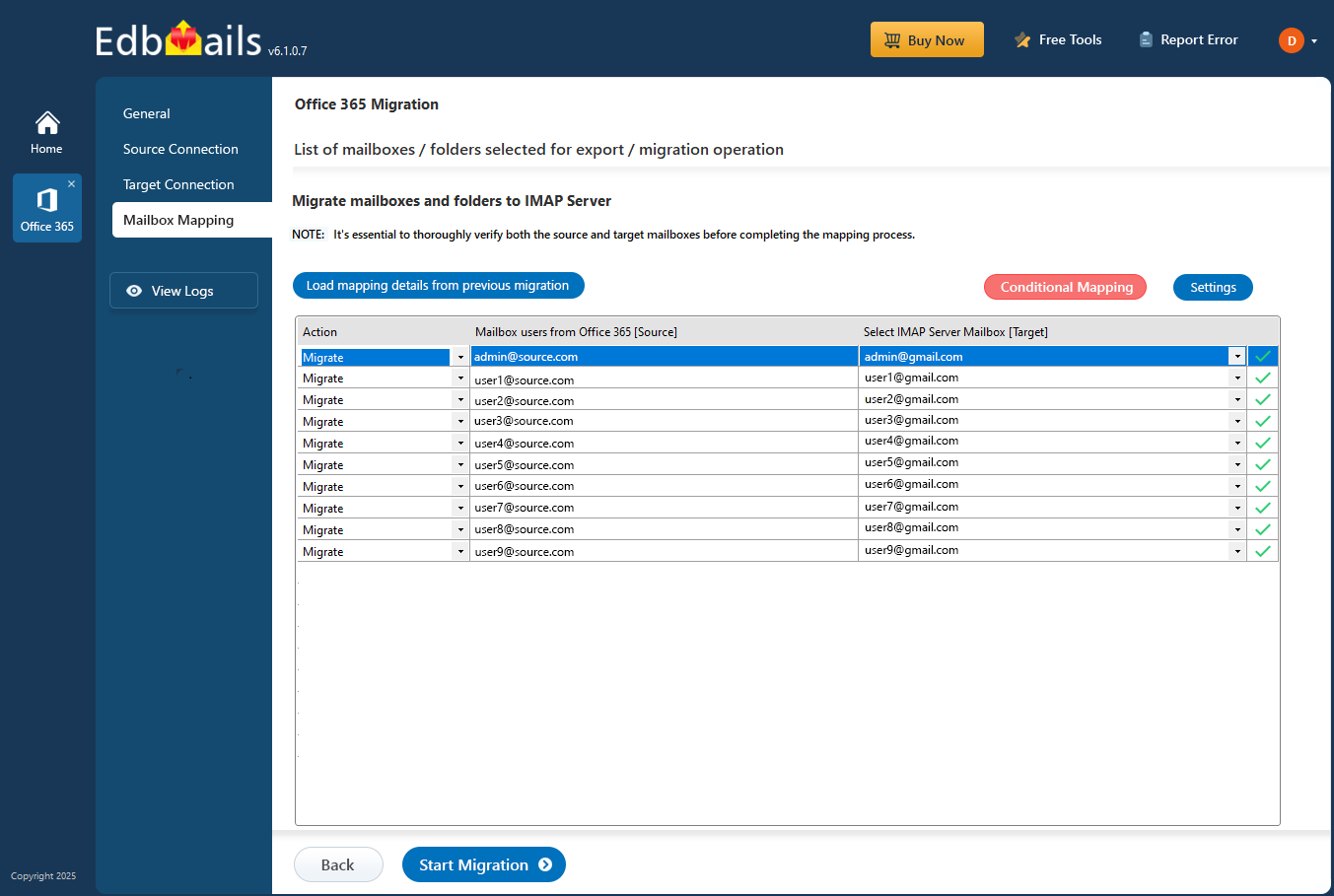
      Map Office 365 to iCloud mailboxes

    Step 6: Start the Office 365 to Yahoo Mail migration

    • Click ‘Start Migration’ to begin the transfer.
    • After completion, click ‘View Log’ to check the detailed migration report and verify the results on the target server.
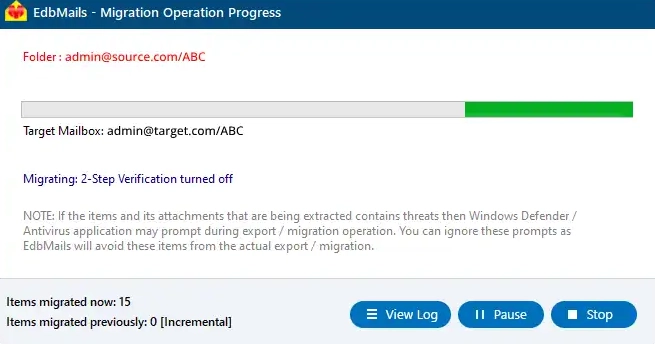
      Office 365 to Yahoo Mail migration progress

  4. Post migration activities

    Once the migration finishes, update your MX records to route incoming emails to the new destination server.

Common Mistakes to Avoid During Office 365 to Yahoo Mail Migration:

  1. Deleting Source Mailboxes Before Verifying the Migration: EdbMails recommends verifying the migrated data using logs and checking the target Yahoo mailbox before deleting or modifying any Office 365 mailbox.
  2. Using Incorrect Yahoo IMAP Host or Port Settings: Incorrect IMAP settings can cause login failures or incomplete transfers. EdbMails requires accurate IMAP server details (hostname, port, credentials) for each Yahoo mailbox when using CSV-based migration.
  3. Overlooking Migration Verification and Error Logs: Ignoring migration status reports may result in unnoticed skipped or failed items. EdbMails generates detailed logs for each mailbox, allowing users to review migration status, identify errors, and rerun the process if required.

Benefits of EdbMails Office 365 to Yahoo Mail migration tool

  1. Enhanced security with MFA

    EdbMails supports secure login with modern authentication and Multi-Factor Authentication (MFA). This adds a strong layer of protection during the Office 365 to Yahoo migration and ensures only verified users can access or transfer sensitive mailbox data.

  2. 24/7 free tech support

    You can rely on EdbMails support team anytime if you face an issue. The technical experts are available 24/7 to resolve migration queries, assist with setup, and provide guidance throughout the entire process without any extra charges.

  3. Selective data migration

    With EdbMails, you can filter and move only the required emails, folders, or date range. This helps reduce transfer time, avoids unnecessary mailbox load, and gives you full control over what gets migrated to Yahoo Mail.

  4. Automatic mailbox mapping

    The tool intelligently matches source and target mailboxes without manual input. This automatic mapping feature ensures accuracy, saves time, and helps prevent errors during the transition from Office 365 to Yahoo Mail.

  5. Multilingual support

    EdbMails handles mailbox data in various languages without corrupting or altering content. This is essential for international users who work with different character sets or regional formats across their Office 365 mailboxes.


Additional resources:

  • Office 365 to Exchange Migration
  • Office 365 Migration with same Domain
  • Office 365 Group Migration
  • Office 365 multiple mailbox migration
  • Office 365 Server to Server Migration
lady image

 In this manual

IntroductionPre-migration activitiesMigration StepsPost-migrationBenefits of EdbMails

Office 365 Migration

100 Mailboxes $299 Only

Buy Now

Need help?

24/7 Customer support

Contact us on Live chat

Personalized Demo

Book a personalized demo

Still need help?

Email us / Call us

© 2026 Shifttocloud Inc. Privacy Policy | Terms of Use | GDPR | Security | Press Releases

hidden msg
Live Chat

Hi, May I help you?

Hide Chat Now